Transcript
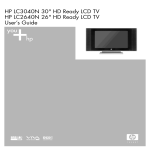
HP LC2640N (26") HD Ready LCD Television
HP LC3040N (30") HD Ready LCD Television
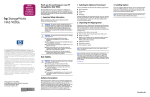
Start Here
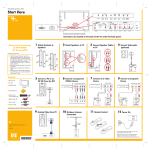
Connectors are located on the back of the TV, under the back panel.
Remove rear door before making connections.
■ Identify the type of connectors your home
entertainment equipment uses, then go to the
corresponding step on this poster and follow
those directions. (Example: To connect a cable
or satellite set-top-box which connects via
S-video cabling, refer to step 6, Connect an
S-video device.)
■ Refer to the user documentation for advanced
connections.
■ Apply power to all components and then to
the TV.
■ Finally, refer to the section titled “First Time
Setup for Channels” in your user
documentation to finalize your TV setup.
1 Attach Speaker Cables to TV
a
b
2
Connect Speaker Cables
3
Connect Subwoofer
(optional)
OUT
Contents
■ HP LCD TV with stand
■ Speakerbars (2)
■ Documentation kit
4
■ Remote control
with AA batteries (2)
Connect a PC or Other
Device by DVI
5
Connect a Component
(YPbPr) Device
Component Video Outputs
■ Speaker cables (2)
DVI
R
L
Y
Pb
6
Connect an S-video
Device
7
Connect a Composite
Device
S-video Outputs
Composite Video Outputs
Pr
■ Antenna cable
■ AC power cable
■ DVI cable
■ VGA cable
■ Component cable
■ S-video cable
■ Composite cable
The information in this document is subject to change without notice.
8
Analog Video from PC
VGA
© 2004 Hewlett-Packard Development Company, L.P.
9
Outdoor Antenna
Connection
10 Remote Control
11 Turn On
Wall
Signal
Coaxial
Cable
Printed in
www.hp.com
Once the power cable is connected, turn on TV by
pressing PWR on the remote control.
Refer to the section in the user documentation titled
“First Time Setup for Channels” to complete TV setup.
Refer to the user documentation for advanced connections.