1
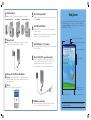
getting acquainted
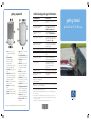
1. Power: Press to power on/off
Press and hold to turn backlight
on/off
2. LED Power Indicator:
amber flash = charging
amber solid = charged
green flash = alarm
blue flash = Bluetooth active (only
on Bluetooth equipped units)
3. Color Display: High contrast color
screen
4. Today Button*: Display the Today
screen to view upcoming appointments, insert messages, and tasks
that need to be completed
5. Inbox*: Access your inbox to send
and receive e-mail
6. Navigation: 5-way Navigation
Button:
Up/Down/Left/Right/Select
7. Contacts*: Display your contacts list
8. Calendar*: Schedule appointments
9. Stylus: Slide up to remove, slide
down to store
10. Secure Digital (SD) Slot: Supports
SD storage cards and SDIO cards
11. Microphone: Records notes or
other sounds
12. Audio Jack: Connects 2.5 mm
stereo earpiece or headphone
(3.5 mm audio jack adapter
included)
13. Infrared: Beams information
between other mobile devices
equipped with infrared
14. Record Button*: Turn recording
feature on and off. (Press to turn on
and release to turn off)
15. Reset Button: Resets your Pocket PC
16. Charging/Communication Port:
Connects to the synchronization
cable, AC charger adapter, or
optional synchronization cradle
17. Battery Cover: Houses the
removable, rechargeable battery
18. Battery Cover Latch: Latches the
battery cover
troubleshooting and support information
for information on...
see this source...
Using your Pocket PC
HP iPAQ h1900 Series User’s Guide
on the CD
Connecting to and synchronizing
with a personal computer
ActiveSync Help on your computer.
To view Help, start ActiveSync, click
Help>Microsoft ActiveSync Help.
Troubleshooting on ActiveSync
connections
ActiveSync troubleshooter on your
computer. Click Help>Troubleshooter.
Programs that are on your Pocket PC
HP iPAQ h1900 Series User’s Guide
on the CD and Help located on Pocket
PC. Tap Start, and then Help.
Additional programs that can be
installed on your Pocket PC
HP iPAQ h1900 Series Companion CD
or http://www.microsoft.com/mobile/
pocketpc/downloads
Updates on Windows-powered devices
http://www.microsoft.com/pocketpc
Safety precautions
Important Safety Information document on
the CD
Worldwide Limited Warranty
Worldwide Limited Warranty and
Technical Support document in the box
Accessory products
Accessories information brochure
included with your Pocket PC or
http://www.hp.com/products/
pocketpc/options
Support for your Pocket PC
http://www.hp.com/support/pocketpc
Worldwide telephone support
phone numbers
http://www.hp.com/country/us/eng/
wwcontact.html
Registering your Pocket PC to receive
e-mail from HP regarding special
offers and promotions
http://www.register.hp.com
Note: This is a Class B digital device, pursuant to Part 15 of the FCC Rules. Refer to the
documentation CD for Class B information.
© 2003 Hewlett-Packard Development Company, L.P.
HP, Hewlett-Packard, and the Hewlett-Packard logo are trademarks of the Hewlett-Packard Company in the
U.S. and other countries.
iPAQ is a trademark of the Hewlett-Packard Development Company, L.P. in the U.S. and other countries.
Microsoft, Windows, the Windows logo, Outlook, and ActiveSync are trademarks of Microsoft Corporation
in the U.S, and other countries.
hp iPAQ Pocket PC is Powered by Microsoft Windows. First Edition, May 2003.
*These buttons are programmable but at start-up they are assigned by default.
337111-001
getting started
hp iPAQ Pocket PC h1900 series