1
HP e-Commerce/XML Director Server Appliance SA8250 Getting Started Guide
Side Rail
Installation
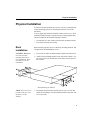
Side rail mounting of the SA8250 requires the use of the enclosed
small mounting brackets and four of the Phillips head screws.
1. Locate the two small mounting brackets and the provided screws.
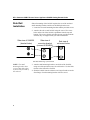
2. Attach a side rail to each SA8250 using the rows of five screw
holes on the side of the SA8250, equidistant from the top and
bottom. The screws for this procedure are not provided with the
SA8250; they are supplied with your side rail hardware.
Side-view of SA8250
(bracket holes)
Side-view of
mounting bracket
(connect to SA8250)
End-view of
rail-mount holes
Side Rail Mounting of the SA8250
NOTE: The small
mounting brackets have
recesses that allow them
to fit over the front end of
the side rail.
4
3. Attach a small mounting bracket to each side of the SA8250,
using two of the provided screws for each bracket. Use the holes
nearest to the front of the SA8250.
4. Slide the SA8250 into the cabinet’s receiving rails and secure the
front flange of each mounting bracket with two screws.