1
Changing the dbadmin password
For security, factory-default passwords were changed during the HP CS300 Vertica Installation &
Startup Service. The HP CS300 Vertica appliance was configured using a password your
organization supplied for the non-root, system account, dbadmin. You should not need to change
the password.
If you change the HP Vertica administrator password, you must use the same username and
password on all HP Vertica nodes and management servers.
To maintain password consistency across all devices in the appliance, HP recommends:
•
Change the dbadmin password from the HP Vertica management server.
•
Manually change passwords on the switches, PDUs, management servers (r001mn001 and
r001mn002), and HP iLOs.
TIP:
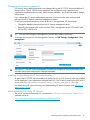
You must also change the Management Console administrator’s password.
To change this password on the Management Console, click MC Settings→Configuration→User
management.
IMPORTANT: The HP Vertica Management Console only changes HP Vertica passwords. Linux
and other device passwords must be changed separately
Installing or upgrading an HP Vertica license key
As part of the HP CS300 Vertica Installation & Startup Service, your HP Vertica license was installed
and an employee in your organization accepted the EULA. Your license is stored on the r001mn001
server in the/opt/hp/CS300/licenses/<cust_vlicense_xxx_bytes.dat> file.
For details about HP Vertica licensing, see Understanding HP Vertica Licenses in the HP Vertica
Administrator’s Guide.
More information for using HP Vertica
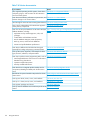
The full HP Vertica documentation set, summarized in “HP Vertica documentation” (page 22), is
available online at:
http://www.hp.com/go/convergedsystem/cs300vertica/docs
Performing advanced database administrator tasks
21