Transcript
FMWSP11
Screen Protector
3.
Installation Instructions
Stylistic LT C-500
Apply pressure along the edges of the screen
protector with your finger. (Avoid lifting the screen
protector from the screen after it is installed. The
adhesive requires 48 hours to cure properly.)
The FMWSP11 screen protector is designed for use
on the Stylistic LT C-500 pen tablet display screen.
Notes
• Before installing a new screen protector,
remove any screen protector that is already
installed. A notch in the corner of the screen
protector allows you to slide a firm, pliable
implement (such as a credit card) under the
screen protector for removal. Do not use a
metal implement; it could scratch the screen.
• To ensure good adhesion, clean the screen
with a soft cotton cloth dampened with
isopropyl alcohol before installing the screen
protector. When the alcohol dries, it may
leave streaks on the screen. If streaking
occurs, buff the screen gently with a clean,
dry cloth to remove streaks.
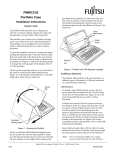
Figure 2. Installing the Screen Protector
4.
Remove the protective film from the top of the screen
protector, as shown in Figure 3.
5.
Wipe the exposed surface of the screen protector with a
clean dry cloth to remove any adhesive left behind by
the protective film.
Figure 1. Peeling Protective Film
Installation Instructions
1.
2.
0
Peel the protective film from the adhesive side of
the screen protector, as shown in Figure 1.
Figure 3. Removing the Protective Film
Install the screen protector on the pen tablet
display screen. Apply the adhesive side to the
screen with the notch in the lower left corner, as
shown in Figure 2.
Stylistic LT C-500 is a trademark of Fujitsu PC Corporation © 2000 Fujitsu PC Corporation
7/00
58-0741-00A