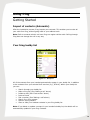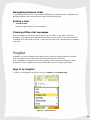
1
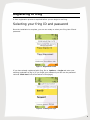
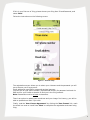
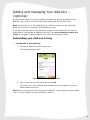
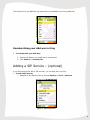
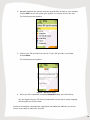
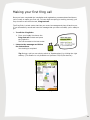
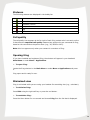
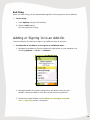
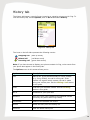
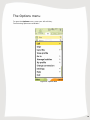
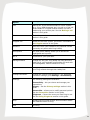
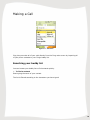
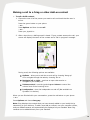
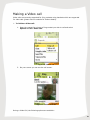
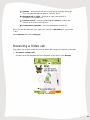
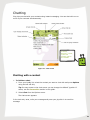
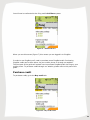
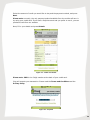
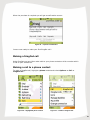
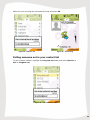
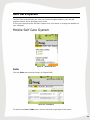
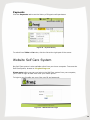
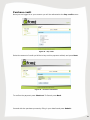
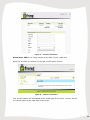
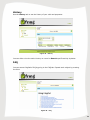
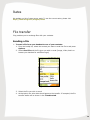
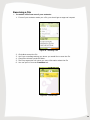
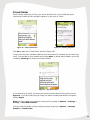
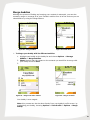
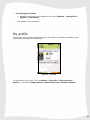
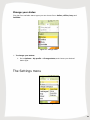
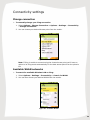
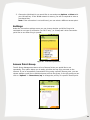
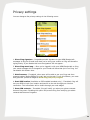
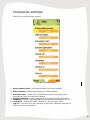
Installation and User Guide fring version 4.4 For Nokia S60 3rd edition (Symbian 9) 1 Table of Contents Table of Contents ...................................................................................................... 2 Introduction ............................................................................................................... 4 System Requirements ............................................................................................... 5 Registering to fring .................................................................................................... 6 Selecting your fring ID and password .................................................................... 6 Adding and managing Your Add-Ons – (optional).................................................. 8 Subscribing your Add-ons in fring ...................................................................... 8 Unsubscribing your Add-ons in fring .................................................................. 9 Adding a SIP Service – (optional) .......................................................................... 9 Making your first fring call .................................................................................... 11 Using fring ............................................................................................................... 12 Getting Started .................................................................................................... 12 Import of contacts (Automatic) ......................................................................... 12 Your fring buddy list ......................................................................................... 12 Statuses .......................................................................................................... 13 Call quality ....................................................................................................... 13 Opening fring ................................................................................................... 13 Minimized view ................................................................................................ 13 Exit fring .......................................................................................................... 14 Adding or Signing In to an Add-On ...................................................................... 14 History tab ........................................................................................................... 15 The Options menu ............................................................................................... 16 Making a Call ...................................................................................................... 18 Making a call to a fring or other Add-on contact ............................................... 19 Making a cellular call from fring ....................................................................... 20 Making a SIP call from fring ............................................................................. 20 Receiving a fring call ....................................................................................... 20 Making a Video call ............................................................................................. 21 Receiving a Video call ......................................................................................... 22 Chatting ............................................................................................................... 23 Chatting with a contact .................................................................................... 23 Navigating between chats................................................................................ 24 Ending a chat .................................................................................................. 24 Viewing offline chat messages......................................................................... 24 fringOut ............................................................................................................... 24 Sign in to fringOut ............................................................................................ 24 Purchase credit ............................................................................................... 25 Making a fringOut call ...................................................................................... 27 Making a call to a phone contact ..................................................................... 27 Calling someone not in your contact list ........................................................... 28 Mobile Self Care System ..................................................................................... 29 Calls ................................................................................................................ 29 Payments ........................................................................................................ 30 Website Self Care System ................................................................................... 30 Purchase credit ............................................................................................... 31 History ............................................................................................................. 33 FAQ ................................................................................................................. 33 Rates................................................................................................................... 34 2 File transfer ......................................................................................................... 34 View profile.......................................................................................................... 36 Manage buddies .................................................................................................. 38 Adding new buddy ........................................................................................... 38 Remove buddy ................................................................................................ 39 Rename buddy ................................................................................................ 39 Friend finder .................................................................................................... 40 Merge buddies ................................................................................................. 41 My profile............................................................................................................. 42 Change your status ......................................................................................... 43 The Settings menu .............................................................................................. 43 Connectivity settings ........................................................................................... 44 Change connection.......................................................................................... 44 Available WLAN networks ............................................................................... 44 Settings ........................................................................................................... 45 Access Point Group ......................................................................................... 45 Privacy settings ................................................................................................... 46 Personalize settings ............................................................................................ 47 Using fringtones .................................................................................................. 48 Uninstalling fring .................................................................................................. 49 Troubleshooting ...................................................................................................... 50 Frequently Asked Questions ................................................................................... 52 Downloading & Installing fring ............................................................................. 52 Registering to fring .............................................................................................. 53 Connection .......................................................................................................... 53 General ............................................................................................................... 54 Wanna get involved? ........................................................................................... 55 3 Introduction About fring fring™ is a mobile internet community and communication service that allows friends to connect, share experiences and enhance their online communities together. Using your handset′s internet connection, you can interact with friends on all your favorite social networks including MSN Messenger®, Google Talk™, ICQ, SIP, Twitter, Yahoo!™ and AIM®. You can also tailor make your very own fring by adding more cool experiences from fringAdd-ons™. fring puts all your online friends into one, dynamic fringFriends™ buddy list, which is always connected so you can enjoy free calls and instant messaging with all your online friends, see their real-time status, and even find each other’s actual location. fring makes your mobile the ultimate social device. As well as its social appeal, fring also lets you make affordable local and international calls to landline and regular cellular numbers using fringOut™and almost any internet voice service (SIP) such as SIPNET, EuteliaVoIP, VoIPVoIP and VoIPTalk, even from nonSIP enabled handsets. To sum it up, you'll not only make your phone more useful, you can also save money. This guide will help you get started. 4 System Requirements Hardware requirements In order to use our Beta version, you will need: A Nokia S60 handset. Internet GPRS, EDGE, 3G data connection (Not a WAP connection) on your mobile handset. Optional: WiFi connection. If you are using a handset with WiFi capabilities, you can choose to use a Wi-Fi access point to connect to the fring network. Using fring via a Wi-Fi access point means the data is transferred by Wi-Fi, and does not use your data plan. Notes: To initiate a call to a landline (or a non-fring user) using fring, make sure to purchase fringOut or SIP credits. For internet GPRS/3G data rates, contact your mobile service provider or browse our community forum at http://www.fring.com/forums 5 Registering to fring A short registration process is required before you can begin to use fring. Selecting your fring ID and password Once the installation is complete, you are now ready to select your fring User ID and password. Figure 1 - Registration Screen If you have already registered with fring, Go to Options -> Login and enter your existing credentials to log in (If you forgot your password you can use the password retrieval 'Click here' link at the bottom of this page): Figure 2 – Existing user login 6 If this is your first use of fring, please choose your fring User ID and Password, and select 'Next'. Follow the instructions on the following screen: Figure 3 – Account setup The registration screen allows you to select your nickname and the password you will use to access your fring account. Email address is required for password retrieval purpose. You can also fill your phone number (international format) for password retrieval via SMS and for your friends to be able to find you in the fring network. Note: Passwords must be at least 4 characters. There's an option to update your mood text and your image. Don't worry; you will be able to update them later if you wish. Finally, read the 'User License Agreement' by clicking the 'User license' link, mark the check box next to it and Press 'Next' to complete the registration and start using fring. 7 Adding and managing Your Add-Ons – (optional) Once you have chosen your fring nickname and password, provide the details of your Add-Ons (e.g., GTALK) so that you can begin making and receiving VoIP calls. Note: You can add one or more Add-Ons (e.g., GTALK) to which you are registered. Make sure to have your username and password for each. If you do not already have a service account, register on the Web before you begin to add networks. You can add an Add-On at any time. See Error! Reference source not found. in this guide. To add an Add-On now, follow the instructions below. Subscribing your Add-ons in fring To subscribe to your Add-Ons: 1. Choose the Add-On you would like to use. The following screen opens: Figure 4 – Add-On User ID and Password 2. Type in your User Id and Password and press Ok. fring signs you in to the Add-On and the Add-Ons screen appears so you can add an additional service. Note: Once you have chosen and configured an Add-On, a check appears on the Add-On Icon. You may configure as many Add-Ons as you like. 8 The contacts from the Add-Ons you subscribe to are added to your fring buddy list. Figure 5 – fring buddy List Unsubscribing your Add-ons in fring To unsubscribe your Add-Ons: 1. Choose the Add-on you would like to unsubscribe. 2. Click Options > Unsubscribe. Adding a SIP Service – (optional) If you have an account with a SIP provider, you can also use it on fring. To add a SIP service: 1. Navigate to the Add-ons Tab by clicking Options > Go to > Add-ons Figure 6 - Service Selection 9 2. Navigate between the options using the up and down arrows on your handset. Choose SIP from the list (press your joystick in to select items in the list). The following screen appears: Figure 7 – Select SIP Service 3. Choose your SIP provider from the list. If your SIP provider is not listed, choose Other. The following screen appears: Figure 8 – SIP Service Setup 4. Enter your SIP credentials and press Subscribe using your left soft key. You are logged into your SIP Service and should now be able to make outgoing calls through your SIP provider. You have successfully completed the registration and added the Add-Ons you chose. You are now ready to make your first call. 10 Making your first fring call Once you have completed the installation and registration processes described above, you're ready to make your first call. To know that everything is working correctly, you may choose to call the Echo test, fring test call. The fring Echo is a test center that lets you record a message and plays it back to you. If you successfully record and hear the message that you have recorded, you're ready to go! To call the fring Echo: 1. From your buddy list choose the fring test call contact and press the joystick in. The call connects to the test center. Listen to the message and follow the instructions. Your testing is complete! Tip: During a call you can simply switch to 'Speakerphone' by clicking the right softkey. (This feature is only available on Symbian 9.2/9.3/9.4 devices): Figure 9 - Call in progress 11 Using fring Getting Started Import of contacts (Automatic) After the installation process, fring imports your contacts. This enables you to make all your calls from fring, without going back to your address book. Note: Calls to contacts who do not have fring are regular cellular calls. Calling through fring does not change the call in any way. Your fring buddy list Figure 10 – Buddy list All of the contacts from your handset automatically appear in your buddy list, in addition to the contacts from your selected VoIP services (e.g., GTALK). Within your buddy list you can: Search through your buddy list Make a fring call (See ‘Making a call’ above) Initiate a chat (See ‘Chat section’ above) Invite a friend Dial a number (See ‘Making a call’ above) Search for a fring contact Remove a fring contact Show or hide your handset contacts in your fring buddy list Note: If you delete or update a contact in your handset's buddy list, the details will be automatically updated in your fring Contacts. 12 Statuses The following statuses are displayed in the buddy list: On a call Unread chat event Available / Online Busy N/A Offline Call quality The call quality icon appears at the far right of each fring contact who is currently online. It describes the expected call quality between two parties who are connected to fring, based on the connections the parties have (e.g., 3G, GPRS or WiFi). Note: this icon appears only when your contact is a member of fring. Opening fring If you have installed and registered fring, the shortcut will appear in your handset's Main Menu or under Menu > Applications. To open fring: Locate the fring shortcut in the Main Menu or under Menu > Applications and press it. fring opens and is ready for use. Minimized view fring is minimized while you are using your handset for something else (e.g., calculator). To minimize fring: Press Hide using the right soft key or press the red button. To maximize fring: Press the Menu button for one second and choose fring from the list that is displayed. 13 Exit fring When you open fring, you are automatically signed in to fring and your other Add-ons. To exit fring: 1. Press Options using the left soft key. 2. Select the Exit option. You are signed out of fring. Adding or Signing In to an Add-On You can subscribe for Add-ons or sign-in as a different user at any time. To subscribe to an Add-on or to sign-in as a different user: 1. Navigate to the Add-ons Tab by pressing the right arrow on your handset or by choosing Options --> Go to --> Add-ons. Figure 11 – Add-on Selection 2. Navigate between the options using the up and down arrows on your handset. Choose the Add-on from the list and press the joystick in. 3. Follow the process defined in the Adding and managing Your AddOns – (optional) section in this guide. 14 History tab The history tab keeps a record of every incoming or outgoing voice event in fring. To view the history tab, choose Options, click on Go to and select History. Figure 12 - History Tab The icons on the left side represent the following events: Outgoing call Missed call Incoming call (blue up arrow) (red down arrow) (green down arrow) Note: If you have chosen to display your phone contacts in fring, voice events from your phone also appear in the history tab. The Options menu in this screen allows you to: Option Description Call Make a call. If the selected contact is a VoIP contact (e.g., fring, GTALK), the call is a fring call. If the contact is a regular mobile contact, the call is made using your cellular plan. See the Making a call section in this guide. Chat Chat with your selected contact. See the Chatting section in this guide. Go to A shortcut to your open tabs Send file Send a file from your handset to the selected contact (currently only works with fring & MSN) Call details Details of the selected call record. Delete Delete the entry from the history list. Clear list Clear the entire history list. 15 The Options menu To open the Options menu, press your left soft key. The following options are available: Figure 13 - Options Menu 16 Option Description Call Make a call. If the selected contact is a VoIP contact (e.g., fring, MSN Messenger etc), the call is a fring call. If the contact is a regular mobile contact, the call is made using your cellular plan. See the Making a call section in this guide. Chat Chat with your selected contact. See the Chatting section in this guide. fringOut info Access the self care system, get further information in the fringOut section of this guide. Send file Send a file from your handset to the selected contact (currently only works with fring & MSN) View profile The view profile feature allows you to access the highlighted user's profile. Go to A shortcut to your open tabs. Manage buddies Change the way your fring buddy list looks and feels, mash up all your separate communities of friends into one manageable, mobile interface via fring. My profile Change your profile and the information available to your fring contacts through their buddy lists. Change connection Change the current fring connection – for advanced connection settings go to Settings Connectivity Settings The following settings are available: Connectivity – lets you choose and manage your connections. Privacy – See the Privacy settings section in this guide. Personalize – allows you to modify personal options. See the Personalize section in this guide fringtones - Choose the tones you want fring to use. See the Using fringtones section in this guide. Help Displays the fring help screens and information about the installed version of fring. Exit Exit fring 17 Making a Call Figure 14 – Call menu fring lets you make all of your calls directly from the fring main screen by importing all of your phone contacts to your fring's buddy list. Searching your buddy list You can browse your buddy list to find contacts quickly. To find a contact: Start typing the name of your contact. The list is filtered according to the characters you have typed. 18 Making a call to a fring or other Add-on contact To call a VoIP contact: 1. Choose the user-id of the person you want to call and check that the user is online. Press the green button on your phone – or – Press Options and then choose call – or – Press your joystick in. 2. After a short time, a dialing sound is heard. If your contact answers the call, your screen will display the name of the contact and a "Call in progress" message. Figure 15 – Call in progress During a call, the following options are available: Options – allow you to end the current call by choosing 'Hang-up' or to navigate through the tabs by choosing 'Go to'. Navigate left or right – continue an open chat session or navigate to your buddy list. Volume control – use the joystick up and down to control the volume level of the incoming voice. Loudspeaker – turn the loudspeaker on and off (Not available on Symbian 9.1 devices). When you are finished with your conversation, press the red button on your phone – or – Press Options and choose hang-up. Note: fring displays the contacts that you have already added to your buddy list by subscribing to your Add-ons. To add a new Add-on contact, use your computer clients, and your added contacts will automatically be displayed on your handset. New fring contacts can be added directly from your handset. 19 Making a cellular call from fring You can call your contacts from the fring buddy list exactly as you would call them from the buddy list of your handset. Dialing a cellular call from fring uses your regular cellular voice plan (Cellular call). Note: While your phone is in offline mode, this option will not be available. Making a SIP call from fring To make a SIP call: 1. Choose a contact in your address book and press Options using your left soft key. 2. From the Call submenu, choose SIP call. 3. Your call is made using the SIP account you have added. Note: Currently, you can only add one SIP account to fring. Receiving a fring call fring allows you to both make and receive calls using voice-over-IP (VoIP) technology. To receive a fring call A call screen appears including the nickname of the caller. Press accept using your left soft key - or – Press the green button on your handset. 20 Making a Video call Video calls are currently supported for fring contacts using handsets which are supported for video calls (please visit our website for further details). To initiate a Video call: 1. Open the contact list, choose a fring contact you wish to call and select Options > Call > Video call. Figure 16 – Initiate call 2. On your screen you can see the call screen. Figure 17 – Video Call screen During a Video Call, the following options are available: 21 Options – allow you to end the current call by choosing 'Hang-up' or to navigate through the tabs by choosing 'Go to'. Navigate left or right – continue an open chat session or navigate to your buddy list. Volume control – use the joystick up and down to control the volume level of the incoming voice. Loudspeaker/Handset – turn the loudspeaker on and off. When you are finished with your Video call, press the red button on your phone – or – Press Options and choose Hang-up. Receiving a Video call fring allows you to both make and receive Video calls using your internet connection. To receive a Video call: A Video call screen appears with the nickname of the caller. Press Accept. Figure 18 – Incoming Call 22 Chatting fring lets you chat with your contacts using instant messaging. You can chat with one or more of your contacts simultaneously. As always, dictionary, number, symbol and language options are available. Figure 19 – Chat screen Chatting with a contact To initiate a chat: 1. From your buddy list, select the contact you want to chat with and press Options using the left soft key. Tip: for easy access to the chat screen you can change the default "joystick in" action, see the Personalize section in this guide. 2. Select Chat from the Options menu. The chat screen appears. In the text entry area, write your message and press your joystick in to send the message. 23 Navigating between chats If you choose to have two or more chats simultaneously, each will have a separate tab. Navigate between the chats using the right and left joystick keys. Ending a chat To end a chat: Press the right soft key on your handset. Viewing offline chat messages Chat messages can be received even when you are offline. If you have received a message, it will appear as an additional tab when you open fring. If you have received messages from more than one user, a tab opens for each user, displaying the messages they sent. fringOut fringOut is a new fring feature that allows users to call any phone number for almostfree. fring users can call landlines and mobile phones from 1c/minute. Now, in addition to fring's free services of calling, video calling and chatting to other fringsters for free, fringOut lets users call friends not yet on fring at great rates. Sign in to fringOut To Sign in to fringOut for the first time, go to Options -> fringOut info: Figure 20 – Mobile Self Care 24 You will now be redirected to the fring mobile Self Care system: Figure 21 – Mobile Self Care When you see this screen (figure 7) this means you are logged in to fringOut. In order to use fringOut you'll need to purchase some fringOut credit. Purchasing fringOut credit can be done either via your mobile phone or through our website. The next part of the guide will explain how to purchase fringOut credit via fring on your mobile phone. To purchase credit through our website, please refer to this part of the guide. Purchase credit To purchase credit, go to the Buy credit tab: Figure 22 – Buy credit screen 25 Select the amount of credit you would like to buy and the payment method, and press Next. Please note: currently, the only payment method available from the mobile self care is by using your credit card. If you have a PayPal account and you prefer to use it, you can purchase credit from our website. Next, fill in your details and press Submit: Figure 23 – Credit card details Please note: CW2 is the 3 digit number at the back of your credit card. fring will execute your transaction. Please read the Terms and Conditions and the Privacy Policy. Figure 24 – Payment 26 When the purchase is complete you will get a confirmation screen: Figure 25 – Payment confirmation You are now ready to make your first fringOut call ! Making a fringOut call Using fringOut you can either make calls to your phone contacts or dial a number which is not on your contact list. Making a call to a phone contact To make a fringOut call, highlight a phone contact and select Options -> Call -> fringOut call. Figure 26 – Highlighted phone contact Figure 27 – Initiate a fringOut call 27 Make sure you are using the international format and press OK. Figure 28– initiate a call Figure 29 – Call starting Calling someone not in your contact list To call a random number, highlight the fring test call buddy and select Options -> Call -> fringOut call. Figure 30 – Call a random number 28 Self Care system The Self Care system allows you view your current fringOut balance, your call and payment history and to purchase more credit. In fring you can access the Self Care system from your device or through our website on your computer. Mobile Self Care System Figure 31 – Mobile Self Care Calls Click the Calls tab to see the history of fringout calls: Figure 32 – Call History To switch from List to Table view, click the link at the right part of the screen. 29 Payments Click the Payments tab to see the history of fringout credit purchases: Figure 33 – Payment history To switch from Table to List view, click the link at the right part of the screen. Website Self Care System Our Self Care system is also available online from your home computer. To access the Self Care System, browse to fringOut.fring.com Please note: before you can you login to the Self Care system from your computer, you'll need to login at least once from your mobile phone.. To login to your fringOut use your fring user ID and password: Figure 34 – Website Self Care login 30 Purchase credit Once you are logged in to your account you will be redirected to the Buy credit screen: Figure 35 – Buy credit Select the amount of credit you'd like to buy and the payment withod, and press Next: Figure 36 – Purchase confirmation To confirm the payment press Check out. To Cancel press Back. Proceed with the purchase process by filling in your details and press Submit: 31 Figure 37 – Purchase confirmation Please note: CW2 is the 3 digit number at the back of your credit card. When the purchase is complete you will get a confirmation screen: Figure 38 – Payment confirmation Your current balance will be updated at the middle part of the screen. You can also hit the refresh button at the right side of the screen. 32 History Use the History tab to see the history of your calls and payments: Figure 39 – History You can either view the entire history on record or Search specific activity by dates. FAQ You can access fringOut's FAQ by going to the FAQ tab. Expand each subject by pressing the links: Figure 40 – FAQ 33 Rates We update our list of rates once a week. To see the current rates, please visit http://www.fring.com/fringout/rates File transfer fring enables you to exchange files with your contacts. Sending a file To send a file from your handset to one of your contacts: 1. From the buddy list, select the contact you want to send the file to and press Options. 2. Select Send file and the file type you wish to send (Image, Video, Audio or browse your handset for a different type) Figure 41 – Send file manu 3. Select the file you wish to send. 4. At that point, the other side should approve the transfer. If accepted, the file transfer status will be shown in the Transfers tab. 34 Receiving a file To receive a file from one of your contacts: 1. If one of your contacts sends you a file, you should get an approval request. Figure 42 – Receiving a file 2. 3. 4. 5. 6. Click ok to accept the file You'll get a message asking you where you would like to save the file. Choose the directory and the folder. The file progress bar will show you some information about the file You can open it from the Transfers tab. Figure 43 – Transfers tab 35 View profile The view profile feature allows you to access the highlighted user's profile. In the user's profile you can see its details, its online/offline status and its current mood message. Figure 44 – User's profile If your contact was merged you can access all of its info directly through one combined profile. Figure 45 – Merged contact's profile page To access the profile page of one of your contacts: 1. Highlight the contact and click Options > View profile. 36 There are several options on your contact's profile page, available by choosing options: Figure 46 – Options Option Description Call Call your contact from his profile page. You can select what kind of call you want to make. You can also initiate the call by pressing the green button directly in your contact's profile page. Chat Chat with your selected contact. Send file Send a file to the selected contact (currently only works with fring & MSN) Rename Change the way your contact appears on your buddy list. Merge buddy Merge your contact with your contact's other entities on additional social networks. Undo merge Cancel the current merge between your contact and its different entities. 37 Manage buddies The manage buddies submenu lets you change the way your fring buddy list looks and feels. Using this feature you can mash up all your separate communities of friends into one manageable, mobile interface via fring. Figure 47 – Manage buddies options To access the Manage buddies feature: 1. Click Options > Manage buddies. Adding new buddy You can search for a contact who has already registered with fring and add her or him to your buddy list. To search for a fring contact in the fring network: 1. Choose the Add new buddy option in the Manage buddies submenu. Your address book will open. You can scroll and Select on any contact. The contact's phone number will be shown on the search screen and an option to Add or Cancel will appear. If the user is already a fring user, the contact will be added to your buddy list. If the user has not yet registered with fring, an SMS will be sent to him, asking him/her to join fring. 2. If you click Other on the address book screen, you'll be able to manually enter the phone number (including the int. prefix) and click add. If the user is already a fring user, the contact will be added to your buddy list. If the user has not yet registered with fring, an SMS will be sent to him, asking him/her to join fring. 38 Figure 48 – Adding a buddy Note: While your phone is in offline mode, you will not be able to use this feature. Remove buddy Only fring contacts can be removed from your buddy list. Note: In order to be able to remove a fring buddy, you'll need to make sure the fring buddy is not merged with other entities of your contact from different social networks. To remove a fring contact: 1. Highlight the contact you would like to delete and choose Options > Manage buddies > Remove buddy. The contact is removed. Rename buddy You can change the way your contact appears in your buddy list. To change your contact's or your merged contacts' nickname 1. Highlight the contact and choose Options > Manage buddies > Rename buddy. 2. Type in the desired new nickname and click Save. The contact's nickname is now changed. 39 Friend finder When initially registering to fring, you will be alerted of all of your GSM and social community friends who are already fringsters, in the form of "Hints". Figure 49 – Start Friend finder Figure 50 – Pending fringsters Click OK to start the "Friend finder" process (Figure 28). Fring will browse your handset's address book and search for contacts who are also fring users. You can add all your buddies by pressing Next or decide which buddies you’d like to add by checking the check box of each contact. Figure 51 - Personalize Menu If you want fring to notify you when your phone contacts become fring users choose Approve. If you don't want fring to notify you about contacts that become fringsters choose Reject. Note: you can change your selection at any times by going to Options > Settings > Privacy > Save GSM contacts. You can check the status of your pending contacts by going to Options > Manage buddies > Friend finder. 40 Merge buddies Although the process of finding and merging your contacts is automatic, you can also manually merge or unmerge all of your contact's entities from all of the services you are subscribed to by using the Merge feature. Figure 52 – Merge buddies Figure 53–Initial state To Merge your buddy with its different entities: 1. Highlight your buddy on the buddy list and choose Options > Manage buddies > Merge buddies. 2. Check the box near the contact or the contacts you would like to merge with your buddy and click Save. 3. Figure 54 – Merge with other entities Figure 55 – Merged contacts Your buddy is now merged. Note: this process can also be done directly from your buddy's profile screen by highlighting your buddy, choosing Options > View Profile > Options > Merge buddy. 41 To Unmerge your buddy: 1. Highlight your buddy on the buddy list and choose Options > View profile > Options > Undo merge. Your buddy is now unmerged. My profile Fring allows you to access and change your profile and the information available to your fring contacts through their buddy lists. Figure 56 – My profile To start editing your profile, click on Options > My profile > Edit my profile > Options > and choose Update picture / Update mood text / Change nickname. 42 Change your status fring has four available status types you can choose from: Online, offline, busy and Invisible. Figure 57 – Change status To change your status: 1. Go to Options > My profile > Change status, and choose your desired status type. The Settings menu Figure 58 - Settings Menu 43 Connectivity settings Change connection To manually change your fring connection 1. Select Options > Change Connection or Options > Settings > Connectivity > Change Connection. 2. You can choose your desired Access point from the results. Figure 59 – Select access point Note: If fring is unable to connect using the chosen Access point you'll have an option to let fring search automatically for the best access point from the phone's list. Available WLAN networks To search for available Wireless LAN on fring: 1. Select Options > Settings > Connectivity > Search for WLAN. 2. You can then choose your desired WLAN from the results. Figure 60 – Available WLANs 44 3. Choose the WLAN which you would like to use and press Options > Select with your left soft key. If the WLAN network is secure, you will be required to enter a pre-shared key. Note: If the connection is not confirmed, you can select a different access point. Settings Under the connection settings menu you can choose whether you'd like fring to be restricted to one type of connection (ex."Wi-Fi only") or 'Always ask' which connection you'd like to use when fring is opened. Figure 61 – Connection preference Access Point Group The AP-Group Management stores a list of Access Points you would like to use repeatedly. This option allows you to easily prioritize the way fring connects to the internet. If you've successfully connected to fring using a specific Access point, you can choose whether you'd like to add this Access point to the group. In the AP group you can click on 'Options' 'Move down/up' to change the priority of a specific Access point. Figure 62 – Access point group 45 Privacy settings You can change a few privacy settings in the following menu: Figure 63 – Privacy settings 1. Show fring signature – fring adds periodic signature to your MSN/Google talk messages to let your friends know that you're using your mobile on fring and therefore typing slowly. If you disable this here the signature will not appear. 2. Show fring mood msg. – Once you're logged in with your MSN/Google talk on fring your mood message will be changed so your friends will know that you're on fring. You can disable this feature here. 3. Web Presence - If enabled, other users will be able to see your fring real-time presence status (Online/Offline/In a call/ etc) on the web. To use this feature, you must also generate yourself a widget at www.fring.com/fun/fringme 4. Send GPS location (Available on GPS enabled handsets only) - If enabled, fring will use your GPS to track your location and send it to the web through your internet connection. This information will be visible through your web widget. 5. Save GSM contacts – If enabled, fring will notify you when your phone contacts become fring users. Disabling this option will prevent fring from notifying you about contacts that become fringsters. 46 Personalize settings Allow you to modify personal options: Figure 64 – Personalize setting 1. Phone address book - Showing and hiding your phone contacts. 2. Offline buddies - Showing and hiding your offline buddies. 3. Automatic start - allows you to choose whether you'd like fring to open automatically when you start your handset. 4. System application - When enabled fring will act as a system application. 5. Language - Change fring's language from the available languages in the list. 6. Joystick-in - Choose the default "Joystick-in" action (Chat or Call). 7. Log out – Log out of your fring account (to sign in as a different fring user or to create a new fring account). 47 Using fringtones You can determine what tones are used for incoming calls and messages. You can also decide whether you want your handset to vibrate when you receive a fring call or message. To choose the tones you want fring to use: 1. From the Options menu choose Settings. 2. Choose fringtones. Figure 65 - fringtone settings 3. In the fringtone field, choose the current tone. Figure 66 – Choose fringtone 48 Choose the tone you want to use when a fring call is received and press select using your left soft key. You can also select the fring message tone field in the same way. Choose the tone you want to use when a fring message is received and press Select using your left soft key. In the fring vibrating alert field, choose whether you want your handset to vibrate when a fring call or message is received. When you are finished making changes, press Change using your left soft key. Note: The above options are active only when using the following profiles: General, Outdoors and Silent. Tip: Looking for some cool fringtones? Get them here. Uninstalling fring To uninstall fring: 1. From the main menu of your handset, choose Applications. 2. Navigate to the Application Manager option and choose it. A list displaying the applications currently installed on your handset opens. 3. Navigate to fring and press Options using your left soft key. 4. Navigate to the Remove option and choose it. A message opens indicating that the fring client will be removed. 5. Press Yes using your left soft key. The fring client is removed from your handset. Note: The VoipAudioSrv component that was installed with fring should be uninstalled separately. 49 Troubleshooting I didn't receive the SMS Message with the download link. Please make sure you've entered your cell phone number correctly and try again. If you still haven't received the SMS, please contact our support team who will be happy to help. I got the SMS but the link is not clickable Enable the automatic find on feature available in the Options menu of your SMS message. I got a message "Installation Security Error - Unable to install" – what do I do now? Before attempting another installation, set the following settings on your handset: 1. Go to the Menu on your handset and navigate to the Tools option and choose it. 2. In the Tools menu, navigate to the Manager (application manager) option and choose it. 3. Press Options using the left soft key. 4. Choose the Settings options and press Select using the left soft key. 5. Set the Software installation option to On. To set the Software installation option to On: Choose the Software installation option. Use the up and down arrows on your handset to move to the On option. Press Ok using the left soft key. 6. Set the Online certif. check option to Off. To set the Online certif. check option to On: Choose the Online certif. check option. Use the up and down arrows on your handset to move to the Off option. Press Ok using the left soft key. I get a message saying "Memory Full". If your memory is full, clear some space by erasing files (e.g., applications, music files). Once there is sufficient available space, try downloading again. 50 I forgot my password. Please go to http://www.fring.com/password I've downloaded and installed fring but cannot find it on my handset. Where was it installed? This varies from handset to handset. Usually, the shortcut is in the Main Menu of the handset or under Applications. 51 Frequently Asked Questions Downloading & Installing fring How do I download fring? fring can be downloaded from the fring website (www.fring.com), fring WAP site (m.fring.com) or via an SMS invitation sent by your friend. For detailed information about downloading fring, see the Downloading section in this guide. Is fring free? Yes. fring's service is free. Your cost for using fring is the standard data tariff for air time it takes to download and use fring. When using fring over 3G data networks, please be aware that you will be subject to the data usage costs that your service provider charges. If you are using an unlimited 3G data plan you can talk as much as you like for free. Using fring over WiFi benefits you with superior voice quality and reduced latency - completely free of charge As a guideline for calculating your data charges when using fring, assume that fring requires 1MB of data per 15 minutes of talk time. Why do you need my phone number and Email address? We use your phone number to send an SMS message with a link to download fring. This number is then used as your user-id. Your Email address is optional and we will use it to notify you about new system enhancements or for password retrieval purpose. I've received the SMS, how do I install fring? Refer to the Installing section in this guide. Where would you recommend installing fring - on my external memory or phone memory? It makes no difference. Install fring wherever there is sufficient free memory. However, if you are experiencing any issues during the installation, try to install fring on a different available memory space. 52 Registering to fring How do I register? See the registration section in this guide. Can I use more than one user-id on my handset? No, each handset is limited to a single user-id. Can I add more than one GTALK account to my fring account? No, each fring account is limited to a single GTALK account. I bought a new handset and kept my number; can I use the same user-id and password? Yes. Download the application again and install it on your new handset. Enter the same fring nickname and password you used with the old handset. Make sure to download the correct version for your handset. I bought a new handset and I have a new phone number (SIM card). I would like to use my fring account on my new phone. Can I do that? Yes. Download fring via PC and when asked if you are a new or an existing user during the installation, choose "Existing" and enter your credentials. Connection What is GPRS? GPRS stands for Global Packet Radio System (or General Packet Radio Service). GPRS is used to send and receive data. How can I configure my GPRS/3G settings? First of all, make sure you are subscribed to a data plan with your cellular operator. Each handset and service provider uses different settings to use GPRS/3G in order to connect to the Internet. If you are still unable to connect, contact your service provider for detailed instructions and support. 53 How do I create/edit my access point's settings? If you followed the previous instructions, you may have a few options for connecting your device to the Internet. On most Nokia handsets you can get your default access points by clicking on Menu Tools Utilities Sett. Wizard To edit one of your access points: Go to Menu Tools Settings Connection Access points 1. Navigate to the Access point you want to edit and choose it. 2. Edit the Access point as desired. Changes are saved automatically. My client looks like it is connecting forever – what should I do? It's possible that the Internet connection on your phone is not configured properly. Although you may be able to access the Internet, you are probably using a WAP connection, which is limited. In order to use fring a standard GPRS/3G/WiFi connection is required. For the right settings for your handset, please contact your service provider or use the settings wizard as described above. General Can I use my Bluetooth instead of GPRS/3G/Wi-Fi? The current fring version provides connectivity to the VoIP network from our servers. It cannot be accessed by Bluetooth. This feature is planned for future releases. Can I add contacts from other messaging services like Jabber? Not at this time. This option will be available in a future version. How do I search for other contacts? You can search through your buddy list to find contacts quickly. To search your buddy list: Start typing the name of your contact. The list is filtered according to the characters you have typed. 54 What happens to my GSM calls while I'm on a call through fring? GSM calls take precedence over fring calls. If you are on a fring call and a GSM call comes through, your fring call will be disconnected. I've finished a GSM call and fring disappeared, where is it? Check to see if fring is in its minimized state. Press and hold the menu button for a second and choose fring from the menu. Does fring have any effect on my phone battery? Unfortunately, yes. fring uses wireless data on your mobile phone and therefore tends to consume extra battery power. The actual usage depends on the length of the call and special requirements imposed by your specific network. I forgot my password. Please go to http://www.fring.com/password Thank you for becoming a fringster… We welcome your comments and suggestions and hope you enjoy fring! Wanna get involved? YouTube – Our YouTube channel is a great place to find our ‘How To’ videos and other fun stuff. Twitter – Our Twitter account is managed by the fring staff, feel free to follow us and send us your feedbacks and questions. We’re always here to listen and share some ‘behind the scenes’ stories. Facebook – This is the place to share your experience with other fringsters worldwide. The official fring blog – Our blog is the Place to hear some hot news from the fring HQ. fring forums – The place to get quick answers from the fring community. 55