1
via Telnet or HyperTerminal or DataViewer
• a Web browser by sending a Post command on port 80 followed by the delimited
data in the .shtml file
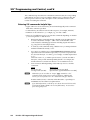
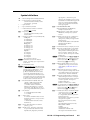
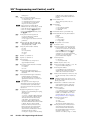
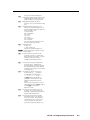
Creating and using query strings
A query string is a command that contains parameters or instructions for the Web
server (the IPL 250) to execute. The query string is contained after the question
mark within a reference URL (Web address). (See the syntax section below.)
When a link is accessed on a Web page, the URL is sent to the Web server (IPL)
to tell it which Web page to return to the browser. Upon receiving the URL, the
IPL 250’s internal Web server locates the query string within the URL and executes
the command it contains.
Query string command types and syntax
Host vs. remote commands
As with SSI formatted commands, query strings can use any valid SIS command of
either type (host or remote).
• Host commands instruct the IPL 250, itself, to act or respond.
• Remote commands send data to an external control port on the IPL 250.
Command syntax
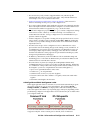
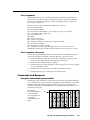
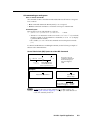
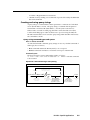
The basic format for a query string within a link is as follows:
<a href=”index.html?cmd=x”>linked text</a> where x is the SIS command
to be executed.
Syntax for a URL Containing a Query String
Text between the quotation marks is typed with no spaces.
Delimiter
“?” indicates the start
of the query string.
Delimiter
<a href="index.html ? cmd=
HTML URL
reference (link)
command
Indicator that
a command
follows
">
SIS command
to be executed by the
IPL (Web server)
(typed with no spaces)
</a>
Link text
(text that appears
on the Web page for
the user to click on)
End of link
tag
IPL 250 • Special Applications
5-5