1
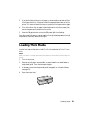
1. Open the paper support and pull up the extensions, then open the output tray
and pull out the extensions.
2. Insert paper, glossy or printable side up, short edge first, against the right side
and beneath the tab. Then press the button on the edge guide and slide it
against the paper (but not too tightly).
Always load paper short edge first, even for landscape printing.
Load letterhead or pre-printed paper top edge first.
Note:
The edge guide moves slightly during paper feeding and printing.
Do not adjust it while printing is in progress.
Loading Paper 7