1
12. Turn off the CX11N/CX11NF and remove the following items:
■
Any loaded paper in the MP tray
■
Optional paper cassette unit (if installed; see the online User’s Guide for more
information)
■
USB cable
■
Power cord
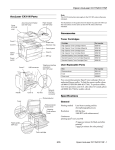
13. Use shipping tape to tape the scanner and
supporting foam to the printer as shown:
Caution:
Don’t forget to place the foam in-between
the scanner and printer; otherwise, the
scanner hinges may be damaged during
shipping.
14. Place the CX11N/CX11NF in the original
lower box housing.
Warning:
The back side of the CX11N/CX11NF is
heavier than the front, so prepare for this
difference as you lift. Two people should lift
the CX11N/CX11NF.
Foam