1
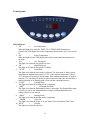
Control panel
LED indicators
1. “ST”
=
Set Temperature
When this light is lit (when the TEMP. UP or TEMP. DOWN buttons are
pressed), the LED display shows the temperature that the unit is set to cool or heat
to.
2. “RT”
=
Room Temperature
When this light is lit the LED display shows the current ambient temperature in
the room.
3. “LO”
=
Low Fan Speed
This light is lit when the fan speed is on Low.
4. “HI”
=
High Fan Speed
This light is lit when the fan speed is on High.
5. “AUTO”
=
Auto Mode
This light is lit when the Auto mode is selected. The Auto mode is factory preset
to maintain an ambient temperature of 73°F. If the ambient temperature is above
73°F, the unit will operate in cooling mode. If the ambient temperature is equal to
or below 73°F, the unit will operate in either Fan mode (if the unit does not have a
heating function) or in Heating mode (if the unit has a heating function.)
6. “COOL”
=
Cooling Mode
This light is lit when the Cooling mode is operating.
7. “DRY”
=
Dehumidifier Mode
This light is lit when the Dehumidifier mode is operating. The Dehumidifier mode
is factory pre-set to one dehumidification setting- and the dehumidification
settings cannot be user-altered.
8. “HEAT”
=
Heating Mode
This light is lit when the Heating mode is operating.
9. “TIMER”
=
Timer On
This light is lit when the Timer is on. See below for a description of the Timer.
10. “RUN”
=
Unit On
This light is lit when the unit is on.
11