1
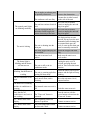
Troubleshooting
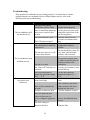
If the portable air conditioner is not working properly, it is usually due to a minor
problem that the user can handle. Before calling customer service, refer to the
following chart for troubleshooting:
Problem
Possible Causes
The plug is not properly
installed into a power outlet
The air conditioner will
not function at all
Plug the unit in properly.
The exhaust hose is kinked or
corkscrewed
Check your fuses (refer to the
rating label on the back of the
unit for Amp draw)
Drain the water reservoir.
Press the reset button on the
plug
Make sure the exhaust hose is
straight and as short as
possible
The unit is too close to a wall
or some other obstacle.
The unit should be at least 20"
away from walls and other
obstacles. Move the unit.
The unit is covered.
The unit will overheat if the
air intake or exhaust ports are
obstructed. Remove the
obstruction.
The "Timer off" function was
activated.
Press the power button to turn
the unit back on.
The room temperature is
outside the operational range
of 61° - 97°F
Room is too large
Use the unit within the
operational range of 61° 97°F
Use the unit in a smaller
room.
There is direct sunlight into
the room.
Windows or doors are open.
Close curtains or pull down
blinds; minimize the direct
sunlight into the room.
Close the windows or doors.
There are additional heat
sources in the room, e.g.,
servers, computer equipment,
etc.
Remove the additional heat
sources.
The filter is dusty or
otherwise blocked.
Clean the filter
There is insufficient amperage
in the power circuit to start
the unit.
The water reservoir is full.
The LCDI plug is tripped
The air conditioner starts
and then cuts out.
The air conditioner does
not seem to cool
effectively.
Solutions
19