1
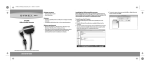
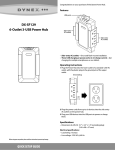
Installing your hub
DX-U27H41
Note: When you connect your hub to a
computer, the computer detects your hub and
automatically installs the driver.
1 Connect the smaller end of the USB
cable to the upstream port on the rear
of the hub, then connect the larger end
of the USB cable to an open USB port
on your computer.
DX-U34H41
2 Plug the AC power adapter into your
hub’s DC jack and into a power outlet.
3 Connect your USB devices into your
hub.
Note: Do not disconnect from your
computer or USB device during data
transfer. Doing so may corrupt your data or
damage your devices.
One-year limited warranty
For complete warranty, visit
www.dynexproducts.com.
Contact Dynex:
For customer service, call 1-800-305-2204
(U.S. and Canada) or 01-800-926-3020
(Mexico)
www.dynexproducts.com
DYNEX is a registered trademark of BBY Solutions, Inc.
Registered in some countries.
Distributed by Best Buy Purchasing, LLC, 7601 Penn
Ave South, Richfield, MN 55423 U.S.A.
©2013 BBY Solutions, Inc. All Rights Reserved.
V1 ENGLISH 13-0733