1
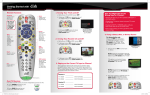
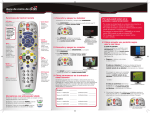
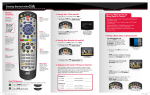
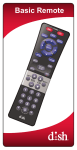
Getting Started with DISH 512 Remote Functions 1. Turning Your TV On and Off SAT Mode Correct mode for operating your DISH system. TV / VIDEO TV / VIDEO GUIDE H VIEW LIVE TV On Dem d an DIS INFO Cancel Go back one on-screen menu at a time. (Note: This may not be the previous screen you were viewing.) GUIDE c.To turn your TV OFF, press and release the red TV POWER button on your DISH remote again. SELECT CANCEL 2. Turning Your Receiver On and Off INFO SKIP BACK SKIP FWD b.To turn your receiver ON, press and release the red POWER button on your DISH remote. PAUSE PLAY RECORD POWER RECORD abc IN PUT def PAGE PO IT S VOLUME ghi jkl mno pqrs tuv wxyz MUTE GUIDE A TV picture appears. c.To turn your receiver OFF, press and release the red POWER button on your DISH remote again. N SELECT IO abc ghi tuv mno wxyz PO IT S DVR Controls See the Getting Started with Your DVR guide for further instructions on how to use your DISH DVR. 3. S taying on the Correct TV Input or Channel RECALL CANCEL INFO VIEW LIVE TV On Dem SKIP BACK SKIP FWD BACK STOP PLAY AP _______________ INPUT/CHANNEL_______________ abc TV2: ROOM ghi N PIP def IO SW TV1: ROOM A TV picture appears. FWD PAUSE RECORD Remote image may vary. Cycle your TV through its inputs by pressing the INPUT, SOURCE, or TV/VIDEO button on your TV remote or the TV itself. If the picture is not restored, change your TV to channel 3 or 4 using your TV remote or the TV itself. Your TV needs to remain on the correct input or channel to watch your DISH service. If your TV is not on the correct input or channel, your TV may display a black, blue, or snowy screen, depending on your TV. The correct input or channel for your TV may be noted on a sticker on the back of your DISH remote or below. H Receiver #1 _______________ 1 PO IT S b. Once your TV picture is restored, press and release the SAT mode button on your DISH remote to ensure you’re in the proper mode for controlling your receiver. _______________INPUT/CHANNEL _______________ jkl mno POWER POWER Receiver #2 _______________ pqrs tuv wxyz TV1: ROOM _______________INPUT/CHANNEL _______________ TV2: ROOM _______________INPUT/CHANNEL _______________ TV / VIDEO IN PUT TV / VIDEO PAGE IN VOLUME PUT PAGE VOLUME The SAT button lights up. MUTE GUIDE MUTE GUIDE SELECT WSE BRO THE ES M SELECT WSE BRO THE ES M RETEN814 512 QRG Update_FINAL.indd 1 A black, blue, or snowy screen appears. d an pqrs jkl def For demonstration only Get your TV OFF the correct input or channel by pressing and releasing the CHANNEL UP button on your TV remote or the TV itself. (If you are already on a black, blue, or snowy screen, go to 4a.) a. Get your TV back ON the correct input or channel: WSE BRO SW AP -P ower outage causing your TV to get off the correct channel or input PLAY PIP TV / VIDEO THE ES M PIP AP FWD PAUSE STOP SW FWD STOP H VIEW LIVE TV On Dem a.Start with your TV on and DISH receiver off. SKIP FWD View Live TV Return to watching live TV. Also exits all on-screen menus. The screen saver appears whenever your receiver is OFF to remind you that your TV is still ON. 4. Fixing a Black, Blue, or Snowy Screen RECALL BACK SKIP BACK WSE BRO CANCEL MUTE d an RECALL VOLUME THE ES M WSE BRO SELECT PUT DIS MUTE BACK Info Display additional program info. -P ressing the INPUT or CHANNEL buttons with your DISH remote when you are not in SAT mode PAGE VOLUME IN Recall Go back to the last channel viewed. -C hanging your TV input or channel using your TV remote or the TV itself POWER N PUT -C hanging the input on your TV to operate a DVD player or video game system IO IN b. To turn your TV ON, press and release the red TV POWER button on your DISH remote. PAGE THE ES M Menu Access features and settings, including Parental Locks, Favorites Lists, Customer Support and more. Guide Display current and future TV program listings. POWER DIS TIP: Press and release the SAT mode button to ensure you are in the proper mode for controlling your receiver. How You Might Get On the Wrong Input or Channel: a. Start with your TV and DISH receiver off. 8/16/12 2:23 PM POWER TV / VIDEO IN PAGE PUT VOLUME MUTE GUIDE WSE BRO THE ES M SELECT 5. Changing Channels RECALL CANCEL INFO VIEW LIVE TV On Dem DIS d an There are three ways to change channels on your receiver. H SKIP BACK SKIP FWD Type a channel number using the number buttons on the keypad. BACK PLAY For your convenience, two Favorites Lists have been pre-programmed: All Chan– Displays all DISH channels All Sub – Displays all channels you subscribe to RECORD a. Press and release the GUIDE button to bring up the on-screen TV Guide. Press and release the GUIDE button to cycle through favorite lists. IO SW N PIP AP FWD PAUSE STOP 6. Selecting a Favorites List to Display on Your Program Guide PO IT S abc def ghi jkl mno pqrs tuv wxyz POWER TV / VIDEO IN The TV channel changes. - OR - PUT inadvertently lock certain news or other programs that are not rated. VOLUME b. When you are done, press “Lock System” and set/use a password for any of the above locks to take effect. GUIDE POWER On Dem VIEW LIVE TV PAGE VOLUME RECALL H SKIP BACK SKIP FWD BACK - OR Use the Program Guide. a. Press and release the GUIDE button. RECALL SKIP FWD The TV channel changes. PIP AP POWER STOP PLAY TV RECORD / VIDEO IN PUT THE ES M pqrs N IO jkl mno tuv SELECT wxyz On Dem VIEW LIVE TV RECALL H SKIP BACK SKIP FWD Press and release the CHANNEL UP/ DOWN or the PAGE UP/DOWN buttons to highlight the channel you want to watch. BACK STOP mno pqrs tuv wxyz 2. Make sure your TV is on the correct input/channel. 3. Make sure you’re on the correct Favorites List. When you’re in an on-screen menu, it’s easy to exit the on-screen menu and return to the program you were watching. 4. Check for anything obstructing the signal to your satellite dish, such as tree branches, severe rain, or snow build-up. If it is safe to do so, remove the obstruction or wait for it to pass. N TV / VIDEO IN ghi jkl mno tuv wxyz DIS TV / VIDEO The Program Guide moves up or down. H SKIP BACK • SKIP FWD N SW ghi jkl mno pqrs tuv wxyz IO AP PO IT S ghi RECALL CANCEL H SKIP BACK SKIP FWD def jkl mno PO IT S pqrs The TV changes to the highlighted channel. tuv wxyz FWD PAUSE STOP abc TIP: The Cancel button on your DISH remote is another option for exiting one on-screen menu at a time. VIEW LIVE TV On Dem d an DIS INFO N PIP WSE BRO THE ES M SW def The menu screen is exited and a TV picture appears. PLAY RECORD GUIDE PIP FWD PAUSE STOP PLAY abc SELECT BACK CANCEL BACK FWD VOLUME PAUSE RECORD AP VIEW LIVE TV INFO PAGE STOP MUTE On Dem • mydish.com/support • Channel 101 IO PUT WSE BRO d an SKIP FWD Where to go for additional information: d an VIEW LIVE TV SKIP BACK SELECT RECALL CANCEL c. Press and release the SELECT button. VOLUME GUIDE THE ES M RECALL PUT MUTE WSE BRO THE ES M SELECT On Dem H POWER PAGE a. To exit an on-screen menu, press and release the VIEW LIVE TV button. GUIDE INFO 5. Reset your receiver by unplugging it from the wall for 10 seconds. Plug it back in and turn it back on. POWER P OPAGE SIT def pqrs IN The TV is on a menu screen. IO SW abc VOLUME MUTE BACK PLAY PUT 75% of all technical problems that an agent can help you with can be solved by following these five easy steps: 1. Make sure your DISH remote is in SAT mode. The Program Guide appears. POWER RECORD IN Troubleshooting: FWD PAUSE PIP jkl PO IT S CANCEL INFO A PTV / VIDEO GUIDE d an b. PO IT S def DIS ghi DIS ghi def 7. Exiting On-Screen Menus VOLUME abc WSE BRO SW MUTE PAGE PIP AP abc FWD PAUSE N DIS RECORD SW SKIP BACK BACK PLAY The Program Guide indicates which list you are on. If you are on the All Chan list, channels shown in red or green are not included in your subscription. d an H STOP VIEW LIVE TV On Dem FWD PAUSE CANCEL INFO d an WSE BRO THE ES M SELECT CANCEL INFO GUIDE DIS MUTE IO PUT SELECT WSE BRO IN THE ES M TV / VIDEO Setting Parental Controls: a. Press and release the MENU button and then select “Locks.” • To lock all adult channels, select “Hide Adult.” • To lock all PPV channels, select “Lock PPV.” • To lock specific channels, select “Channel Locks.” • To lock a channel based on rating, select “Ratings Locks.” • Note: If you lock channels with an NR/AO rating, you may PAGE MUTE Press and release the CHANNEL UP/DOWN buttons. PN 197463 Additional Tips PLAY PIP SW AP P IO RETEN814 512 QRG Update_FINAL.indd 2 N RECORD T 8/16/12 2:23 PM