1
ENGLISH
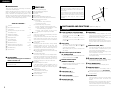
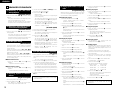
!6 Pitch Slider
• Use this slider to adjust the play speed. Slide
up to decrease the play speed, down to
increase the play speed.
!7 PROG. PLAY ON/OFF button
• When this button is pressed while the PROG
indicator is lit, the program play mode is set.
• The button will not function during the A-B play
mode.
• The PROG. PLAY ON/OFF LED lights during
the program play standby and play modes.
• When the button is pressed during the
program play standby or play mode, the
program play mode is cleared.
!8 PROGRAM IN button
• Press this button to set the program input
mode.
• The button will not function during the play
mode.
• The PROG indicator flashes when in the
program input mode.
• The PROG indicator lights when a program is
set.
!9 REPEAT button
• Press this to perform repeat playback.
@0 TIME button
• The time display switches each time this
button is pressed. (“REMAIN”, “ELAPSED”)
@1 TITLE button
@2 FOLDER button
• When disc containing MP3 format files is
loaded, in the stop mode press this button then
the folder select mode is possible.
@3 A-B (A-B repeat) button
• Use this to play a set section repeatedly.
• When the button is pressed once during
playback, that position is set as the A point and
the “A-B” indicator flashes on the display.
• When the button is pressed again, that position
is set as the B point, the “A-B” indicator stops
flashing (remaining lit), and the A-B section
begins playing repeatedly.
• When the button is pressed again, A-B repeat
is canceled and the mode returns to the normal
play mode.
@4 Headphones jack
• For private listening, you can connect your
headphones to this jack.
@5 PHONES LEVEL control
• Use this adjust the output level of the
headphones.
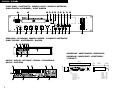
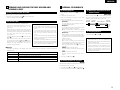
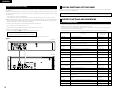
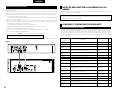
(2) Rear panel
q BALANCED OUT connectors
RS-422A
• These are active balanced outputs using XLR
type connections. The CD’s playback signals
are output from these connectors.
• Pin layout : 1. Common / 2. Hot / 3. Cold
• Applicable connector :
Cannon XLR-3-31 or equivalent.
NOTE :
• Do not short-circuit the hot or cold pin with
the common pin.
w LEVEL L/R controls
• Use these controls to adjust the level of the
audio signals from the BALANCED OUT
connectors.
e UNBALANCED OUT jacks
• These are unbalanced outputs using RCA type
jacks.
Elapsed time of currently playing track
1
6
2
7
3
4
Title name
5
NC
I
_
NC
_
S. GROUND
_
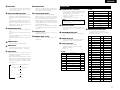
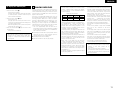
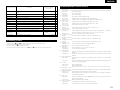
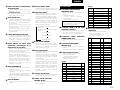
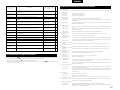
y Parallel remote control port
• This is a parallel remote connector.
• Applicable connector : 25-pin D-sub (male)
• Connecting signal layout
14
2
16
4
GND
NC
_
TxD
O
_
NC
I
_
NC
_
NC
_
S. GROUND
_
Signal Name
FG
5
18
6
7
O
TTL (Iol = 20mA)
PLAY command
I
HCMOS (Ii = 3mA)
PAUSE tally
O
TTL (Iol = 20mA)
PAUSE command
I
HCMOS (Ii = 3mA)
CUE tally
O
TTL (Iol = 20mA)
CUE command
I
HCMOS (Ii = 3mA)
INDEX 2/INDEX 3 tally
O
TTL (Iol = 20mA)
TRACK (+) command
I
_
HCMOS (Ii = 3mA)
I
_
HCMOS (Ii = 3mA)
I
_
HCMOS (Ii = 3mA)
I
_
HCMOS (Ii = 3mA)
I
_
HCMOS (Ii = 3mA)
Tally power supply
Command common
_
(Ii = 10mA)
Command common
_
NC
_
EOM tally
_
Reserved
_
Reserved
_
Reserved
_
Tally common
Reserved
SEARCH (Fwd) command
20
8
Reserved
SEARCH (Rev) command
21
9
Reserved
FADER START command
22
10
23
24
25
13
I/O
_
PLAY tally
TRACK (–) command
19
12
Album name
I
RxD (RETURN)
5
11
Artist name
O
RxD
4
3
I/O
_
RxD
8
9
File name of currently playing track
8
17
NC
TxD
7
15
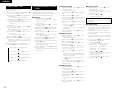
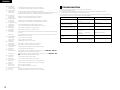
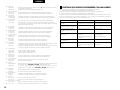
This is serial remote connector.
Applicable connector : 9-pin D-sub (male)
Baud rate : 9600 bps
Pin layout
Signal Name
_
O
3
t Serial control port
Pin No.
NC
TxD (RETURN)
6
2
1
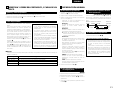
• This is a coaxial output using an RCA type jack.
• Signal format : SPDIF or IEC-958 Type II
I/O
_
GND
Pin No.
r DIGITAL OUT jack
•
•
•
•
Signal Name
9
RS-232C
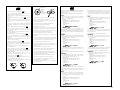
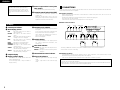
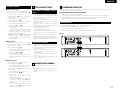
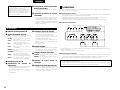
• When the button is pressed, the text
information (Disc title, track title, disc artist or
track artits) is displayed.
• When the button is pressed while in the stop
mode with a disc containing an MP3 ID3-Tag
loaded, the file name is displayed. When
pressed during playback, the display switches
as shown below.
Pin No.
1
+3.3V, 20mA
TTL (Iol = 20mA)
7