1
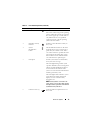
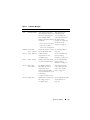
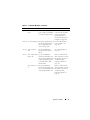
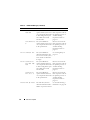
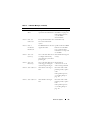
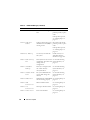
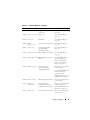
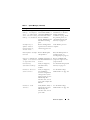
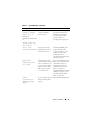
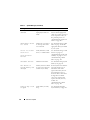
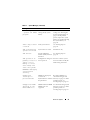
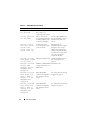
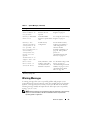
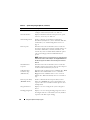
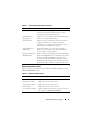
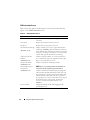
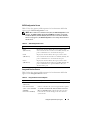
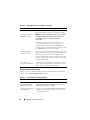
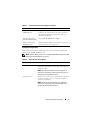
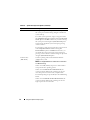
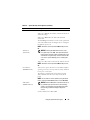
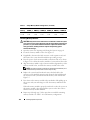
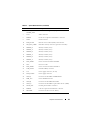
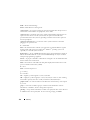
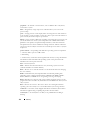
Table 1-6.
Code
LCD Status Messages (continued)
Text
Causes
Corrective Actions
E1811 HDD ## Rbld
Abrt
The specified hard drive has See "Troubleshooting a
experienced a rebuild abort. Hard Drive" on page 142.
If the problem persists,
see your RAID
documentation.
E1812 HDD ##
Removed
The specified hard drive has Information only.
been removed from the
system.
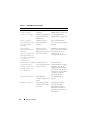
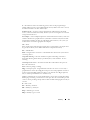
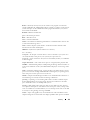
E1913 CPU &
Firmware
Mismatch
The BMC firmware does not Update to the latest BMC
support the CPU.
firmware. See the BMC
User’s Guide for more
information on setup and
use of BMC.
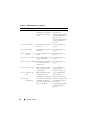
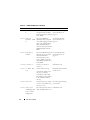
E1A12 PCI Rsr
Config
One or all of the PCIe risers Reinstall the missing riser
is configured incorrectly,
card(s).
preventing the system from
powering on.
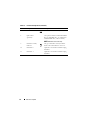
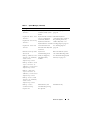
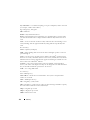
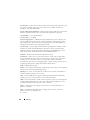
E1A12 PCI Rsr
Missing
One or all of the PCIe risers Check that all
is missing, preventing the
connections are secure
system from powering on.
and correctly positioned.
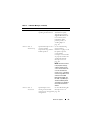
E1A14 SAS Cable A
SAS cable A is missing or
bad.
Reseat the cable. If the
problem persists, replace
cable.
If the problem persists,
see "Getting Help" on
page 165.
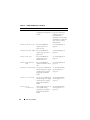
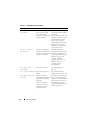
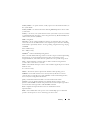
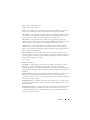
E1A15 SAS Cable B
SAS cable B is missing or
bad.
Reseat the cable. If the
problem persists, replace
cable.
If the problem persists,
see "Getting Help" on
page 165.
About Your System
29