1
book.book Page 21 Friday, May 26, 2006 3:03 PM
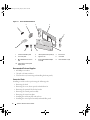
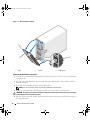
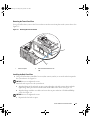
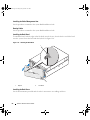
Figure 1-9. Installing the Shoulder Nuts
2
1
3
1
plastic filler panel (3)
2
10-32 shoulder nut (6)
3
shoulder mount (6)
Removing the Rack Doors
You must remove the doors from the rack cabinet to provide access to the interior of the rack and to
prevent damage to the doors while installing the system in the rack cabinet.
See the documentation provided with the rack for instructions on removing rack doors.
Installing the System in a Rack
If you are installing the system in a rack cabinet, see the procedures contained in the system Rack
Installation Guide.
Tower-to-Rack Conversion Guide
21