1
Dell Latitude E-Family & Mobile Precision Reimage “How-To” Guide
Dell
Business Client
Re-Image “How-To” Guide
Latitude E-Family & Mobile Precision
Revision 3.0
A03
May 5th, 2011
Dell Latitude E-Family & Mobile Precision Reimage “How-To” Guide
Contents
1
Overview ................................................................................................................................................................................ 3
2
“How-To” .............................................................................................................................................................................. 4
2.1
Supported Operating Systems ........................................................................................................................................ 4
2.2
Latitude E-Family & Mobile Precision New Features & Image Impact ....................................................................... 5
2.3
Latest Drivers / Applications and Utilities ..................................................................................................................... 6
2.4
Installation Sequence ..................................................................................................................................................... 7
2.5
BIOS ............................................................................................................................................................................ 10
2.6
Recommended Drivers / Applications Installation Order ............................................................................................ 12
Appendix A - .NET Requirements............................................................................................................................................... 27
Appendix B - 512e / 4KBe HDD Re-image Guidelines .............................................................................................................. 28
Appendix C - FAQs ..................................................................................................................................................................... 32
Appendix D - Tables .................................................................................................................................................................... 34
-
Control Point System Manager Features - Table B1 ........................................................................................................... 34
-
Control Point Security Manager Features – Table B2 ......................................................................................................... 35
-
Dell Data Protection | Access, DDPA – Table B3 ................................................................................................................. 35
-
Control Point Connection Manager Features – Table B4 .................................................................................................... 36
Appendix E - E-Docks .................................................................................................................................................................37
Dell Latitude E-Family & Mobile Precision Reimage “How-To” Guide
Overview
The purpose of this document is to detail the required steps for reimaging Dell Latitude E-Family & Mobile Precision
notebooks with Microsoft Operating Systems.
Dell Latitude E-Family & Mobile Precision notebooks systems ship with MS Windows XP SP3 (SP2 for XP 32-Bit),
Vista SP2, or Windows 7. These images include the Dell recommended software stack and settings, drivers, and
applications which are tested and validated with the system.
Drivers and applications must be installed on Dell Latitude E-Family & Mobile Precision systems in a prescribed order
to ensure optimal performance. Failure to install drivers and applications as detailed in this document may result in
undesirable performance.
Dell provides drivers and applications that are not included in Microsoft Operating Systems. These drivers are required
to enable the new technologies and features of Dell Latitude E-Family & Mobile Precision products, including the 512e
Advanced Format HDD (See appendix –B). Reinstalled images should be built from a clean hand installed OS load and
following the steps in this guide. Dell does not recommend starting from an image built on previous generations of
products or other computer systems.
Dell recommends ensuring BIOS settings (including SATA configurations modes) are correctly set and using the latest
device drivers and applications when imaging their systems.
This “How-To” guide applies to the following Latitude E-Family & Mobile Precision systems:
Latitude E-Family
Product
Precision Mobile
WorkStations
1
1st Generation
2nd Generation
3rd Generation
E4200
-
E6220
E4300
E4310
E6320
E5400
E5410
E5420/E5420m
E5500
E5510
E5520/E5520m
E6400
E6410
E6420
E6400 ATG
E6410 ATG
E6420 ATG
E6500
E6510
E6520
M2400
-
-
M4400
M4500
M4600
M6400
M6500
M6600
Dell Latitude E-Family & Mobile Precision Reimage “How-To” Guide
2
“How-To”
2.1 Supported Operating Systems
The following Microsoft operating systems have been validated for use on Dell Latitude E-Family & Mobile
Precision notebook computers:
Microsoft Windows XP 32 & 64-Bit
Vista 32 & 64-Bit
Windows 7 32 & 64-Bit
Dell Latitude E-Family & Mobile Precision Reimage “How-To” Guide
2.2 Latitude E-Family & Mobile Precision New Features & Image Impact
Dell Latitude E-Family & Mobile Precision systems feature new hardware technologies which require a new
software stack, drivers, and / or applications. These products are not compatible with previous images built or
installed on none Latitude E-Family, Mobile Precision or previous Dell products. Images between 1st, 2nd & 3rd
generations Latitude E-Family & Mobile Precision are also not compatible
Among these new hardware and technologies are:
2.2.1
-
-
New Features Offered on Latitude E-Family & Mobile Precision systems, All Generations:
Note: Not all features are available on all systems
New BIOS architecture – Latitude E-Family & Mobile Precision
Chipset
1. Intel Core i3, i5 & i7 Dual Core CPUs that include updated integrated graphics
2. Intel Core i7 Quad Core CPUs
512e / 4KBe Sector HDDs
Intel RAID Functionality
eSATA
Intel Turbo Boost
Intel AMT (Intel Active Management Technology) & vPRO
Graphics controller (Intel, nVidia and AMD)
HDMI Audio
Network LoM (Intel and Broadcom)
Wireless LAN
Wireless WAN
WiMAX
Bluetooth
UWB
Broadcom Unified Security Hub (USH)
Contactless smartcard / RFID
Webcam
USB 3.0
Free Fall Sensor on the mother board
Multi-touch Touchpad
Dell Control Point, 1st and 2nd generation Latitude E-Family & Mobile Precision
Dell Feature Enhancement Package – DFEP, 1st, 2nd & 3rd generation Latitude E-Family & Mobile
Precision
Dell Data Protection | Access, 2nd & 3rd generation Latitude E-Family & Mobile Precision
Privacy Panel
Touch Screen Digitizer & 4-Finger touch with Stylus support
Latitude On / Precision On - Reader, Flash, and ARM
Dell Latitude E-Family & Mobile Precision Reimage “How-To” Guide
2.3
Latest Drivers / Applications and Utilities
Dell recommends always obtaining the latest and most updated BIOS, drivers, firmware, and applications. Dell
validated and tested drivers and applications are located on Dell’s support web site http://support.dell.com/
-
Choose drivers and downloads
Enter the Service Tag or select the product model and the model number
Select Operating System (32-Bit or 64-Bit version must be selected)
Dell Latitude E-Family & Mobile Precision Reimage “How-To” Guide
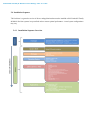
2.4 Installation Sequence
The list below is a general overview of drivers and applications that must be installed on Dell Latitude E-Family
& Mobile Precision systems in a prescribed order to ensure optimal performance. Actual system configurations
may vary
2.4.1 Installation Sequence Overview
Dell Latitude E-Family & Mobile Precision Reimage “How-To” Guide
2.4.2 Installation Sequence & Features at a Glance:
2.4.2.1 BIOS, Drivers and Firmware:
-
-
-
-
-
-
BIOS
Intel Chipset - Helps Windows control system board components and controllers.
Dell Desktop System Software - A compilation of critical Microsoft QFEs updates
Media Memory Card / SmartCard controller - Enables and enhances the Media Memory / SmartCard
controller
Intel Storage:
1. Intel Matrix Storage Manager – Latitude E-Family & Mobile Precision 1st generation
2. Intel Rapid Storage Technology – Latitude E-Family & Mobile Precision 2nd & 3rd generations
Audio - Enables and enhances the audio controller
Graphics:
1. Enhances and optimizes video performance
2. Enables & provides additional functionality that are not included in MS native VGA driver
User customizable Power Management features
Portability & behavioral profiles
Multiple monitor support
Intel Turbo Boost (only on E-Family 2nd generation systems)
1. A driver-based power management mechanism for Intel i3, i5 and i7 processors
2. Intelligent power sharing across cores
3. Budgets power limits available to Processor or graphics turbo Processor
Integrated Wired Network Controller & Intel PROSet Utility / Application - Enables and enhances
the network controller
Control Point Security Driver pack
1. Installs and enables the security devices & controllers
2. Even if you do not install the Control Point managers you should install the Control Point
security driver as it contains needed drivers
Networking & Communication
1. Wireless Local Area Network Adapters (WLAN) - Enables and enhances the Wireless LAN
network adapter
2. Wireless Personal Area Network Adapter (UWB / WPAN) - Enables and enhances the UWB or
Bluetooth Adapter
3. Mobile Broadband Wireless Wide Area Network Adapter (WWAN) - Enables and enhances the
Broadband wireless Adapter
Touch Pad / Track Stick / Pointer - Enhances the pointing device features
Free Fall Sensor
Modem - Enables and enhances the modem
Intel vPro or AMT – Enhances System Manageability
1. HW based solution using out-of-band communication for management access to client systems
(independent of the system state)
Dell Latitude E-Family & Mobile Precision Reimage “How-To” Guide
-
USB 3.0
Touch Screen Digitizer
Webcam driver – XP (32 & 64-Bit) only
Control Vault Firmware Update
2.4.2.2 Applications:
-
Dell Control Point – DCP, 1st & 2nd generations Latitude E-Family & Mobile Precision
1. Control Point System Manager
DCP Extended Battery Life – EBL
DCP – Ambient Light Sensor
-
Requires Dell DCP System Manager (for all System Manager release)
Requires Security driver (for System Manager version 1.0 & 1.1 only)
Requires Dell DCP-SM or ALS utility in case DCP-SM is not desired and under
Microsoft Windows Vista only
2. Control Point Connection Manager – 1st generation E- Family & Mobile Precision
3. Control Point Security Manager (Requires Dell Control Point security driver pack)
Dell Feature Enhance Package – DFEP, 2nd & 3rd generations Latitude E-Family & Mobile Precision
Dell Data Protection | Access, 2nd & 3rd generations Latitude E-Family & Mobile Precision
Latitude On / Precision On – Reader, Flash, and ARM
1. Communication solution that is designed to provide quick access to business critical data
Dell Latitude E-Family & Mobile Precision Reimage “How-To” Guide
2.5
BIOS
Dell recommends flashing the latest BIOS available to the system. This is posted on Dell’s driver & downloads
support web site (support.dell.com) under the “BIOS” section.
Some of the BIOS settings are critical to Operating System performance. These are as follows:
Settings System Configuration SATA Operation
Disabled: SATA Controllers are hidden
ATA, Basic Disk Operation mode, does not require additional storage driver. Note:
eSATA is not functional in this mode
AHCI, SATA bus is configured for AHCI mode (Advanced Disk Operation mode)
which offers faster performance, eSATA support, and increased battery life. This mode
requires an additional storage driver provided by Dell
IRRT / RAID On, SATA bus is configured to support IRRT (Intel’s Rapid Recovery
Technology). This mode supports AHCI mode features as well as disk mirroring (RAID1). IRRT allows data backup and restoration. This mode requires an additional storage
driver provided by Dell
RAID, SATA bus is configured to support RAID. This mode supports AHCI mode
features as well as disk mirroring (RAID-1). RAID allows data backup and restoration.
This mode requires an additional storage driver provided by Dell
Notes:
o RAID support requires second hard disk drive.
-
If AHCI, IRRT, RAID On, or RAID modes are selected, Intel’s Matrix Storage Manager / Intel Rapid
Storage Technology driver must be installed in conjunction with the installation of the Operating System.
See section “2.6.4 Intel Storage” of this document
Dell Latitude E-Family & Mobile Precision Reimage “How-To” Guide
TPM Security:
These options enable and configure the Trusted Platform Module (TPM). If TPM is to be deployed, TPM
must be enabled in the BIOS Setup program
1. Security TPM Security
TPM Security:
Disabled (Default): The BIOS will not turn on the TPM during POST. The TPM
will be non-functional and invisible to the Operating System
Enabled: The BIOS will turn the TPM during POST so that it can be used by the
Operating System
Deactivate (Default) = The TPM will be deactivated
Activate = The TPM will be enabled and activated
Clear = The BIOS clears the information stored in the TPM
Dell Latitude E-Family & Mobile Precision Reimage “How-To” Guide
2.6 Recommended Drivers / Applications Installation Order
For best results, Dell recommends installing drivers / applications in the following order:
2.6.1 Intel Mobile Chipset
-
Microsoft Operating Systems might not include the updated Intel Chipset Mobile driver for Dell Latitude
E-Family & Mobile Precision notebooks. The Intel Mobile Chipset driver is available on Dell’s driver &
downloads support web site (support.dell.com) under the “Chipset” section
2.6.2 Dell System Software for critical Microsoft QFEs
-
Dell recommends installing all of the latest available fixes specific to the system. These are available
through the Dell System Software utility posted on Dell’s driver & downloads support web site
(support.dell.com) under the “System Utilities” section
2.6.3 Media Memory Card / Smartcard Controller
-
Microsoft Operating Systems do not include the Smartcard controller driver. Install the following driver
provided by Dell:
R5C8xx Ricoh driver is available on Dell’s driver & downloads support web site
(support.dell.com) found under the “Chipset” section
PCI8412 TI driver (Applies only for M6500) is available on Dell’s driver & downloads support
web site (support.dell.com) found under the “Chipset” section
O2 Micro TI driver (Applies for 3rd generation Latitude E-Family & Mobile Precision) is
available on Dell’s driver & downloads support web site (support.dell.com) found under the
“Chipset” section
2.6.4 Intel Storage - Intel Matrix Storage Manager / Intel Rapid Storage Technology
-
The Intel Matrix Storage Manager (IMSM) driver on Dell 1st generation Latitude E-Family & Mobile
Precision or Intel Rapid Storage Technology (IRST) driver on 2nd & 3rd generations Latitude E-Family &
Mobile Precision is required to be installed on Operating Systems in AHCI, IRRT, RAID On, and RAID
SATA modes
-
The Intel IMSM or IRST application must also be installed
-
The SATA operation modes are configured in the BIOS. Refer to the BIOS section 2.5
-
If the SATA mode is configured in AHCI, IRRT, RAID On, or RAID mode, the IMSM / IRST driver
must be installed during the initial Operating System installation stages. The IMSM / IRST driver is only
available from Dell
-
If SATA configuration mode in the BIOS is set to either AHCI, IRRT, RAID On, or RAID, install the
Dell IMSM / IRST driver and application available on Dell’s driver & downloads support web site
(support.dell.com) under the “SATA Drivers” section
Dell Latitude E-Family & Mobile Precision Reimage “How-To” Guide
-
Follow these steps to install the IMSM / IRST driver:
1. For Microsoft XP 32 & 64-Bit Operating Systems:
Installing the Intel IMSM driver using the Floppy Drive
Boot to the Dell Recovery DVD (RDVD) and select the Create RAID driver
from the list of items. You will need Floppy Disk Drive and a diskette for this
selection. The IMSM / IRST driver must be on the root of the A:\
Note: the latest IMSM / IRST driver can also be obtained from support.dell.com
under the “SATA Drivers” section
Once the driver is extracted and stored on the target diskette, boot to the
operating system CD and start the installation
In the initial stage of Windows Setup, press <F6> to install the third-party IMSM
SCSI or RAID drivers
When prompted, insert the floppy disk containing the IMSM driver and follow
the instructions provided by Windows Setup
After reading the floppy disk, either choose "Intel(R) ICH9M-E/M SATA AHCI
Controller" if in AHCI mode or "Intel(R) ICH8M-E/ICH9M-eSATA RAID
Controller" if in IRRT mode – select the appropriate driver to install
2. For Microsoft Vista / Windows 7 (32 & 64-Bit) Operating Systems:
Installing the Intel IMSM / IRST driver after the installation of the Operating
System
Boot to the Operating System DVD and start the installation
After completing the OS installation, insert the Dell RDVD
Select the IMSM / IRST driver and follow the installation procedure
Note: the latest IMSM / IRST driver can also be obtained from support.dell.com
under the “SATA Drivers” section
-
If Intel Rapid Recovery or RAID Technologies is to be used, ensure the following:
1. SATA operation mode in the BIOS is set to the appropriate IRRT, RAID On, or RAID mode
2. Microsoft Operating System was installed under IRRT, RAID On, or RAID mode and the latest
Intel Storage IMSM / IRST driver is installed
3. Install the following Intel IMSM application provided by Dell:
Intel Matrix Storage Manager Application, or
Intel Rapid Storage Technology Application
Dell Latitude E-Family & Mobile Precision Reimage “How-To” Guide
2.6.5 Graphics:
-
Under XP 32-Bit only with service packs earlier than Service pack-3 and for Latitude E-Family &
Mobile Precision 1st generation only, the Audio driver must be installed prior to installing the graphics
driver. This applies to Intel graphics solution only. Please refer to the section 2.6.5 Audio in this
document
-
Microsoft Operating Systems include the VGA graphics drivers only. Therefore for optimum graphics
performance, Dell recommends installing the Dell graphics driver applicable to their system available on
Dell’s driver & downloads support web site (support.dell.com) under the “Video” section
Note: for the nVidia Discrete Graphics solution on Latitude E-Family & Mobile Precision 3rd
Generation platforms (refer to the below table), the following should be followed:
1. First, install the Intel Media adapter Graphics driver that applies to the system
2. Second, install the nVidia Discrete Graphics driver that applies to the system
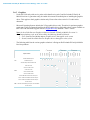
The following table lists the various graphics solutions’ offerings on Dell Latitude E-Family & Mobile
Precision products:
X
X
X
X
X
Quadro 2000M with 2GB GDDR3 Switchable Graphics
X
X
X
X
Intel Media Adapter HD/HD 2000/HD 3000
Quadro NVS 160M
Quadro FX 2700M / 3700M
X
X
X
X
E6520
M6600
X
M4600
E6420
X
E6420 ATG
X
E6320
X
E5420 / E5520
X
Quadro 1000M with 2GB GDDR3 Switchable Graphics
Intel GMA HD Graphics
M6500
X
E6510
X
3rd Generation
Generation
M4500
X
nd
E6410
X
M6400
X
M4400
E5500
X
E6500
E5400
X
2
M2400
E4300
Intel GMA 4500MHD Graphics
E6400
Graphic Solution
Generation
E6410 ATG
Intel
st
E4200
1
E6400 ATG
-
X
X
X
X
X
X
Quadro NVS 3100M
X
X
nVidia
Quadro FX 880M & 1800M
X
Quadro FX 2800M / 3800M
X
N12M 512MB DDR3 Switchable Discrete Graphics
AMD
ATI FirePro M7740
X
X
AMD FirePro M5950 Mobility Pro Graphics with 1GB GDDR5
X
X
ATI FirePro M7740
X
X
Dell Latitude E-Family & Mobile Precision Reimage “How-To” Guide
2.6.6 Audio:
-
Microsoft Operating Systems do not include the Audio driver recommended by Dell. The IDT 92HDxxx
HD Audio driver is available on Dell’s driver & downloads support web site (support.dell.com) under
the “Audio” section
Note: Under XP 32-Bit only with service packs earlier than Service pack-3 and for Latitude E-Family &
mobile Precision 1st generation only, the Audio driver must be installed prior to installing the graphics
driver. This applies to Intel graphics solution only
2.6.7 Intel Turbo Boost Driver – (applies for 2nd generation only Latitude E-Family & Mobile Precision )
-
-
Intel Turbo Boost driver is required to be installed on platforms meeting both of following criteria:
1. nVidia or ATI discrete graphics cards
2. Core i7 and i5 Dual Core CPUs
Microsoft Operating Systems do not include the Intel Dual-Core Turbo Boost driver. Install the
following driver provided by Dell:
Dual-Core Turbo Boost driver is available on Dell’s driver & downloads support web site
(support.dell.com) found under the “Chipset” section
2.6.8 Integrated Wired Network Controller (Ethernet)
Microsoft Operating Systems XP 32 & 64-Bit, Vista 32 & 64-Bit, and Win7 32 & 64-Bit either do not
provide native support or do not include the driver recommended by Dell. Install the following Dell
driver for network connectivity:
-
X
M6600
X
M4600
X
E6520
X
E6420
X
E6420 ATG
X
E6320
X
E5420 / E5520
X
M4500
X
M6500
X
E6510
X
3rd Generation
E6410
X
E5510
X
E5410
X
E4310
M4400
X
M6400
M2400
X
E6500
X
E6400
X
2nd Generation
E6400 ATG
X
Broadcom 57XX Gigabit Integrated Controller
E5500
E4300
Intel 825xx Gigabit Platform LAN Network device
E5400
Solution
E4200
1st Generation
E6410 ATG
-
X
X
X
X
X
Network Controller drivers are available on Dell’s driver & downloads support web site
(support.dell.com) under the “Network” section
Note: To ensure full functionality of the Intel Gigabit Network adapter, Dell recommends that you install
the Intel PROSet available on Dell’s driver & downloads support web site (support.dell.com) under the
“Network” section
Dell Latitude E-Family & Mobile Precision Reimage “How-To” Guide
2.6.9 Dell Control Point – DCP, (applies to 1st & 2nd generations Latitude E-Family & Mobile
Precision only)
2.6.9.1 Control Point Security Device Driver
Note: for 2nd generation Latitude E-Family & Mobile Precision, the Control Point Security
Device driver needs to be applied only if the Control Point Security Manager is used, it is not
required for the Dell Data Protection | Access suite.
-
Microsoft Operating System does not have the desired drivers and applications necessary for
the security functions offered on Latitude E-Family & Mobile Precision
-
The driver will install the device driver for the security devices installed in the Dell E-Family
notebook computer. In addition, it will install Microsoft Net framework 2.0 SP1 and any
relevant Microsoft QFEs required allowing these security devices to operate correctly
-
The driver supports the following Security devices:
1.
2.
3.
4.
5.
6.
7.
8.
9.
10.
-
Broadcom Trusted Platform Module
Atmel Trusted Platform Module
STMicroelectronics Trusted Platform Module
Winbond Trusted Platform Module
O2Micro Smart Card Reader
Dell Smart Card Keyboard
UPEK TouchChip Fingerprint Reader
Authentec Fingerprint Reader
Broadcom Unified Security Hub
Vista Storage driver Update (for ATAPI.SYS)
The Control Point Security Device Driver is available on Dell’s driver & downloads support
web site (support.dell.com) under the “Control Point” section
2.6.9.2 Control Point System Manager
-
Dell Control Point System Manager module is a Dell developed modular application providing
a complete set of power management configuring and alerting capabilities:
o
o
o
o
o
-
Battery Status
Power Scheme and Sleep Mode
Display and Devices
Keyboard Backlighting and Hotkeys Customization
Extended Battery Life / All Day Battery Life
The Control Point System Manager Application is available on Dell’s driver & downloads
support web site (support.dell.com) under “Control Point” section
Dell Latitude E-Family & Mobile Precision Reimage “How-To” Guide
-
Refer to Table B1 under Appendix-B for DCP System Manager features
-
For Extended Battery Life feature (EBL), install the Dell Control Point components offered by
Dell in addition to the System Manager Module( version 1.2 & 1.3)
o Control Point System Security Manager driver (applies to Control Point System Manager
1.0 and 1.1)
o Control Point System Manager XML file (applies to Control Point System Manager 1.0,
1.1, 1.2 and 1.3. Not required for 1.4 and beyond)
-
For Ambient Light Sensor (ALS), install the Dell Ambient Light Sensor Utility component of
Control Point in addition to the System Manager Module. This component is applicable to
Vista 32 & 64-Bit only, and is not required for XP 32 & 64-Bit and Win7 32 & 64-Bit
Note: Customers can obtain ALS feature by installing ALS utility in case Control Point System
Manager is not desired and under Microsoft Windows Vista only
2.6.9.3 Control Point Security Manager
-
Dell Control Point Security Manager module is a Dell developed modular application
providing provides access to authentication, encryption, fingerprint readers, and smartcard
technologies:
1.
2.
3.
-
Obtain Security Status
Manage Logins and Passwords
Manage Data Protection
Security Software Stack:
1.
2.
3.
4.
For these security devices to function and interface on E-Family notebooks, install the
appropriate Software stack (Applications and Utilities)
The security software stack can be obtained through one of the two options:
Control Point Security Manager Application which is offered to E-Family Customers
through Dell’s support website
Third party security software specific to the customer’s environment. Dell does not provide
3rd party security software
-
The Control Point Security Manager Application is available on Dell’s driver & downloads
support web site (support.dell.com) under the “Control Point” section
-
Refer to Table B2 under Appendix-B for DCP Security Manager features
2.6.9.4 Control Point Connection Manager, (applies to 1st generation Latitude E-Family &
Mobile Precision only)
-
Dell Control Point Connections Manager module is a Dell developed modular application
providing a complete communications management environment:
o
Allows the user to create multiple mobile profile settings
Dell Latitude E-Family & Mobile Precision Reimage “How-To” Guide
o
o
o
o
Ability to create, export, and import user defined usage profiles
System custom configuration
Execute comprehensive diagnostics and troubleshooting
Provides the capability to enable or disable any of the radios on the notebook such as Wi-Fi,
Bluetooth GPS, UWB, and mobile broadband
-
The Control Point Connection Manager Application is available on Dell’s driver & downloads
support web site (support.dell.com) under the “Control Point” section
-
Refer to Table B3 under Appendix-B for DCP Security Manager features
2.6.10 Dell Feature Enhancement Pack – DFEP, (applies to Latitude Precision 1st, 2nd & 3rd
generations E-Family & Mobile)
-
Dell Feature Enhancement Pack – DFEP is a Dell developed application providing a complete set of
power management configuring and alerting capabilities
Support for hot keys and system events
Dell customized power plans and extensions
Battery Health Information
Touch Panel
Keyboard hotkey information, including backlighting
Smart Settings
-
The DFEP Application is available on Dell’s driver & downloads support web site (support.dell.com)
under “System Utilities” section
Note: Supported for Windows7 only
Note: Dell Feature Enhancement Pack will uninstall Dell System Manager if present on the systems
2.6.11 Dell Data Protection | Access – DDPA, (applies to Latitude Precision 2nd & 3rd generations
E-Family & Mobile only)
-
Dell Data Protection Access Application is a Dell developed application providing provides access to
authentication, encryption, fingerprint readers, and smartcard technologies:
Obtain Security Status
Manage Logins and Passwords
Manage Data Protection
-
The Dell Date Protection | Access Application components are available on Dell’s driver & downloads
support web site (support.dell.com) under the “Dell Data Protection” section
-
The following components should be installed in order:
Dell Latitude E-Family & Mobile Precision Reimage “How-To” Guide
Prerequisites Installer
- This installer contains Windows Installer 4.5 and Microsoft .NET Framework 3.5 SP1
- Both of these are required in order for Dell Data Protection | Access to work on Windows XP
and Vista
Drivers Installer
Note: The Dell Data Protection | Access application installer will not install if the DDPA
Drivers installer is not on the platform FIRST
Middleware Installer
- This installer contains certain relevant Microsoft QFEs
- It also contains the NTRU Trusted Software Stack (TSS) that provides TPM access
Application Installer
- This is the main application Dell Data Protection | Access
Note: It will only install if the Drivers Installer has already been installed on the system, so the
installation order is important
-
Refer to Table B3 under Appendix-B for DDPA – Data Protection Access
2.6.12 Wireless Local Network Adapters (WLAN)
-
Microsoft XP 32 & 64-Bit, Vista 32 & 64-Bit and Win7 32 & 64-Bit Operating Systems do not provide
native device driver support for WLAN controllers featured in Dell Latitude E-Family & Mobile
Precision systems. To obtain wireless network functionality, install the Wireless LAN device driver
applicable to the WLAN devices installed in the notebook computer found under the “Network” section
posted on Dell’s driver & downloads support web site (support.dell.com). The installer also provides
WLAN application support which provides additional features including enterprise authentication
enhancements
-
Microsoft Windows XP 32 & 64-Bit, Windows Vista 32 & 64-Bit, and Windows 7 32 & 64-Bit
Operating Systems do not provide native device driver support for WiMAX controllers featured in Dell
E-Family systems. To obtain WiMAX functionality, install the WiMAX software applicable to the
WiMAX device installed in the notebook computer. This is available on Dell’s driver & downloads
support web site (support.dell.com) under the “Network” section
-
Customers choosing to utilize the Dell Wireless (DW) WLAN Card Utility or Intel PROSet / Wireless
should not install Control Point Connection Manager. If Control Point Connection Manager is installed,
uninstall the existing Intel PROSet / Wireless or Dell Wireless WLAN entries in Add / Remove
Programs (or Programs and Features) before installing this software. Customers may also choose to
uninstall Dell Control Point Connection manager or uncheck the Wi-Fi control within Dell Control Point
Connection Manager
Dell Latitude E-Family & Mobile Precision Reimage “How-To” Guide
2.6.13 Wireless Personal Area Network Adapter (UWB / WPAN)
-
Microsoft XP 32 & 64-Bit, Vista 32 & 64-Bit, and Win7 32 & 64-Bit Operating Systems do not support
the Bluetooth controllers featured on Latitude E-Family & Mobile Precision systems. To obtain
Bluetooth or UWB functionality, install the associated Bluetooth or UWB device drivers available on
Dell’s driver & downloads support web site (support.dell.com) under the “Network” section
2.6.14 Mobile Broadband Wireless Wide Area Network Adapter (WWAN)
-
Microsoft XP 32 & 64-Bit, Vista 32 & 64-Bit, and Win7 32 & 64-Bit Operating Systems do not provide
native support for the broadband Wireless WAN controllers featured in Dell Latitude E-Family &
Mobile Precision systems. To obtain broadband functionality, install the Broadband device driver
applicable to the wireless WAN devices installed in the system, and to the service carrier you have a
contract with available on Dell’s driver & downloads support web site (support.dell.com) under the
“Communication” section
-
The Wireless 5600 EVDO-HSPA module requires the installation of Dell Control Point Connection
Manager. Install the driver and FW before installing the Dell Control Point Connection Manager. The
latest versions of Dell Control Point Connection Manager (v1.3 and later) provide the WWAN drivers
and FW in the Dell Control Point Connection Manager Driver Pack. Earlier versions provide the drivers
and FW in one single Dell Control Point Connection Manager installer. The Dell Control Point
Connection Manger application and Driver Packs can be found under the “Control Point” section posted
on Dell’s driver & downloads support web site (support.dell.com). Individual driver and FW releases for
the 5600 EVDO-HPSA module can be found under the “Communication” section posted on Dell’s
driver & downloads support web site (support.dell.com). It is highly recommended to use the Driver
Packs to ensure version compatibility
Dell Latitude E-Family & Mobile Precision Reimage “How-To” Guide
2.6.15 Touchpad
-
Microsoft XP 32 & 64-Bit, Vista 32 & 64-Bit, and Win7 32 & 64-Bit Operating Systems do not include
the Dell Touchpad drivers
-
The Microsoft native OS mouse driver only provides basic point and click functionality. No advanced
features are available with the native driver and this may provide a less than optimal user experience
-
Dell recommends installing the appropriate Dell Touchpad driver for the following user experience
benefits:
1. The driver is tuned to the system characteristics to offer enhanced cursor acceleration and
precision
2. The driver provides the core palm rejection features
3. Access to additional features and control setting (varies with system) including:
Enhanced scrolling and tapping
Touch sensitivity control
Multi-Touch Gestures (2nd Generation)
Jog Shuttle control (M6400 & M6500)
-
Differences between Dell Touchpad devices and drivers:
Dell Jog Shuttle Touchpad
Dell Jog Shuttle Touchpad (Multi-Touch)
M4600
M6600
X
E6520
X
E6420
X
E6420 ATG
X
E6320
X
E5420 / E5520
X
M6500
M4500
X
E6510
X
E6410
X
3rd Generation
E6410 ATG
Dell Multi-Touch Touchpad
E5510
X
E5410
X
E4310
X
M6400
X
M4400
X
2nd Generation
M2400
E5500
X
E6500
E5400
X
E6400
E4300
Dell Touchpad / Pointing Stick
E6400 ATG
Solution
E4200
1st Generation
X
X
X
X
X
X
X
-
Dell Touchpad drivers are different between the 1st and 2nd generation of systems. Drivers from the 1st
generation (Dell Touchpad / Pointing Stick) and 2nd generation (Dell Multi-Touch Touchpad) are NOT
compatible. Dell strongly recommends only installing the appropriate driver for the system. 3rd
generation Latitude Touchpad driver is backword compatible on 2nd generation Latitude systems
-
Dell Touchpad drivers are found under the “Input Device Drivers” section posted on Dell’s driver &
downloads support web site (support.dell.com)
Dell Latitude E-Family & Mobile Precision Reimage “How-To” Guide
2.6.16 Free Fall Sensor
-
Microsoft XP 32 & 64-Bit, Vista 32 & 64-Bit, and Win7 32 & 64-Bit Operating Systems do not include
the Free Fall Sensor driver. Install the following driver provided by Dell:
1. Free Fall Sensor driver found under the “Applications” section posted on Dell’s driver &
downloads support web site (support.dell.com)
2.6.17 Modem (Only applies to some systems)
-
Microsoft XP 32 & 64-Bit, Vista 32 & 64-Bit, and Win7 32 & 64-Bit Operating Systems do not include
the Conexant modem driver. Install the following driver provided by Dell:
1. Conexant D330,HDA,MDC,v.92,modem available on Dell’s driver & downloads support web
site (support.dell.com) under the “Communication” section
-
If Dell Control Point Connection Manager module is installed, the Conexant modem driver does not
need to be installed
2.6.18 Intel vPro or AMT (Applicable ONLY to vPro Configurations)
-
Intel Active Management Technology (Intel AMT) allows users to easily manage networked computers
to:
1. Discover computing assets on a network
2. Remotely repair systems even after operating system failures
3. Protect networks from incoming threats while easily keeping software up to date
-
Ensure that the following drivers provided by Dell are being installed prior to installing the AMT drivers:
1. Intel Mobile Chipset driver
2. Intel 825xx Gigabit Platform LAN Network Device
3. Intel Wireless WLAN driver for WLAN AMT manageability via Intel WLAN adapter
-
Microsoft XP 32 & 64-Bit, Vista 32 & 64-Bit, and Win7 32 & 64-Bit Operating Systems do not include
the AMT drivers. The AMT drivers are available on Dell’s driver & downloads support web site
(support.dell.com) under the “Chipset” section
1. For E-Family 1st generation systems
Intel AMT HECI
Intel AMT SOL/ LMS
2. For E-Family 2nd generation systems
Intel AMT HECI (Unified AMT6 Driver)
3. For E-Family 3rd generation systems,
Intel Unified AMT 7 Management Interface Driver
Intel Identity Protection Technology (IPT) feature requires IPT Middleware to be installed
after the AMT Unified driver
Dell Latitude E-Family & Mobile Precision Reimage “How-To” Guide
2.6.19 USB 3.0
-
Microsoft XP 32 & 64-Bit, Vista 32 & 64-Bit, and Win7 32 & 64-Bit Operating Systems do not include
the USB 3.0 driver. Install the NEC USB 3.0 driver available on Dell’s driver & downloads support web
site (support.dell.com) under the “Chipset” section
Solution
E6420
E6420 ATG
E6520
M4600
M6600
3rd Generation
M6500
2nd Generation
NEC USB 3.0 Solution
X
X
X
X
X
X
2.6.20 Touch Screen Digitizer
Microsoft XP 32 & 64-Bit, Vista 32 & 64-Bit, and Win7 32 & 64-Bit Operating Systems do not include
the digitizer driver and application. Install the appropriate Touchscreen driver and application available
on Dell’s driver & downloads support web site (support.dell.com) under the “Input Device Drivers”
section
n-Trig Multi Touch
X
X
X
X
X
M6600
M4600
X
E6520
eGalax EMPIA
X
3rd Generation
E6420 ATG
Digitech Touch Screen
E6410 ATG
Solution
2nd Generation
E6400 ATG
st
1 Generation
E6420
-
X
2.6.21 Webcam
-
The Dell E-Family Webcam driver enables the built-in system digital camera. Install the following driver
provided by Dell for Microsoft Windows XP 32 & 64 Bit only:
1. Creative Labs Integrated Webcam driver available on Dell’s driver & downloads support web
site (support.dell.com) under the “Input Device Drivers” section
2. For video capturing / streaming features, install webcam software available from a variety of
third party providers and as freeware
Dell Latitude E-Family & Mobile Precision Reimage “How-To” Guide
2.6.22 Control Vault Firmware
-
Dell recommends updating the Control Vault Firmware available on Dell’s driver & downloads support
web site (support.dell.com) under the “Control Point” section
2.6.23 Windows Update
-
Dell recommends performing Microsoft Windows updates to ensure the latest security, reliability, and
compatibility updates are installed. These updates can be downloaded from
Windowsupdate.Microsoft.com
Dell Latitude E-Family & Mobile Precision Reimage “How-To” Guide
2.6.24 Latitude ON / Precision ON
-
Microsoft XP 32 & 64-Bit, Vista 32 & 64-Bit, and Win7 32 & 64-Bit Operating Systems do not include
the Latitude ON / Precision ON driver and application
-
The following table lists which products supports the Latitude ON / Precision ON feature
-
X
X
X
Latitude ON
X
X
M6500
X
E5510
X
E5410
X
E4310
Latitude ON Flash
M4500
X
M6400
X
M4400
X
M2400
X
E6500
X
E6400
X
E5500
Latitude ON Reader
E5400
E6510
Generation
E6410 ATG
nd
E6410
2
E4300
E6400 ATG
Generation
Solution
Latitude
ON
Precision
ON
st
E4200
1
X
Precision ON Reader
X
X
Precision ON Flash
X
X
In order to enable the Latitude ON / Precision ON button to hibernate Windows when switching to
Latitude ON / Precision ON modes, Dell recommends installing the appropriate software. In order to
determine the appropriate software to install, boot to the system BIOS and check the following:
1. Under BIOS settings -> system configuration
Latitude ON – ARM module is installed:
Install the "Control Point Button Service" in Windows available on Dell’s driver
& downloads support web site (support.dell.com) under the “Control Point”
section
NOTE: If you installed the Dell Control Point Connection Manager, the “Control
Point Button Service” is already installed
Latitude ON Flash / Precision ON Flash – Flash module is installed
Install the "Latitude ON Flash” in Windows available on Dell’s driver &
downloads support web site (support.dell.com) under the “Applications” section
Latitude ON Reader / Precision ON Reader
Install the "Reader 2.0" in Windows available on Dell’s driver & downloads
support web site (support.dell.com) under the “Applications” section
Dell Latitude E-Family & Mobile Precision Reimage “How-To” Guide
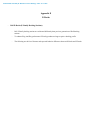
Appendix
Dell Latitude E-Family & Mobile Precision Reimage “How-To” Guide
Appendix A
.NET Framework Requirements
What is .NET Framework?
The .NET Framework is a software framework from Microsoft, which is bundled with Windows operating systems.
The .NET Framework is intended to be used by most applications created for the Microsoft Windows platform.
.NET Framework Requirements?
Windows 7
Windows Vista
Windows XP
.NET 3.5
.NET 3.0
.NET 1.1
.NET 3.0
.NET 3.0
.NET 3.0
N/A
.NET 3.5x
N/A
.NET 3.0
.NET 3.0
.NET 3.0
Driver / SW Stack
Intel GMA 4500MHD Graphics
Intel
Intel GMA HD Graphics
Intel Media Adapter HD/HD 2000/HD 3000
AMD Catalyst Control Center - Control Panel
Intel MSM / RST Storage
Dell Latitude E-Family & Mobile Precision Reimage “How-To” Guide
Appendix B
512e / 4KBe HDD Re-image Guidelines
1
What is Advanced Format HDD?
HDD industry is moving towards supporting higher drives capacity, to address the current limitations with the 512byte sector HDDs, the industry is moving towards the Advanced Format with 4KB sector HDDs.
The transition to 4KB sector HDDs will allow storage devices to more easily adopt larger capacities in both the
notebook and desktop space.
While hard drives will transition to 4KB sectors and to maintain backwards compatibility, current Advanced
Format 4KB HDDs, also known as 512e HDDs, will emulate 512-byte SATA communications to hosts and will
operate at 4KB.
2
How does an Advanced Format HDD impact OS Images?
Even though a 512e drive is designed to be backward compatible, most of current Operating Systems are not aware
of the Advanced Format technology. Depending on the Operating System and its service pack, some extra steps
may be required to optimize the performance of the Advanced Format (512e) HDDs and to maintain full Operating
System and Application functionality.
These extra steps could require using alignment tools to fix any sector misalignment as a result of deploying a nonAdvanced Format aware image on an Advanced Format HDD which may otherwise cause performance issues.
Dell Latitude E-Family & Mobile Precision Reimage “How-To” Guide
3
Re-imaging Requirements when using Advanced Format HDDs
The following are the re-imaging guidelines needed to support Advanced Format HDDs. These requirements are
dependent on which Operating System will be installed and which method of deployment will be used.
3.1
Microsoft Operating Systems Advanced Format Aware Readiness
An Operating System is Advanced Format Aware if it meets the following criteria:
o
o
o
It understands the concept of physical sector vs. logical sector
It maximizes writes using multiples of 4k bytes
Disk partition starts at the boundary of 4k sector
Not all current Microsoft Operating Systems are Advanced Format Aware (refer to the Table below). A system
configured with an Advanced Format drive and an operating system that is not Advanced Format aware can
experience sector misalignment, resulting in performance or compatibility issues.
-
Some extra steps may be required for re-imaging even with Advanced Format Aware Microsoft Operating
Systems, Install/upgrade to the latest Intel Storage driver
Apply the applicable Microsoft KB article
Partition alignment
such as (Please refer to section 3.2 for detailed instructions):
Operating System
Microsoft Windows 7 SP1
Microsoft Windows 7
Microsoft Vista SP1
Microsoft Vista
Microsoft XP (all versions)
Microsoft Windows PE 3.0 or Later
Microsoft Windows PE older versions
Advanced Format
Aware
Yes
Yes
Yes
No
No
Yes
No
Dell Latitude E-Family & Mobile Precision Reimage “How-To” Guide
3.2 Image Installation Guidelines
3.2.1
Clean Image Installation on an Advanced Format HDD
Microsoft® OS Installation
Method
Using Dell Operating System
Media
-
Windows 7 SP1
Windows 7
Windows Vista SP1
1. Install/Upgrade
Intel RST Storage
driver to 9.6 or
(1)
later
1. Apply Microsoft KB
article 982018
2. Install/Upgrade Intel
RST Storage driver to
(1)
9.6 or later
1. Apply Microsoft KB
article 2470478
2. Install/Upgrade Intel
RST Storage driver to
(1)
9.6 or later
1. Use Alignment Tool to ensure
Advanced Format drive partitions are
properly aligned
2. Install/Upgrade Intel RST Storage
(1)
driver to 9.6 or higher
Using non-Dell off the shelf
Operating System Media
1. Install/Upgrade
Intel RST Storage
driver to 9.6 or
(1)
later
1. Apply Microsoft KB
article 982018
2. Install/Upgrade Intel
RST Storage driver to
(1)
9.6 or later
1. Apply Microsoft KB
article 2470478
2. Install/Upgrade Intel
RST Storage driver to
(1)
9.6 or later
Using Windows PE 3.0 or
prior
Note: If using a Win PE version
earlier than 3.0, apply Windows
Automated KIT
1. Install/Upgrade
Intel RST Storage
driver to 9.6 or
(1)
later
1. Apply Microsoft KB
article 982018
2. Install/Upgrade Intel
RST Storage driver to
(1)
9.6 or later
1. Apply Microsoft KB
article 2470478
2. Install/Upgrade Intel
RST Storage driver to
(1)
9.6 or later
1. Use Alignment Tool to ensure
Advanced Format drive partitions are
properly aligned
2. Install/Upgrade Intel RST Storage
(1)
driver to 9.6 or higher
1. Install/Upgrade Intel RST Storage
(1)
driver to 9.6 or higher
Using Windows PE 3.1
1. Install/Upgrade Intel RST Storage driver to 9.6 or later
(2)
(1)
Deploying 512B pre-installed image to an Advanced Format drive
Microsoft® OS Installation
Method
Using Dell Factory Installed
Image
Using Sector-Based Utilities
(Norton Ghost, Altiris, etc.)
-
Windows XP
(2)
(1) The Intel RST Driver 9.6 or higher can be found on the Dell Support website in Dell Drivers and Downloads for your system under the SATA
drivers section
(2) Please refer to the Partition Alignment Tools - Section 3.4
3.2.2
-
Windows Vista
Windows 7 SP1
Windows 7
Windows Vista SP1
No actions required. Dell Factory Images include required components.
1. Use Alignment
(2)
Tool
to ensure
Advanced Format
drive partitions are
properly aligned
before re-imaging
2. Install/Upgrade
Intel RST Storage
driver to 9.6 or
(1)
later
(2)
1. Use Alignment Tool
to ensure Advanced
Format drive
partitions are properly
aligned before reimaging
2. Apply Microsoft KB
article 982018
3. Install/Upgrade Intel
RST Storage driver to
(1)
9.6 or later
Windows Vista
Windows XP
Not Available
(2)
1. Use Alignment Tool
to ensure Advanced
Format drive
partitions are properly
aligned before reimaging
2. Apply Microsoft KB
article 2470478
3. Install/Upgrade Intel
RST Storage driver to
(1)
9.6 or later
Not Available
(2)
1. Use Alignment Tool to ensure
Advanced Format drive partitions are
properly aligned before re-imaging
2. Install/Upgrade Intel RST Storage driver
(1)
to 9.6 or later
(1) The Intel RST Driver 9.6 or higher can be found on the Dell Support website in Dell Drivers and Downloads for your system under the SATA
drivers section
(2) Please refer to the Partition Alignment Tools - Section 3.4
Dell Latitude E-Family & Mobile Precision Reimage “How-To” Guide
3.3 Other Partition Alignment Requirements
Environment
IRRT / RAID 0,1 & 5 Configuration
Data Protection / Encryption
Action
Use Alignment Tools(1) to ensure Advanced Format drive
partitions are properly aligned
Use Alignment Tools(1) to ensure Advanced Format drive
partitions are properly aligned before encrypting the drive.
Note: Misaligned encrypted Advanced Format drives need to be
decrypted, then aligned and re-encrypted
(1) Please refer to the Partition Alignment Tools - Section 3.4
3.4 Partition Alignment Options
Partition alignment is required for older operating systems and is recommended for new operating systems in order
to insure proper hard drive performance and imaging between drives of differing sector sizes. An aligned partition
is when the starting offset of the partition is divisible by 4096 Bytes or by 8 for logical block addressing (LBA)
numbers.
3.4.1
Pre-Installation of Operating System
This section lists a few options for partition alignment pre-installation of OS:
-
Using Ghost:
Ghost 11.5 will maintain the alignment state of the Gold/Master image. If the disk image is built and
aligned on a 512e/Advanced Format drive, the clones of that image will remain aligned. If the image is
built on a 512B, Ghost command line switch {-align=1MB} can be used to ensure alignment when
deployed to any drive.
-
Using DISKPART:
DISKPART may be used to enable storage configuration or create a partition at an explicit disk offset
from a script, a remote session, or another command prompt.
Dell recommends using WinPE's (3.0 or greater) Diskpart.exe from Windows Vista or Windows 7 to
create the partitions for Windows XP installation. This will create a partition that is Advanced Format
aligned. Without PE, starting with Windows Vista or Windows 7 DVD to create the partition for the
Windows XP will create correct partitioning. On how to use DISKPART utility and how to divide the
offset value of the selected partition, refer to Microsoft KB Article 300415
3.4.2
Post-Installation of Operating System
The Paragon Alignment Tool (PAT) is a hardware agnostic tool available for download from the Dell
Support website in Dell Drivers and Downloads for your system under the SATA Drives section. This tool
can be used after an Operating System is installed to align the partitions of an Advanced Format drive.
Dell Latitude E-Family & Mobile Precision Reimage “How-To” Guide
Appendix C
General Re-Imaging FAQs
1. How do I resolve a PCI Yellow Bang?
a. After installing the drivers and you have this PCI yellow bang in device manager, you need to install the
following drivers found in the Chipset folder:
b. For E-Family 1st generation you need to install two drivers - AMT SOL / LMS and AMT HECI
c. For E-Family 2nd generation you need to install one driver - AMT HECI
2. How do I resolve a Broadcom USH Yellow Bang?
a. After installing the drivers and you have this USH yellow bang in device manager, you need to install the
Control Point Security Device Driver Pack
3. How do I resolve this Unknown Device yellow bang on E-Family 2nd generation?
a. After installing the drivers and you have an unknown device yellow bang in device manager, you need to
install the ST Micro Freefall Sensor driver found under Chipset
4. What drivers are in the Control Point Security Device Driver pack?
a. The driver pack has the drivers for all security related hardware, including:
2. Broadcom Trusted Platform Module
3. Atmel Trusted Platform Module
4. STMicroelectronics Trusted Platform Module
5. Winbond Trusted Platform Module
6. O2Micro Smart Card Reader
7. Dell Smart Card Keyboard
8. UPEK TouchChip Fingerprint Reader
9. Authentec Fingerprint Reader
10. Broadcom Unified Security Hub
11. Vista Storage Driver Update (for ATAPI.SYS)
5. Can I use WiMax and WiFi at the same time?
a. No, the wireless adapter only supports one of them being active at one time
6. What is the Dell System Software utility and why do I need it?
a. The Dell System Software utility provides critical updates and patches for your operating system
necessary for the correct operation of your system. It is important to install this utility first after reimaging your system. It is found under the System Utilities folder on the Dell Drivers and Download page
Dell Latitude E-Family & Mobile Precision Reimage “How-To” Guide
7. What is the Client System Update application?
a. Located under System Management > Client System Update, this is primarily targeted at Customers who
want to manage systems on their own. The tool is designed to allow users to specify their update
preferences and apply updates based on the criticality. Alternatively, end users can use the scheduling
option to keep their system up-to-date with the systems software released by Dell
8. What is eSATA?
One of the connectors on the system is a dual eSATA / USB combo port. It can interface with either an
eSATA device or a USB device. eSATA is an industry standard interface. A few of the key benefits of
eSATA technology are:
o
o
o
o
Data speeds up to six times faster than USB 2.0 and IEEE 1394
Robust and user friendly external connection
High performance, cost effective expansion storage
Up to 2 meter shielded cables and connectors
Dell Latitude E-Family & Mobile Precision Reimage “How-To” Guide
Appendix D
Tables
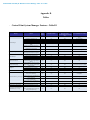
- Control Point System Manager Features - Table B1
Category
Power Manager
Display settings
Function Keys
Hot Key customizaton
Keyboard backlighting
Brightness
ALS
DCP SM
Release
Version
Availablity of Feature
when DCP Installed?
user profiles
v1.0
Yes
View battery manufacturer info.
View battery health info.
battery charge enable/disable status
Network card power management
Extended Battery Life/ All Day Battery Life.
(ADBL)
Dell Enhanced Performance Plans (User
Selectable Thermal Tables for Performance,
temperature and sound levels)
Digidesign Audio/Video mode
v1.0
v1.0
v1.0
v1.0
Yes
Yes
Yes
Yes
N/A
N/A
N/A
Yes (Intel LOM)
Only power schemes are available in
the OS.
Yes, through BIOS
Yes, through BIOS
Yes
No (some Broadcom LOMs)
v1.0
Yes
N/A
No
v1.4
Yes
N/A
No
v1.3
Yes
N/A
Yes, thru individual settings in BIOS/OS
v1.0
Yes
N/A
No
v1.0
v1.0
v1.0
v1.0
Yes
Yes
Yes
Yes
N/A
N/A
N/A
N/A
Yes, but with No screen pop-up display
No
No
Yes, but with No screen pop-up display
v1.0
Yes
N/A
No
v1.0
Yes
N/A
Yes, but with No screen pop-up display
v1.0
v1.0
v1.0
v1.0
Yes
Yes
Yes
Yes
N/A
N/A
N/A
N/A
Yes, but with No screen pop-up display
No
Yes
No
v1.2
Yes
N/A
Through BIOS
v1.2
Yes
N/A
Through BIOS
v1.2
Yes
N/A
Through BIOS
v1.2
Yes
N/A
Through BIOS
Inactivate display and system timeouts when
activating an external display using FnF8.
Fn+F2 to enable Battery Charge disable
Fn+F3 launch DCP w/ Battery Status
Fn+F7 to enable/disable DCP
Fn+F8 to switch between display settings
User hot key customization ability (also Fn+D
functionality which is set to toggle display by
default).
Keyboard backlighting options (to be able to
set the intensity, inactivity timeout values
and input triggers.)
Ability to Adjust Brightness Level
feedback through on screen display
Ability to enale/disable ALS
Feedback through on screen display
Reporting of Ambient Temp log information
at OS presence (PWS only)
Hardware Monitoring for Desktops
Privacy Screen - Discreet Graphics
Privacy Screen - UMA Graphics
"Color Space" Panel Settings for
RGB LED Displays (17" only)
Availablity of Feature
when Dell provides
drivers/middleware, but No DCP
App?
Feature
Reporting of CPU Temp log information at OS
presence (PWS only)
Reporting of SMART Alerts log information at
OS presence (PWS only)
Reporting of ECC Alerts log information at OS
presence (PWS only)
Fn+E to enable/disable Privacy screen
N/A
Availabilty of Feature
when only Windows OS installed?
v1.0
Yes
N/A
No
Fn+E to enable/disable Privacy screen
v1.2.01
Yes
N/A
No
Provides system level controls for NTSC,
sRGB, Pro Photo RGB/Kodak or Adobe color
settings (certain panels only)
v1.3
Yes
N/A
No
Dell Latitude E-Family & Mobile Precision Reimage “How-To” Guide
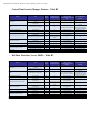
- Control Point Security Manager Features – Table B2
Category
Feature
Secure processing and storage of user security
information
Ability to locally backup and restore
credentials in CV
ControlVault
TPM
Pre-Boot Authentication (PBA)
Embedded Finger Print Reader
Release
Version
Availablity of Feature
when DCP Installed?
Availablity of Feature
when Dell provides
drivers/middleware, but No DCP
App?
Availabilty of Feature
when only Windows OS
installed?
v1.0
Yes - USH platforms only
No
No
v1.4
Yes - USH platforms only
No
TPM enablement and management
v1.0
Yes
Password and SSO
Full configuration and management for PBA
and Windows Logon
Full configuration and management for
Windows Logon
v1.0
Yes
v1.0
Yes
v1.0
yes ( No PBA SUPPORT)
v1.4
yes (E2 with CV only, no M'09,
Foose, Reebok, or Fonseca
support)
v1.0
Yes
v1.0
Yes
v1.0
Yes
v1.2
v1.0
v1.2.01
v1.3
v1.1
v1.0
Yes
Yes
Yes
Yes
Yes - USH platforms only
Yes
External Dell Branded Finger Print Reader
Full configuration and management for PBA
Contact Smart Card Reader
Contacless Smart Card Reader
Contacless Smart Card Reader
Full Disked Encrypted Drives (FDE)
RSA SecurID
Bitlocker (Vista Only)
Full configuration and management for
Windows Logon
Full configuration and management for PBA
Full configuration and management for
Windows Logon
Full configuration and management for PBA
Support for 5400 and 7200 FDE's
Support for SSD FDE's
Support for dual FDE's (non-RAID)
RSA SecurID storage in ControlVault
DCP does not interact with Bitlocker
Yes - with third party software,
including Windows Vista Bitlocker
Password only, no SSO
Yes - with 3rd party software,
does not include PBA
Yes - with 3rd party software,
does not include PBA
No
Yes - with 3rd party software,
does not include PBA
No
Yes - with 3rd party software,
does not include PBA
No
Yes - with 3rd party software
Yes - with 3rd party software
Yes - with 3rd party software
Yes - USH platforms only
N/A
No
No for XP
Yes, with Windows Vista (driver
included) or third party software,
including Windows Vista Bitlocker
Password only, no SSO
No
No
No
No
No
No
No
Yes - with 3rd party software
Yes - with 3rd party software
Yes - with 3rd party software
No
Yes
- Dell Data Protection | Access, DDPA – Table B3
Category
ControlVault
TPM
Pre-Boot Authentication (PBA)
Embedded Finger Print Reader
Feature
Secure processing and storage of user security
information
Ability to locally backup and restore
credentials in CV
Release
Version
Availablity of Feature
when DDPA Installed?
Availablity of Feature
when Dell provides
drivers/middleware, but No
DDPA App?
Availabilty of Feature
when only Windows OS
installed?
v2.0
Yes - USH platforms only
No
No
v2.0
Yes - USH platforms only
No
TPM enablement and management
v2.0
Yes
Password and SSO
Full configuration and management for PBA
and Windows Logon
Full configuration and management for
Windows Logon
v2.0
Yes
v2.0
Yes
v2.0
yes ( No PBA SUPPORT)
v2.0
yes (E2 with CV only, no M'09,
Foose, Reebok, or Fonseca
support)
v2.0
Yes
v2.0
Yes
v2.0
Yes
v2.0
v2.0
v2.0
v2.0
v2.0
v2.0
Yes
Yes
Yes
Yes
Yes - USH platforms only
Yes
External Dell Branded Finger Print Reader
Full configuration and management for PBA
Contact Smart Card Reader
Contacless Smart Card Reader
Contacless Smart Card Reader
Full Disked Encrypted Drives (FDE)
RSA SecurID
Bitlocker (Vista Only)
Full configuration and management for
Windows Logon
Full configuration and management for PBA
Full configuration and management for
Windows Logon
Full configuration and management for PBA
Support for 5400 and 7200 FDE's
Support for SSD FDE's
Support for dual FDE's (non-RAID)
RSA SecurID storage in ControlVault
DCP does not interact with Bitlocker
Yes - with third party software,
including Windows Vista Bitlocker
Password only, no SSO
Yes - with 3rd party software,
does not include PBA
Yes - with 3rd party software,
does not include PBA
No
Yes - with 3rd party software,
does not include PBA
No
Yes - with 3rd party software,
does not include PBA
No
Yes - with 3rd party software
Yes - with 3rd party software
Yes - with 3rd party software
Yes - USH platforms only
N/A
No
No for XP
Yes, with Windows Vista (driver
included) or third party software,
including Windows Vista Bitlocker
Password only, no SSO
No
No
No
No
No
No
No
Yes - with 3rd party software
Yes - with 3rd party software
Yes - with 3rd party software
No
Yes
Dell Latitude E-Family & Mobile Precision Reimage “How-To” Guide
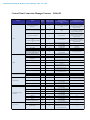
- Control Point Connection Manager Features – Table B4
Category
WLAN
WWAN
LAN/ Modem/other connections
Location Profiles
Radio Management
connection/device/status
Information
Feature
Release
Version
Availablity of Feature
when DCP Installed?
Availablity of Feature
when Dell provides
drivers/middleware, but No DCP
App?
Availabilty of Feature
when only Windows OS installed?
Dell Wireless LAN 1397, 1510
(Broadcom)
v1.1
Yes
Yes, WITH Dell Wireless Client Utility
(DCU)
No for XP
Yes for Vista & Win 7, with WLAN
AutoConfig, but in box driver has not
been Dell validated
Dell Wireless LAN 1520
(Broadcom TGV - no enterprise extension)
v1.3.01
Yes
Yes, with Dell Wireless Client Utility
(DCU)
No for XP
Yes - for Vista & Win 7 ( with in box
drivers) and WLAN AutoConfig
Intel Wireless LAN 5100, 5300
v1.2
Yes
Yes, with Intel Proset
• Intel® Centrino® Ultimate-N 6300 WiFi
card
• Intel® Centrino® Advanced-N 6200 WiFi
card
v1.4
Yes
Yes, with Intel Proset
Disconnect on Ethernet WLAN
v1.2
Yes
Yes, with Intel Proset or Dell Wireless
Clinet Utility (DCU)
Yes, with Intel Proset or Dell Wireless
Clinet Utility (DCU)
Basic Mode Only
Yes, in BIOS
View availabe networks & Site Monitors
v1.0
Yes
WiFi - Catcher
Hardware Radio Switch
Enterprise Extension for WLAN - 802.1x,
WPA-Enterprise/WPA2-Enterprise, CCKM
(CCX5, TTLS not available for Win 7)
Dell Wireless Mobile Broadband 5720
Minicard
Dell Wireless 5600 EV/HSPA (GOBI)
Dell Wireless 5530 HSPA Minicard
(Helmsley)
v1.0
v1.0
Yes
Yes
v1.2
Yes
v1.0
Yes
v1.2
Yes
Yes, with Dell Mobile Broadband Client
Utility (DMBCU) for 5720 EVDO (novatel)
No
v1.0
Yes
No
Yes, wth Intel PROSet or Dell Wireless
Client Utility (DCU)
Dell Wirless 5620 EV/HSPA (GOBI2)
v1.4
Yes
Dell Wireless 5540 HSPA Minicard (H2)
v1.4
Yes
GPS Novatel/Ericcson
v1.0
Yes
Disconnect on Ethernet WWAN
v1.0
Yes
SMS Text Messaging
v1.0
Yes
Broadcom Gigabit LAN
Intel 825X Gigabit
Conexant HAD D330 MDC V.92 modem
v1.0
v1.0
v1.0
Yes
Yes
Yes
Yes, planned alternative connection
manager
Yes, planned alternative connection
manager
Yes, with Dell Mobile Broadband Client
Utility (DMBCU) for 5720 EVDO (novatel)
No, for 5530 HSPA (Ericson)
No
Yes, with Dell Mobile Broadband Client
Utility (DMBCU) for 5720 EVDO (novatel)
No, for 5530 HSPA (Ericson)
Yes
Yes
Yes
Location Profiles
v1.0
Yes
N/A
Import/Export Profiles
v1.0
Yes
Profile Management Wizard
v1.0
Yes
Airplane Mode
v1.0
Yes
Connection Logs
v1.0
Yes
Connection Status
v1.0
Yes
Device Status
v1.0
Yes
Network Status Details
v1.0
Yes
Status Logs
Diagnostics Connection base/ Hardware
based
v1.0
Yes
v1.0
Yes
Troubleshooting FAQ's/Web links
v1.0
Yes
SSO Pre-logon (Windows XP only)
v1.0
Yes
VPN Enforcement
v1.0
Yes
Log-on Features
Yes, with Intel Proset or Dell Wireless
Clinet Utility (DCU)
Yes, with Intel Proset or Dell Wireless
Clinet Utility (DCU)
No
Yes, with Intel Proset or Dell Wireless
Clinet Utility (DCU)
Yes, with Intel Proset or Dell Wireless
Clinet Utility (DCU)
Yes, with Intel Proset or Dell Wireless
Clinet Utility (DCU)
Yes, with Intel Proset or Dell Wireless
Clinet Utility (DCU)
Yes, with Intel Proset or Dell Wireless
Utilityor
(DCU)
Yes, with Clinet
Intel Proset
Dell Wireless
Clinet Utility (DCU)
Yes, with Intel Proset or Dell Wireless
Clinet Utility (DCU)
Yes, with Intel Proset or Dell Wireless
Clinet Utility (DCU)
Yes, with Dell Mobile Broadband Client
Utility 9DMBCU) for 5720 EVDO (novatel)
No, for 5530 HSPA (Ericson)
No for XP
Yes for Vista & Win 7, with WLAN
AutoConfig, but in box driver has not
been Dell validated
No for XP
Yes for Vista & Win 7, with WLAN
AutoConfig, but in box driver has not
been Dell validated
No
WZC/WLAN AutoConfig for available
networks
Basic Mode Only
Yes, in BIOS
Yes, except CCX and TTLS
No
No
No
No
No
No
No
No
Yes
Yes
Yes
Yes, limited attributes through Vista and
Windows 7 (Network and Sharing Center)
Yes, limited to WiFi profiles (netsh)
No
No
No
Yes
Yes
Yes
No
Yes
Yes
Yes, through GPO (Server 2008)
No
Dell Latitude E-Family & Mobile Precision Reimage “How-To” Guide
Appendix E
E-Docks
-
Dell E-Docks (E-Family Docking Stations)
-
Dell E-Family docking stations are architected differently than previous generations of Dell docking
stations.
-
To enhance Plug And Play performance E-Family products no longer require a docking profile
-
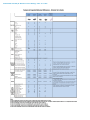
The following are the list of features and expected behavior differences between D-Docks and E-Docks:
Dell Latitude E-Family & Mobile Precision Reimage “How-To” Guide