1
Studio Reference I & II Professional Studio Amplifiers
and transformer thermal protection. These systems will
prevent amplifier damage in virtually any situation.
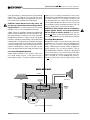
4.3.1 ODEP
Crown invented ODEP to solve two long-standing
problems in amplifier design: to prevent amplifier shutdown during demanding operation and to increase the
efficiency of output circuitry.
To do this, Crown established a rigorous program to
measure the safe operating area (SOA) of each output
transistor before installing it in an amplifier. Next,
Crown designed intelligent circuitry to simulate the instantaneous operating conditions of the output transistors. Its name describes what it does: Output Device
Emulation Protection or ODEP. In addition to simulating
the operating conditions of the output transistors, it also
compares their operation to their known SOA. If ODEP
sees that more power is about to be asked of the output
transistors than they are capable of delivering under
the present conditions, ODEP immediately limits the
drive level until it falls within the SOA. Limiting is proportional and kept to an absolute minimum—only what
is required to prevent output transistor damage.
This level of protection enables Crown to increase output efficiency to never-before-achieved levels while
greatly increasing amplifier reliability.
The on-board intelligence is monitored two ways. First,
the amplifier’s ODEP indicators show whether the unit
is functioning correctly or if ODEP is limiting output.
Second, ODEP data is fed to the amplifier’s internal
P.I.P. connector so advanced P.I.P. modules like the
IQ-P.I.P. can use it to monitor and control the amplifier.
This is how ODEP keeps the show going with maximum power and maximum protection at all times.
The amplifier’s overvoltage protection circuitry will
put both channels into standby when excessive AC
mains voltage is detected. Studio Reference amplifiers
should not be operated with an AC mains voltage of
more than 10% over the unit’s rated voltage.
If dangerous subsonic frequencies or direct current
(DC) is detected in the amplifier’s output, the unit will
activate its DC / low-frequency protection circuitry
and put the affected channels in standby. This protects
the loads and prevents oscillations. The amplifier resumes normal operation as soon as it no longer detects
dangerous low-frequency or DC output. Although it is
extremely unlikely that you will ever activate the
amplifier’s DC / low-frequency protection system, improper source materials such as subsonic square
waves or input overloads that result in excessively
clipped signals can activate this system.
The amplifier’s fault protection system will put an amplifier channel into standby mode in rare situations
where heavy common-mode current is detected in the
channel’s output. The amplifier should never output
heavy common-mode current unless its circuitry is
damaged in some way, and putting the channel into
standby mode helps to prevent further damage.
The amplifier’s transformer thermal protection circuitry is activated in very unusual circumstances where
the unit’s transformer temperature rises to unsafe levels. Under these abnormal conditions, the amplifier will
put both channels into standby mode. The amplifier will
return to normal operation after the transformer cools to
a safe temperature. (For more information on transformer thermal protection, refer to the section that follows.)
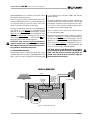
4.3.2 Standby Mode
An important part of a Studio Reference amplifier’s protection systems is standby mode. Standby protects the
amplifier during potentially catastrophic conditions. It
temporarily removes power from the high-voltage supplies to protect the amplifier and its loads. Standby
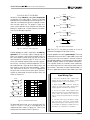
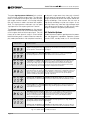
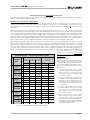
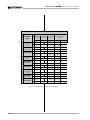
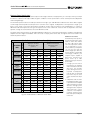
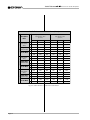
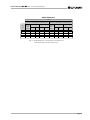
mode can be identified using the table in Figure 4.2.
4.3.3 Transformer Thermal Protection
All Studio Reference amplifiers have transformer thermal protection which protects the power supplies from
damage under rare conditions where the transformer
temperature rises too high. A thermal switch embedded in the transformer removes power to the high-voltage power supplies if it detects excessive heat. The
switch automatically resets itself as soon as the transformer cools to a safe temperature.
Standby mode is activated in five situations. First, when
you turn on the enable switch, standby mode is activated to provide turn-on protection. This power-up delay lets other system components settle before any
signals are amplified and it provides some power-up
“randomness” for multiple units so the system’s start-up
current demands are better distributed over time.
If your amplifier is operated within rated conditions, it is
extremely unlikely that you will ever see it activate
transformer thermal protection. One reason is that
ODEP keeps the amplifier working under very severe
conditions. Even so, higher than rated output levels,
excessively low-impedance loads and unreasonably
high input signals can generate more heat in the trans-
Page 21