1
English
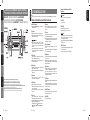
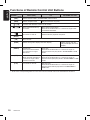
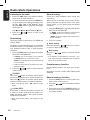
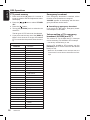
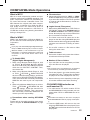
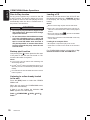
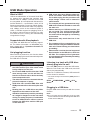
Functions of Remote Control Unit Buttons
Button
Mode
[SRC]
],[
[
Switch reception band.
]
],[
[
CD
MP3/WMA and USB
Switch between Radio, CD/MP3/WMA, USB and AUX.
[BND]
[
Radio (RDS)
Increase and decrease volume (in all modes).
]
]
[MUTE]
[TA]
[DISP]
[PS/AS]
[AF]
[PTY]
Play the first track. Top play.
Move preset channels up
and down.
Move tracks up and down.
Press and hold the button for 1 second or longer: Fastforward/fast-backward.
Turn mute on and off.
Switch between playback and pause.
TA on and off.
Switch among main display and clock display.
Switch among main display, title display and clock
display.
Preset scan.
Press and hold the button
for 2 seconds or longer:
Auto store.
Scan play.
Press and hold the button for 1 second or longer to
perform folder scan play while in the MP3/WMA or USB
mode.
AF function on and off.
When pressed and held for
1 second or longer: REG
function on and off.
Repeat play.
Press and hold the button for 1 second or longer to
perform folder repeat play while in the MP3/WMA or USB
mode.
PTY mode on and off.
Random play.
Press and hold the button for 1 second or longer to
perform folder random play while in the MP3/WMA or
USB mode.
∗ Some of the corresponding buttons on the main unit and remote control unit have different functions.
10
DB568RUSB