1
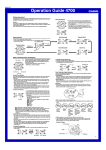
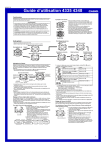
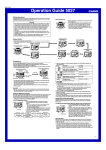
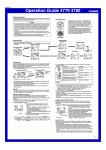
Operation Guide 4335 4348
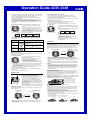
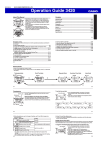
Alarm
Alarm time
(Hour : Minutes)
Recalling Temperature Data
Data storage time
Alarm on indicator
When the alarm is turned on, the watch beeps when the
alarm time is reached. You can also turn on an Hourly
Time Signal, which will cause the watch to beep twice
every hour on the hour.
• All of the operations in this section are performed in the
Alarm Mode, which you enter by pressing C.
Hourly time signal
on indicator
To set the alarm time
llll
1. In the Alarm Mode, hold down A until the hour setting
of the alarm time starts to flash, which indicates the
setting screen.
• This operation turns on the alarm automatically.
2. Press C to move the flashing between the hour and
ll
minute settings.
3. While a setting is flashing, use D (+) and B (–) to
change it.
• When setting the alarm time using the 12-hour format, take care to set the time
correctly as a.m. (A indicator) or p.m. (P indicator).
4. Press A to exit the setting screen.
llll
To recall temperature records
1. In the Timekeeping Mode, press C twice to enter the
Temperature
Temperature Data Recall Mode.
Record
• This displays the newest record currently in memory.
Number 2. Use D (+) and B (–) to scroll through the records.
• Pressing D while the oldest record is displayed will
scroll to the newest record.
• If a temperature measurement operation is performed
while a record is displayed, the displayed record's
number will be incremented by 1.
• If an error occurs during temperature measurement,
‘‘--.-’’ will be shown for the temperature value in the
corresponding record.
AM indicator
ll
The measurements the watch takes at the top and the bottom of each hour are stored
in memory automatically. Memory can hold up to 50 measurement records. You can
use the Temperature Data Recall Mode to recall memory data when you need it.
• Temperature data records are assigned numbers automatically starting from 01.
• When there are already 50 records in memory, storage of a new temperature
reading causes the oldest record (record number 50) to be deleted automatically to
make room for the new data. The new data is assigned record number 1, and all of
the numbers of all the other records (01 to 49) are incremented by 1 (becoming 02
through 50).
Alarm Operation
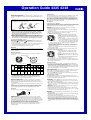
Stopwatch
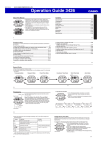
The stopwatch lets you measure elapsed time, split times,
Minutes
1/100 Second and two finishes.
• The display range of the stopwatch is 99 hours, 59
minutes, 59.99 seconds.
• The stopwatch continues to run, restarting from zero
after it reaches its limit, until you stop it.
• All of the operations in this section are performed in the
Stopwatch Mode, which you enter by pressing C.
The alarm sounds at the preset time for 10 seconds, regardless of the mode the watch
is in.
• To stop the alarm tone after it starts to sound, press any button.
To test the alarm
In the Alarm Mode, hold down D to sound the alarm.
To turn the Daily alarm and the Hourly Time Signal on and off
In the Alarm Mode, press D to cycle through the settings shown below.
Module 4335
Seconds
Hours
Alarm Off
Signal Off
Alarm On
Signal Off
Alarm Off
Signal On
Alarm On
Signal On
Alarm Off
Signal Off
Alarm On
Signal Off
Alarm Off
Signal On
Alarm On
Signal On
To measure times with the stopwatch
Module 4348
Elapsed Time
D
Start
➤D
Stop
➤D
Re-start
➤D
Stop
➤A
Clear
➤A
Split
➤A
Split release
➤D
Stop
➤A
Clear
➤D
Stop
➤A
Split release
➤A
Clear
Split Time
D
Start
• The alarm on indicator and the Hourly Time Signal on indicator are shown on the
display in all modes while these functions are turned on.
(SPL displayed)
Two Finishes
D
World Time
➤A
Split
Start
First runner
finishes.
Display time of
first runner.
Second runner
finishes.
Display time of
second runner.
Day of the week and day
in the selected city
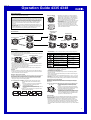
Countdown Timer
Hours Minutes
Second
You can set the countdown timer within a range of one
minute to 100 hours. An alarm sounds when the
countdown reaches zero.
• You can also select auto-repeat, which automatically
restarts the countdown from the original value you set
whenever zero is reached.
• All of the operations in this section are performed in the
Countdown Timer Mode, which you enter by pressing
C.
To use the countdown timer
Press D while in the Countdown Timer Mode to start the countdown timer.
• When the end of the countdown is reached and auto-repeat is turned off, the alarm
sounds for 10 seconds or until you stop it by pressing any button. The countdown
time is automatically reset to its starting value after the alarm stops.
• When auto-repeat is turned on, the countdown will restart automatically without
pausing when it reaches zero. The alarm sounds to signal when the countdown
reaches zero.
• The countdown timer measurement operation continues even if you exit the
Countdown Timer Mode.
• To stop a countdown operation completely, first pause it (by pressing D), and then
press A. This returns the countdown time to its starting value.
llll
llll
To configure countdown start time and auto-repeat settings
1. While the countdown start time is on the display in the
Countdown Timer Mode, hold down A until the hour
Auto-repeat on indicator
setting of the countdown start time starts to flash, which
indicates the setting screen.
• If the countdown start time is not displayed, use the
procedure under “To use the countdown timer” to
ll l
display it.
2. Press C to move the flashing in the sequence shown
below, and select the setting you want to change.
lll
On/Off status
Start Time
(Hours)
Start Time
(Minutes)
Auto-Repeat
On/Off
3. Perform the following operations, depending on which setting is currently selected
on the display.
• While the start time setting is flashing, use D (+) and B (–) to change it.
• Set 0:00 to specify 100 hours.
• While the auto-repeat on/off setting (0N or 0F) is flashing on the display, press
D to toggle auto-repeat on (0N) and off (0F).
4. Press A to exit the setting screen.
• The auto-repeat on indicator (
) is displayed on the Countdown Timer Mode
screen while this function is turned on.
• Frequent use of auto-repeat and the alarm can run down battery power.
City code
Current time in
selected city
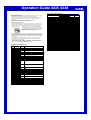
The World Time Mode digitally displays the current time in
50 cities (30 time zones) around the world.
• The times kept in the World Time Mode are
synchronized with the time being kept in the
Timekeeping Mode. If you feel that there is an error in
any World Time Mode time, check the UTC differential of
your Home Site Data (Home City) and the current
setting of the Timekeeping Mode time.
• Select a city code in the World Time Mode to display the
current time in any particular time zone around the
globe. See the “UTC Differential/City Code List” for
information about the UTC differential settings that are
supported.
• All of the operations in this section are performed in the
World Time Mode, which you enter by pressing C.
To view the time in another city
While in the World Time Mode, press D to scroll eastward through the city codes
(time zones) or B to scroll westward.
To toggle a city code time between Standard Time and Daylight Saving Time
1. In the World Time Mode, use D and B to display the
city code (time zone) whose Standard Time/Daylight
Saving Time setting you want to change.
2. Hold down A to toggle between Daylight Saving Time
(DST indicator displayed) and Standard Time (DST
indicator not displayed).
• The DST indicator is shown on the World Time screen
while
Daylight Saving Time is turned on.
DST indicator
• Note that changing the Daylight Saving Time for any city
code causes the setting to be applied to all city codes.
Illumination
Auto light switch
on indicator
This watch has an EL (electro-luminescent) panel that
causes the entire display to glow for easy reading in the
dark. The watch’s auto light switch turns on illumination
automatically when you angle the watch towards your
face.
• The auto light switch must be turned on (indicated by
the auto light switch on indicator) for it to operate.
• See “Illumination Precautions” for other important
information about using illumination.
To turn on illumination manually
In any mode, press L to illuminate the display for about
1.5 seconds.
• The above operation turns on illumination regardless of
the current auto light switch setting.
3