1
Instruction for Canon Pixma ip4200 CISS
I
CISS Components:
1) CISS
1 set
4) Syringe
5 pcs
II
2) air filter
5 pcs
5) CD instruction
1 pc
3) support arm
1 set
How to Install:
Step 1:
1.Put the CISS at the right side of
the printer
2. Pull out the rubber plug from
the Air Hole.
3. Insert the Air Filter.
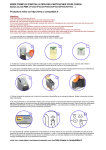
2.Use knife to cut the 2 points
that fix the chip. And then
remove the chip. Pls be careful
when doing this.
3. Then the chip is removed.
Step 2: Install Chips
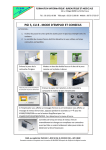
1.Take out the original cartridge,
and find the chip.
4.Put glue at the same position
of the CISS cartridge (at the
2 sides)
5.Stick the chips on the CISS
cartridge (Pls note that the
color should be correct. Do
Not misuse the chips).
6. Repeat this with other
cartridges.
Step 3: Install Cartridges
1.Fix the support arm on the printer.
2. Put the cartridges in the printer carriage.
Step 4: Fix the Tube
1. Fix the tube on the support arm
with the tube clip.
2. The installation is finished.
Step 5: Adjust the Tube
1. Adjust the length of the tube,
and move the printer carriage.
2.Leave enough length for the
tube so that the carriage can
reach the fastest place.
3. Make sure that the rube will not
make trouble to the carriage
moving during working.
Improper Situation:
1.Too long Tube
2. Twisted Tube
Proper Situation:
Step 6: Check the Nozzle
Broken lines may be caused by the air inside the nozzle. After repeating cleaning
printer head, if there is still broken lines, especially when the individual color has
only 1 broken line, then there is no need of continuous cleaning. Just leave the printer
stay there for about 1 hour, and this problem may be solved. If the nozzle check is
still not OK, then pls contact us.
III
Refill Ink
1. Pls note the left ink in the ink
tank. If the left ink is less than
1 cm, pls add ink in time.
2. Pull out the Rubber Plug
carefully.
3. Refill ink according to the colors.
After filling, pls recover the rubber
plug in the ink filling hole.
Pls keep the ink tanks and the printer on the same level.
Notice:
1. During normal use, pls do not take out the inner cartridges freely.
2. During printing, pls do not invert the ink tanks. Pls keep the ink tanks on the same level
with the printer.
3. Use the CISS in 15℃-35℃ environment.
4. When refill ink, suggesting using our ink, in order to ensure the printing quality.
5. When you intend not to use the CISS for long time, pls take off the Air Filter, and recover
the Rubber Plug in the Air Hole.
Warning:
1. Do not drink. Leave it at the place unavailable by children.
2. Avoid the sunshine. Do not keep the CISS in too high or too low temperature.