1
ENGLISH
ESPAÑOL
3
2
1
Getting Started
Guía de inicio
Vi d e o Tu t o ri a l s
Av a i l a b l e
4
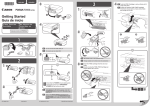
EN Push the FINE Cartridge in and up firmly until it
snaps into place.
ES Empuje el cartucho FINE (FINE Cartridge)
firmemente hacia dentro y hacia arriba hasta
que encaje en su sitio.
3
S e d isp o n e d e
tu to ria le s e n
víd eo
2
2
1
1
RMC: K10405
1
EN
Do not connect the USB cable yet.
ES
No conecte aún el cable USB.
4
3
(A)
1
2
1
(B)
2
EN Check that the ON lamp (A) lights green.
ES Compruebe que la luz de ACTIVADO (ON) (A)
3
se ilumina en verde.
4
QT5-6903-V01
XXXXXXXX
EN
If the Alarm lamp (B) flashes orange, press the ON
button to turn OFF the machine, then redo from .
ES
Si la luz de Alarma (Alarm) parpadea (B) en
naranja, pulse el botón ACTIVADO (ON) para
apagar el equipo y repita desde .
© CANON INC. 2014
PRINTED IN XXXXXXXX
EN
Be careful of ink on the protective tape.
ES
Tenga cuidado con la tinta de la cinta protectora.
EN Insert the FINE Cartridge into the slot at an
angle.
ES Inserte el cartucho FINE (FINE Cartridge) en
ángulo dentro de la ranura.
2
5
EN Repeat
Cartridge.
to
4
to install the other FINE
ES Repita de
a
para instalar el otro cartucho
FINE (FINE Cartridge).
1
5
EN Install the software on your devices.
ES Instale el software en sus dispositivos.
2
3
EN Load paper with the print side facing up.
ES Cargue papel con el lado de impresión hacia
arriba.
6
4
(A)
(B)
EN Wait until the ON lamp (A) is lit, then proceed.
ES Espere hasta que se ilumine la luz ACTIVADO
(ON) (A) y continúe.
EN
ES
If the Alarm lamp (B) flashes orange, check that the
both black and color FINE Cartridges are installed
correctly.
Si la luz de Alarma (Alarm) (B) parpadea en
naranja, compruebe que ambos cartuchos FINE
(FINE Cartridges) de negro y de color estén
instalados correctamente.
5
Windows XP
Windows Vista
Windows 7
Windows 8
Windows 8.1
Manuals
Manuales