1
5
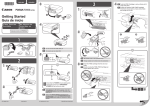
EN Repeat
Cartridge.
to
4
to install the other FINE
ES Repita de
a
para instalar el otro cartucho
FINE (FINE Cartridge).
1
5
EN Install the software on your devices.
ES Instale el software en sus dispositivos.
2
3
EN Load paper with the print side facing up.
ES Cargue papel con el lado de impresión hacia
arriba.
6
4
(A)
(B)
EN Wait until the ON lamp (A) is lit, then proceed.
ES Espere hasta que se ilumine la luz ACTIVADO
(ON) (A) y continúe.
EN
ES
If the Alarm lamp (B) flashes orange, check that the
both black and color FINE Cartridges are installed
correctly.
Si la luz de Alarma (Alarm) (B) parpadea en
naranja, compruebe que ambos cartuchos FINE
(FINE Cartridges) de negro y de color estén
instalados correctamente.
5
Windows XP
Windows Vista
Windows 7
Windows 8
Windows 8.1
Manuals
Manuales