1
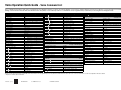
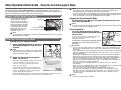
Voice Operation Quick Guide - Voice Command List
This is a partial list of the phrases that can be recognized in the Voice Navigation mode. If you want to use Favorite Settings, it is necessary to register settings in memory keys in advance. For more information on Favorite
Settings, see the instruction manuals that came with the machine. The phrases "voice mode help" and "voice command list" can be recognized on any screen when you are using the Voice Navigation mode.
Word/Item Name
Starting/Stopping Copying
Start Copy
Stop Copy
Entering the Number of Copies
Number of Copies
Copy Ratio
Copy Ratio
Direct or [1:1]
Reading
Start copy
Stop
Displayed on the Basic Features Screen
1 copy, 2 copies, 3 copies
Displayed on the Basic Features Screen
Copy ratio
Direct
Select Paper
Select Paper
Color Selection
Select Color
Finishing
Finishing
2-Sided
2-Sided
Density
Density
Original Type
Original type
Zoom Settings
Auto
Custom Copy Ratio
Displayed on the Basic Features Screen
Select paper
Displayed on the Basic Features Screen
Select color
Displayed on the Options Screen
Finishing
Displayed on the Options Screen
Double-sided
Displayed on the Options Screen
Density
Displayed on the Options Screen
Original type
Displayed on the Zoom Settings Screen
Auto ratio
99%, 100%, 101%
B4
A3
From B4 to A3
B5
A4
From B5 to A4
B5
LTR
From B5 to Letter
LGL
A4
LTR
A5
LTR
A4
LTR
11x17
B4
B5
A3
A3
STMT
A4
From Letter to A3
From B5 to B4
From A5 to A3
11x17
MAX.
A3
From Letter to 11 by 17
From A4 to A3
A3
B4
From Letter to B4
LTR
B5
B4
B5
Reading
From Letter to B5
B4
A4
From B4 to A4
B4
LTR
From B4 to Letter
B5
A5
From B5 to A5
LGL
LTR
From Legal to Letter
11x17
LGL
From 11 by 17 to Legal
11x15
LTR
From 11 by 15 to Letter
A3
A4
From A3 to A4
A3
LTR
From A3 to Letter
B4
B5
From B4 to B5
11x17
LTR
From 11 by 17 to Letter
A3
B5
From A3 to B5
A3
A5
From A3 to A5
11x17
STMT
MIN.
Direct
Paper Selection
Auto
Paper Drawer 1 to 7
Finishing
Collate (Page order)
Group (Same pages)
Staple
Hole Punch
Fold
Offset
Rotate 90 Degrees
Face Up/Face Down
From A5 to B5
11x17
A5
From Legal to 11 by 17
From A4 to B4
B4
B5
Word/Item Name
(Start, Stop)
Density
Darker
Lighter
Auto
2-Sided Copying
From Statement to 11 by 17
From 11 by 17 to Statement
Minimum
Direct
Displayed on the Paper Select Screen
Auto
Paper drawer X *1
Displayed on the Screen for Selecting
the Type of Finishing Mode
Collate
Group
Staple
Hole punch
Fold
Offset
Rotate 90 degrees
Face up or face down
Displayed on the Density Adjustment
Screen
Darker density
Lighter density
Auto
Word/Item Name
Book
2-Sided
Original Type Selection
Text/Photo/Map
Printed Image
Photo Printout
Text
Color Selection
Reading
Book to double-sided
Displayed on the Original Type
Selection Screen
Text photo map
Printed image
Photo printout
Text
Displayed on the Color Mode Selection
Screen
Auto color select
Full color
Black and white
Single color
Two colors
Auto-Color Select
Full Color
Black
Single Color
Two Colors
Favorite Settings
Favorite Settings 1 to 9
Favorite settings X *1
Check Settings
Check settings
Other Frequently Performed Operations
Voice Mode Help
Voice mode help
Voice Command List
Voice command list
OK
Ok
Next
Next
Cancel Settings
Cancel settings
Set Details
Set details
Close
Close
Confirm Settings
Confirm settings
Back
Back
Stop
Stop
Cancel
Cancel
▲
Previous page
▼
Next page
Reset
Reset
Settings/Registration
Settings registration
Voice Navigation Settings
Voice navigation settings
Displayed on the Screen for Selecting
the Type of Two-Sided Copying
Maximum
1
2-Sided
Single-sided to double-sided
From A3 to B4
2
2-Sided
Double-sided to double-sided
From A4 to B5
2
1-Sided
Double-sided to single-sided
This list is of the phrases that are recognizable in the Vocal mode. The recognizable phrases may differ if the Manual and Vocal mode is set. For more information, see the Voice Operation Kit User's Guide.
*1 Replace 'X' with the desired number.
FT5-2670 (000)
XXXXXXXXXX
© CANON INC. 2009
PRINTED IN JAPAN