1
EXtEnSIvE ISO RAngE
EOS
EOS tECHnOLOgIES
AdvAnCEd EXPOSURE COntROL
SCEnE IntELLIgEnt AUtO
LIvE vIEW FUnCtIOn
IntELLIgEnt vIEWFIndER
EOS IntEgRAtEd CLEAnIng
SYStEM
Picture Style
Auto
Auto
Exposure
Auto Lighting
Optimizer
Scene Intelligent Auto
Auto Focus
Auto White
Balance
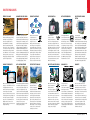
EOS cameras feature an exceptionally
wide ISO sensitivity range, providing
remarkable shooting flexibility in
diverse photographic situations.
The EOS 5D Mark III, for example,
features the breathtaking standard
ISO range of 100-12800, expandable to
a low of ISO 50 and high of ISO 102400!
Even at higher ISO settings, renowned
Canon CMOS sensor and noise reduction
technologies work to ensure superb
image quality, enabling higher shutter
speeds in low-light situations.
EOS cameras incorporate advanced
exposure control systems, which ensure
precise Auto Exposure with a wide range of
metering options. iFCL metering, found on
select EOS cameras, integrate the camera’s
AF system into its readings, ensuring the
subject gets metering priority. Multi-zone
Full-frame Evaluative metering assures
excellent results even in difficult lighting
situations. Center-Weighted, Partial, Spot and
Multi-spot provide advanced photographers
extraordinary exposure control, enabling
them to capture superb images under the
most challenging lighting conditions.
Select EOS cameras feature
a sophisticated scene
analysis system that takes
the guesswork out of
making optimal camera settings in
a wide variety of shooting situations.
Scene Intelligent Auto provides image
capture data to the camera’s exposure,
white balance, picture style and lighting
optimizer systems. It merges a number
of very complex measurements into
settings that ensure photographs of
gorgeous tonality, accurate color,
sharp focus and phenomenal detail.
Live View makes it
possible to compose
directly from the camera’s
LCD and is an indispensable feature
for creative photography in numerous
situations. Thanks to Canon’s amazing
Hybrid CMOS AF, sharp focus is achieved
with great speed and it’s easy to zoom
in and navigate the composition to check
critical detail and make corrections quickly.
In the studio, Live View enables remote
operation when the camera is connected
to a computer (via USB or an optional
Wireless File Transmitter).
The Intelligent Viewfinder,
found on select EOS cameras,
is a transparent LCD through
which the image is viewed.
Because it is an electronic display,it
can superimpose a variety of shooting
information that can be dynamically
varied. AF points, for example, can
be displayed, adjusted, or hidden as
needed. The Intelligent Viewfinder
also includes a Grid Display, and in
Spot Metering mode, the specific
Fig. 21 Adjustable angle
measurement area is shown.
Canon’s Integrated
Cleaning System helps
combat stray dust that
can enter the camera and settle on the image
sensor, causing “spots” in captured images.
The sensor cleans itself automatically with
ultrasonic vibrations every time the camera is
turned on or off. Removed dust adheres to
special material around the sensor to help it
stay off the surface. The EOS-1D X’s system
improves upon this, using two vibrating
elements and a fluorine coating on the
camera’s infrared/ultraviolet absorption glass
filter to further discourage dust adhesion.
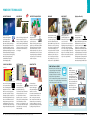
HIgHLIgHt tOnE PRIORItY
AUtO LIgHtIng OPtIMIZER
PICtURE StYLE tECHnOLOgY
AXIS ELECtROnIC LEvEL SEnSOR
vARI-AngLE LCd
dURABILItY
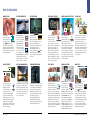
When faced with shooting
situations that make it
difficult to find true
horizontal, photographers
can use the Electronic Level Display
on the EOS 5D Mark III, EOS 7D and
EOS 60D for more precise composition.
Indicators are visible in both the
viewfinder and on the LCD, showing
when the camera is within one degree
of true level. The EOS 7D has a Dual Axis
Electronic Level Display capable of
sensing both roll and pitch.
For easy composition,
despite the camera’s
location, there’s nothing like
the Vari-angle LCD screens
found on the EOS 60D, the EOS Rebel T3i
and the EOS Rebel T4i. The EOS Rebel T4i
even has a newly engineered, Vari-angle
Touch Screen 3.0-inch Clear View LCD
monitor II that uses the same capacitive
technology as today’s popular mobile
devices—it’s touch-sensitive and delivers
sophisticated operation with a whole new
level of simplicity.
Hold a Canon EOS camera in your
hands. The look and feel of quality and
reliability are the result of decades of
camera-making experience – knowledge
that translates to real-world performance
and durability second to none.
Professional-level EOS cameras employ
advanced alloys to ensure outstanding
strength without excessive weight, while
an abundance of gaskets and seals
assure outstanding water and dust
resistance. These are truly precision
instruments built to last.
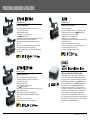
ALO OFF
When shooting brightly lit, contrasting
subjects, it is often difficult to avoid loss
of highlight detail: white areas are
washed out and flat. Canon’s Highlight
Tone Priority function calculates
exposures to make the best possible use
of available dynamic range, making sure
more detail is preserved in highlight
areas. This not only minimizes blown
highlights but also renders a more
natural reproduction of continuous tones
throughout the image.
40
ALO ON
The Auto Lighting Optimizer automatically
and selectively adjusts image exposure
to help ensure accurate brightness and
contrast. It can brighten areas of the
composition while maintaining highlight
detail and darken areas while maintaining
shadow detail. Available in Full Auto and
other shooting modes, this feature can
be used by beginners and fine-tuned by
advanced shooters to ensure
beautifully exposed images in a wide
variety of lighting situations.
Picture Style – Landscape
Canon’s ingenious Picture
Style feature makes it
easier for photographers
at any level to deal with
the myriad available camera features
and settings. It provides a number of
user-friendly presets that facilitate
optimal choices based simply on the
type of shooting. New presets can be
created using Canon’s included Picture
Style Editor Software, and individual
camera settings – such as sharpening,
contrast, color tone, and saturation –
can always be overridden.
usa.canon.com/eos
41