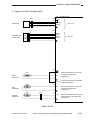
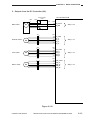
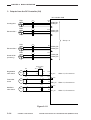
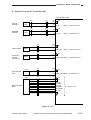
1
SERVICE
MANUAL
REVISION 0
AUG. 1998
COPYRIGHT © 1998 CANON INC.
FY8-13FB-000
CANON NP7161/NP7160 REV.0 AUG. 1998 PRINTED IN JAPAN (IMPRIME AU JAPON)
IMPORTANT
THIS DOCUMENTATION IS PUBLISHED BY CANON INC., JAPAN, TO SERVE AS A SOURCE OF
REFERENCE FOR WORK IN THE FIELD.
SPECIFICATIONS AND OTHER INFORMATION CONTAINED HEREIN MAY VARY SLIGHTLY FROM
ACTUAL MACHINE VALUES OR THOSE FOUND IN ADVERTISING AND OTHER PRINTED MATTER.
ANY QUESTIONS REGARDING INFORMATION CONTAINED HEREIN SHOULD BE DIRECTED TO THE
COPIER SERVICE DEPARTMENT OF THE SALES COMPANY.
THIS DOCUMENTATION IS INTENDED FOR ALL SALES AREAS, AND MAY CONTAIN INFORMATION
NOT APPLICABLE TO CERTAIN AREAS.
COPYRIGHT © 1998 CANON INC.
Printed in Japan
Imprimé au Japon
Use of this manual should be
strictly supervised to avoid
disclosure of confidential
information.
Prepared by
OFFICE IMAGING PRODUCTS TECHNICAL SUPPORT DEPT. 1
OFFICE IMAGING PRODUCTS TECHNICAL SUPPORT DIV.
CANON INC.
5-1, Hakusan 7-chome, Toride-shi, Ibaraki 302-8501, Japan
COPYRIGHT © 1998 CANON INC.
CANON NP7161/NP7160 REV.0 AUG. 1998 PRINTED IN JAPAN (IMPRIME AU JAPON)
INTRODUCTION
This Service Manual contains basic facts and figures on the NP7161/NP7160
needed to service the machine in the field.
This copier is designed to enable full automatic copying work, and comes with the
following systems accessories:
1. ADF-G1*
2. Staper Sorter-L1*
3. MS-C1*
4. Cassette Feeding Module-C1
* NP7161 only.
This Service Manual covers the copier only, and consists of the following chapters:
Chapter 1
General Description introduces the copier’s features and specifications,
shows how to operate the copier, and explains how copies are made.
Chapter 2
Basic Operation provides outlines of the copier's various mechanical
workings.
Chapter 3
Exposure System discusses the principles of operation used for the
copier's lens drive unit and scanner drive unit. It also explains the timing at
which these drive units are operated, and shows how they may be
disassembled/assembled and adjusted.
Chapter 4
Image Formation System discusses the principles of how images are
formed. It also explains the timing at which the various units involved in
image formation are operated, and shows how they may be disassembled/
assembled and adjusted.
Chapter 5
Pick-Up/Feeding System explains the principles used from when copy
paper is picked up to when a copy is delivered in view of the functions of
electrical and mechanical units and in relation to their timing of operation. It
also shows how these units may be disassembled/assembled and
adjusted.
Chapter 6
Fixing System explains the principles used to fuse toner images to transfer
media in view of the functions of electrical and mechanical units and in
relation to their timing of operation. It also shows how these units may be
disassembled/assembled and adjusted.
Chapter 7
Externals/Auxiliary Mechanisms shows the copier’s external parts, and
explains the principles used for the copier’s various control mechanisms in
view of the functions of electrical and mechanical units and in relation to
their timing of operation. It also shows how these units may be
disassembled/assembled and adjusted.
Chapter 8
Installation introduces requirements for the site of installation, and shows
how the copier may be installed using step-by-step instructions.
Chapter 9
Maintenance and Servicing provides tables of periodically replaced parts
and consumables/durables and scheduled servicing charts.
Chapter 10 Troubleshooting provides tables of maintenance/inspection, standards/
adjustments, and problem identification (image fault/malfunction).
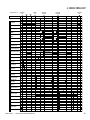
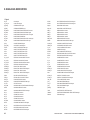
Appendix contains a general timing chart and general circuit diagrams.
COPYRIGHT © 1998 CANON INC.
CANON NP7161/NP7160 REV.0 AUG. 1998 PRINTED IN JAPAN (IMPRIME AU JAPON)
i
The following rules apply throughout this Service Manual:
1. Each chapter contains sections explaining the purpose of specific functions
and the relationship between electrical and mechanical systems with reference
to the timing of operation.
In the diagrams,
represents the path of mechanical drive—where a
signal name accompanies the symbol
, the arrow indicates the
direction of the electric signal.
The expression “turn on the power” means flipping on the power switch,
closing the front door, and closing the delivery unit door, which results in
supplying the machine with power.
2. In the digital circuits, ‘1’ is used to indicate that the voltage level of a given
signal is “High,” while ‘0’ is used to indicate “Low.” (The voltage value,
however, differs from circuit to circuit.)
In practically all cases, the internal mechanisms of a microprocessor cannot be
checked in the field. Therefore, the operations of the microprocessors used in
the machines are not discussed: they are explained in terms of from sensors to
the input of the DC controller PCB and from the output of the DC controller
PCB to the loads.
The descriptions in this Service Manual are subject to change without notice for
product improvement or other purposes, and major changes will be communicated in
the form of Service Information bulletins.
All service persons are expected to have a good understanding of the contents of this
Service Manual and all relevant Service Information bulletins and be able to identify and
isolate faults in the machine.
ii
COPYRIGHT © 1998 CANON INC.
CANON NP7161/NP7160 REV.0 AUG. 1998 PRINTED IN JAPAN (IMPRIME AU JAPON)
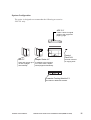
System Configuration
The copier is designed to accommodate the following accessories:
*NP7161 only.
ADF-G1*
Feeds a stack of original
pages to the copyboard
page by page.
Control
Card IV N
MS-C1*
Stapler Sorter-L1*
Sorts and groups up to In addition to the functions
10 sets of pages
of a 10-bin sorter, staples
automatically.
sorted pages automatically.
Controls volumes
of copying work.
Cassette Feeding Module-C1
Provides an additional cassette.
COPYRIGHT © 1998 CANON INC.
CANON NP7161/NP7160 REV.0 AUG. 1998 PRINTED IN JAPAN (IMPRIME AU JAPON)
iii
iv
COPYRIGHT © 1998 CANON INC.
CANON NP7161/NP7160 REV.0 AUG. 1998 PRINTED IN JAPAN (IMPRIME AU JAPON)
CONTENTS
CHAPTER 1 GENERAL DESCRIPTION
I. FEATURES .............................................. 1-1
II. SPECIFICATIONS ................................... 1-2
A. Copier ................................................. 1-2
1. Type ............................................. 1-2
2. Mechanisms ................................. 1-2
3. Performance ................................. 1-3
4. Others ........................................... 1-5
III. NAMES OF PARTS .................................. 1-8
A. External View ..................................... 1-8
B. Cross Section ..................................... 1-9
1. Copier ........................................... 1-9
IV. OPERATING THE MACHINE ................ 1-10
A. Control Panel .................................... 1-10
B. User Mode ........................................ 1-12
1. Outline ........................................ 1-12
V. ROUTINE MAINTENANCE
(BY THE USER) .................................... 1-14
VI. PONITS TO NOTE (BY THE USER) ..... 1-15
VII. IMAGE FORMATION ............................. 1-16
A. Outline .............................................. 1-16
CHAPTER 2 BASIC OPERATION
I.
BASIC MECHANISMS ............................. 2-1
A. Functional Construction ..................... 2-1
B. Outline of the Electrical Circuitry ........ 2-2
C. Basic Sequence of Operations .......... 2-4
1. Basic Sequence of Operations at
Power-On ..................................... 2-4
2. Basic Sequence of Operations at
Copy Start .................................... 2-6
D. Main Motor (M1) Control Circuitry ...... 2-8
1. Outline .......................................... 2-8
2. Operation ...................................... 2-8
3. Detecting an Error ........................ 2-8
E. Inputs to the DC Controller ................ 2-9
1. Inputs to the
DC Controller (1/3) ....................... 2-9
COPYRIGHT © 1998 CANON INC.
2. Inputs to the
DC Controller (2/3) ..................... 2-10
3. Inputs to the
DC Controller (3/3) ..................... 2-11
F. Outputs from the DC Controller ....... 2-12
1. Outputs from the
DC Controller (1/4) ..................... 2-12
2. Outputs from the
DC Controller (2/4) ..................... 2-13
3. Outputs from the
DC Controller (3/4) ..................... 2-14
4. Outputs from the
DC Controller (4/4) ..................... 2-15
G. Inputs to and Outputs from
Accessories (1/1) ............................. 2-16
CANON NP7161/NP7160 REV.0 AUG. 1998 PRINTED IN JAPAN (IMPRIME AU JAPON)
v
CHAPTER 3 EXPOSURE SYSTEM
I.
OUTLINE OF OPERATION ..................... 3-1
A. Changing the Reproduction Ratio ...... 3-1
II. LENS DRIVE SYSTEM ............................ 3-3
A. Driving the Lens ................................. 3-3
1. Outline .......................................... 3-3
2. Motor Control Circuit .................... 3-4
3. Moving the Lens ........................... 3-5
III. SCANNER DRIVE SYSTEM .................... 3-6
A. Outline ................................................ 3-6
B. Scanner Motor Control Circuit ........... 3-7
C. Relationship between Scanner
Sensor and Signals ............................ 3-7
D. Basic Sequence of Operations
(scanner) ........................................... 3-8
E. Scanner Movement in
Page Separation Mode ...................... 3-9
IV. OTHERS ................................................. 3-10
A. Detecting the Original Size .............. 3-10
1. Outline ........................................ 3-10
2. Detection of the Original Size
by the ADF ................................. 3-10
V. DISASSEMBLY/ASSEMBLY ................. 3-11
A. Scanner Drive Assembly .................. 3-12
1. Removing the Scanner Motor .... 3-12
2. Removing the Scanner Drive
Cable .......................................... 3-13
3. Routing the Scanner Drive
Cable .......................................... 3-15
4. Adjusting the Position
of the Mirror ................................ 3-16
5. Adjusting the Tension
of the Scanner Drive Cable ........ 3-17
B. Lens Drive Assembly ....................... 3-18
1. Removing the Lens Drive
Motor .......................................... 3-18
2. Removing the Mirror Motor ........ 3-19
CHAPTER 4 IMAGE FORMATION SYSTEM
I.
vi
OUTLINE OF THE PROCESSES ............ 4-1
A. Outline ................................................ 4-1
B. Basic Sequence of Operations
(image formation system) .................. 4-2
C. Controlling the Intensity of the
Scanning Lamp .................................. 4-3
1. Outline .......................................... 4-3
2. Operation ...................................... 4-4
3. Protection Mechanisms ............... 4-5
D. Controlling the Primary/Transfer Bias .. 4-6
1. Outline .......................................... 4-6
2. Turning On/Off the Primary/
Transfer Bias ................................ 4-6
E. Controlling the Developing/Separation
Static Eliminator Bias ......................... 4-7
1. Outline .......................................... 4-7
2. Turning On/Off the Developing
DC Bias ........................................ 4-8
3. Turning On/Off the Developing
AC Bias/Separation Eliminator
Bias .............................................. 4-9
4. Controlling the Developing
DC Bias to a Specific Voltage
to Suit Copy Density .................. 4-10
F. Controlling the Blank Exposure Lamp ... 4-12
1. Outline ........................................ 4-12
2. Turning On the Blank Exposure
Lamp in Reduce Mode ............... 4-13
3. Turning On the Blank Exposure
Lamp in Direct/Enlarge Mode .... 4-13
COPYRIGHT © 1998 CANON INC.
4. Turning On the Blank Exposure
Lamp in Multifeeder Mode ......... 4-13
II. DEVELOPING ASSEMBLY/DRUM
CLEANER ASSEMBLY .......................... 4-14
A. Outline .............................................. 4-14
B. Detecting and Controlling
the Level of Toner ............................ 4-16
C. Monitoring the Waste Toner
Feeding Screw ................................. 4-17
D. Monitoring the Waste Toner Box ..... 4-18
E. Control by the Cleaner Thermistor ... 4-20
1. Copying Speed Down
Sequence ................................... 4-20
F. Auto Density Adjustment (AE) ......... 4-21
1. Outline ........................................ 4-21
2. Measuring the Density
of the Original ............................. 4-21
III. DISASSEMBLY/ASSEMBLY ................. 4-23
A. Scanning Lamp Assembly ............... 4-24
1. Removing the Scanning Lamp .. 4-24
2. Mounting the Scanning Lamp .... 4-25
3. Removing the Thermal Fuse ..... 4-25
B. Exposure Assembly ......................... 4-26
1. Removing the Pre-Exposure/
Blank Exposure Lamp
Assembly .................................... 4-26
2. Removing the Dust-Proofing
Glass .......................................... 4-26
3. Cleaning the No. 6 Mirror ........... 4-27
C. Drum Unit ......................................... 4-28
CANON NP7161/NP7160 REV.0 AUG. 1998 PRINTED IN JAPAN (IMPRIME AU JAPON)
1. Removing the Drum Unit ........... 4-28
2. Cleaning the Photosensitive
Drum ........................................... 4-29
3. Removing the Cleaner
Thermistor .................................. 4-29
D. Primary Charging Assembly ............ 4-30
1. Removing the Primary
Charging Assembly .................... 4-30
E. Transfer Charging Assembly ........... 4-31
1. Removing the Transfer
Charging Assembly .................... 4-31
F. Charging Wire .................................. 4-32
1. Outline ........................................ 4-32
2. Stringing the Charging Wires ..... 4-32
3. Adjusting the Height of the
Charging Wires .......................... 4-36
G. Developing Assembly ....................... 4-37
1. Removing the Developing
Assembly .................................... 4-37
2. Removing the Developing
Blade .......................................... 4-37
3. Removing the Developing
Cylinder ...................................... 4-38
CHAPTER 5 PICK-UP/FEEDING SYSTEM
I. OUTLINE OF OPERATION ..................... 5-1
II. PICK-UP FROM THE CASSETTE .......... 5-2
A. Pick-Up Operation .............................. 5-2
B. Sequence of Operations
(pick-up/feeding) ................................ 5-3
C. Operation of the Cassette Lifter ......... 5-4
D. Detecting the Size of the Cassette .... 5-6
1. Outline .......................................... 5-6
2. Detecting the Cassette Size ........ 5-7
III. PICK-UP FROM THE MULTIFEEDER .... 5-8
A. Pick-Up Operation .............................. 5-8
B. Detecting the Size of Paper
in the Multifeeder ................................ 5-9
C. Sequence of Operations
(pick-up from multifeeder) ................ 5-10
IV. CONTROLLING THE REGISTRATION
CLUTCH ................................................. 5-11
V. DETECTING JAMS ................................ 5-12
A. Outline .............................................. 5-12
B. Sequence of Operations
(jam detection) .................................. 5-13
1. Registration Delay Jam .............. 5-13
2. Registration Stationary Jam ....... 5-13
3. Delivery Delay Jam .................... 5-14
4. Delivery Stationary Jam ............. 5-14
VI. DISASSEMBLY/ASSEMBLY ................. 5-15
A. Pick-Up Assembly ............................ 5-16
1. Removing the Pick-Up Roller ..... 5-16
COPYRIGHT © 1998 CANON INC.
2. Mounting the Pick-Up Roller ...... 5-16
3. Removing the Pick-Up Drive
Assembly .................................... 5-17
4. Removing the Pick-Up
Assembly .................................... 5-17
5. Removing the Feed Roller ......... 5-18
6. Removing the Separation Roller .. 5-18
7. Mounting the Separation Roller ... 5-19
B. Multifeeder Assembly ....................... 5-20
1. Removing the Multifeeder Tray .... 5-20
2. Removing the Multifeeder
Assembly .................................... 5-20
3. Removing the Multifeeder
Pick-Up Roller ............................ 5-21
4. Removing the Separation Pad ..... 5-21
5. Adjusting the Pressure of the
Separation Pad .......................... 5-22
C. Registration Roller Assembly ........... 5-23
1. Removing the Registration
Roller Assembly ......................... 5-23
D. Cassette Assembly .......................... 5-24
1. Removing the Cassette Size
Switch ......................................... 5-24
2. Changing the Cassette Size
(AB/INCH) .................................. 5-25
3. Adjusting the Left/Right
Registration ................................ 5-26
CANON NP7161/NP7160 REV.0 AUG. 1998 PRINTED IN JAPAN (IMPRIME AU JAPON)
vii
CHAPTER 6 FIXING SYSTEM
I.
OUTLINE OF OPERATION ..................... 6-1
A. Outline ................................................ 6-1
B. Controlling the Fixing Temperature ... 6-2
C. Error Detection Circuit ........................ 6-5
1. Outline .......................................... 6-5
2. Surface Temperature of the
Fixing Upper Roller ...................... 6-6
3. Activation of the
Fixing Heater (H1) ........................ 6-6
II. DISASSEMBLY/ASSEMBLY ................... 6-7
A. Fixing Assembly ................................. 6-8
1. Construction ................................. 6-8
2. Locking Mechanism ..................... 6-8
3. Removing the Fixing Assembly ... 6-8
4. Removing the Fixing Heater ...... 6-10
5. Removing the Thermal Switch
Assembly .................................... 6-11
6. Removing the Main Thermistor ... 6-12
7. Removing the Sub Thermistor ... 6-12
8. Removing the Fixing Upper
Roller .......................................... 6-13
9. Removing the Fixing Lower
Roller .......................................... 6-14
10. Removing the Heat Discharge
Roller .......................................... 6-14
11. Adjusting the Height of the
Fixing Inlet Guide ....................... 6-14
12. Adjusting the Nip ........................ 6-15
B. Delivery Assembly ............................ 6-16
1. Removing the Upper
Separation Claw ......................... 6-16
2. Removing the Lower
Separation Claw ......................... 6-16
3. Removing the Delivery Roller .... 6-17
CHAPTER 7 EXTERNALS/AUXILIARY MECHANISMS
I. FANS ........................................................ 7-1
II. POWER SUPPLY ..................................... 7-4
A. Outline of Power Supply .................... 7-4
B. Power Supply Circuitry ....................... 7-5
1. AC Power Supply ......................... 7-5
2. DC Power Supply ......................... 7-5
3. Mirror Heater, Cassette/
Drum Heater, and Accessory
Cassette Heater ........................... 7-6
4. ADF and Sorter ............................ 7-6
C. Protection Mechanisms of the
Power Supply Circuitry ....................... 7-7
III. DISASSEMBLY/ASSEMBLY ................... 7-8
A. External Covers .................................. 7-9
1. Removing the Right Door .......... 7-10
2. Removing the Upper
Right Cover ................................ 7-10
3. Removing the Upper
Left Cover ................................... 7-11
4. Removing the Delivery
Lower Cover ............................... 7-11
5. Removing the Delivery
Upper Cover ............................... 7-11
6. Removing the Lower
Inside Cover ............................... 7-12
B. Control Panel .................................... 7-13
1. Removing the Control Panel ...... 7-13
C. Copyboard Glass ............................. 7-14
viii
COPYRIGHT © 1998 CANON INC.
D.
E.
F.
G.
H.
I.
J.
1. Removing the Copyboard
Glass .......................................... 7-14
Fans .................................................. 7-15
1. Removing the Scanner
Cooling Fan ................................ 7-15
2. Removing the Exhaust Fan ....... 7-16
3. Remove the Ozone Filter ........... 7-17
Counter Assembly ............................ 7-18
1. Removing the Counter
Assembly .................................... 7-18
Main Motor Assembly ....................... 7-18
1. Removing the Main Motor
Assembly .................................... 7-18
DC Controller PCB ........................... 7-19
1. Removing the
DC Controller PCB ..................... 7-19
2. Points to Note When Replacing
the DC Controller PCB ............... 7-19
Removing the Power Supply PCB ... 7-20
1. Removing the
Power Supply PCB .................... 7-20
Removing the High-Voltage
Power Supply PCB ........................... 7-20
1. Removing the High-Voltage
Power Supply PCB .................... 7-20
Lamp Regulator PCB ....................... 7-21
1. Removing the Lamp
Regulator PCB ........................... 7-21
CANON NP7161/NP7160 REV.0 AUG. 1998 PRINTED IN JAPAN (IMPRIME AU JAPON)
CHAPTER 8 INSTALLATION
I. SELECTING THE SITE ............................ 8-1
II. UNPACKING AND INSTALLATION ........ 8-2
A. Unpacking .......................................... 8-2
B. Removing the Metal Fixings ............... 8-3
C. Mounting the Drum Unit ..................... 8-4
D. Cleaning the Parts and Making Checks .. 8-6
E. Checking the Images/Operations and
User Mode .......................................... 8-8
F. Supplying Toner ............................... 8-10
III. RELOCATING THE MACHINE .............. 8-12
IV. INSTALLING THE CONTROL
CARD IV N ............................................. 8-13
V. INSTALLING THE REMOTE
DIAGNOSTIC DEVICE II .......................... 8-14
VI. INSTALLING THE ACCESSORY
COUNTER ................................................ 8-23
VII. INSTALLING THE ACCESSORY
HEATER ................................................. 8-25
A. Installing the Heater Switch ............. 8-25
B. Mounting the Cassette/Drum Heater 8-26
C. Installing the Mirror Heater ............... 8-27
CHAPTER 9 MAINTENANCE AND SERVICING
I.
PERIODICALLY REPLACED PARTS ..... 9-1
A. Copier ................................................. 9-1
II. CONSUMABLES AND DURABLES ........ 9-2
A. Copier ................................................. 9-2
III. SCHEDULED SERVICING CHART ........ 9-3
IV. SCHEDULED SERVICING TABLE ......... 9-5
A. Copier ................................................. 9-5
CHAPTER 10 TROUBLESHOOTING
I.
GUIDE TO TROUBLESHOOTING
TABLES .................................................. 10-1
A. Image Adjustment Basic Procedure 10-3
B. Points to Note for Scheduled Servicing . 10-4
II. STANDARDS AND ADJUSTMENTS .... 10-5
A. Mechanical ....................................... 10-5
1. Leading Edge Non-Image
Width (blank exposure lamp
off timing) .................................... 10-5
2. Image Leading Edge Margin
(registration on timing) ............... 10-5
3. Left/Right Registration
(cassette) .................................... 10-6
B. Exposure System ............................. 10-7
1. Routing the Scanner Drive
Cable .......................................... 10-7
2. Adjusting the Position
of the Mirror ................................ 10-8
3. Adjusting the Tension
of the Scanner Drive Cable ........ 10-9
C. Image Formation System ............... 10-10
1. Outline ...................................... 10-10
2. Stringing the Charging Wires ... 10-10
3. Adjusting the Height of the
Charging Wires ........................ 10-13
D. Pick-Up/Feeding System ............... 10-14
1. Adjusting the Pressure
of the Separation Pad .............. 10-14
COPYRIGHT © 1998 CANON INC.
2. Changing the Cassette Size
(AB/INCH) ................................ 10-14
E. Fixing System ................................. 10-16
1. Adjusting the Height of the
Fixing Assembly Inlet Guide .... 10-16
2. Adjusting the Pressure of
the Lower Roller (nip) ............... 10-16
F. Electrical System ............................ 10-18
1. Obtaining Optimum Exposure ... 10-18
2. AE Adjustment ......................... 10-19
3. After Replacing the
DC Controller PCB ................... 10-22
4. Checking the Photointerrupters .... 10-23
III. IMAGE FAULTS ................................... 10-25
A. Initial Checks .................................. 10-25
1. Checking the Site Environment .... 10-25
2. Checking the Originals ............. 10-25
3. Checking the Copyboard
Cover and Copyboard Glass ... 10-25
4. Checking the Charging
Assembly .................................. 10-26
5. Checking the Developing
Assembly .................................. 10-26
6. Checking the Paper ................. 10-26
7. Checking the Periodically
Replaced Parts ......................... 10-26
8. Others ....................................... 10-26
CANON NP7161/NP7160 REV.0 AUG. 1998 PRINTED IN JAPAN (IMPRIME AU JAPON)
ix
B. Image Fault Samples ..................... 10-28
C. Troubleshooting Image Faults ....... 10-29
1. The copy is too light.
(halftone area only) .................. 10-29
2. The copy is too light.
(including solid black area) ...... 10-30
3. The copy is too light.
(entirely, considerably) ............. 10-30
4. The copy has uneven density.
(front side dark) ........................ 10-31
5. The copy has uneven density.
(front side light) ........................ 10-31
6. The copy is foggy. (overall) ...... 10-32
7. The copy is foggy. (vertical) ..... 10-33
8. The copy has black lines.
(vertical, fuzzy, thick) ............... 10-33
9. The copy has black lines.
(vertical, thin) ............................ 10-33
10. The copy has white spots.
(vertical) .................................... 10-34
11. The copy has white lines.
(vertical) .................................... 10-34
12. The copy has white spots.
(vertical) .................................... 10-35
13. The back of the copy is soiled. .. 10-36
14. The copy has faulty fixing. ....... 10-37
15. The copy has a displaced
leading edge. ............................ 10-38
16. The copy has a displaced
leading edge. ............................ 10-38
17. The copy has a displaced
leading edge. ............................ 10-38
18. The copy has a blurred image. .. 10-39
19. The copy is foggy.
(horizontally) ............................. 10-39
20. The copy has poor sharpness. .. 10-40
21. The copy is blank. .................... 10-41
22. The copy is solid black. ............ 10-41
IV. TROUBLESHOOTING
MALFUNCTIONS ................................. 10-42
A. Copier ............................................. 10-42
1. E000 ......................................... 10-42
2. E001 ......................................... 10-43
3. E002/E003 ............................... 10-44
4. E004 ......................................... 10-45
5. E010 ......................................... 10-45
6. E013 ......................................... 10-46
7. E030 ......................................... 10-46
8. E031 ......................................... 10-47
9. E202 (The keys on the control
panel fail to operate.) ............... 10-47
10. E208 ......................................... 10-48
11. E210 ......................................... 10-48
12. E220 ......................................... 10-49
13. E261 ......................................... 10-49
14. E710/E711 ............................... 10-49
15. E712 ......................................... 10-50
16. E717 ......................................... 10-50
x
COPYRIGHT © 1998 CANON INC.
17.
18.
19.
20.
21.
22.
23.
24.
25.
E800 ......................................... 10-51
E805 ......................................... 10-51
E821 ......................................... 10-51
AC power is absent. ................. 10-52
DC power supply is absent. ..... 10-53
The scanner fails to move. ....... 10-54
The lens fails to move. ............. 10-55
The mirror fails to move. .......... 10-55
The scanning lamp
fails to turn on. .......................... 10-56
26. The pre-exposure lamp
fails to turn on. .......................... 10-57
27. The blank exposure lamp
fails to turn on. .......................... 10-57
28. Pick-up fails. (cassette) ............ 10-58
29. Pick-up operation fails.
(multifeeder) ............................. 10-59
30. The registration roller fails
to rotate. ................................... 10-59
31. The fixing heater fails to
turn on. ..................................... 10-60
32. The Add Toner indicator
does not flash/turn on. ............. 10-60
33. The Add Toner indicator fails
to turn off. ................................. 10-61
34. The Waste Toner Box Full i
ndicator fails to flash/turn on. ... 10-61
35. The Waste Toner Box Full
indicator fails to turn off. ........... 10-62
36. The Add Paper indicator
fails to flash. ............................. 10-62
37. The Add Paper indicator
fails to turn off. .......................... 10-63
38. The Jam indicator fails to
flash. ......................................... 10-63
39. The Jam indicator fails to
turn off. ..................................... 10-64
40. The Set Control Card indicator
fails to turn on. .......................... 10-64
41. The Set Control Card indicator
fails to turn off. .......................... 10-65
V. TROUBLESHOOTING FEEDING
PROBLEMS .......................................... 10-66
A. Copy Jams ..................................... 10-66
1. Pick-Up/Feeding Assembly ...... 10-67
2. Fixing/Delivery Assembly ......... 10-68
B. Faulty Feeding ................................ 10-69
1. Double Feeding ........................ 10-69
2. Wrinkles .................................... 10-69
VI. ARRANGEMENT AND FUNCTIONS
OF ELECTRICAL PARTS .................... 10-70
A. Sensors and Switches ................... 10-70
B. Motors, Fans, Clutches,
and Solenoids ................................. 10-72
C. Heaters, Lamps, and Others .......... 10-74
D. PCBs .............................................. 10-76
E. Variable Resistors, Light-Emitting
Diodes, and Check Pins by PCB ... 10-77
CANON NP7161/NP7160 REV.0 AUG. 1998 PRINTED IN JAPAN (IMPRIME AU JAPON)
1.
2.
3.
4.
DC Controller PCB ................... 10-77
Power Supply PCB .................. 10-80
Lamp Regulator PCB ............... 10-80
High-Voltage Power Supply
PCB .......................................... 10-81
VII. SERVICE MODE .................................. 10-82
A. Outline ............................................ 10-82
B. Using Service Mode ....................... 10-82
1. Starting Service Mode .............. 10-82
2. Selecting Service Mode ........... 10-82
C. Using Adjust Mode and
Function Mode ................................ 10-83
D. Display Mode [1] ............................ 10-84
E. I/O Display Mode [2] ....................... 10-88
F. Adjust Mode [3] .............................. 10-92
G. Function Mode [4] .......................... 10-94
H. Option Mode [5] .............................. 10-95
I. Counter Mode [6] ........................... 10-97
J. Application Mode [7] ....................... 10-98
VIII. SELF DIAGNOSIS .............................. 10-99
A. Copier ............................................. 10-99
B. ADF .............................................. 10-103
C. Sorter ............................................ 10-104
D. Cassette Feeding Module ............ 10-104
APPENDIX
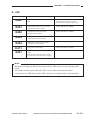
A. GENERAL TIMING CHART ............... A-1
B. SIGNALS AND ABBREVIATIONS .... A-2
C. GENERAL CIRCUIT DIAGRAM ........ A-5
COPYRIGHT © 1998 CANON INC.
D. SPECIAL TOOLS LIST ...................... A-7
E. SOLVENTS AND OILS ...................... A-8
CANON NP7161/NP7160 REV.0 AUG. 1998 PRINTED IN JAPAN (IMPRIME AU JAPON)
xi
CHAPTER 1
GENERAL DESCRIPTION
This chapter introduces the copier’s features and specifications, shows how to operate the copier, and
explains how copies are made.
I. FEATURES .............................................. 1-1
II. SPECIFICATIONS ................................... 1-2
A. Copier ................................................. 1-2
III. NAMES OF PARTS .................................. 1-8
A. External View ..................................... 1-8
B. Cross Section ..................................... 1-9
IV. OPERATING THE MACHINE ................ 1-10
COPYRIGHT © 1998 CANON INC.
A. Control Panel .................................... 1-10
B. User Mode ........................................ 1-12
V. ROUTINE MAINTENANCE
(BY THE USER) .................................... 1-14
VI. PONITS TO NOTE (BY THE USER) ..... 1-15
VII. IMAGE FORMATION ............................. 1-16
A. Outline .............................................. 1-16
CANON NP7161/NP7160 REV.0 AUG. 1998 PRINTED IN JAPAN (IMPRIME AU JAPON)
CHAPTER 1 GENERAL DESCRIPTION
I.
FEATURES
1. The copier is designed light in weight (about 42 kg), and compact in size (566 mm wide,
541mm deep).
2. The copier turns out as many as 16 copies each minute (A4/LTR).
3. The addition of the Cassette Feeding Module-C1 (accessory) enables a source of paper
capable of holding a maximum of 1,050 sheets.
4. The density may be adjusted to 33 different shades, or in automatic mode (AE).
5. The use of a photo mode promises faithful reproduction of halftone.
6. The use of an auto power-off function promises power-saving operation.
COPYRIGHT © 1998 CANON INC.
CANON NP7160/NP7161 REV.0 AUG. 1998 PRINTED IN JAPAN (IMPRIME AU JAPON)
1–1
CHAPTER 1 GENERAL DESCRIPTION
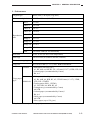
II. SPECIFICATIONS
A. Copier
1. Type
Body
Desktop
Copyboard
Fixed
Light source
Halogen lamp (120V:200W/230V:220W)
Lens
Lens array
Photosensitive material
OPC (30 dia.)
2. Mechanisms
Copying
Indirect electrostatic
Charging
Corona
Exposure
Slit (moving light source)
Copy density adjustment
Auto or manual
Development
Dry (toner projection)
Auto
Front cassette (1 pc.)
Manual
Multifeeder (5 mm deep approx.; about 50 sheets of 80 g/m2 paper)
Pick-up
Transfer
Corona
Separation
Curvature + static eliminator
Cleaning
Blade
Fixing
Heat roller (1000 W for 120V model; 1050 W for 230V model)
1–2
COPYRIGHT © 1998 CANON INC.
CANON NP7160/NP7161 REV.0 AUG. 1998 PRINTED IN JAPAN (IMPRIME AU JAPON)
CHAPTER 1 GENERAL DESCRIPTION
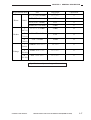
3. Performance
Original type
Sheet, book, 3-D object (2 kg max.)
Maximum original size
A3/279 × 432 mm (11"×17")
Direct
1:1.000
Reduce I
1:0.5000
Reduce II
1:0.707
Reduce III
1:0.0816
Reproduction Reduce IV
ratio
Enlarge I
1:0.0865
1:1.154
Enlarge II
1:1.224
Enlarge III
1:1.414
Enlarge IV
1:2.000
Zoom
1:0.500 to 2.000 (in 1% increments)
Wait time
30 sec or less (at 20°C room temperature)
First copy
5.8 sec or less (A4, Direct, non-AE, cassette)
Continuous copying
999 sheets max.
Copy size
A3/279×432 mm (11"×17") max. B5R/STMTR min.
Cassette
Copy paper
type
Multifeeder
• Plain paper (64 to 80 g/m2)
A3, B4, A4R, A4, B5R,B5, 279 × 432 mm (11"×17"), LTRR, LTR, LGL
• Colored paper (recommended by Canon)
B4, A4
• Plain paper (64 to 80 g/m2)
A3, B4, A4R, A4, B5R, B5, A5, 279X432 mm (11"×17"), LTRR,
LTR, LGL, STMTR
• Tracing paper (SM-1, GNT80)
A3, B4, A4R, A4, B5R, B5, A5
• Transparency (recommended by Canon)
A4/LTR
• Colored paper (recommended by Canon)*
B4, A4
• Label paper (recommended by Canon)
A4/LTR
• Heavy paper (up to 128 g/m2)
*May be used, but may not feed properly.
COPYRIGHT © 1998 CANON INC.
CANON NP7160/NP7161 REV.0 AUG. 1998 PRINTED IN JAPAN (IMPRIME AU JAPON)
1–3
CHAPTER 1 GENERAL DESCRIPTION
Cassette
Claws
Used
Frame
55 mm deep (500 sheets of 80 g/m2 paper; 250 sheets if B5)
100 sheets approx. (plain paper ; 64 to 80 g/m2)
Copy tray
Leading edge Direct 2.0 ±1.0 mm
Non-image
Trailing edge Direct 2.5 ±1.5 mm
width
Direct 2.5 ±2.0 mm
Left/right
Auto clear
Provided (2 min standard; may be changed between 1 and 9 min
in 1-min increments)
Auto power-off
Provided (30 min standard; may be changed between 10 and 90 min
in 10-min increments)
Auto pre-heat
Provided (15 min standard; may be changed between 15 and 90 min
in 15-min increments)
Accessories
• ADF-G1*
• MS-C1*
• Control Card IV N
• Cassette Feeding Module-C1
• Stapler Sorter-L1*
• Remote Diagnostic Device II
*Applies to the NP7161 only.
1–4
COPYRIGHT © 1998 CANON INC.
CANON NP7160/NP7161 REV.0 AUG. 1998 PRINTED IN JAPAN (IMPRIME AU JAPON)
CHAPTER 1 GENERAL DESCRIPTION
4. Others
Operating
conditions
Temperature
7.5° to 32.5°C/45.5° to 90.5°F
Humidity
5% to 80% RH
Atmospheric
pressure
810.6 to 1013.3 hPa (0.8 to 1.0 atm)
NP7160
NP7161
NLB xxxxx
----
----
NLD xxxxx
127V
NLC xxxxx
----
230V
PHQ xxxxx
PHS xxxxx
120V
Power
source
120V (UL)
Maximum
Power
consumption Standby
Continuous
Noise
1.5 kW or less
0.135 kWh (approx.; reference only)
0.645 kWh (approx.; reference only)
Copying
66 dB or less (sound power level by ISO method)
Standby
40 dB or less (sound power level by ISO method)
0.05 ppm or less
Ozone (8-hr average)
Width
566 mm/22.3 in
Dimensions Depth
541 mm/21.3 in
Height
389 mm/15.3 in
Weight
Consumables
NP7160
NP7161
42 kg/92.6 lb (approx.)
42 kg/92.6 lb (approx.)
Copy paper
Keep wrapped, and avoid humidity.
Toner
Avoid direct sunlight, and store at 40°C, 85% or less.
Specifications subject to change without notice.
COPYRIGHT © 1998 CANON INC.
CANON NP7160/NP7161 REV.0 AUG. 1998 PRINTED IN JAPAN (IMPRIME AU JAPON)
1–5
CHAPTER 1 GENERAL DESCRIPTION
Size
Copy paper
Copies/min
A3 (297 × 420mm)
A3
9
A4 (210 × 297mm)
A4
16
B4 (257 × 364mm)
B4
11
B5 (182 × 257mm)
B5
17
A4R (297 × 210mm)
A4R
13
B5R (257 × 182mm)
B5R
14
I
(70.7%)
A3 → A4R
A4R
11
B4 → B5R
B5R
13
II
(81.6%)
B4 → A4R
A4R
12
III
(86.5%)
A3 → B4
B4
10
A4 → B5
B5
17
I
(200%)
A5R → A3
A3
8
II
(141.4%)
A4R → A3
A3
8
B5R → B4
B4
9
III
(122.4%)
A4R → B4
B4
9
IV
(115.4%)
B4 → A3
A3
8
B5 → A4
A4
11
Reproduction mode
Direct
Reduce
(100%)
Enlarge
Specifications subject to change without notice.
1–6
COPYRIGHT © 1998 CANON INC.
CANON NP7160/NP7161 REV.0 AUG. 1998 PRINTED IN JAPAN (IMPRIME AU JAPON)
CHAPTER 1 GENERAL DESCRIPTION
Reproduction mode
Direct
Reduce
Enlarge
Size
Copy paper
Copies/min
11" × 17" (279 × 432mm)
11" × 17"
9
LTR (297 × 216mm)
LTR
16
LGL (216 × 356mm)
LGL
11
LTRR (216 × 297mm)
LTRR
13
I
(64.7%)
11" × 17" → LTRR
LTRR
12
II
(73.3%)
11" × 17" → LGL
LGL
11
III
(78.6%)
LGL → LTRR
LTRR
12
I
(200%)
STMTR → 11" × 17"
11" × 17"
8
II
(129.4%)
LTRR → 11" × 17"
11" × 17"
8
III
(121.4%)
LGL → 11" × 17"
11" × 17"
8
(100%)
Specifications subject to change without notice.
COPYRIGHT © 1998 CANON INC.
CANON NP7160/NP7161 REV.0 AUG. 1998 PRINTED IN JAPAN (IMPRIME AU JAPON)
1–7
CHAPTER 1 GENERAL DESCRIPTION
III. NAMES OF PARTS
A. External View [1]
[2]
[3] [4]
[12] [11]
[5] [6] [7]
[10] [9]
[8]
[1]
Control panel
[5]
Upper right cover
[9]
Right door
[2]
Copyboard glass
[6]
Upper rear cover
[10] Right cover
[3]
Copyboard cover
[7]
Multifeeder
[11] Front door
[4]
Power switch
[8]
Waste toner box
[12] Cassette
Figure 1-301
[1] [2]
[3]
[4] [5] [6] [7]
[8]
[9]
[1]
Copy tray
[4]
Lower delivery cover
[7]
Open/close lever
[2]
Upper left cover
[5]
Front fixing cover
[8]
Lower inside cover
[3]
Upper delivery cover
[6]
Inside cover
[9]
Static eliminator
Figure 1-302
1–8
COPYRIGHT © 1998 CANON INC.
CANON NP7160/NP7161 REV.0 AUG. 1998 PRINTED IN JAPAN (IMPRIME AU JAPON)
CHAPTER 1 GENERAL DESCRIPTION
B. Cross Section
1. Copier
[1]
[2]
[3] [4]
[5]
[6]
[26]
[25]
[24]
[7] [8] [9] [10] [11] [12] [13] [14]
[23]
[22] [21]
[20]
[15]
[19] [18] [17]
[16]
[1]
No. 3 mirror
[11] Dust-proofing glass
[21] Transfer charging assembly
[2]
No. 2 mirror
[12] Developing cylinder
[22] Separation static eliminator
[3]
Scanning lamp
[13] No. 4 mirror
[23] Heat discharging roller
[4]
No. 1 mirror
[14] No. 5 mirror
[24] Lower fixing roller
[5]
Copyboard glass
[15] Multifeeder pick-up roller
[25] Upper fixing roller
[6]
Lens
[16] Feed roller
[26] Delivery roller
[7]
Pre-exposure lamp
[17] Separation roller
[8]
Primary charging assembly
[18] Vertical path roller
[9]
Blank exposure lamp
[19] Pick-up roller
[10] No. 6 mirror
[20] Registration roller
Figure 1-303
COPYRIGHT © 1998 CANON INC.
CANON NP7160/NP7161 REV.0 AUG. 1998 PRINTED IN JAPAN (IMPRIME AU JAPON)
1–9
CHAPTER 1 GENERAL DESCRIPTION
IV. OPERATING THE MACHINE
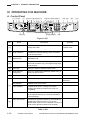
A. Control Panel
[1] [2] [3]
[5] [6] [7] [8] [9] [10] [11]
[4]
Image Combination
Fit Image
Sort
StapleSort
Two-page Separation
Photo
Group
A
Max. 200%
A4/LTR A3 B5 B4
A4/LTR B4
B4 A3 B5 A4/LTR
1:1
A3 B4 A4/LTR B5
B4 A4/LTR
A3 A4/LTR B4 B5
Min. 50%
Reduce
1:1
Enlarge
[22] [23]
[12] [13] [14] [15] [16][17]
[18] 1[9]
Energy Saver
Reset
123
Auto Paper
A3/1117
A4/LTR
A4/LTR R
B4/LGL
B5
U1
B5 R
U2
[21]
[20]
1
2
3
4
5
6
7
8
9
ID
0
C
Stop
ON/OFF
Auto Zoom
%
Zoom
Paper Select
Additional
Functions
Start
Interrupt
[24][25] [26][27]
Clear
[28]
Figure 1-401
Ref.
Name
Description
Remarks
Sorter key*
Press it to select or deselect Sort, Staple Sort, or
Group Sort mode.
*Requires a sorter or
stapler sorter.
[2]
Sorter indicator*
Indicates the selected delivery mode. It remains
off in non-sort mode.
[3]
2-on-1*/Page
Separate key
Press it to select or deselect 2-on-1 or Page
Separate mode.
Fit Page key
Press to select or deselect Fit Page mode. Use
the mode to make a copy covering all image area
of the original.
[5]
Photo key
Press it to select or deselect Photo mode.
[6]
Reduce/Direct/
Enlarge key
Press it to select Reduce/Enlarge (default ratio) or
reset any ratio to Direct.
[7]
Default Ratio indicator
Indicates the selected default reproduction ratio.
Control Card indicator
Flashes when the control card is not set properly.
Jam indicator
Flashes when a jam occurs.
Toner indicator
Flashes when toner is running out. It stops
flashing and remains on when toner runs out
completely.
Paper indicator
Flashes if paper runs out in the selected cassette
or the manual feed tray (or, when the cassette is
not set properly).
Paper Source/Jam
Indicates the selected cassette or the manual tray;
flashes the location of a jam, if any. (It also
flashes when a jam occurs in the ADF or when the
sorter or the right door needs to be checked.)
[1]
[4]
[8]
[9]
*Requires an ADF.
Requires a Control
Card Unit.
* Applies to the NP7161 only
Table 1-401
1–10
COPYRIGHT © 1998 CANON INC.
CANON NP7160/NP7161 REV.0 AUG. 1998 PRINTED IN JAPAN (IMPRIME AU JAPON)
CHAPTER 1 GENERAL DESCRIPTION
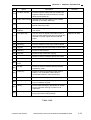
Ref.
Name
Description
Location indicator
Flashes when the waste toner box needs to be
replaced. When the case becomes full, it stops
flashing and remains on.
[11]
Paper Size indicator
Indicates the size of the paper in the cassette
selected by the Paper Select key.
[12]
Paper Select key
Press it to select Auto Paper Select*, Cassette, or
Manual Feed Tray mode.
[13]
Copy Count/Ratio
indicator
Indicates the copy count/ratio and the selected
user mode.
Auto Ratio key*
Use it to select or deselect Auto Ratio mode, in
which the best reproduction ratio is automatically
selected to suit the original and the selected
paper.
[15]
% key
Press it to indicate the selected reproduction ratio.
[16]
Reset key
Use it to reset the current copy mode to default.
[17]
Keypad
Use it to set a copy count or to enter a numeric value.
[18]
Start key
Press it to start copying.
[19]
Stop key
Press it to stop continuous copying.
[20]
Power Save key
Press it to select or deselect power save mode.
[21]
Power switch
Press it to turn on or off the power.
[22]
Copy Density
lever
Slide it to adjust the copy density manually.
[23]
AE key
Press it to select or deselect AE (auto density
adjustment) mode.
Zoom key
Press it to select a reproduction ratio (50% to
200%) in 1% increments. Hold it down to
increase/decrease the ratio continuously.
User Mode key
Press it to set or change user mode settings.
Interrupt key
Press it to stop an ongoing copying run to make a
copy of a different original.
ID key
Press it after entering an appropriate ID number.
Press it also after entering a number for ID
registration.
Clear key
Press it to reset the copy count to 1 or to clear any
wrong input when making settings.
[10]
[14]
[24]
[25]
[26]
[27]
[28]
Remarks
*Requires an ADF.
*Requires an ADF.
* Applies to the NP7161 only
Table 1-402
COPYRIGHT © 1998 CANON INC.
CANON NP7160/NP7161 REV.0 AUG. 1998 PRINTED IN JAPAN (IMPRIME AU JAPON)
1–11
CHAPTER 1 GENERAL DESCRIPTION
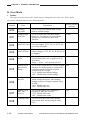
B. User Mode
1. Outline
The copier provides user modes, which may be changed freely by the user. These modes
provide the functions shown in the following table.
Notation
Item
Description
Factory settings
(default)
Resetting
user mode
Use it to reset new settings made in user
mode to default settings.
–
Changing auto
clear time
Use it to set the auto clear time length
between 1 an 9 min in 1-min increments.
Setting it to 0 disables the auto-clear
function.
2 min
U02
Changing auto
power-save time
Use it to select an appropriate auto powersave time length: 10, 15, 20, 30, 40, 50, 60,
or 90 min (8 lengths).
15 min
U03
Changing auto
power-off time
Use it to select an appropriate auto power30 min
off time length: 10, 15, 20, 30, 40, 50, 60, 90
(8 lengths).
Fine-adjusting
Zoom
Use it to adjust vertical and horizontal
reproduction ratios over ±5 grades in 0.2%
increments.
Rang: -1.0% to +1.0% in units of 0.2%
±0.0%
Turning on/off
auto cassette
change
Use it to turn on/off the auto cassette change
function, in which copying is continued by
switching cassettes when the selected
cassette runs out of paper.
O N : Enable auto cassette change.
OFF : Disable auto cassette change.
ON
Turning on/off
auto sort
Use it to turn on/off the auto sort function, in ON
which sorting takes place when making
multiple copies of multiple originals using
an ADF.
O N : Enable auto sort.
OFF : Disable auto sort.
Turning on/off
ADF jam
recovery
Use it to turn on/off auto counting of
originals in ADF jam recovery.
O N : Enable auto count.
OFF : Disable auto count.
OFF
Cleaning feeder
Use it to clean the feeder (after placing
paper in the ADF and pressing the Start
key).
–
U00
U01
U04
U05
U06
U07
U08
1–12
COPYRIGHT © 1998 CANON INC.
CANON NP7160/NP7161 REV.0 AUG. 1998 PRINTED IN JAPAN (IMPRIME AU JAPON)
CHAPTER 1 GENERAL DESCRIPTION
Factory settings
(default)
Notation
Item
Description
U09
Changing Page
Fit mode (ratio)
Use it to change the reproduction ratio used
in Page Fit mode between 90% and 99% in
1% increments.
U10
Changing Page
Fit mode
(centering)
Use it to turn on/off the centering function in ON
Fit Page mode.
O N : Enable centering.
OFF : Disable centering.
U11
Changing Page
Fit mode
(non-image width)
Use it to turn on/off the non-image width
function in Page Fit mode.
O N : Enable (create non-image width).
OFF : Disable (do not create non-image
width).
U12
Correcting
density
Use it to select an appropriate standard value 0
(F5) for manual density adjustment between
-17 and +6 (24 grades).
Use it to select an appropriate fixing
temperature control mode for special paper
when pick-up is from the multifeeder.
0: Standard
1: Rough surface paper (against poor fixing)
2: Tracing paper (against high-temperature
offset)
0
U13
Setting special
paper mode
Drum cleaning
mode
Use it to turn ON/OFF the drum cleaning
function.
To remove dirt from the surface of the
photosensitive drum, toner is deposited on
the surface after copying operation and the
cleaning blade is used to collect the toner
together with the dirt. (In addition, LSTR is
extended by 6.5 sec)
O N : Enable drum cleaning.
OFF : Disable drum cleaning.
OFF
U14*
93%
OFF
* If the drum cleaning settings in service mode No. 519 is turned ON.
COPYRIGHT © 1998 CANON INC.
CANON NP7160/NP7161 REV.0 AUG. 1998 PRINTED IN JAPAN (IMPRIME AU JAPON)
1–13
CHAPTER 1 GENERAL DESCRIPTION
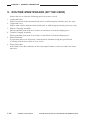
V. ROUTINE MAINTENANCE (BY THE USER)
1.
2.
3.
4.
5.
6.
Instruct the user to clean the following parts at least once a week.
Copyboard Glass
Wipe with a moist cloth (moistened with water or mild detergent solution); then, dry wipe.
Copyboard Cover
Wipe it with a moist cloth (moistened with water or mild detergent solution); then, dry wipe.
Primary Charging Assembly
Pull out and then push in the wire cleaner several times to clean the charging wire.
Transfer Charging Assembly
Pull out and then push in the wire cleaner several times to clean the charging wire.
Static Eliminator
If separation jams occur frequently, clean the static eliminator using the special brush.
(Cleaning need not be as often as every week.)
Waste Toner Box
If the Waste Toner Box indicator on the control panel flashes or turns on, replace the waste
toner box.
1–14
COPYRIGHT © 1998 CANON INC.
CANON NP7160/NP7161 REV.0 AUG. 1998 PRINTED IN JAPAN (IMPRIME AU JAPON)
CHAPTER 1 GENERAL DESCRIPTION
VI. POINTS TO NOTE (BY THE USER)
• Toner Cartridge
Instruct the user to dispose of any used (empty) toner cartridge according to governmental
guidelines.
• Waste Toner Box
Instruct the user to keep any waste toner box for collection during a servicing visit.
Caution:
Do not dispose of the toner cartridge or the waste toner box into fire. Toner can catch
fire, causing implosion or explosion.
COPYRIGHT © 1998 CANON INC.
CANON NP7160/NP7161 REV.0 AUG. 1998 PRINTED IN JAPAN (IMPRIME AU JAPON)
1–15
CHAPTER 1 GENERAL DESCRIPTION
VII.IMAGE FORMATION
A. Outline
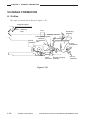
The copier is constructed as shown in Figure 1-701.
Copyboard glass
Scanning
lamp
Lens
Developing
assembly
Blanking exposure
Primary charging lamp
assembly
Pre-exposure
Fixing
assembly lamp
Static
Transfer charging
eliminator assembly
Pick-up
(multifeeder)
Pick-up
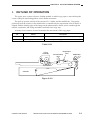
(cassette)
Figure 1-701
1–16
COPYRIGHT © 1998 CANON INC.
CANON NP7160/NP7161 REV.0 AUG. 1998 PRINTED IN JAPAN (IMPRIME AU JAPON)
CHAPTER 1 GENERAL DESCRIPTION
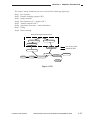
The copier's image formation processes consist of the following eight steps:
Step 1 Pre-exposure
Step 2 Primary charging (negative DC)
Step 3 Image exposure
Step 4 Development (AC + negative DC)
Step 5 Transfer (negative DC)
Step 6 Separation (curvature + static eliminator)
Step 7 Fixing
Step 8 Drum cleaning
Static latent image formation block
2. Primary charging
3. Image exposure
1. Pre-exposure
4. Development
Flow of copy paper
Rotation of drum
8. Drum cleaning
5. Transfer
Multifeeder
Registration
Delivery
7. Fixing
6. Separation
Cassette
Figure 1-702
COPYRIGHT © 1998 CANON INC.
CANON NP7160/NP7161 REV.0 AUG. 1998 PRINTED IN JAPAN (IMPRIME AU JAPON)
1–17
CHAPTER 2
BASIC OPERATION
This chapter provides outlines of the copier’s various mechanical workings.
Process speed
I.
BASIC MECHANISMS ............................. 2-1
A. Functional Construction ..................... 2-1
B. Outline of the Electrical Circuitry ........ 2-2
C. Basic Sequence of Operations .......... 2-4
D. Main Motor (M1) Control Circuitry ...... 2-8
COPYRIGHT © 1998 CANON INC.
105 mm/s
E. Inputs to the DC Controller ................ 2-9
F. Outputs from the DC Controller ....... 2-12
G. Inputs to and Outputs from
Accessories (1/1) ............................. 2-16
CANON NP7161/NP7160 REV.0 AUG. 1998 PRINTED IN JAPAN (IMPRIME AU JAPON)
CHAPTER 2 BASIC OPERATION
I.
BASIC MECHANISMS
A. Functional Construction
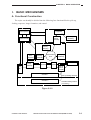
The copier can broadly be divided into the following four functional blocks: pick-up,
feeding, exposure, image formation, and control.
Control system
Exposure system
Copyboard
Control panel
Scanning
assembly
Optical
assembly
Control circuitry
Image formation system
Primary
charging
Waste
toner
container
Drum
cleaning
assembly
Photosensitive
drum
Developing
assembly
Multifeeder
Fixing
assembly
Separation
Transfer
Pick-up
control
assembly
Copy
tray
Cassette 1
Cassette 2
Pick-up feeding assembly
Cassette feeding module
(*accessory)
Figure 2-101
COPYRIGHT © 1998 CANON INC.
CANON NP7161/NP7160 REV.0 AUG. 1998 PRINTED IN JAPAN (IMPRIME AU JAPON)
2–1
CHAPTER 2 BASIC OPERATION
B. Outline of the Electrical Circuitry
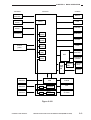
The copier's major electrical mechanisms are controlled by the microprocessor on the DC
controller PCB. The ICs on the DC controller PCB are shown below.
IC121 (ROM)
• Controls copying sequence.
JC113 (gate array)
• Controls scanning lamp (LA1) error detection.
• Controls thermistor (TH1, TH2) error detection.
• Controls triac short circuit error detection.
• Controls power at time of error.
• Turns on/off the scanning lamp (LA3).
• Controls the I/O port.
IC114 (IPC; NP7161 only)
• Controls communication with the ADF and the sorter.
JC116 (RAM)
• Records settings data (service mode, etc.).
IC117 (RESET IC)
• Resets at power-on.
Figure 2-102 is a block diagram showing the relationship between the copier's major circuits.
Reference:
The NP7161 possesses a communications IC (IPC) on its DC controller PCB. The copier
communicates with the ADF and the sorter using the communications IC on each controller
PCB (IPC communication) and the communications PCB on the DC controller PCB (IPC
communication 2).
2–2
COPYRIGHT © 1998 CANON INC.
CANON NP7161/NP7160 REV.0 AUG. 1998 PRINTED IN JAPAN (IMPRIME AU JAPON)
CHAPTER 2 BASIC OPERATION
<Sensors>
<Control>
Sensors
Switches
DC controller PCB
Toner
sensor
<Loads>
Motors
IC119
(CPU)
Fans
AE
sensor
Thermistors
Control
panel
Clutches
IC121
(ROM)
Solenoids
IC116
(RAM)
Counter
IC117
(RESET)
LEDs
IC113
(GA)
Charging
assembly
HVT
IC114
(IPC)
Developing
cylinder
Power
supply
PCB
Lamp
regulator
PCB
Scanning
lamp
Heaters
Sensors
Switches
Cassette relay
PCB
Cassette feeding
module
Sensors
Switches
ADF controller PCB
MicroIPC
processor
ADF
Sensors
Switches
Sorter controller PCB
MicroIPC
processor
Stapler sorter
or Sorter
Figure 2-102
COPYRIGHT © 1998 CANON INC.
CANON NP7161/NP7160 REV.0 AUG. 1998 PRINTED IN JAPAN (IMPRIME AU JAPON)
2–3
CHAPTER 2 BASIC OPERATION
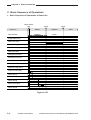
C. Basic Sequence of Operations
1. Basic Sequence of Operations at Power-On
,,
Power switch
ON
Sequence
Wait indicator
120°C
160°C
WMUP
WMUPR
(flashing)
Green
STBY
Fixing heater (H1)
Main motor (M1)
Primary charging assembly
Transfer charging assembly
Static eliminator
Developing AC bias
Developing DC bias
Pre-exposure lamp (LA2)
Blank exposure lamp (LA3)
Scanning lamp (LA1)
Scanner motor (M2)
Scanner home position
sensor (PS1)
Lens motor (M3)
Lens home position
sensor (PS2)
Mirror motor (M4)
Mirror home position
sensor (PS3)
Figure 2-103
2–4
COPYRIGHT © 1998 CANON INC.
CANON NP7161/NP7160 REV.0 AUG. 1998 PRINTED IN JAPAN (IMPRIME AU JAPON)
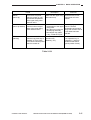
CHAPTER 2 BASIC OPERATION
Period
Description
Remarks
WMUP
(warm-up)
From when the power
switch is turned on until
the surface temperature
of the upper fixing roller
reaches 120˚C.
Waits until the upper fixing Moves the lens, mirror,
roller warms up.
and scanner to home
position.
WMUPR
(warm-up rotation)
From when WMUP ends
until the surface temperature of the upper fixing
roller reaches 160˚C.
• Evens out the surface
temperature of the upper
fixing roller.
• Stirs the toner inside the
developing assembly.
• Discharges copy paper,
if any, inside the copier.
STBY
(standby)
From when WMUPR ends Waits for a press on an
until the Copy Start key is operation key
pressed. Or, from when
(Start key, etc.).
LSTR ends until the power
switch is turned off.
Starts copying operation
when the surface
temperature of the upper
fixing roller reaches 140˚C
if Auto Start has been
selected.
Turns on Auto Clear
if no operation key is
pressed (i.e., resets to
standard mode after a
specific period of time).
Table 2-101
COPYRIGHT © 1998 CANON INC.
CANON NP7161/NP7160 REV.0 AUG. 1998 PRINTED IN JAPAN (IMPRIME AU JAPON)
2–5
CHAPTER 2 BASIC OPERATION
2. Basic Sequence of Operations at Copy Start
Start key
ON
Sequence
STBY
Wait indicator
Green
Fixing heater (H1)
INTR
AER
SCFW
SCRV
SCFW
SCRV LSTR
STBY
Orange
Target temperature control
Main motor (M1)
Primary charging assembly
Transfer charging assembly
Static eliminator
Developing AC bias
Developing DC bias
Voltage control
Pre-exposure lamp (LA2)
Blank exposure lamp (LA3)
Partial activation
Scanning lamp (LA1)
Scanner motor (M2)
FW
RV
Scanner home position
sensor (PS1)
Lens motor (M3)
Lens home position
sensor (PS2)
Mirror motor (M4)
Mirror home position
sensor (PS3)
Figure 2-104
2–6
COPYRIGHT © 1998 CANON INC.
CANON NP7161/NP7160 REV.0 AUG. 1998 PRINTED IN JAPAN (IMPRIME AU JAPON)
CHAPTER 2 BASIC OPERATION
Period
Description
Remarks
INTR
(initial rotation)
From when the Start key
is pressed until the
scanner starts to move
forward.
Stabilizes the drum
sensitivity in preparation
for copying operation.
AER
(AE rotation)
From when the Start key
is pressed until the
scanner finishes
measuring densuty.
Measures the density of
Used only in AE mode.
the original while the
scanner is moving forward.
SCFW
(scanner forward)
While the scanner is
moving forward.
Uses the scanning lamp to
shine the original, and
directs the reflected optical
image to the photosensitive
drum by way of mirrors
and lenses.
SCRV
(scanner reverse)
While the scanner is
moving in reverse.
Returns the scanner to
home position in
preparation for the next
copying operation.
LSTR
(last rotation)
From when SCRV ends
Rids the surface of the
Discharges the last copy.
until the main motor stops. photosensitive drum of
charges (surface potential)
as post-copying operation.
Generates the registration
signal, and moves the
copy paper to the transfer
assembly.
Table 2-102
COPYRIGHT © 1998 CANON INC.
CANON NP7161/NP7160 REV.0 AUG. 1998 PRINTED IN JAPAN (IMPRIME AU JAPON)
2–7
CHAPTER 2 BASIC OPERATION
D. Main Motor (M1) Control Circuitry
1. Outline
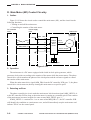
Figure 2-105 shows the circuit used to control the main motor (M1), and the circuit has the
following functions:
• Turning on and off the main motor.
• Controlling the rotation of the main motor.
DC controller
PCB
Power supply
PCB
+24V
Main motor
Clock pulse
generator
J209 J601
-4
-4
J106
J212
-17 MM–DR -8
-2
-2
-16 MM LKDT* -9
–
-1
-1
Phase
control
drive
circuit
Drive
current
M1
Hall IC output
-3
-3
Clock pulse
Reference signal
Figure 2-105
2. Operation
The main motor is a DC motor equipped with a built-in clock pulse generator, which
generates clock pulses according to the rotation of the motor while the motor rotates. The phase
control drive circuit matches the phases of the clock pulses and the reference signals to control
the rotation of the main motor.
When the main motor drive signal (MM_DR) from the DC controller PCB goes '1', the phase
control drive circuit turns on, thereby rotating the main motor at a specific speed.
3. Detecting an Error
The phase control drive circuit sends the main motor lock detection signal (MM_LKDT*)=0
to the DC controller PCB as long as the main motor is rotating at a constant speed. If the rotation
of the main motor becomes irregular for some reason, MM_LKDT* goes '1'.
If MM_LKDT*=1 continues for 1 sec or more when MM_DR is '1', the DC controller PCB
will identify the condition as a main motor error, and will immediately stop the main motor and
indicate "E010" on the control panel.
2–8
COPYRIGHT © 1998 CANON INC.
CANON NP7161/NP7160 REV.0 AUG. 1998 PRINTED IN JAPAN (IMPRIME AU JAPON)
CHAPTER 2 BASIC OPERATION
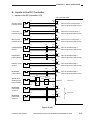
E. Inputs to the DC Controller
1. Inputs to the DC Controller (1/3)
DC controller PCB
Scanner home
position sensor
Lens home
position sensor
Mirror home
position sensor
Cassette paper
sensor
Registration
paper sensor
Delivery paper
sensor
Multifeeder
paper sensor
Waste toner
feeding screw
locked sensor
Multifeeder
paper widh
sensor 1
Multifeeder
paper widh
sensor 2
PS1
PS2
PS3
PS4
PS5
PS6
PS7
PS8
PS9
PS10
J12
-1
-2
-3
J103
-B3
-B2
-B1
J10
-1
-2
-3
-B6
-B5
-B4
J11
-1
-2
-3
-B9
-B8
-B7
J19
-3
-1
-2
J40
-3 -6
-5 -4
-4 -5
J107
-B10
-B12
-B11
J17
-1
-2
-3
J700
-3 -1
-2 -2
-1 -3
-A3
-A2
-A1
J21
-1
-2
-3
J124
-3
-2
-1
J18
-3
-1
-2
J796
-3 -9
-5 -7
-4 -8
J34 J302
-3
-1
-1
-3
-2
-2
J742
-3
-1
-2
J743
-3
-1
-2
J107
-A6
-A8
-A7
HVT
Power supply
+5V J301
PCB
J210
J212 J106
-2
-9
-15
-10
J796
-6 -6
-8 -4
-7 -5
-9
-11
-10
-3
-1
-2
J107
-A9
-A11
-A10
-A12
-A14
-A13
+5V
SCHP
When the scanner is at home position, '1'.
(When the light-blocking plate is at PS1.)
+5V
LNSHP
When the lens is at home position, '1'.
(When the light-blocking plate is at PS2.)
+5V
MRRHP When the mirror is at home position, '1'.
(When the light-blocking plate is at PS3.)
+5V
CSTPDT When PS4 has detected paper, '1'.
(When the light-blocking plate is at PS4.)
+5V
RGPDT When PS5 has detected paper, '1'.
(When the light-blocking plate is at PS5.)
+5V
EXITPD When PS6 has detected paper, '1'.
(When the light-blocking plate is at PS6.)
+5V
MLTPD0 When PS7 has detected paper, '1'.
(When the light-blocking plate is at PS7.)
TRQMLDT
See p. 4-17.
+5V
MLTPD1
+5V
See p. 5-9.
MLTPD2
Figure 2-106
COPYRIGHT © 1998 CANON INC.
CANON NP7161/NP7160 REV.0 AUG. 1998 PRINTED IN JAPAN (IMPRIME AU JAPON)
2–9
CHAPTER 2 BASIC OPERATION
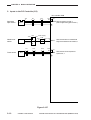
2. Inputs to the DC Controller (2/3)
DC controller PCB
Right door
open sensor
PS11
J303
-1
-3
-2
Waste toner
sensor
Toner sensor
J47
-1 -3
-3 -1
-2 -2
J48
-3
-1
-2
TS1
J15
-1 -3
-2 -2
-3 -1
J797
-5 -3
-7 -1
-6 -2
J107
-B5
-B7
-B6
HVT
Power supply
+5V J301
PCB
J210
J212 J106
-9
-1 -10
-16
J721
-3 -3
-2 -2
-1 -1
J720
-3 -1
-2 -2
-1 -3
J102
-B3
-B2
-B1
+5V
RDOPDT When the right door is closed, '1'.
(When the light-blocking plate is at PS11.)
TNFDT
When the waste toner box is identified as
being full or the waste toner box is absent,'1'.
+5V
TNEMP When the level of toner drops below a
specific level, '1'.
Figure 2-107
2–10
COPYRIGHT © 1998 CANON INC.
CANON NP7161/NP7160 REV.0 AUG. 1998 PRINTED IN JAPAN (IMPRIME AU JAPON)
CHAPTER 2 BASIC OPERATION
3. Inputs to the DC Controller (3/3)
DC controller PCB
AE sensor
Cassette size
switch PCB
SW651
SW652
SW653
SW654
J531
-4 -1
-3 -2
-2 -3
-1 -4
J103
-A4
-A3
-A2
-A1
J16
-2
-3
-4
-5
-1
J110
-4
-3
-2
-1
-5
CSTS0
CSTS1
CSTS2
CSTS3
J108
-1
+5V
+24V
AE_DATA
AE_REF
Main
thermistor
See p. 5-7.
TH1
When the temperature of the fixing roller
increases, the voltage lowers.
(analog signal)
TH1_DT
When the main thermistor is connected to
the DC controller PCB, '1'.
TH1
-2
See p. 4-21.
-3
-4
TH2
J109
-1
Sub
thermistor
TH2
When the temperature of the fixing roller
increases, the voltage lowers.
(analog signal)
CLTH
When the temperature of the drum cleaner
assembly increases, the voltage lowers.
(analog signal)
-2
TH3
Cleaner
thermistor
J23
-2 -1
-1
J112
-1
-2
-2
Figure 2-108
COPYRIGHT © 1998 CANON INC.
CANON NP7161/NP7160 REV.0 AUG. 1998 PRINTED IN JAPAN (IMPRIME AU JAPON)
2–11
CHAPTER 2 BASIC OPERATION
F. Outputs from the DC Controller
1. Outputs from the DC Controller (1/4)
DC controller PCB
Power supply PCB
Heater switch
CB2 CB1
(SW1) (accessory)
LF
J53
-2 -2
-1 -1
DS1
J204
-1
-5
J52
-2 -2
-1 -1
Cassette
heater (H4)
(accessory)
RL
J54
-2 -2
-1 -1
Mirror heater
(H3)
(accessory)
+24V
J201
-1 -1
-2 -2
Fixing heater
(H1)
DC power circuit
Cassette/Drum
heater (H2)
(accessory)
AC
driver
J208
-1
-2
-3
-4
-5
J105
-1
-2
-3
-5
-4
J212
-3
-2
-1
J106
-22
-23
-24
J212
-6
-4
J106
-19
-21
See p.6-5.
HEAT_ERR
HEAT_DR
J212
-21
-17
-19
J106
-4
-8
-6
See p.4-3.
J212
-14
-13
-12
-11
-10
J106
-11
-12
-13
-14
-15
+24V
GND
+5VU
+5VR
GND
See p.7-4.
ZRCRSS
5V_ON
AC_24V_ON
RL1
Thermo switch
(TSW1)
Lamp
regulator
PCB
J501 J51
-1 -1 -1
-3 -3 -3
To HVT
(J307)
J55
-1 -1
-3 -3
Scannimg lamp (LA1)
Thermal fuse (FU1)
-4
-6
J503-1
-2
-3
-4
-5
To RL1
J203
-1
-3
J211-5
-4
-3
-2
-1
J307
-1
-3
+24V
HVT
J301
-10
-3
-4
-5
-6
-7
-8
-9
J210
-1
-8
-7
-6
-5
-4
-3
-2
+5V
+24V
+5V
LMPDR
LMP_PWM
LMPDT
See p.4-6.
DV_DC_CNT
DV_DC_DR
DV_AC_CNT
DV_AC_DR
HVT_DR
Figure 2-109
2–12
COPYRIGHT © 1998 CANON INC.
CANON NP7161/NP7160 REV.0 AUG. 1998 PRINTED IN JAPAN (IMPRIME AU JAPON)
CHAPTER 2 BASIC OPERATION
2. Outputs from the DC Controller (2/4)
Main motor
Scanner motor
Lens motor
Mirror motor
M1
M2
M3
M4
J601
-4
-1
-2
-3
J209
-4
-1
-2
-3
Power supply
PCB
+24V
DC controller PCB
J212
-9
-8
J106
-16
-17
MM_LKDT*
MM_DR
See p. 2-8.
J37
-3
-1
-4
-2
-5
J104
-A3
-A5
-A2
-A4
-A1
SC_COM
SC_A
SC_A*
SC_B
SC_B*
See p. 3-7.
J38
-3 -3
-1 -5
-2 -4
-4 -2
-5 -1
J101
-A3
-A1
-A2
-A4
-A5
LNS_COM
LNS_A
LNS_A*
LNS_B
LNS_B*
See p. 3-4.
J39
-3 -3
-1 -5
-2 -4
-4 -2
-5 -1
J103
-A7
-A5
-A6
-A8
-A9
MMR_COM
MMR_A
MMR_A*
MMR_B
MMR_B*
See p. 3-4.
Figure 2-110
COPYRIGHT © 1998 CANON INC.
CANON NP7161/NP7160 REV.0 AUG. 1998 PRINTED IN JAPAN (IMPRIME AU JAPON)
2–13
CHAPTER 2 BASIC OPERATION
3. Outputs from the DC Controller (3/4)
DC controller PCB
FM1
Cooling fan 1
FM2
Exhaust fan 1
J14
-1 -3
-2 -2
-3 -1
J104
-B1
-B2
-B3
SCFAN_DR
SCFAN_DT*
J20
-1 -3
-2 -2
-3 -1
-B10
-B11
-B12
EXFAN1_DR
EXFAN1_DT*
See p. 7-2.
FM4
Exhaust fan 2
FM5
Sorter kit fan
(accesory)
J22
-1 -3
-2 -2
-3 -1
-B7
-B8
-B9
EXFAN0_DR
EXFAN0_DT*
J24
-1 -3
-2 -2
-3 -1
J123
-1
-2
-3
STFAN0_DR
STFAN0_DT*
J29
-2 -1
Registration
roller clutch
CL1
-1
-2
J35
-2
Feed roller
clutch
CL2
-1
J31
-2
Multifeed
roller clutch
CL3
-1
Power supply
PCB
+24V
J211
-7
J212
-22
-6
J106
-3
J796
-1 -11
J107
-A4
-10
-A5
-2
J797
-1 -7
-B1
-6
-B2
-2
RG_CL*
When '0', CL1 turns on.
+24V
FEED_CL*
When '0', CL2 turns on.
+24V
MLT_CL*
When '0', CL3 turns on.
Figure 2-111
2–14
COPYRIGHT © 1998 CANON INC.
CANON NP7161/NP7160 REV.0 AUG. 1998 PRINTED IN JAPAN (IMPRIME AU JAPON)
CHAPTER 2 BASIC OPERATION
4. Outputs from the DC Controller (4/4)
DC controller PCB
J36
-2
Pick-up
solenoid
SL1
J40
-1 -8
-1
Total counter
Accessory
counter
(accessory)
SL2
CNT1
CNT2
LA2
Pre-exposure
lamp
-1
Blank exposure
lamp
-7
-B9
PU_SL*
J797
-3 -5
-B3
-4
-B4
-4
J33
-2 -1
J102
-A11
-2
-A10
J32
-3 -1
-A13
-1
-3
-A12
J501
-1 -2
J104
-A6
-1
-2
LA3
+24V
-2
J30
-2
Multifeed
solenoid
J107
-B8
-1
J551
-1 -10
-3 -8
-5 -6
-6 -5
-7 -4
-8 -3
-9 -2
-10 -1
-2 -9
-4 -7
-A7
J101
-A6
-A8
-A10
-A11
-A12
-A13
-A14
-A15
-A7
-A9
When '0', SL1 turns on.
+24V
MLT_SL*
When '0', SL3 turns on.
+24V
TCNT_DR* When '0', CNT1 turns on.
+24V
OPCNT_DR* When '0', CNT2 turns on.
+24V
PREXP_DR* When '0', LA2 turns on.
+24V
+5V
BLK_SD
BLK_SCK
BLK_LCK
BLK_DEN*
BLK_CNDR*
BLK_PW
See p. 4-12.
Figure 2-112
COPYRIGHT © 1998 CANON INC.
CANON NP7161/NP7160 REV.0 AUG. 1998 PRINTED IN JAPAN (IMPRIME AU JAPON)
2–15
CHAPTER 2 BASIC OPERATION
G. Inputs to and Outputs from Accessories (1/1)
DC controller PCB
J754
-4
-2
-3
-1
To ADF
J750
-4 -4
-2 -2
-3 -3
-1 -1
J752
-9 -1 -1
-10 -2 -2
-11 -3 -3
-12 -4 -4
J755
-9
-10
-11
-12
To Sorter
-4
-2
-3
-1
J753
-1 -1
-2 -2
-3 -3
-4 -4
J120
-1
-3
-2
-4
Accesory power
J955
supply PCB
-1 +24V1
-2 +24V2
-3 GND1
-4 GND2 J951
-1
-3
J952
-1 +24V1
-2 +24V2
-3 GND1
-4 GND2
J751
-4 -4
-2 -2
-3 -3
-1 -1
DF-TXD
DF-RXD
See the ADF Service Manual.
ST-TXD
ST-RXD
See the Sorter Service Manual.
Power supply
PCB
J206
-1 AC
-4 AC
J120
-5
-7
-6
-8
J701
To Cassette
Feeding
Module-C1
To Control
Card IV N
To Remote
Diagnostic
Device II
J122
J790
-2
-4
-3
-1
J104
-A9
-A11
-A10
-A8
J722
-7
-2
-5
-4
-3
-8
-6
-1
J121
-2
-7
-4
-5
-6
-1
-3
-8
+5V
CCD*
CCDT*
When '0', control card turns on.
When '0', the card is detected.
+24V
+5V
AS_TXD See the Remote Diagnostic
AS_RXD Device II Service Manual.
AS_CNTP
Figure 2-113
2–16
COPYRIGHT © 1998 CANON INC.
CANON NP7161/NP7160 REV.0 AUG. 1998 PRINTED IN JAPAN (IMPRIME AU JAPON)
CHAPTER 3
EXPOSURE SYSTEM
This chapter discusses the principles of operation used for the copier's lens drive unit and scanner drive
unit. It also explains the timing at which these drive units are operated, and shows how they may be
disassembled/assembled and adjusted.
I.
OUTLINE OF OPERATION ..................... 3-1
A. Changing the Reproduction Ratio ...... 3-1
II. LENS DRIVE SYSTEM ............................ 3-3
A. Driving the Lens ................................. 3-3
III. SCANNER DRIVE SYSTEM .................... 3-6
A. Outline ................................................ 3-6
B. Scanner Motor Control Circuit ........... 3-7
C. Relationship between Scanner Sensor
and Signals ......................................... 3-7
COPYRIGHT © 1998 CANON INC.
D. Basic Sequence of Operations
(scanner) ........................................... 3-8
E. Scanner Movement in
Page Separation Mode ...................... 3-9
IV. OTHERS ................................................. 3-10
A. Detecting the Original Size .............. 3-10
V. DISASSEMBLY/ASSEMBLY ................. 3-11
A. Scanner Drive Assembly .................. 3-12
B. Lens Drive Assembly ....................... 3-18
CANON NP7161/NP7160 REV.0 AUG. 1998 PRINTED IN JAPAN (IMPRIME AU JAPON)
CHAPTER 3 EXPOSURE SYSTEM
I.
OUTLINE OF OPERATION
A. Changing the Reproduction Ratio
The reproduction ratio in the axial direction of the photosensitive drum is varied by the lens
drive system and the mirror drive system, and that in the peripheral direction of the
photosensitive drum is changed by the scanner drive system.
The lens drive system uses a lens array and, as shown in Figure 3-101, the lens position and
the optical length are varied to change the reproduction ratio in the axial direction of the
photosensitive drum.
The optical length is varied, as shown in Figure 3-102, by changing the location of the No. 4/
No. 5 mirror unit.
The scanner drive system moves the No. 1 mirror relatively faster (in Reduce) or slower (in
Enlarge) than the photosensitive drum (peripheral speed) to change the reproduction ratio in the
peripheral direction of the photosensitive drum.
Note:
1. In Direct, the speed of the No. 1 mirror is made identical to the peripheral speed of the
photosensitive drum.
2. In both Reduce and Enlarge, the optical length is longer than in Direct.
Direct
F'
F
Optical length
L1
Reduce
F'
F
Optical length
L2
Enlarge
F'
F
Optical length
L3
Figure 3-101
COPYRIGHT © 1998 CANON INC.
CANON NP7161/NP7160 REV.0 AUG. 1998 PRINTED IN JAPAN (IMPRIME AU JAPON)
3–1
CHAPTER 3 EXPOSURE SYSTEM
Copyboard glass
Enlarge/reduce
Enlarge Reduse
Lens
No.4/No.5 mirror unit
Photosensitive
drum
Figure 3-102
3–2
COPYRIGHT © 1998 CANON INC.
CANON NP7161/NP7160 REV.0 AUG. 1998 PRINTED IN JAPAN (IMPRIME AU JAPON)
CHAPTER 3 EXPOSURE SYSTEM
II. LENS DRIVE SYSTEM
A. Driving the Lens
1. Outline
The lens is driven by the lens motor (M3) and the mirror motor (M4).
As shown in Figure 3-201, when the lens motor rotates in normal direction, the lens moves in
the direction of Enlarge by the drive coming through gears and drive belt.
At this time, the No. 4/No. 5 mirror unit moves by the drive coming from the mirror motor in
the direction of Enlarge/Reduce according to how much the lens moves (reproduction ratio),
thereby varying the optical length.
Mirror motor (M4)
Mirror motor drive command
Mirror home position
sensor (PS3)
Mirror home position
detection signal (MRRHP)
Enlarge/Reduce
Direct
DC
controller
PCB
Enlarge
Reduce
Lens home position
sensor (PS2)
Lens
motor (M3)
Lens
motor
drive command
CW
CCW
Lens home position detection signal (LNSHP)
Figure 3-201
COPYRIGHT © 1998 CANON INC.
CANON NP7161/NP7160 REV.0 AUG. 1998 PRINTED IN JAPAN (IMPRIME AU JAPON)
3–3
CHAPTER 3 EXPOSURE SYSTEM
2. Motor Control Circuit
The lens motor (M3) and the mirror motor (M4) are 4-phase stepping motors, and are
controlled by the motor drive power supply signal (COM) and four drive pulse signals (A, B, A*,
B*) generated by the DC controller PCB.
The direction of rotation of the motor is switched by changing the timing at which the four
drive pulse signals (A, B, A*, B*) are generated.
The motor drive power supply signal (COM) is used to supply +24 V when rotating each
motor. It is used to provide +5 V when the motors are at rest, thereby ensuring that the lens and
the No. 4/No. 5 mirror unit remain still against vibration.
DC controller PCB
+24V
Lens
motor
+5V drive
circuit
IC119
(CPU)
+24V
Mirror
motor
+5V drive
circuit
J101
-A3
-A1
-A2
-A4
-A5
LNS_COM
LNS_A
LNS_A*
LNS_B
LNS_B*
J38
-3 -3
-5 -1
-4 -2
-2 -4
-1 -5
J103
-A7
-A5
-A6
-A8
-A9
MMR_COM
MMR_A
MMR_A*
MMR_B
MMR_B*
J39
-3 -3
-5 -1
-4 -2
-2 -4
-1 -5
M3
Lens motor
M4
Mirror motor
Figure 3-202
3–4
COPYRIGHT © 1998 CANON INC.
CANON NP7161/NP7160 REV.0 AUG. 1998 PRINTED IN JAPAN (IMPRIME AU JAPON)
CHAPTER 3 EXPOSURE SYSTEM
3. Moving the Lens
The lens and the No. 4/ No. 5 mirror unit are moved with reference to the points at which
the lens home position sensor (PS2) and the mirror home position sensor (PS3) turn on.
The number of pulses (indicating the positions of the lens and the No. 4/ No. 5 mirror)
applied to each motor is stored in memory by the microprocessor on the DC controller PCB.
When the lens and the No. 4/ No. 5 mirror unit need to be moved, the appropriate number of
pulses that suits the selected reproduction ratio is generated.
When the lens and the No. 4/ No. 5 mirror unit need to be moved in the direction of
reduction (e.g., from Direct to Reduce), each motor is rotated in reverse first to move the lens
and the No. 4/ No. 5 mirror unit past the position found for the selected reproduction ratio.
Thereafter, the motors are rotated in normal direction so as to move the lens and the No. 4/ No. 5
mirror unit to their appropriate positions. Ending the motor rotation when they are rotating in
normal direction ensures accurate positioning of the lens and the No. 4/ No. 5 mirror unit.
Power switch
ON
Sequence
Reduce
key ON
WMUP
Enlarge
key ON
WMUPR
STBY
*
Scanner motor (M2)
Start key
ON
*
INTR
*
*
Lens motor (M3)
Mirror motor (M4)
Scanner home position
sensor (PS1)
Lens home position
sensor (PS2)
Mirror home position
sensor (PS3)
: Motor CW/sensor ON
: Motor CCW
*Length varies depending on the selected reproduction ratio.
Figure 3-203
The copier enables adjustment of the lens or the No. 4/No. 5 mirror unit home position in
service mode.
COPYRIGHT © 1998 CANON INC.
CANON NP7161/NP7160 REV.0 AUG. 1998 PRINTED IN JAPAN (IMPRIME AU JAPON)
3–5
CHAPTER 3 EXPOSURE SYSTEM
III. SCANNER DRIVE SYSTEM
A. Outline
The scanner is driven by the scanner motor (M2)
As shown in Figure 3-301, when the scanner motor rotates in reverse direction, the scanner
moves forward by the drive coming through the gears, drive belt, and cable. The scanner motor is
rotated in the opposite direction to move the scanner in reverse.
The speed of rotation of the scanner motor when the scanner is moved forward is varied
according to the selected reproduction ratio. The speed when the scanner is moved in reverse,
however, is the same regardless of the selected reproduction ratio—it is about 2.5 times the speed
used in Direct when the scanner is moved forward.
The distance over which the scanner is moved varies according to the length of copy paper
and the selected reproduction ratio.
Scanner
motor (M2)
CW
Scanner motor
drive command
Scanner home position detection signal
(SCHP)
DC controller PCB
CCW
Scanner home
position sensor
(PS1)
Foward
Reverse
Figure 3-301
3–6
COPYRIGHT © 1998 CANON INC.
CANON NP7161/NP7160 REV.0 AUG. 1998 PRINTED IN JAPAN (IMPRIME AU JAPON)
CHAPTER 3 EXPOSURE SYSTEM
B. Scanner Motor Control Circuit
The scanner motor (M2) is a 4-phase stepping motor, and is controlled by four pulse signals
(SC_A, SC_B, SC_A*, SC_B*) generated by the DC controller PCB.
The scanner motor is turned on/off and its direction of rotation are controlled by changing
the timing at which these four pulse signals are generated. The speed of rotation, on the other
hand, is controlled by switching the current supplied to the scanner motor.
DC controller PCB
+24V
IC119
(CPU)
J104
-A3
-A5
-A2
-A4
-A1
SC_COM
SC_A
SC_A*
SC_B
SC_B*
J37
-3
-1
-4
-2
-5
M2
Scanner
motor
Scanner
motor
control
circuit
(IC117)
Figure 3-302
C. Relationship between Scanner Sensor and Signals
Sensor
Signal
Scanner
Foward
Scanner
home position
sensor (PS1)
Description
Reverse
• The scanner is at home position.
SCHP
• The scanner has reached home position.
Table 3-301
COPYRIGHT © 1998 CANON INC.
CANON NP7161/NP7160 REV.0 AUG. 1998 PRINTED IN JAPAN (IMPRIME AU JAPON)
3–7
CHAPTER 3 EXPOSURE SYSTEM
D. Basic Sequence of Operations (scanner)
The scanner is moved forward over a distance determined by the microprocessor based on
the selected paper size, reproduction ratio, and copying mode.
The microprocessor computes the dimensions of the original in reference to the selected
paper size and reproduction ration to determine how much the scanner should be moved forward.
Power switch
ON
Sequence
Start key
ON
WMUP
Scanner motor (M2)
INTR
AER
SCFW
SCRV
FW
RV
SCFW
SCRV LSTR STBY
Scanner home position
sensor (PS1)
Scanning lamp (LA1)
Figure 3-303
3–8
COPYRIGHT © 1998 CANON INC.
CANON NP7161/NP7160 REV.0 AUG. 1998 PRINTED IN JAPAN (IMPRIME AU JAPON)
CHAPTER 3 EXPOSURE SYSTEM
E. Scanner Movement in Page Separation Mode
Start key
ON
Sequence
Scanner motor (M2)
Scanner home position
sensor (PS1)
Leading edge of
1st page (original)
INTR
AER
SCFW1
Leading edge of Leading edge of
1st page (original) 2nd page (original)
SCRV2
SCFW2
I
II
FW
18mm
SCRV2
LSTR
III
RV
18mm
Scanning lamp (LA1)
Figure 3-304
I, II, and III shown in Figure 3-304 are controlled by the microprocessor on the DC controller
PCB with reference to the wait position of the scanner.
The length from wait position to the leading edge is 18 mm. The microprocessor determines
how much the scanner should be moved (including the distance to the leading edge) according to
the selected reproduction ratio and the original size or cassette size.
I, II : The distance over which the scanner is moved forward for the 1st page is determined
according to the selected reproduction ratio and the original size or cassette size.
III : The distance over which the scanner is moved forward is determined as follows: the
microprocessor divides the detected original size by 2, and assumes the result of the
division to be the middle of the original (assuming the middle to be the leading edge
of the 2nd page).
If original size detection is not performed, the microprocessor uses the cassette size when
determining the distance over which the scanner should be moved.
Reference:
The copier does not require paper size registration for the multifeeder. For this reason, it
cancels Page Separate mode if the Start key is pressed after selecting the multifeeder.
COPYRIGHT © 1998 CANON INC.
CANON NP7161/NP7160 REV.0 AUG. 1998 PRINTED IN JAPAN (IMPRIME AU JAPON)
3–9
CHAPTER 3 EXPOSURE SYSTEM
IV. OTHERS
A. Detecting the Original Size
1. Outline
The NP7161 is equipped with auto paper selection and auto reproduction selection
functions, and these functions require identification of the size of originals.
To enable identification, the copier uses the following:
• original size detection by the ADF (NP7161)
2. Detection of the Original Size by the ADF
The size of originals is detected when originals are fed by the ADF. (For details, see the
ADF Service Manual.)
3–10
COPYRIGHT © 1998 CANON INC.
CANON NP7161/NP7160 REV.0 AUG. 1998 PRINTED IN JAPAN (IMPRIME AU JAPON)
CHAPTER 3 EXPOSURE SYSTEM
V. DISASSEMBLY/ASSEMBLY
The copier may be disassembled and assembled as shown here. Pay attention to the copier's
mechanical characteristics along with the steps for disassembly/assembly.
Important:
1. Turn off the power and disconnect the power plug to ensure safety whenever disassembling/
assembling the copier.
2. Unless otherwise noted, assemble the parts by reversing the steps used to disassemble them.
3. Identify the screws by type (length, diameter) to avoid use in the wrong location.
4. Use a washer where needed. The mounting screws used for the grounding wire and varistor
come with a washer to ensure electric continuity. Do not forget to use these washers.
5. As a rule, do not operate the copier with any of its parts removed.
COPYRIGHT © 1998 CANON INC.
CANON NP7161/NP7160 REV.0 AUG. 1998 PRINTED IN JAPAN (IMPRIME AU JAPON)
3–11
CHAPTER 3 EXPOSURE SYSTEM
A. Scanner Drive Assembly
1. Removing the Scanner Motor
1) Remove the rear upper cover.
2) Disconnect the connector [1] and the two
mounting screws [2].
[2]
[1]
Figure 3-501
3) Slide the scanner motor [3] to the right to
detach from the motor mount; then, move
it to the cut-off [A] to remove.
[A]
[3]
Figure 3-502
3–12
COPYRIGHT © 1998 CANON INC.
CANON NP7161/NP7160 REV.0 AUG. 1998 PRINTED IN JAPAN (IMPRIME AU JAPON)
CHAPTER 3 EXPOSURE SYSTEM
2. Removing the Scanner Drive Cable
1) In standby state, press the Reduce key so
that the lens and the No.4 /No.5 mirror
unit move to 70% reproduction position.
2) Turn off the power switch, and disconnect
the power plug.
Caution:
Whenever you need to perform
disassembly/assembly work, be sure to
turn it off and disconnect its power
plug.
3) Remove the lens hood.
(See p. 3-20.)
4) Remove the scanner motor.
(See p. 3-12.)
5) Remove the control panel
(See p. 7-13.)
6) Remove the upper left cover.
(See p.7-11.)
7) Remove the upper right cover.
(See p.7-10.)
8) Detach the lock support [1] from the
connector base [2].
9) Remove the two mounting screws [3], and
pull out the connector base [2].
[3]
[1]
[2]
Figure 3-503
COPYRIGHT © 1998 CANON INC.
CANON NP7161/NP7160 REV.0 AUG. 1998 PRINTED IN JAPAN (IMPRIME AU JAPON)
3–13
CHAPTER 3 EXPOSURE SYSTEM
[6]
10) Remove the three mounting screws [4],
and detach the motor base [5] and the
timing belt [6].
[4]
[5]
Caution:
When detaching the motor base, be
sure to mark its position at its four
corners. When mounting it, on the
other hand, be sure to refer to these
markings.
Figure 3-504
11) Holding the bent [A], pull the scanner
until it reaches the hole [B]; then, remove
the two screws [7].
[7]
[7]
[B]
[A]
Figure 3-505
12) Remove the two tension springs [8], and
detach the scanner drive cable (front) [9]
and the scanner drive cable (rear) [10].
[9]
[8]
[10]
Figure 3-506
3–14
COPYRIGHT © 1998 CANON INC.
CANON NP7161/NP7160 REV.0 AUG. 1998 PRINTED IN JAPAN (IMPRIME AU JAPON)
CHAPTER 3 EXPOSURE SYSTEM
3. Routing the Scanner Drive Cable
Route the scanner drive cable following the sequence indicated in Figure 3-507, i.e., [1]
through [7].
Be sure to adjust the mirror position and the tension as indicated later after routing the
scanner drive cable.
[3]
[4]
Secure temporarily.
[1]
Steel
ball
Wind 11 times.
[2]
[6]
[5]
[2]
[7]
[6]
Figure 3-507
COPYRIGHT © 1998 CANON INC.
CANON NP7161/NP7160 REV.0 AUG. 1998 PRINTED IN JAPAN (IMPRIME AU JAPON)
3–15
CHAPTER 3 EXPOSURE SYSTEM
4. Adjusting the Position of the Mirror
Be sure to adjust the position of the mirror
as follows after you have mounted the
scanner drive cable.
1) Keep the mirror positioning tool nearby.
Arrange the mirror positioning tool (FY93009-050) as shown to adapt it to the
copier.
Figure 3-508a (Rear)
Figure 3-508b (Front)
2) Fit the mirror positioning tool [1] to the
No. 1 mirror base and the No. 2 mirror
base (both front and rear).
3) Tighten the mounting screw [2] on the
cable metal fixing of the No. 1 mirror
base (both front and rear).
[1]
[2]
Figure 3-509a (Rear)
[2]
[1]
Figure 3-509b (Front)
4) Detach the mirror positioning tool.
3–16
COPYRIGHT © 1998 CANON INC.
CANON NP7161/NP7160 REV.0 AUG. 1998 PRINTED IN JAPAN (IMPRIME AU JAPON)
CHAPTER 3 EXPOSURE SYSTEM
5. Adjusting the Tension of the
Scanner Drive Cable
Be sure to adjust the tension as follows
after routing the scanner drive cable.
1) Move the scanner to home position.
2) Pull the center of the scanner drive cable
with a spring gauge about 10 mm. At this
time, adjust the position [A] of the tension
spring [1] so that the reading of the spring
gauge is 95 ±15 g.
[A]
[1]
[1]
Scanner
10mm
10mm
Figure 3-510
COPYRIGHT © 1998 CANON INC.
Figure 3-511
CANON NP7161/NP7160 REV.0 AUG. 1998 PRINTED IN JAPAN (IMPRIME AU JAPON)
3–17
CHAPTER 3 EXPOSURE SYSTEM
B. Lens Drive Assembly
1. Removing the Lens Drive Motor
1) Remove the copyboard glass. (See p.7-14)
2) Holding the bend [A], slide out the
scanner as far as the cut-off [B].
[B]
[A]
[B]
Figure 3-512
3) Remove the inside cover and the delivery
upper cover. (See p.7-11)
4) Disconnect the connector [1].
[1]
Figure 3-513
5) Remove the two screws [2], and remove
the lens motor [3].
[2]
[3]
[2]
Figure 3-514
3–18
COPYRIGHT © 1998 CANON INC.
CANON NP7161/NP7160 REV.0 AUG. 1998 PRINTED IN JAPAN (IMPRIME AU JAPON)
CHAPTER 3 EXPOSURE SYSTEM
2. Removing the Mirror Motor
1) While the copier is in standby state, press
the Enlarge key to move the lens and the
No. 4/No. 5 mirror unit to 200% position.
2) Turn off the power switch, and disconnect
the power plug.
Caution:
Whenever you are disassembling/
assembling the copier, be sure to turn
off the power switch and disconnect
the power plug.
3) Remove the copyboard glass. (See p.7-14)
4) Remove the developing assembly.
(See p.4-37)
5) Remove the drum unit. (See p.4-28)
6) Remove the upper right cover. (See p.710)
7) Disconnect the connector [1].
[1]
Figure 3-515
COPYRIGHT © 1998 CANON INC.
CANON NP7161/NP7160 REV.0 AUG. 1998 PRINTED IN JAPAN (IMPRIME AU JAPON)
3–19
CHAPTER 3 EXPOSURE SYSTEM
8) Remove the two mounting screws [2], and
remove the lens hood [3].
[2]
Caution:
When mounting the lens hood, take
care not to trap the wire.
[3]
[2]
Figure 3-516
9) Remove the two mounting screws [4], and
remove the mirror motor [5].
[5]
[4]
Figure 3-517
3–20
COPYRIGHT © 1998 CANON INC.
CANON NP7161/NP7160 REV.0 AUG. 1998 PRINTED IN JAPAN (IMPRIME AU JAPON)
CHAPTER 4
IMAGE FORMATION SYSTEM
This chapter discusses the principles of how images are formed. It also explains the timing at which the
various units involved in image formation are operated, and shows how they may be disassembled/
assembled and adjusted.
I.
OUTLINE OF THE PROCESSES ............ 4-1
A. Outline ................................................ 4-1
B. Basic Sequence of Operations
(image formation system) .................. 4-2
C. Controlling the Intensity of the
Scanning Lamp .................................. 4-3
D. Controlling the Primary/Transfer Bias .. 4-6
E. Controlling the Developing/Separation
Static Eliminator Bias ......................... 4-7
F. Controlling the Blank Exposure Lamp ... 4-12
II. DEVELOPING ASSEMBLY/DRUM
CLEANER ASSEMBLY .......................... 4-14
A. Outline .............................................. 4-14
B. Detecting and Controlling
the Level of Toner ............................ 4-16
COPYRIGHT © 1998 CANON INC.
C. Monitoring the Waste Toner
Feeding Screw ................................. 4-17
D. Monitoring the Waste Toner Box ..... 4-18
E. Control by the Cleaner Thermistor ... 4-20
F. Auto Density Adjustment (AE) ......... 4-21
III. DISASSEMBLY/ASSEMBLY ................. 4-23
A. Scanning Lamp Assembly ............... 4-24
B. Exposure Assembly ......................... 4-26
C. Drum Unit ......................................... 4-28
D. Primary Charging Assembly ............ 4-30
E. Transfer Charging Assembly ........... 4-31
F. Charging Wire .................................. 4-32
G. Developing Assembly ....................... 4-37
CANON NP7161/NP7160 REV.0 AUG. 1998 PRINTED IN JAPAN (IMPRIME AU JAPON)
CHAPTER 4 IMAGE FORMATION SYSTEM
I.
OUTLINE OF THE PROCESSES
A. Outline
Figure 4-101 shows the copier's basic construction in reference to image formation. Image
formation consists of the following functions:
• Scanning lamp control
• Primary corona current control
• Transfer control current control
• Separation static eliminator bias control
• Developing bias control
• Blank exposure lamp control
Copy board glass
Lamp regulator
PCB
No.2
mirror
Lens
Scanning lamp (LA1)
No.4 mirror
AE sensor
AE sensor output signal (AE_DATA)
No.3
mirror
No.1
mirror
Preexposure
lamp (LA2)
No.6
Blank
mirror
exposure
lamp (LA3)
No.5 mirror
Developing
assembly
Primary
corona
assembly
Static
eliminator
Transfer
corona
assembly
HVT
DC controller PCB
Figure 4-101
COPYRIGHT © 1998 CANON INC.
CANON NP7161/NP7160 REV.0 AUG. 1998 PRINTED IN JAPAN (IMPRIME AU JAPON)
4–1
CHAPTER 4 IMAGE FORMATION SYSTEM
B. Basic Sequence of Operations (image formation system)
Start key
ON
Sequence
STBY
INTR
AER
SCFW
SCRV
SCFW
SCRV LSTR
STBY
Main motor (M1)
Primary charging assembly
Developing DC bias
Voltage control
Developing AC bias
Transfer charging assembly
Static eliminator
Pre-exposure lamp (LA2)
Blank exposure lamp (LA3)
Partial activation
Scanning lamp (LA1)
Figure 4-102
4–2
COPYRIGHT © 1998 CANON INC.
CANON NP7161/NP7160 REV.0 AUG. 1998 PRINTED IN JAPAN (IMPRIME AU JAPON)
CHAPTER 4 IMAGE FORMATION SYSTEM
C. Controlling the Intensity of the Scanning Lamp
1. Outline
Figure 4-103 shows the circuit used to control the intensity of the scanning lamp, and the
circuit has the following functions:
1. Turning on/off the scanning lamp
2. Controlling the intensity of the scanning lamp
• controlling the light to a specific intensity against fluctuations in power supply voltage
DC controller
PCB
Power supply
PCB
J203
-1
IC119
(CPU)
Lamp regulator
PCB
J501
-4
RL
-3
-6
J501
-1
Drive
circuit
-3
Thermal fuse
(FU1)
+24V
Error
detection
circuit
Lamp
ON
detection
Scanning lamp
(LA1)
J106
J106
-24 AC_24V_ON -24
J212
J106
LMPDR
-21
-4
LMP_PWM -17
-8
LMPDT
-19
-6
+5V
J211
-5
-4
-3
-2
-1
J503
-1
-2
-3
-4
-5
Control
circuit
IC113
Figure 4-103
COPYRIGHT © 1998 CANON INC.
CANON NP7161/NP7160 REV.0 AUG. 1998 PRINTED IN JAPAN (IMPRIME AU JAPON)
4–3
CHAPTER 4 IMAGE FORMATION SYSTEM
2. Operation
a. Turning On/Off the Scanning Lamp
When the scanning lamp drive signal (LMPDR) is ‘0’, the output of the control circuit goes
‘0’, keeping the drive circuit from turning on and therefore not supplying the scanning lamp
(LA1) with AC power.
When LMPDR is ‘1’, the output of the control circuit will be ‘1’, turning on the drive circuit
and thereby supplying the scanning lamp (LA1) with AC power.
b. Controlling the Intensity of the Scanning Lamp
The intensity of the scanning lamp is increased/decreased by controlling the voltage of the
power supplied to the scanning lamp according to the level of the pulse width modulation signal
(LMP_PWM) from the DC controller PCB.
LMP_PWM varies the pulse duty between 10% and 90% to suit the selected reproduction
ratio so as to control the voltage of the power supplied to the scanning lamp as shown in Table 4101 (actual value).
t
T
Pulse duty (%) = t / T x 100
Figure 4-104
Power supply
Pulse duty
DC output
120V
10 to 90%
45 to 80V
230V
10 to 90%
98 to 175V
Table 4-101
c. Detecting the Activation of the Scanning Lamp
The control circuit on the lamp regulator PCB generates the drive detection signal
(LMPDT) at all times while the scanning lamp remains on, and sends the signal to the lamp
activation detection IC (IC113) on the DC controller PCB.
If the scanning lamp remains on for 21 sec or more, the error detection circuit will cause the
AC_24V_ON signal to go ‘0’, thereby cutting the supply of AC power to the lamp regulator
PCB.
If an error is identified in the scanning lamp, the DC controller PCB will cut the AC power
to the lamp regulator and, at the same time, will indicate ‘E220’ on the control panel.
4–4
COPYRIGHT © 1998 CANON INC.
CANON NP7161/NP7160 REV.0 AUG. 1998 PRINTED IN JAPAN (IMPRIME AU JAPON)
CHAPTER 4 IMAGE FORMATION SYSTEM
3. Protection Mechanisms
To prevent malfunction of the scanning lamp (LA1), the copier is equipped with a fuse
(FU1).
If the temperature around the scanning lamp increases abnormally (about 141°C or more)
because of a short circuit or the like, the thermal fuse (FU1) will melt to cut the power to the
scanning lamp.
COPYRIGHT © 1998 CANON INC.
CANON NP7161/NP7160 REV.0 AUG. 1998 PRINTED IN JAPAN (IMPRIME AU JAPON)
4–5
CHAPTER 4 IMAGE FORMATION SYSTEM
D. Controlling the Primary/Transfer Bias
1. Outline
Figure 4-108 shows the circuit used to control the primary/transfer bias, and the circuit has
the following functions:
1. Turning on/off the primary/transfer bias
2. Controlling the grid bias to a specific voltage
3. Controlling the primary shield current to a specific current
To eliminate the effects of changes in the environment to corona charging, the output to the
primary charging assembly is controlled by controlling the shield current to a specific current.
The primary/transfer bias is turned on/off using the following signal from the DC controller
PCB.
• HVT_DR (HVT drive command)
DC controller
PCB
Power supply
PCB
J106 J212
-15
-10
HVT_DR
J210
-3
HVT
J301
-8
Transformer
Oscillation
control circuit
Pr
Short circuit/no load
detection circuit
Tr
Reference
voltage circuit
Current
detection circuit
Figure 4-108
2. Turning On/Off the Primary/Transfer Bias
a. When the primary/transfer bias is off,
• When HVT_DR is 0,
Oscillation control circuit turns off
Primary/transfer high-voltage transformer turns off
b. When the primary/transfer bias is on,
• When HVT_DR is 1,
Oscillation control circuit turns on
Primary/transfer high-voltage transformer turns on
4–6
COPYRIGHT © 1998 CANON INC.
CANON NP7161/NP7160 REV.0 AUG. 1998 PRINTED IN JAPAN (IMPRIME AU JAPON)
CHAPTER 4 IMAGE FORMATION SYSTEM
E. Controlling the Developing/Separation Static Eliminator Bias
1. Outline
Figure 4-109 shows the circuit used to control the developing/static eliminating bias, and the
circuit has the following functions:
1. Turning on/off the developing DC bias
2. Turning on/off the developing AC bias/separation static eliminator bias
3. Controlling the developing DC bias to a specific voltage to suit copy density
The above control mechanisms are driven by the following signals:
• DV_AC_DR (developing AC bias drive signal)
• DV_AC_CNT (developing AC bias control signal)
• DV_DC_DR (developing DC bias drive signal)
• DV_DC_CNT (developing DC bias control signal)
Power supply
PCB
DC controller
PCB
J106
-13
J212
-12
J210
-5
HVT
J301
-6
DV_AC_CNT
-14
-11
-4
-7
DV_AC_DR
Transformer
Frequency
switching circuit
Control
circuit
Oscillation
circuit
Amplifier
circuit
Short circuit
detection circuit
Reference
voltage circuit
-12
-13
-6
-5
-11
-14
-7
-4
DV_DC_DR
DV_DC_CNT
Voltage
detection circuit
Transformer
Dev
Sp
Oscillation
control circuit
Voltage
detection circuit
Short circuit
detection circuit
Transformer
Oscillation
control circuit
Voltage
detection circuit
Short circuit
detection circuit
Figure 4-109
COPYRIGHT © 1998 CANON INC.
CANON NP7161/NP7160 REV.0 AUG. 1998 PRINTED IN JAPAN (IMPRIME AU JAPON)
4–7
CHAPTER 4 IMAGE FORMATION SYSTEM
2. Turning On/Off the Developing DC Bias
a. Turning On/Off the Developing DC Bias
• When DV_DC_DR is 0,
Oscillation control circuit turns off
DC high-voltage transformer turns off
The above condition deprives the developing cylinder of developing DC bias.
• When DV_DC_DR is 1,
Oscillation control circuit turns on
DC high-voltage transformer turns on
The above condition supplies the developing cylinder with developing DC bias.
b. Control Timing
As shown in Figure 4-110, a specific developing DC bias (-300 V) is applied to the
developing cylinder to prevent adhesion of excess toner to the photosensitive drum when copies
are not being made.
Start key
ON
Sequence
STBY
Developing DC bias
INTR
AER
SCFW
SCRV
SCFW
SCRV LSTR
STBY
Voltage
control
Developing AC bias
Figure 4-110
4–8
COPYRIGHT © 1998 CANON INC.
CANON NP7161/NP7160 REV.0 AUG. 1998 PRINTED IN JAPAN (IMPRIME AU JAPON)
CHAPTER 4 IMAGE FORMATION SYSTEM
3. Turning On/Off the Developing AC Bias/Separation Eliminator Bias
a. Turning On/Off the Developing AC Bias
• When DV_AC_DR is 0,
control circuit turns off
oscillation circuit turns off
amplification circuit turns off
AC high-voltage transformer turns off
The above condition deprives the developing cylinder of developing AC bias.
• When DV_AC_DR is 1,
control circuit turns on
oscillation circuit turns on
amplification circuit turns off
AC high-voltage transformer turns on
The above condition supplies the developing cylinder with AC bias.
b. Turning On/Off the Separation Static Eliminator
• When DV_AC_DR is 0,
oscillation control circuit turns off
high-voltage transformer turns off
The above condition deprives the static eliminator of separation static eliminator bias.
• When DV_AC_DR is 1,
oscillation control circuit turns on
high-voltage transformer turns on
The above condition supplies the static eliminator with separation static eliminator bias.
COPYRIGHT © 1998 CANON INC.
CANON NP7161/NP7160 REV.0 AUG. 1998 PRINTED IN JAPAN (IMPRIME AU JAPON)
4–9
CHAPTER 4 IMAGE FORMATION SYSTEM
4. Controlling the Developing DC Bias to a Specific Voltage to Suit Copy Density
While copies are being made, developing AC bias and developing DC bias are applied to the
developing cylinder. The developing AC bias is 1400 Vp-p, and the developing DC bias may be
varied by sliding the Copy Density lever on the control panel.
When the Copy Density lever on the control panel is slid, the CPY_DNS signal will vary
between 1 and 5 V. The developing DC bias will then vary between -110 and -550 V.
Normally, the optimum image is obtained when the developing DC bias is set at -270 V
(CPY_DNS is 2.45V).
CPY_DNS
(V)
Developing
DC bias (V)
-600
5
-500
4
-400
3
-300
2
-200
1
-100
F1
F2
F3
Darker
F4
F5
F6
Copy density
F7
F8
F9
Lighter
Figure 4-111
4–10
COPYRIGHT © 1998 CANON INC.
CANON NP7161/NP7160 REV.0 AUG. 1998 PRINTED IN JAPAN (IMPRIME AU JAPON)
CHAPTER 4 IMAGE FORMATION SYSTEM
Copy density
F1
F1.25
F1.5
F1.75
F2
F2.25
F2.5
F2.75
F3
F3.25
F3.5
F3.75
F4
F4.25
F4.5
F4.75
F5
F5.25
F5.5
F5.75
F6
F6.25
F6.5
F6.75
F7
F7.25
F7.5
F7.75
F8
F8.25
F8.5
F8.75
F9
Developing DC bias [V]
-110
-120
-130
-140
-150
-160
-170
-180
-190
-200
-210
-220
-230
-240
-250
-260
-270
-280
-290
-300
-310
-315
-330
-347.5
-365
-382.5
-400
-425
-450
-475
-500
-525
-550
CPY_DNS [V]
1.00
1.09
1.18
1.27
1.36
1.45
1.54
1.63
1.72
1.81
1.91
2.00
2.09
2.18
2.27
2.36
2.45
2.54
2.63
2.72
2.81
2.90
3.00
3.16
3.32
3.48
3.64
3.86
4.09
4.32
4.55
4.77
5.00
Table 4-102
COPYRIGHT © 1998 CANON INC.
CANON NP7161/NP7160 REV.0 AUG. 1998 PRINTED IN JAPAN (IMPRIME AU JAPON)
4–11
CHAPTER 4 IMAGE FORMATION SYSTEM
F. Controlling the Blank Exposure Lamp
1. Outline
The blank exposure lamp is an LED array (40 built-in LEDs), and its activation is controlled
by a static method.
All LEDs of the blank exposure lamp are turned on while the photosensitive drum is rotating
and, in addition, the scanner is not exposing an original so as to prevent adhesion of excess toner
to the photosensitive drum. (The farthest LED (each at front and rear) is kept on at all times as
long as the photosensitive drum is rotating.)
The charges on the photosensitive drum are removed in appropriate widths according to
reproduction ratios and paper sizes while the scanner is exposing an original, thereby preventing
adhesion of unwanted toner.
The copier turns on/off the ten LEDs at the center using the blank exposure lamp center
activation signal (BLK_CNDR*), and controls the 15 LEDs (each at front and rear) by means of
serial data communication using the following signals:
• blank exposure lamp serial data signal (BLK_SD)
• blank exposure lamp serial data clock signal (BLK_SCK)
• blank exposure lamp serial data latch signal (BLK_LCK)
• blank exposure lamp drive enable signal (BLK_DEN*)
• blank exposure lamp power supply line (BLK_PW)
DC controller PCB
+24V
+5V
J101
-A6
Blank exposure lamp (LA3)
J551
-10
-A8
-A10 BLK_SD
-A11 BLK_SCK
-A12 BLK_LCK
-A13 BLK_DEN*
-A9
-8
-6
-5
-4
-3
-7
-A14 BLK_CNDR*
-A15 BLK_PW
-A7
-2
-1
-9
LED circuit
(40 pcs)
Control
circuit
Center
(10 pcs)
Figure 4-112
4–12
COPYRIGHT © 1998 CANON INC.
CANON NP7161/NP7160 REV.0 AUG. 1998 PRINTED IN JAPAN (IMPRIME AU JAPON)
CHAPTER 4 IMAGE FORMATION SYSTEM
2. Turning On the Blank Exposure Lamp in Reduce Mode
While the original is being illuminated in Reduce mode, as many LEDs (both front and rear)
as suited to the selected reduction ratio are turned on to blank out the non-image widths on the
photosensitive drum regardless of the selected paper size.
3. Turning On the Blank Exposure Lamp in Direct/Enlarge Mode
While the original is being illuminated in Direct/Enlarge mode, as many LEDs (both front
and rear) as suited to the selected paper size (Table 4-101) are turned on to blank out the nonimage widths on the photosensitive drum.
LEDs (number of)
Paper size
Front
Rear
A3, A4
1
1
279 × 432mm (11"×17"), LTR
3
3
B4, B5
5
5
A4R, A5, LGL, LTRR
9
9
B5R
13
13
A5R
15
15
Table 4-103
4. Turning On the Blank Exposure Lamp in Multifeeder Mode
When copies are made on paper picked up from the multifeeder, the blank exposure lamp is
turned on to suit the paper width obtained by combinations of the states of the multifeeder paper
width sensors 1 and 2 (PS9, 10); see p. 5-9.
COPYRIGHT © 1998 CANON INC.
CANON NP7161/NP7160 REV.0 AUG. 1998 PRINTED IN JAPAN (IMPRIME AU JAPON)
4–13
CHAPTER 4 IMAGE FORMATION SYSTEM
II. DEVELOPING ASSEMBLY/DRUM CLEANER
ASSEMBLY
A. Outline
The developing assembly and the drum cleaner are rotated by the drive from the main motor
(M1) through drive gears.
The level of toner inside the developing assembly is monitored by the toner sensor (TS1);
when the amount drops below a specific level, the copier turns on or flashes the Toner indicator
on the control panel.
The drum cleaner assembly collects waste toner using the cleaning blade, and moves it to the
waste toner case using the waste toner feeding screw. The waste toner feeding screw locked
detection sensor (PS8) serves to monitor the rotation of the waste toner feeding screw.
The level of the waste toner inside the waste toner case is monitored by the waste toner
sensor; when the amount of the waste toner exceeds a specific level, the copier flashes the Waste
Toner indicator on the control panel.
The cleaner thermistor (TH3) serves to detect overheating of the drum cleaner assembly.
Cleaning blade
Waste toner
feeding screw
Waste toner
sensor
Developing assembly
Waste toner feeding
screw locked sensor
PS8
TS1
M1
Main motor
Toner empty signal (TNEMP)
Cleaner thermistor signal (CLTH)
Waste toner full
detection signal (TNFDT)
Waste toner feeding screw locked
detection signal (TRQMLDT)
TH3
DC controller PCB
Figure 4-201
4–14
COPYRIGHT © 1998 CANON INC.
CANON NP7161/NP7160 REV.0 AUG. 1998 PRINTED IN JAPAN (IMPRIME AU JAPON)
CHAPTER 4 IMAGE FORMATION SYSTEM
The copier is designed to collect more waste toner than existing models, and is equipped with
a paddle at the bottom of the waste toner box.
The paddle is linked to the movement of the cassette, and is designed to tap on the bottom of
the waste toner box to even out the toner inside it.
Waste toner assembly
Paddle
Paddle
Waste toner
assembly
Cassette
Waste toner
assembly
Paddle
Figure 4-202
COPYRIGHT © 1998 CANON INC.
CANON NP7161/NP7160 REV.0 AUG. 1998 PRINTED IN JAPAN (IMPRIME AU JAPON)
4–15
CHAPTER 4 IMAGE FORMATION SYSTEM
B. Detecting and Controlling the Level of Toner
The toner inside the developing assembly is monitored by the toner sensor (TS1).
The toner sensor uses a piezoelectric oscillator which oscillates in the absence of toner over
the sensor at several kHz and sends an oscillation signal (TNEMP) to the DC controller PCB. In
the presence of toner over the sensor, on the other hand, the weight will prevent oscillation.
AMP
Integration
circuit
Output
TNEMP
Piezoelectric oscillator
Figure 4-203
The copier detects the absence of toner in two stages.
The DC controller PCB monitors the output of the toner sensor at all times as long as the
main motor is rotating. If the sum of periods of the toner absent signal is 70 sec (consecutive two
periods), it will identify the condition as a condition preceding the absence of toner and will flash
the Toner indicator on the control panel.
Thereafter, if the period of the toner absent signal reaches 180 sec or more, the DC controller
PCB will assume the condition to be the absence of toner, and will stop flashing the Toner
indicator to keep it on. At this time, the copy being made is processed as would a normal copy
and discharged, and then the operation will be stopped.
Sequence
T1
Toner sensor (TS1)
T2
T1
T2
T1
Toner absent
Figure 4-204
Toner indication
Flashing
On
Conditions
(T1+T2)
or
(T2+T1)
T1
or
T2
>
=
>
=
Copying
70sec
180sec
Possible
No possible
Table 4-201
Note:
When the DC controller identifies a condition preceding the absence of toner, there is
likely to be as much as 10 g of toner inside the developing assembly. In terms of A4
copies, about 200 copies may be made without the addition of toner.
4–16
COPYRIGHT © 1998 CANON INC.
CANON NP7161/NP7160 REV.0 AUG. 1998 PRINTED IN JAPAN (IMPRIME AU JAPON)
CHAPTER 4 IMAGE FORMATION SYSTEM
C. Monitoring the Waste Toner Feeding Screw
If the waste toner inside the drum cartridge cakes and, as a result, hinders the rotation of the
waste toner feeding screw, waste toner can start to leak from the pipe. To prevent such a
problem, the copier is equipped with a waste toner feeding screw detection mechanism
constructed as shown in Figure 4-206.
The waste toner feeding screw is linked with a spring clutch and a flag, and is rotated by the
engagement of the spring clutch with the gear A.
The rotation of the flag is monitored by the waste toner feeding screw sensor (PS8) at all
times while the main motor (M1) is rotating.
When the waste toner feeding screw locks, the spring clutch is subjected to force in the axial
direction and moves in the direction of the arrow, causing the flag to stop rotating. If the waste
toner feeding screw lock signal (TRQMLDT) remains unchanged for 0.5 sec or more, the DC
controller PCB will assume that the waste toner feeding screw became locked, and will
immediately indicate ‘E013’ on the control panel and stop responding to a press on the Start key.
Main motor drive command
DC controller PCB
Waste toner feeding screw locked detection signal (TRQMLDT)
Flag
PS8
Cleaning blade
Waste toner feeding
screw
Spring clutch
Gear A
M1
Photosensitve drum
Figure 4-205
COPYRIGHT © 1998 CANON INC.
CANON NP7161/NP7160 REV.0 AUG. 1998 PRINTED IN JAPAN (IMPRIME AU JAPON)
4–17
CHAPTER 4 IMAGE FORMATION SYSTEM
D. Monitoring the Waste Toner Box
The copier monitors the waste toner box in two levels.
The amount of waste toner inside the waste toner box is checked by the waste toner sensor.
The waste toner sensor is a pair of photosensors (light-emitting cell and light-receiving cell), and
is designed to generate the waste toner full detection signal (TNFDT) when waste toner blocks
the light between the two photosensors.
The DC controller PCB monitors the state of the waste toner sensor at all times; when the
voltage of the waste toner full detection signal (TNFDT) drops below the reference voltage, it
will identify the condition as “pre-waste toner full condition” and will flash the Waste Toner
indicator on the control panel.
When the waste toner box is not set, the light-blocking plate blocks the light between the
photosensors, causing the copier to flash the Waste Toner indicator.
Light-blocking plate
Stopper
HVT
+5V
J301
J210
-1 -10
Power
supply
PCB
DC controller
PCB
J212 J106
-9
-16
TNFDT
J303
-1
-2
-3
Comparator
circuit
Reference
voltage
circuit
Waste toner sensor
(light-receiving unit)
Waste toner box
Waste toner sensor
(light-emitting unit)
Figure 4-206
4–18
COPYRIGHT © 1998 CANON INC.
CANON NP7161/NP7160 REV.0 AUG. 1998 PRINTED IN JAPAN (IMPRIME AU JAPON)
CHAPTER 4 IMAGE FORMATION SYSTEM
When as many as 100 copies (A4) have been made during a pre-waste toner full condition,
the DC controller PCB will identify the condition as “waste toner full,” stopping to flash the
Waste Toner indicator and instead keeping it on. The copier will not accept the Start key while
the Waste Toner indicator remains on.
Reference:
If the DC controller PCB identifies a waste toner full condition during continuous copying,
the copier will discharge copies being processed and turn on the Waste Toner indicator.
COPYRIGHT © 1998 CANON INC.
CANON NP7161/NP7160 REV.0 AUG. 1998 PRINTED IN JAPAN (IMPRIME AU JAPON)
4–19
CHAPTER 4 IMAGE FORMATION SYSTEM
E. Control by the Cleaner Thermistor
The copier is equipped with a thermistor (cleaner thermistor TH3) used to detect overheating
of the drum cleaner assembly, and is designed to perform the following according to the
temperature detected by the thermistor.
• controlling the rotation of the exhaust fan (See p. 7-2.)
• controlling the copying speed down sequence
The cleaner thermistor checks for overheating of the drum cleaner at all times, and will
indicate error code ‘E821’ on the control panel when it identifies a temperature of 55°C or more.
1. Copying Speed Down Sequence
The copier’s normal copying speed is 16 cpm (A4, Direct, non-AE).
To prevent overheating of the drum cleaner assembly in continuous copying mode or
overheating of the copyboard glass in enlargement mode, the copier adjusts the sheet-to-sheet
distance according to the selected copy count and the reading of the cleaner thermistor (TH3).
• A4 Original, A4 Copy
Reading by cleaner
thermistor (TH3)
Less than 40°C
40°C or more
Copy count at lower than 500
Copy count at 500 or more
50 to100% 101 to141% 142 to200% 50 to100% 101 to141% 142 to200%
16cpm
12cpm
12cpm
12cpm
12cpm
12cpm
16cpm
12cpm
8cpm
12cpm
12cpm
8cpm
Table 4-202
4–20
COPYRIGHT © 1998 CANON INC.
CANON NP7161/NP7160 REV.0 AUG. 1998 PRINTED IN JAPAN (IMPRIME AU JAPON)
CHAPTER 4 IMAGE FORMATION SYSTEM
F. Auto Density Adjustment (AE)
1. Outline
The copier is equipped with an automatic density adjustment mechanism (AE), which
controls the developing DC bias to suit the density of originals. As long as the original is of even
density, the AE mechanism is capable of ensuring copies free of fogging by changing the
developing DC bias to suit the density of the original.
2. Measuring the Density of the Original
In initial rotation state (INTR), the scanning lamp (LA1) is turned on at a specific intensity
and the scanner is moved forward 70 mm to expose the original. When the scanner has stopped,
the light reflected by the area shown in Figure 4-208 (in reference to the original butting
position) is measured by the AE sensor (photodiode), whose output is sent to the DC controller
PCB as the AE sensor output signal (AE_DATA).
Based on the signal, the DC controller PCB computes the optimum level of the developing
DC bias for copying, and sends the result to the high-voltage power supply PCB as the
developing bias control signal (DV_DC_CNT).
Area of AE detection
28 mm (approx.)
56 mm (approx.)
Center of image
20 mm
(approx.)
70 mm
(distance of scanner travel)
Figure 4-208
COPYRIGHT © 1998 CANON INC.
CANON NP7161/NP7160 REV.0 AUG. 1998 PRINTED IN JAPAN (IMPRIME AU JAPON)
4–21
CHAPTER 4 IMAGE FORMATION SYSTEM
Figure 4-209 shows changes in the developing DC bias in relation to the density of different
originals. If the density of the original is higher (darker) than the Test Sheet and lower (lighter)
than a newspaper, the developing DC bias will vary between F5.0 and F7.5 in terms of Copy
Density lever position.
If the original is lighter than the Test Sheet, copies are made at an F5.0 equivalent (-270 V);
if it is darker than a newspaper, on the other hand, copies are made at an F7.5 equivalent (-400
V).
Developing bias DC (V)
F7.5 equivalent
F5.0 equivalent
Lighter
Test Sheet
Density of original
Darker
Newspaper
Figure 4-209
F7.5
F5.0
Figure 4-210
4–22
COPYRIGHT © 1998 CANON INC.
CANON NP7161/NP7160 REV.0 AUG. 1998 PRINTED IN JAPAN (IMPRIME AU JAPON)
CHAPTER 4 IMAGE FORMATION SYSTEM
III. DISASSEMBLY/ASSEMBLY
The copier may be disassembled and assembled as shown here. Pay attention to the copier's
mechanical characteristics along with the steps for disassembly/assembly.
Important:
1. Turn off the power and disconnect the power plug to ensure safety whenever disassembling/
assembling the copier.
2. Unless otherwise noted, assemble the parts by reversing the steps used to disassemble them.
3. Identify the screws by type (length, diameter) to avoid use in the wrong location.
4. Use a washer where needed. The mounting screws used for the grounding wire and varistor
come with a washer to ensure electric continuity. Do not forget to use these washers.
5. As a rule, do not operate the copier with any of its parts removed.
COPYRIGHT © 1998 CANON INC.
CANON NP7161/NP7160 REV.0 AUG. 1998 PRINTED IN JAPAN (IMPRIME AU JAPON)
4–23
CHAPTER 4 IMAGE FORMATION SYSTEM
A. Scanning Lamp Assembly
1. Removing the Scanning Lamp
1) Remove the copyboard glass. (See .7-14)
2) Holding the bend [A], pull out the scanner
as far as the cut-off [B].
[B]
[A]
[B]
Figure 4-301
3) Remove the mounting screw [1], and
remove the reflecting cover [2].
[1]
[2]
Figure 4-302
4–24
COPYRIGHT © 1998 CANON INC.
CANON NP7161/NP7160 REV.0 AUG. 1998 PRINTED IN JAPAN (IMPRIME AU JAPON)
CHAPTER 4 IMAGE FORMATION SYSTEM
4) Wrap both ends of the scanning lamp [3]
with lint-free paper. Then, remove the
lamp while pushing toward the rear end.
Caution:
1. Do not work if the surface of the
scanning lamp is hot.
2. Do not leave fingerprints on the
surface of the scanning lamp.
3. If the surface of the scanning lamp
is soiled, dry wipe it.
4. Do not leave fingerprints on the
reflecting cover.
5. Do not deform the reflecting cover.
2. Mounting the Scanning Lamp
Mount the scanning lamp by reversing the
steps used to remove it. However, keep the
following in mind:
• Orient the scanning lamp so that the
side with the shorter boss-to-terminal
length is toward the rear.
• Orient the scanning lamp so that the
boss is at the angle indicated in Figure
4-304.
[3]
Figure 4-303
45˚
Figure 4-304
[1]
3. Removing the Thermal Fuse
1) Remove the scanning lamp.
2) Remove the two mounting screws[1], and
remove the thermal fuse [2].
Caution:
Mount the thermal fuse by reversing
the steps used to remove it. Be careful
of the orientation of the fuse.
[2]
Figure 4-305
COPYRIGHT © 1998 CANON INC.
CANON NP7161/NP7160 REV.0 AUG. 1998 PRINTED IN JAPAN (IMPRIME AU JAPON)
4–25
CHAPTER 4 IMAGE FORMATION SYSTEM
B. Exposure Assembly
1. Removing the Pre-Exposure/Blank
Exposure Lamp Assembly
1) Remove the developing assembly. (See
p.4-37)
2) Remove the drum unit. (See p.4-28)
3) Remove the inside over.
4) Disconnect the two connectors [1], and
remove the mounting screw [2] ; then,
remove the pre-exposure/blank exposure
lamp assembly [3].
[3]
[2]
[1]
Figure 4-306
2. Removing the Dust-Proofing Glass
1) Remove the inside cover.
2) Remove the mounting screws [1], and
remove the dust-proofing glass [2].
[1]
[2]
Figure 4-307
4–26
COPYRIGHT © 1998 CANON INC.
CANON NP7161/NP7160 REV.0 AUG. 1998 PRINTED IN JAPAN (IMPRIME AU JAPON)
CHAPTER 4 IMAGE FORMATION SYSTEM
3. Cleaning the No. 6 Mirror
1) Remove the developing assembly. (See p.
4-37.)
2) Remove the drum unit. (See p. 4-28.)
3) Remove the dust-proofing glass. (See p.
4-26.)
4) Remove the mounting screw [1], and
remove the developing assembly rail [2].
[1]
[2]
Figure 4-308
5) Clean the No. 6 mirror [3].
[3]
Figure 4-309
COPYRIGHT © 1998 CANON INC.
CANON NP7161/NP7160 REV.0 AUG. 1998 PRINTED IN JAPAN (IMPRIME AU JAPON)
4–27
CHAPTER 4 IMAGE FORMATION SYSTEM
C. Drum Unit
1. Removing the Drum Unit
1) Open the top unit, release the developing
assembly.
2) Remove the thumb screw [1], and slide
out the drum unit [2] to the front to remove.
Caution:
• The photosensitive drum is
susceptible to strong light. If it was
subjected to strong light for a long
time, it can cause copies to have
white spots or black lines.
Whenever you have taken out the
drum unit from the copier, be sure to
keep it in the bag used at time of
installation. If the bag is not at hand,
substitute several sheets of fresh
copy paper to wrap the drum unit,
and keep it in a dark place.
• When mounting the drum unit to the
copier, be sure to slide it along the
rails and work with extra care.
4–28
COPYRIGHT © 1998 CANON INC.
[2]
[1]
Figure 4-310
CANON NP7161/NP7160 REV.0 AUG. 1998 PRINTED IN JAPAN (IMPRIME AU JAPON)
CHAPTER 4 IMAGE FORMATION SYSTEM
2. Cleaning the Photosensitive Drum
If the surface of the photosensitive drum
is soiled, wipe it with a flannel cloth coated
with toner.
Caution:
• Do not dry wipe the surface of the
photosensitive drum. Do not use
solvent.
• Do not use paper, lint-free or
otherwise, to avoid damaging the
surface of the photosensitive drum.
• Work briskly when cleaning the
photosensitive drum to avoid
unnecessarily subjecting it to light
and thus affecting images.
• If you must rotate the photosensitive
drum, be sure to rotate it in the same
direction as it would when making
copies.
[1]
3.
1)
2)
3)
Removing the Cleaner Thermistor
Remove the drum unit. (See p. 4-28.)
Remove the fixing assembly. (See p. 6-8.)
Disconnect the connector [1], and remove
the mounting screw [2]; then, remove the
cleaner thermistor [3].
[3]
[2]
Figure 4-311
COPYRIGHT © 1998 CANON INC.
CANON NP7161/NP7160 REV.0 AUG. 1998 PRINTED IN JAPAN (IMPRIME AU JAPON)
4–29
CHAPTER 4 IMAGE FORMATION SYSTEM
D. Primary Charging
Assembly
1. Removing the Primary Charging
Assembly
1) Remove the drum unit. (See p. 4-28.)
2) Pull the charging wire cleaning lever [1]
slightly to the front.
3) Detach the hook [2], and detach the drum
front cover [3].
[3]
[2]
[1]
Figure 4-312
4) Remove the mounting screw [4], and
remove the primary charging assembly
[5].
[5]
[4]
Figure 4-313
4–30
COPYRIGHT © 1998 CANON INC.
CANON NP7161/NP7160 REV.0 AUG. 1998 PRINTED IN JAPAN (IMPRIME AU JAPON)
CHAPTER 4 IMAGE FORMATION SYSTEM
E. Transfer Charging
Assembly
1. Removing the Transfer Charging
Assembly
1) Open the copier top, and remove the front
door.
2) Pull the charging wire cleaning lever [1]
slightly to the front.
3) Remove the mounting screw [2], and lift
the stopper [3] to remove.
4) Pull the transfer charging assembly [4] to
the front to remove.
[4]
[1]
[2]
[3]
Figure 4-314
COPYRIGHT © 1998 CANON INC.
CANON NP7161/NP7160 REV.0 AUG. 1998 PRINTED IN JAPAN (IMPRIME AU JAPON)
4–31
CHAPTER 4 IMAGE FORMATION SYSTEM
F. Charging Wire
1. Outline
As many as two charging wires are
located around the photosensitive drum.
(These charging wires are 0.06 mm in
diameter.)
2. Stringing the Charging Wires
Basically, all charging wires are strung in
the same way. (The following uses the
primary charging wire as an example.)
1) Remove the mounting screw [1], and
remove the stopper [2] and the grid plate
[3].
To remove the transfer charging
assembly, remove the three hooks [a], and
remove the guide wire plate [b].
• Primary Charging Assembly
• Transfer Charging Assembly
[1]
[a]
[3]
[2]
Figure 4-315a
4–32
COPYRIGHT © 1998 CANON INC.
[a]
[a]
[b]
Figure 4-315b
CANON NP7161/NP7160 REV.0 AUG. 1998 PRINTED IN JAPAN (IMPRIME AU JAPON)
CHAPTER 4 IMAGE FORMATION SYSTEM
2) Remove the sheet (front) [4] and the sheet
(rear) [5].
To remove the transfer charging
assembly, remove the sheet (front) [c] and
the sheet (rear) [d].
• Primary Charging Assembly
• Transfer Charging Assembly
[c]
[5]
[d]
[4]
Figure 4-316a
Figure 4-316b
3) Remove the spring [6], and remove the
charging wire [7].
To remove the transfer charging
assembly, remove the spring [e], and
remove the charging wire [f].
• Primary Charging Assembly
[7]
[e]
[6]
Figure 4-317a
COPYRIGHT © 1998 CANON INC.
• Transfer Charging Assembly
[f]
Figure 4-317b
CANON NP7161/NP7160 REV.0 AUG. 1998 PRINTED IN JAPAN (IMPRIME AU JAPON)
4–33
CHAPTER 4 IMAGE FORMATION SYSTEM
4) Free a length of about 5 cm from the
charging wire reel (0.06 mm wire).
Reference:
To form a loop, wind the charging wire
around a hex key once, and turn the hex
key three to four times; then, twist the
charging wire.
5) Cut the end (excess) of the twisted
charging wire with a nipper.
6) Hook the loop on the charging electrode
at the rear.
Figure 4-318
7) Hook the charging wire on the charging
wire positioner at the rear, and hook the
charging wire tension spring on the
charging wire by the distance A; then,
twist it.
A
A:
Primary charging assembly : 13.0 ±0.5 mm
Transfer charging assembly : 12.0 ±0.5 mm
4–34
COPYRIGHT © 1998 CANON INC.
Figure 4-319
CANON NP7161/NP7160 REV.0 AUG. 1998 PRINTED IN JAPAN (IMPRIME AU JAPON)
CHAPTER 4 IMAGE FORMATION SYSTEM
8) Cut the excess charging wire with a
nipper.
9) Pick the end of the charging wire
tensioning spring with tweezers, and hook
it on the charging electrode.
Figure 4-320
Note:
Go through the following:
• Be sure that the charging wire is free
of bending and twisting, and its gold
plating has not peeled.
• Be sure that the charging wire is in
the V-groove of the charging wire
positioner.
(correct)
(wrong)
Figure 4-321
10) Wipe the charging wire with lint-free
paper moistened with alcohol.
Caution:
• Do not use a cloth carrying metal
powder for cleaning.
• Do not use a moist cloth for
cleaning.
• Dry wipe with lint-free paper; then,
mount only after making sure that
alcohol has completely evaporated.
11) Mount the sheet (front) and the sheet
(rear).
12) Mount the stopper and the grid plate.
For the transfer charging assembly, mount
the guide wire plate.
COPYRIGHT © 1998 CANON INC.
CANON NP7161/NP7160 REV.0 AUG. 1998 PRINTED IN JAPAN (IMPRIME AU JAPON)
4–35
CHAPTER 4 IMAGE FORMATION SYSTEM
3. Adjusting the Height of the
Charging Wires
To adjust each charging wire, turn its
respective height adjusting screw. A full turn
on the screw will change the height of the
primary charging wire by about 0.5 mm and
that of the transfer charging wire by about 0.7
mm.
Charging
assembly
Height of charging
wire (mm)
Range
11.0 0.2mm
Primary
Transfer
1.0mm
1.0mm
9.5 0.2mm
Figure 4-322
• Primary Charging Assembly
Height adjusting
screw
• Transfer Charging Assembly
Height adjusting
screw
Height adjusting
screw
Height adjusting
screw
Figure 4-323a
4–36
COPYRIGHT © 1998 CANON INC.
Figure 4-323b
CANON NP7161/NP7160 REV.0 AUG. 1998 PRINTED IN JAPAN (IMPRIME AU JAPON)
CHAPTER 4 IMAGE FORMATION SYSTEM
G. Developing Assembly
[2] [1]
[3]
1. Removing the Developing
Assembly
1) Open the front door, and release the
developing assembly.
2) Remove the mounting screw [1], and
remove the stopper [2].
3) Pull the developing assembly [3] to
remove.
Figure 4-324
Caution:
Take care not to damage the
developing cylinder.
2. Removing the Developing Blade
1) Remove the developing assembly.
2) Remove the mounting screw [1] and the
three hooks [2]; then, remove the
developing front cover [3].
[1]
[3]
[2]
Figure 4-325
[4]
3) Remove the three mounting screws [4],
and detach the developing blade cover [5].
[5]
Figure 4-326
COPYRIGHT © 1998 CANON INC.
CANON NP7161/NP7160 REV.0 AUG. 1998 PRINTED IN JAPAN (IMPRIME AU JAPON)
4–37
CHAPTER 4 IMAGE FORMATION SYSTEM
4) Lift the front of the developing upper
cover [6] slightly, and slide it in the
direction of the arrow to remove.
[6]
Figure 4-327
5) Place a newspaper or the like on the floor,
and empty the developing assembly of
toner.
6) Put copy paper between the developing
blade and the developing cylinder.
7) Remove the two mounting screws [7], and
remove the developing blade [8].
Caution:
When mounting the developing blade,
be sure to put copy paper on the
developing cylinder before mounting
the developing blade so as to protect
the cylinder.
[8]
[7]
Figure 4-328
3. Removing the Developing Cylinder
1) Remove the developing blade. (See p. 437.)
2) Remove the mounting screw [1], and
remove the magnet positioning plate [2].
[2]
[1]
Figure 4-329
4–38
COPYRIGHT © 1998 CANON INC.
CANON NP7161/NP7160 REV.0 AUG. 1998 PRINTED IN JAPAN (IMPRIME AU JAPON)
CHAPTER 4 IMAGE FORMATION SYSTEM
3) Remove the grip ring [3], and remove the
developing roll [4].
4) Remove the two mounting screws [5], and
remove the bearing holder (front) [6] and
the bearing [7].
[5]
[7]
[6]
[3]
[4]
[5]
Figure 4-330
5) Remove the two mounting screws [8], and
remove the gear support plate [9].
Caution:
Take extra care when removing the
gear support plate. The gear will be
freed.
[8]
[9]
Figure 4-331
6) Remove the E-ring [10], and remove the
gear [11].
7) Remove the grip ring [12], and remove
the gear [13].
8) Remove the gear [14].
[11]
[10]
[14]
[13]
[12]
Figure 4-332
COPYRIGHT © 1998 CANON INC.
CANON NP7161/NP7160 REV.0 AUG. 1998 PRINTED IN JAPAN (IMPRIME AU JAPON)
4–39
CHAPTER 4 IMAGE FORMATION SYSTEM
9) Remove the two mounting screws [15];
then, remove the bearing holder (rear)
[16], bearing [17], and developing roll
[18].
[15]
[16]
[17]
[18]
Figure 4-333
10) Remove the developing cylinder [19].
Caution
Do not leave fingerprints or oils on
the surface of the developing cylinder.
As necessary, dry wipe the surface
with lint-free paper.
4–40
COPYRIGHT © 1998 CANON INC.
[19]
Figure 4-334
CANON NP7161/NP7160 REV.0 AUG. 1998 PRINTED IN JAPAN (IMPRIME AU JAPON)
CHAPTER 5
PICK-UP/FEEDING SYSTEM
This chapter explains the principles used from when copy paper is picked up to when a copy is delivered
in view of the functions of electrical and mechanical units and in relation to their timing of operation. It
also shows how these units may be disassembled/assembled and adjusted.
I. OUTLINE OF OPERATION ..................... 5-1
II. PICK-UP FROM THE CASSETTE .......... 5-2
A. Pick-Up Operation .............................. 5-2
B. Sequence of Operations
(pick-up/feeding) ................................ 5-3
C. Operation of the Cassette Lifter ......... 5-4
D. Detecting the Size of the Cassette .... 5-6
III. PICK-UP FROM THE MULTIFEEDER .... 5-8
A. Pick-Up Operation .............................. 5-8
B. Detecting the Size of Paper
in the Multifeeder ................................ 5-9
C. Sequence of Operations
(pick-up from multifeeder) ................ 5-10
COPYRIGHT © 1998 CANON INC.
IV. CONTROLLING THE REGISTRATION
CLUTCH ................................................. 5-11
V. DETECTING JAMS ................................ 5-12
A. Outline .............................................. 5-12
B. Sequence of Operations
(jam detection) .................................. 5-13
VI. DISASSEMBLY/ASSEMBLY ................. 5-15
A. Pick-Up Assembly ............................ 5-16
B. Multifeeder Assembly ....................... 5-20
C. Registration Roller Assembly ........... 5-23
D. Cassette Assembly .......................... 5-24
CANON NP7161/NP7160 REV.0 AUG. 1998 PRINTED IN JAPAN (IMPRIME AU JAPON)
CHAPTER 5 PICK-UP/FEEDING SYSTEM
I.
OUTLINE OF OPERATION
The copier uses a center reference feeding method, in which copy paper is moved along the
center of the pick-up/feeding path to ensure stable movement.
The pick-up system consists of the cassette No. 1 holder and the multifeeder. Copy paper
picked up from the cassette or the multifeeder is controlled by the registration roller so that it is
aligned with the leading edge of the image on the photosensitive drum, and is sent through the
transfer, separation, and fixing assemblies and then to the copy tray.
As many as two sensors are used to monitor the movement of the copy paper.
No.
Sensor
Description
PS5
Registration paper sensor
Detects delay/stationary jams, measures paper length.
PS6
Delivery paper sensor
Detects delay/stationary jams.
Table 5-101
Fixing
assembly
PS6
Registration
roller
Photosensitive
drum
Multifeeder
PS5
Cassette
Figure 5-101
COPYRIGHT © 1998 CANON INC.
CANON NP7161/NP7160 REV.0 AUG. 1998 PRINTED IN JAPAN (IMPRIME AU JAPON)
5–1
CHAPTER 5 PICK-UP/FEEDING SYSTEM
II. PICK-UP FROM THE CASSETTE
A. Pick-Up Operation
The pick-up roller and the feed roller are controlled by the pick-up solenoid (SL1).
The stack of copy paper inside the cassette is held up by the lifter, and the pick-up roller is
controlled by the pick-up solenoid and is kept away from the surface of the stack.
When the pick-up solenoid turns on, the claws move away from the pick-up gear, and the
drive of the main motor (M1) is transmitted to the pick-up roller and the feed roller.
A single sheet of copy paper is picked up and sent to the feed roller by the work of the pickup roller and the separation claws. If multiple sheets should be picked up, the feed roller and the
separation roller would serve to make sure that no more than a single sheet is sent forward to the
vertical path roller.
The copy paper is then moved by the vertical path roller to the registration roller. In response,
the registration roller controls the movement of the copy paper so that its leading edge matches
the image on the photosensitive drum.
Power supply
Main motor drive PCB
command
Registration roller
Feed roller
Pick-up
roller
M1
Vertical
path roller
Registration paper detection signal (RGPDT)
Feed roller clutch drive command (FEED_CL*)
DC
Registration roller
Power supply
controller clutch drive
PCB
command
PCB
(RG_CL*)
Pick-up solenoid drive command (PU_SL*)
CL2
CL1
SL1
Photosensitive
drum
PS5
PS4
Cassette paper detection signal (CSTPDT)
Separation roller
Figure 5-201
5–2
COPYRIGHT © 1998 CANON INC.
CANON NP7161/NP7160 REV.0 AUG. 1998 PRINTED IN JAPAN (IMPRIME AU JAPON)
CHAPTER 5 PICK-UP/FEEDING SYSTEM
B. Sequence of Operations (pick-up/feeding)
•
A4, 2 Copies
Start key
ON
Sequence
STBY
INTR
AER
SCFW
SCRV
FW
RV
SCFW
SCRV LSTR
STBY
Main motor (M1)
Scanner motor (M2)
Scanner home position
sensor (PS1)
Pick-up solenoid (SL1)
Registlation paper sensor
(PS5)
Registlation roller clutch
(CL1)
Feed roller clutch (CL2)
Delivery paper sensor (PS6)
Figure 5-202
COPYRIGHT © 1998 CANON INC.
CANON NP7161/NP7160 REV.0 AUG. 1998 PRINTED IN JAPAN (IMPRIME AU JAPON)
5–3
CHAPTER 5 PICK-UP/FEEDING SYSTEM
C. Operation of the Cassette Lifter
When the cassette is pushed inside the copier, the lifter stopper will be freed, and the lifter
will move up by the force of a spring. At this time, the copy paper will push up the paper
detecting lever of the cassette paper sensor (PS4) to enable detection of the presence/absence of
copy paper.
The rear end guide plate is slid in conjunction with the upward movement of the lifter to
improve pick-up performance.
Paper detection lever
Lifter stopper
PS4
Lifter
Rear guide plate
Figure 5-205
5–4
COPYRIGHT © 1998 CANON INC.
CANON NP7161/NP7160 REV.0 AUG. 1998 PRINTED IN JAPAN (IMPRIME AU JAPON)
CHAPTER 5 PICK-UP/FEEDING SYSTEM
The copier’s cassette is designed to apply auxiliary pressure on paper of B4 or wider. The
auxiliary tension spring acts on the lifter through the cut-off in the bottom of the cassette when
the side guide plate is slid to the outside. In the case of paper narrower than B4, the spring
remains slack and therefore does not act on the lifter.
Auxiliary pressure spring
Cut-off
Auxiliary pressure lever
Lifter
Figure 5-206
COPYRIGHT © 1998 CANON INC.
CANON NP7161/NP7160 REV.0 AUG. 1998 PRINTED IN JAPAN (IMPRIME AU JAPON)
5–5
CHAPTER 5 PICK-UP/FEEDING SYSTEM
D. Detecting the Size of the Cassette
1. Outline
The presence of paper and the size of paper inside the cassette are checked by the cassette
size switch PCB mounted to the left of the cassette slot.
When the cassette is set in the copier, the cassette paper size switching block and the AB/
Inch switching block act on the cassette size switch PCB to enable detection of the presence/
absence of a cassette and the size of paper inside it.
The cassette paper size switching block slid to the front and rear by the work of the cam
linked to the cassette paper size dial, causing the cassette paper size switching block to turn on/
off the cassette size switch PCB.
The AB/Inch switching block, on the other hand, turns on/off the switch on the cassette size
switch PCB according to how it is positioned. (The AB and Inch size notations are switched over
by sliding the AB/Inch switching lever.)
AB/Inch
changing lever
Cassette paper
size display
Cassette paper size
changing block
A4R
U1
Cassette paper size
setting knob
Cam
AB/Inch changing block
Figure 5-207
5–6
COPYRIGHT © 1998 CANON INC.
CANON NP7161/NP7160 REV.0 AUG. 1998 PRINTED IN JAPAN (IMPRIME AU JAPON)
CHAPTER 5 PICK-UP/FEEDING SYSTEM
2. Detecting the Cassette Size
The AB configuration and the Inch configuration are distinguished by the switch (SW654) on
the cassette switching PCB.
The size of the paper inside the cassette is identified with reference to the states (on/off) of
the switches (SW651 through 653) on the cassette size switch PCB.
Table 5-201 shows the combinations used to identify specific paper sizes.
Cassette size switch PCB
SW651
SW652
SW653
SW654
Figure 5-208
•AB size (SW654=0)
•Inch size (SW654=1)
Result of detection
Result of detection
SW651 SW652 SW653
SW651 SW652 SW653
No cassette
0
0
0
No cassette
0
0
0
B5
1
0
0
LGL
1
0
0
A4
0
1
0
U2*
0
1
0
A3
1
1
0
LDR
1
1
0
B5R
0
0
1
LTR
0
0
1
B4
1
0
1
LTR-R
1
0
1
A4R
0
1
1
U1*
0
1
1
No cassette
1
1
1
No cassette
1
1
1
*Non-AB/Inch configuration sizes may be registered
(default sizes only) in service mode [5].
Table 5-201
COPYRIGHT © 1998 CANON INC.
CANON NP7161/NP7160 REV.0 AUG. 1998 PRINTED IN JAPAN (IMPRIME AU JAPON)
5–7
CHAPTER 5 PICK-UP/FEEDING SYSTEM
III. PICK-UP FROM THE MULTIFEEDER
A. Pick-Up Operation
The presence/absence of copy paper in the multifeeder is detected by the multifeeder paper
sensor (PS7).
When the multifeeder is selected and the Start key is pressed, the multifeeder solenoid (SL2)
turns on to butt the paper guide plate against the multifeeder pick-up roller.
Then, the multifeeder roller clutch (CL3) turns on to transmit the drive of the main motor
(M1) to the multifeeder pick-up roller. A single sheet of copy paper is picked up from the stack
by the work of the multifeeder pick-up roller and the separation pad, and is sent to the
registration roller.
This sequence of operations is repeated for each pick-up operation.
Multifeeder paper
detection signal
(MLTPD0)
Multifeed solenoid
drive command
(MLT_SL*)
Multifeed roller
clutch drive
command
(MLT_CL*)
Main motor drive
command
DC controller PCB
Multifeed
roller
clutch (CL3)
Multifeed
solenoid
(SL2)
Stopper
SL2
CL3
Control ring
M1
Cam
Paper guide
plate
Control ring
Cam
Multifeeder paper
sensor (PS7)
Multifeed roller
Separation pad
Paper guide plate
Figure 5-301
5–8
COPYRIGHT © 1998 CANON INC.
CANON NP7161/NP7160 REV.0 AUG. 1998 PRINTED IN JAPAN (IMPRIME AU JAPON)
CHAPTER 5 PICK-UP/FEEDING SYSTEM
B. Detecting the Size of Paper in the Multifeeder
When the user sets the slide guide of the multifeeder to the width of copy paper, the
multifeeder paper width sensor 1 (PS9) and the multifeeder paper width sensor (PS10) operating
in conjunction with the movement of the side guide detect the width of the copy paper.
The identified width is used for blank exposure and fixing temperature control. The length of
copy paper in multifeeder mode is detected with reference to how long the registration paper
sensor (PS5) remains on.
Slide guide (front)
PS10
PS9
Tape
Slide guide (rear)
Multifeeder paper width
detection signal 1 (MLTPD1)
DC
controller Multifeeder paper width PS9
PCB
detection signal 2 (MLTPD2)
PS10
Slide guide (front)
Multifeeder tray
Figure 5-302
Paper width (mm)
PS9
PS10
Paper width > 257
0
1
> Paper width > 216
257 =
1
1
> Paper width > 182
216 =
1
0
> Paper width
182 =
0
0
Table 5-301
COPYRIGHT © 1998 CANON INC.
CANON NP7161/NP7160 REV.0 AUG. 1998 PRINTED IN JAPAN (IMPRIME AU JAPON)
5–9
CHAPTER 5 PICK-UP/FEEDING SYSTEM
C. Sequence of Operations (pick-up from multifeeder)
•
A4, 2 Copies
Start key
ON
Sequence
STBY
INTR
AER
SCFW
SCRV
FW
RV
SCFW
SCRV LSTR
STBY
Main motor (M1)
Scanner motor (M2)
Scanner home position
sensor (PS1)
Multifeed solenoid (SL2)
Registration paper sensor
(PS5)
Registration roller clutch
(CL1)
Multifeed roller clutch (CL3)
Delivery paper sensor (PS6)
Figure 5-303
5–10
COPYRIGHT © 1998 CANON INC.
CANON NP7161/NP7160 REV.0 AUG. 1998 PRINTED IN JAPAN (IMPRIME AU JAPON)
CHAPTER 5 PICK-UP/FEEDING SYSTEM
IV. CONTROLLING THE REGISTRATION CLUTCH
The registration clutch exerts the following control so as to match copy paper with the image
on the photosensitive drum at a specific location.
Selected copy mode
Control timing
Standard copying
A
Page separation
A
Centering
OFF
A
Centering
ON
B
Image area on copy paper
Remarks
The size of margin
C varies to suit the
selected reproduction
ratio and copy paper
size. The size of margin
D is 21.6 mm maximum.
C
Fit to page
D
Copy paper
Drum
C-D
Image area
Drum
Image on drum
Image on drum
Copy paper
Copy paper
B
A Copy paper behind image
on drum
Copy paper ahead of
image on drum
Figure 5-401
If centering is turned on in Fit Page mode, control is exerted so that half of the trailing edge
C resulting in relation to the selected reproduction ratio and copy paper size will be the leading
edge margin. The maximum leading edge margin in such cases, however, is 21.6 mm.
If centering is turned off in Fit Page mode, control is exerted so that the leading edge of copy
paper and the leading edge of the image on the photosensitive drum match.
COPYRIGHT © 1998 CANON INC.
CANON NP7161/NP7160 REV.0 AUG. 1998 PRINTED IN JAPAN (IMPRIME AU JAPON)
5–11
CHAPTER 5 PICK-UP/FEEDING SYSTEM
V. DETECTING JAMS
A. Outline
The copier is equipped with the following two sensors used to check the movement of copy
paper.
• Registration paper sensor (PS5)
• Delivery paper sensor (PS6)
Jams are identified in relation to the presence/absence of copy paper over each sensor at such
times as programmed in the microprocessor. As soon as a jam is identified, the microprocessor
will immediately stop the operation, and flash the Jam indicator on the control panel.
The microprocessor identifies any of the following conditions as a jam:
a. Paper exists over a specific sensor at power-on, at end of warm-up, or during standby
(power-on jam).
b. Paper fails to reach a specific sensor within a specific period of time (delay jam).
1. Registration delay jam detected by the registration paper sensor (PS5).
2. Delivery delay jam detected by the delivery paper sensor (PS6).
c. Paper does not move past a specific sensor within a specific period of time (stationary jam).
1. Registration stationary jam detected by the registration paper sensor (PS5).
2. Delivery paper stationary jam detected by the delivery paper sensor (PS6).
Fixing
assembly
PS6
Registration
roller
Photosensitive
drum
Multifeed
roller
Vertical path Multifeeder
roller
PS5
Cassette
Pick-up
roller
Feed
roller
Separation
roller
Figure 5-501
5–12
COPYRIGHT © 1998 CANON INC.
CANON NP7161/NP7160 REV.0 AUG. 1998 PRINTED IN JAPAN (IMPRIME AU JAPON)
CHAPTER 5 PICK-UP/FEEDING SYSTEM
B. Sequence of Operations (jam detection)
1. Registration Delay Jam
Start key
ON
Sequence
STBY
Jam indicator
flashed
INTR
SCFW
approx
1.5sec
Jam check
SCRV
SCFW
approx
1.5sec
Pick-up solenoid (SL1)
Feed roller clutch (CL2)
Registration paper sensor
(PS5)
Normal
Error
Main motor (M1)
Figure 5-502
2. Registration Stationary Jam
Start key
ON
Sequence
Jam check
STBY
Jam indicator
flashed
INTR
SCFW
SCRV
*1
SCFW
*1
Pick-up solenoid (SL1)
Feed roller clutch (CL2)
Registration paper sensor
(PS5)
Normal
Error
Main motor (M1)
*1:Varies according to paper size.
Figure 5-503
COPYRIGHT © 1998 CANON INC.
CANON NP7161/NP7160 REV.0 AUG. 1998 PRINTED IN JAPAN (IMPRIME AU JAPON)
5–13
CHAPTER 5 PICK-UP/FEEDING SYSTEM
3. Delivery Delay Jam
Start key
ON
Sequence
STBY
Jam indicator
flashed
INTR
SCFW
SCRV
approx 2.2sec
Jam check
SCFW
SCRV
approx 2.2sec
Registration roller clutch
(CL1)
Normal
Delivery paper sensor (PS6)
Error
Main motor (M1)
Figure 5-504
4. Delivery Stationary Jam
Start key
ON
Sequence
STBY
Jam indicator
flashed
INTR
SCFW
SCRV
SCFW
SCRV LSTR
*1
Jam check
*1
Registration roller clutch
(CL1)
Normal
Delivery paper sensor (PS6)
Error
Main motor (M1)
*1:Varies according to paper size.
Figure 5-505
5–14
COPYRIGHT © 1998 CANON INC.
CANON NP7161/NP7160 REV.0 AUG. 1998 PRINTED IN JAPAN (IMPRIME AU JAPON)
CHAPTER 5 PICK-UP/FEEDING SYSTEM
VI. DISASSEMBLY/ASSEMBLY
The copier may be disassembled and assembled as shown here. Pay attention to the copier’s
mechanical characteristics along with the steps for disassembly/assembly.
Important:
1. Turn off the power and disconnect the power plug to ensure safety whenever disassembling/
assembling the copier.
2. Unless otherwise noted, assemble the parts by reversing the steps used to disassemble them.
3. Identify the screws by type (length, diameter) to avoid use in the wrong location.
4. Use a washer where needed. The mounting screws used for the grounding wire and varistor
come with a washer to ensure electric continuity. Do not forget to use these washers.
5. As a rule, do not operate the copier with any of its parts removed.
COPYRIGHT © 1998 CANON INC.
CANON NP7161/NP7160 REV.0 AUG. 1998 PRINTED IN JAPAN (IMPRIME AU JAPON)
5–15
CHAPTER 5 PICK-UP/FEEDING SYSTEM
A. Pick-Up Assembly
1. Removing the Pick-Up Roller
1) Remove the cassette.
2) Remove the stepped screw [1], and pull
the roller support plate [2] to the front to
remove.
3) Remove the pick-up roller assembly [3].
[3]
[1]
[2]
Figure 5-601
4) Push the section indicated by an arrow,
and remove the two pick-up rollers [4].
[4]
Figure 5-602
2. Mounting the Pick-Up Roller
Mount the pick-up roller by reversing the
steps used to remove it and with the following
in mind:
• Match the boss on the pick-up roller and the
cut-off in the holder.
• Do not detach the rubber section of the
pick-up roller.
• When mounting the pick-up roller assembly
to the copier, be sure to position it securely
face up.
5–16
COPYRIGHT © 1998 CANON INC.
CANON NP7161/NP7160 REV.0 AUG. 1998 PRINTED IN JAPAN (IMPRIME AU JAPON)
CHAPTER 5 PICK-UP/FEEDING SYSTEM
3. Removing the Pick-Up Drive
Assembly
1) Remove the registration roller assembly.
(See p. 5-23.)
2) Remove the E-ring [1], and slide the
vertical path roll [2] in the direction of the
arrow.
3) Remove the bushing [3], and then vertical
path roller [2] together with the gear [4].
[1]
[3]
[2]
[2]
[4]
Figure 5-603
4) Remove the four mounting screws [5],
and remove the pick-up drive assembly
[6].
[5]
[6]
[5]
Figure 5-604
4. Removing the Pick-Up Assembly
1) Remove the separation roller assembly.
(See p. 5-18.)
2) Remove the registration roller assembly.
(See p. 5-23.)
3) Disconnect the connector [1], and remove
the two screws [2].
[2]
[1]
[2]
Figure 5-605
COPYRIGHT © 1998 CANON INC.
CANON NP7161/NP7160 REV.0 AUG. 1998 PRINTED IN JAPAN (IMPRIME AU JAPON)
5–17
CHAPTER 5 PICK-UP/FEEDING SYSTEM
4) Slide the pick-up assembly [3] to the rear,
and remove the hook.
[3]
Figure 5-606
5. Removing the Feed Roller
1) Remove the separation roller assembly.
2) While holding the claw [A], move the
feed roller [2] in the direction of the arrow
to remove.
[A]
[2]
Figure 5-607
6.
1)
2)
3)
Removing the Separation Roller
Remove the cassette.
Remove the right door. (See p.7-10)
Remove the two mounting screws [1], and
remove the separation roller assembly [2].
[1]
[2]
[1]
Figure 5-608
5–18
COPYRIGHT © 1998 CANON INC.
CANON NP7161/NP7160 REV.0 AUG. 1998 PRINTED IN JAPAN (IMPRIME AU JAPON)
CHAPTER 5 PICK-UP/FEEDING SYSTEM
4) Remove the roller cover [3].
[3]
Figure 5-609
[5]
5) Remove the two bushings [4], and remove
the two springs [5].
[4]
Figure 5-610
[6]
6) While pushing the claw [A] with a flatblade screwdriver, remove the separation
roller [6].
[A]
Figure 5-611
7. Mounting the Separation Roller
Mount the separation roller by reversing
the steps used to remove it and with the
following in mind:
• When mounting the separation roller, be
sure to fit the pin [1] in the groove [2]
of the holder.
• When mounting the roller cover, be sure
so that the roller cover will push against
the bushing.
COPYRIGHT © 1998 CANON INC.
[2]
[1]
Figure 5-612
CANON NP7161/NP7160 REV.0 AUG. 1998 PRINTED IN JAPAN (IMPRIME AU JAPON)
5–19
CHAPTER 5 PICK-UP/FEEDING SYSTEM
B. Multifeeder Assembly
1. Removing the Multifeeder Tray
1) Open the multifeeder tray, and remove the
face cover [1] using a flat-blade
screwdriver.
[1]
Figure 5-613
2) Remove the guide pin [2], and remove the
multifeeder tray [3].
[2]
[3]
Figure 5-614
2. Removing the Multifeeder
Assembly
1) Remove the rear cover, and open the right
door.
2) Remove the lower inside cover. (See p.712.)
3) Disconnect the two connectors [1], and
remove the mounting screw [2].
[1]
[2]
Figure 5-615
5–20
COPYRIGHT © 1998 CANON INC.
CANON NP7161/NP7160 REV.0 AUG. 1998 PRINTED IN JAPAN (IMPRIME AU JAPON)
CHAPTER 5 PICK-UP/FEEDING SYSTEM
4) Disconnect the two connectors [3], and
remove the three mounting screws [4];
then, detach the multifeeder assembly [5].
[3]
The two holes each
(upper/lower) are
spare holes.
[5]
[4]
[4]
Figure 5-616
3. Removing the Multifeeder Pick-Up
Roller
1) Remove the developing assembly. (See p.
4-37.)
2) Remove the drum unit. (See p. 4-28.)
3) Remove the E-ring [1]; then, while
pushing down the multifeeder separation
pad [2] to free it from pressure, detach the
multifeeder pick-up roller [3].
[1]
[3]
[2]
Figure 5-617
4. Removing the Separation Pad
1) Execute service mode 402 (multifeeder
holding plate release) in standby state so
as to lift the multifeeder holding plate [1].
[1]
Figure 5-618
COPYRIGHT © 1998 CANON INC.
CANON NP7161/NP7160 REV.0 AUG. 1998 PRINTED IN JAPAN (IMPRIME AU JAPON)
5–21
CHAPTER 5 PICK-UP/FEEDING SYSTEM
2) Turn off the copier, and disconnect the
power plug.
Caution:
Whenever you need to perform
disassembly/assembly work, be sure
to turn off the copier and disconnect
its power plug.
[2]
[3]
3) Open the right door.
4) Remove the mounting screw [2], and slide
the multifeeder separation pad assembly
[3] in the direction of the arrow to
remove.
Figure 5-619
[4]
[5]
5) Detach the multifeeder separation pad [5]
from the holder [4].
Figure 5-620
5. Adjusting the Pressure of the
Separation Pad
If double feeding or pick-up failure
occurs, loosen the adjusting screw [1] and
relocate the holder [2] to adjust the force of
the separation pad tension spring.
• If pick-up failure occurs, move the holder in
the direction of [A].
• If double feeding occurs, move the holder
in the direction of [B].
[2]
[A]
[B]
[1]
Figure 5-621
5–22
COPYRIGHT © 1998 CANON INC.
CANON NP7161/NP7160 REV.0 AUG. 1998 PRINTED IN JAPAN (IMPRIME AU JAPON)
CHAPTER 5 PICK-UP/FEEDING SYSTEM
C. Registration Roller
Assembly
[1]
1. Removing the Registration Roller
Assembly
1) Remove the developing assembly. (See p.
4-37.)
2) Remove the drum unit. (See p. 4-28.)
3) Remove the multifeeder assembly. (See p.
5-20.)
4) Disconnect the connector [1], and remove
the grip right [2]; then, detach the
registration roller clutch [3].
[3]
[2]
Figure 5-622
5) Disconnect the connector [4], and remove
the three mounting screws [5]; then,
detach the registration roller assembly [6].
[5]
[5]
[4]
[6]
Figure 5-623
COPYRIGHT © 1998 CANON INC.
CANON NP7161/NP7160 REV.0 AUG. 1998 PRINTED IN JAPAN (IMPRIME AU JAPON)
5–23
CHAPTER 5 PICK-UP/FEEDING SYSTEM
D. Cassette Assembly
1. Removing the Cassette Size Switch
1) Remove the cassette.
2) Remove the delivery lower cover. (See
p.7-11)
3) Disconnect the connector [1] (J110) of the
DC controller PCB, and remove the
mounting screw [2] ; then, free the
harness from the harness guide.
[2]
[1]
Figure 5-624
[3]
[5]
[4]
4) Remove the mounting screw [3], and
remove the stopper [4].
5) Remove the cassette switch assembly [5].
Figure 5-625
6) Remove the hook [6], and remove the
cassette size switch [7].
[8]
[7]
[6]
Caution:
When mounting the cassette size
switch assembly, check to make sure
that the cassette size switch assembly
slides normally by the work of the
spring [8] pressure.
Figure 5-626
5–24
COPYRIGHT © 1998 CANON INC.
CANON NP7161/NP7160 REV.0 AUG. 1998 PRINTED IN JAPAN (IMPRIME AU JAPON)
CHAPTER 5 PICK-UP/FEEDING SYSTEM
2. Changing the Cassette Size (AB/
INCH)
1) Slide out the cassette.
2) Loosen the mounting screw [1] on the left
side of the cassette; then, slide the size
switching block [2] to the desired size
position, and fix it in place.
•AB
[2] [1]
[2]
[1]
•INCH
Figure 5-627
3) Remove the mounting screw [3]; then,
slide the size switching lever [4] to the
desired size position, and fix it in place.
•AB
[4]
[3]
[4]
[3]
•INCH
Figure 5-628
COPYRIGHT © 1998 CANON INC.
CANON NP7161/NP7160 REV.0 AUG. 1998 PRINTED IN JAPAN (IMPRIME AU JAPON)
5–25
CHAPTER 5 PICK-UP/FEEDING SYSTEM
3. Adjusting the Left/Right
Registration
Turn the adjusting screw [1] until the
cassette locking lever plate [2] and the
cassette locking lever [3] engage.
When the adjusting screw [1] is turned
clockwise, the cassette locking plate moves to
the front.
When the adjusting screw [1] is turned
counterclockwise, the cassette locking lever
plate [2] moves to the rear.
[1]
[2]
[3]
Figure 5-629
(-)
(+)
0
2
4
6
8
10
Figure 5-630
5–26
COPYRIGHT © 1998 CANON INC.
CANON NP7161/NP7160 REV.0 AUG. 1998 PRINTED IN JAPAN (IMPRIME AU JAPON)
CHAPTER 6
FIXING SYSTEM
This chapter explains the principles used to fuse toner images to transfer medium in view of the functions of electrical and mechanical units and in relation to their timing of operation. It also shows how
these units may be disassembled/assembled and adjusted.
I.
OUTLINE OF OPERATION ..................... 6-1
A. Outline ................................................ 6-1
B. Controlling the Fixing Temperature ... 6-2
C. Error Detection Circuit ........................ 6-5
COPYRIGHT © 1998 CANON INC.
II. DISASSEMBLY/ASSEMBLY ................... 6-7
A. Fixing Assembly ................................. 6-8
B. Delivery Assembly ............................ 6-16
CANON NP7161/NP7160 REV.0 AUG. 1998 PRINTED IN JAPAN (IMPRIME AU JAPON)
CHAPTER 6 FIXING SYSTEM
I.
OUTLINE OF OPERATION
A. Outline
The upper roller and the lower roller of the fixing assembly and the delivery roller of the
delivery assembly are operated by the drive from the main motor (M1) coming through gears.
The upper roller has a built-in heater which is kept on during WMUP after power-on at 1000
W (120 V)/1050 W (230 V). Other than WMUP, the heater is subjected to phase control, and is
turned on at 805 w (120/230 V) or off.
The fixing temperature is detected with reference to the surface temperature of the upper
roller rear end detected by the main thermistor (TH1) and the sub thermistor (TH2), and is
communicated to the microprocessor on the DC controller PCB.
Based on the thermistor signal (TH1, TH2), the DC controller PCB turns on/off the fixing
heater drive signal (HEAT_DR) to turn on/off the fixing heater (H1), thereby keeping it at the
target temperature. To cut off AC power to the heater in the event of overheating, a thermal
switch (TSW1) is mounted at the front of the fixing upper roller.
The copier is designed to remove toner adhering to the upper or the lower roller; for this
reason, its heat discharge roller is kept in firm contact with the lower roller.
Fixing sub thermistor signal (TH2)
+24V GND
RL1
Power
supply
PCB
TSW1
TH1
TH2
HEAT_DR
HEAT_ERR
DC
controller
PCB
Fixing main thermistor signal (TH1)
H1
Fixing upper
roller
Delivery
roller
Pressure
roller
Heat discharge
roller
M1
Figure 6-101
Reference:
Fixing heater:
Thermal switch:
COPYRIGHT © 1998 CANON INC.
1000 W for the 120 V model, 1050 W for the 230 V model.
230 ±10°C.
CANON NP7161/NP7160 REV.0 AUG. 1998 PRINTED IN JAPAN (IMPRIME AU JAPON)
6–1
CHAPTER 6 FIXING SYSTEM
B. Controlling the Fixing Temperature
The copier uses two thermistors mounted at the rear ends of the upper roller to monitor
surface temperature. When copies are made continuously using sheets of B4 or less, the
temperature of the area (center) coming into contact with the paper will be lower than the
temperature of the areas (ends) not coming into contact with the paper. To prevent such a
problem, the target temperature is varied in steps to suit the width of copy paper and the
temperature detected by the thermistor during copying operation.
To improve fixing on rough surface paper or tracing paper, a special paper mode (U13) has
been added to user mode, thereby enabling a target temperature unique to these types of paper.
• Paper Width >257 mm
Temperature detected by
thermistor at Start key on
Target temperature immediately
after Start key on
General plain paper Paper with rough surface
Tracing paper
Less than 170°C
171°C
196°C
161°C
170°C or more, less than 180°C
181°C
200°C
171°C
180°C or more, less than 190°C
181°C
206°C
171°C
190°C or more
181°C
209°C
171°C
Target temperature during
continuous copying (upper limit)
General plain paper Paper with rough surface
181°C
209°C
Tracing paper
171°C
Table 6-101
• 257 mm > Paper Width > 216 mm
Temperature detected by
thermistor at Start key on
Target temperature immediately
after Start key on
General plain paper Paper with rough surface
Tracing paper
Less than 170°C
179°C
196°C
169°C
170°C or more, less than 180°C
188°C
201°C
178°C
180°C or more, less than 190°C
193°C
206°C
183°C
190°C or more
193°C
211°C
183°C
Target temperature during
continuous copying (upper limit)
General plain paper Paper with rough surface
193°C
211°C
Tracing paper
183°C
Table 6-102
• 216 mm > Paper Width > 182 mm
Temperature detected by
thermistor at Start key on
Target temperature immediately
after Start key on
General plain paper Paper with rough surface
Tracing paper
Less than 170°C
177°C
196°C
167°C
170°C or more, less than 180°C
186°C
202°C
176°C
180°C or more, less than 190°C
192°C
207°C
182°C
190°C or more
200°C
214°C
190°C
Target temperature during
continuous copying (upper limit)
General plain paper Paper with rough surface
200°C
214°C
Tracing paper
190°C
Table 6-103
6–2
COPYRIGHT © 1998 CANON INC.
CANON NP7161/NP7160 REV.0 AUG. 1998 PRINTED IN JAPAN (IMPRIME AU JAPON)
CHAPTER 6 FIXING SYSTEM
• 182 mm > Paper Width
Temperature detected by
thermistor at Start key on
Target temperature immediately
after Start key on
General plain paper Paper with rough surface
Target temperature during
continuous copying (upper limit)
Tracing paper
Less than 170°C
175°C
196°C
165°C
170°C or more, less than 180°C
186°C
204°C
176°C
180°C or more, less than 190°C
194°C
208°C
184°C
190°C or more
200°C
215°C
190°C
General plain paper Paper with rough surface
200°C
215°C
Tracing paper
190°C
Table 6-104
,
• From Power-On to End of Copying
Power switch
ON
Sequence
Wait indicator
Start key
ON
WMUP WMUPR STBY INTR
(flashing) Green
COPY
LSTR STBY
Orange
Main motor (M1)
Fixing heater (H1)
Target temperature control
220°C
*1
200°C
180°C
Paper with rough surface mode
160°C
140°C
General plain paper mode
Tracing paper mode
120°C
*1:Varies according to paper width.
Figure 6-102
COPYRIGHT © 1998 CANON INC.
CANON NP7161/NP7160 REV.0 AUG. 1998 PRINTED IN JAPAN (IMPRIME AU JAPON)
6–3
CHAPTER 6 FIXING SYSTEM
• Power Save Key ON or Auto-Power OFF
Start key
ON
Sequence
STBY
INTR
Energy saver Auto power
key ON
OFF
COPY
LSTR
STBY
*2
Energy saver
indicator
Main motor (M1)
Target temperature control
Fixing heater (H1)
220°C
*1
200°C
180°C
160°C
140°C
120°C
*1:Varies according to paper width.
*2:May be varied in user mode.
Figure 6-103
6–4
COPYRIGHT © 1998 CANON INC.
CANON NP7161/NP7160 REV.0 AUG. 1998 PRINTED IN JAPAN (IMPRIME AU JAPON)
CHAPTER 6 FIXING SYSTEM
C. Error Detection Circuit
1. Outline
The copier’s error detection circuit is constructed as shown in Figure 6-104, and monitors the
following items for an error:
• Surface temperature of the upper fixing roller
• Activation of the fixing heater (H1)
AC power line
DC signal line
Fixing assembly
CB1
TH1
LF
H1
TSW
J201
RL1
-2
CB2
DS1
RL
-1
AC
driver
J210
-1
-2
Power supply PCB
J106
J212
-19 HEAT_ERR
-6
-1
J109-2
TH2
TH1
TH1_DT
HVT
J108-3
-2
-4
-1
+24V
+5V
+5V
+5V
J106
J212
-24 AC_24V_ON
-1
TH2
Error
detection
circuit
Buffer
+
+5V
Buffer
+
Gate
array
Converter timer
IC113
Heater ON
detection
IC119
CPU
DC controller PCB
Figure 6-104
COPYRIGHT © 1998 CANON INC.
CANON NP7161/NP7160 REV.0 AUG. 1998 PRINTED IN JAPAN (IMPRIME AU JAPON)
6–5
CHAPTER 6 FIXING SYSTEM
2. Surface Temperature of the Fixing Upper Roller
The main thermistor (TH1) and the sub thermistor are arranged nearby at the rear of the
fixing upper roller, and are used to monitor the difference in voltage between two thermistor
signals (TH1, TH2).
If either thermistor suffers an open circuit, the CW input terminal of the differential amplifier
circuit will be about 5 V. At this time, the voltage of the other thermistor will decrease as the
surface temperature of the fixing upper roller increases, gradually increasing the output of the
differential amplifier circuit.
When the output of the differential amplifier circuit exceeds the value set on the comparator,
the comparator will send a signal to the gate array. When the gate array detects the signal from
the comparator for a specific period of time, the DC controller PCB will cut off 24 V and AC
power supply and, at the same time, will indicate ‘E000’, ‘E002’, or ‘E003’.
If the connector of the main thermistor is not connected or both thermistors suffer an open
circuit, the microprocessor will not be able to detect any excess increases in the surface
temperature of the fixing upper roller, causing it to indicate ‘E000’, ‘E002’, or ‘E003’ on the
control panel.
3. Activation of the Fixing Heater (H1)
The fixing heater error signal (HEAT_ERR) from the AC drier is monitored by IC113 on the
DC controller PCB, and its reading is compared against the fixing heater drive signal
(HEAT_DR) to find out whether the power to the fixing heater is normal or not.
If the microprocessor on the DC controller PCB identifies the state of the fixing heater to be
faulty, it will cut the power supplied to the fixing heater and, at the same time, will indicate
‘E001’ on the control panel.
6–6
COPYRIGHT © 1998 CANON INC.
CANON NP7161/NP7160 REV.0 AUG. 1998 PRINTED IN JAPAN (IMPRIME AU JAPON)
CHAPTER 6 FIXING SYSTEM
II. DISASSEMBLY/ASSEMBLY
The copier may be disassembled and assembled as shown here. Pay attention to the copier’s
mechanical characteristics along with the steps for disassembly/assembly.
Important:
1. Turn off the power and disconnect the power plug to ensure safety whenever
disassembling/assembling the copier.
2. Unless otherwise noted, assemble the parts by reversing the steps used to disassemble
them.
3. Identify the screws by type (length, diameter) to avoid use in the wrong location.
4. Use a washer where needed. The mounting screws used for the grounding wire and
varistor come with a washer to ensure electric continuity. Do not forget to use these
washers.
5. As a rule, do not operate the copier with any of its parts removed.
COPYRIGHT © 1998 CANON INC.
CANON NP7161/NP7160 REV.0 AUG. 1998 PRINTED IN JAPAN (IMPRIME AU JAPON)
6–7
CHAPTER 6 FIXING SYSTEM
A. Fixing Assembly
1.
[1]
[2]
[3]
[4]
[1]
Construction
Upper roller
Lower roller
Heat discharge roller
Delivery roller
[4]
[2]
[3]
Figure 6-201
2. Locking Mechanism
Fulcrum
Locking arm
Figure 6-202
[1]
3. Removing the Fixing Assembly
1) Remove the rear cover.
2) Disconnect the connector [1].
Figure 6-203
6–8
COPYRIGHT © 1998 CANON INC.
CANON NP7161/NP7160 REV.0 AUG. 1998 PRINTED IN JAPAN (IMPRIME AU JAPON)
CHAPTER 6 FIXING SYSTEM
3) Remove the drum unit. (See p. 4-28.)
4) Remove the delivery upper cover. (See p.
7-11.)
5) Remove the delivery lower cover. (See p.
7-11.)
6) Disconnect the two connectors [2] (J108,
J109) on the DC controller PCB, and free
the wires from the harness guide.
[2]
Figure 6-204
7) Remove the front door.
8) Turn the screw [3] counterclockwise, and
remove the fixing knob [4].
9) Remove the two mounting screws [5], and
remove the fixing front cover [6].
[4]
[3]
[6]
[5]
Figure 6-205
10) Disconnect the connector [7], and free the
harness from the harness guide.
11) Remove the two mounting screws [8].
[7]
[8]
Figure 6-206
COPYRIGHT © 1998 CANON INC.
CANON NP7161/NP7160 REV.0 AUG. 1998 PRINTED IN JAPAN (IMPRIME AU JAPON)
6–9
CHAPTER 6 FIXING SYSTEM
12) Lift the front of the fixing assembly [9]
slightly to remove.
Caution:
When removing the fixing assembly,
take care not to damage the feeding
assembly.
[9]
Figure 6-207
[1]
4. Removing the Fixing Heater
1) Remove the fixing assembly. (See p. 6-8.)
2) Disconnect the two connectors [1], and
free the harness from the harness guide.
3) Remove the mounting screw [2], and
detach the heater support plate (front) [3].
[3]
[2]
Figure 6-208
4) Remove the mounting screw [4], and free
the harness from the harness guide; then,
detach the connector support plate [5].
5) Disconnect all connectors [6] from the
connector support plate [5].
6) Remove the mounting screw [7], and free
the harness; then, detach the harness guide
[8].
[8]
[7]
[6]
[5]
[4]
Figure 6-209
6–10
COPYRIGHT © 1998 CANON INC.
CANON NP7161/NP7160 REV.0 AUG. 1998 PRINTED IN JAPAN (IMPRIME AU JAPON)
CHAPTER 6 FIXING SYSTEM
7) Free the harness from the harness retainer
[9].
8) Remove the two mounting screws [10],
and detach the heater support plate (rear)
[11].
[10]
[9]
[11]
[10]
Figure 6-210
9) Free the harness from the harness guide
[12], and detach the fixing heater [13].
Caution:
1.Do not start work if the surface of
the fixing heater is hot.
2.Do not touch the surface of the
fixing heater.
3.If the surface of the fixing heater is
soiled, dry wipe it.
5. Removing the Thermal Switch
Assembly
1) Remove the fixing assembly. (See p. 6-8.)
2) Disconnect the two connectors [1].
[12]
[13]
Figure 6-211
[1]
Figure 6-212
COPYRIGHT © 1998 CANON INC.
CANON NP7161/NP7160 REV.0 AUG. 1998 PRINTED IN JAPAN (IMPRIME AU JAPON)
6–11
CHAPTER 6 FIXING SYSTEM
3) Remove the mounting screw [2], and
detach the thermal switch assembly [3].
[2]
[3]
Figure 6-213
6. Removing the Main Thermistor
1) Remove the fixing assembly. (See p. 6-8.)
2) Remove the mounting screw [1], and free
the harness from the harness guide; then,
detach the main thermistor [2].
[2]
[1]
Figure 6-214
7. Removing the Sub Thermistor
1) Remove the fixing assembly. (See p. 6-8.)
2) Open the upper delivery assembly, and
insert a screwdriver into the hole [A] to
keep the upper delivery assembly from
closing.
[A]
Figure 6-215
3) As shown, pick the hook assembly with
pincers, and remove the tension spring
[1].
[1]
Figure 6-216
6–12
COPYRIGHT © 1998 CANON INC.
CANON NP7161/NP7160 REV.0 AUG. 1998 PRINTED IN JAPAN (IMPRIME AU JAPON)
CHAPTER 6 FIXING SYSTEM
4) Remove the mounting screw [2].
5) Free the harness from the harness guide,
and remove the sub thermistor [3].
[3]
[2]
Figure 6-217
[2]
8. Removing the Fixing Upper Roller
1) Remove the fixing heater. (See p. 6-10.)
2) Remove the upper delivery assembly.
(See p. 6-16.)
3) Remove the lower delivery assembly (See
p. 6-17.)
4) Remove the three mounting screws [1],
and remove the fixing upper inlet guide
assembly [2].
5) Remove the double gear [3] and the Cring [4]; then, detach the gear [5] and the
bushing [6].
[1]
[1]
Figure 6-218
[6]
[5]
[4]
[3]
Figure 6-219
[9]
6) Remove the C-ring [7], and detach the
gear [8] and the bushing [9].
7) Remove the fixing upper roller [10].
[8]
[7]
[10]
Figure 6-220
COPYRIGHT © 1998 CANON INC.
CANON NP7161/NP7160 REV.0 AUG. 1998 PRINTED IN JAPAN (IMPRIME AU JAPON)
6–13
CHAPTER 6 FIXING SYSTEM
9. Removing the Fixing Lower Roller
1) Remove the fixing upper roller. (See p. 613.)
2) Remove the bearing [1] and the fixing
lower roller [2].
[1]
[2]
[1]
Figure 6-221
10. Removing the Heat Discharge
Roller
1) Remove the fixing assembly. (See p. 6-8.)
2) Remove the two mounting screws [1], and
detach the fixing inlet guide assembly [2].
[1]
[1]
[2]
Figure 6-222
3) Remove the heat discharge roller [3].
[3]
Caution:
If you have removed the height
adjusting screw of the inlet guide, be
sure to perform the steps under
“Adjusting the Height of the Fixing
Inlet Guide.”
Figure 6-223
11. Adjusting the Height of the Fixing
Inlet Guide
Loosen the two adjusting screws [1], and
adjust the height of the fixing inlet guide [2].
[1]
[1]
[2]
Figure 6-224
6–14
COPYRIGHT © 1998 CANON INC.
CANON NP7161/NP7160 REV.0 AUG. 1998 PRINTED IN JAPAN (IMPRIME AU JAPON)
CHAPTER 6 FIXING SYSTEM
12. Adjusting the Nip
The nip is appropriate if it is as indicated
in Table 6-201.
If it is not as indicated, relocate the
tension spring [1].
[1]
[1]
Note:
a and c are points 10 mm from both
ends of copy paper.
Figure 6-225
Feeding
direction
A3 size
c
b
Center of
copy paper
a
Figure 6-226
a.
Dimensions
Measurements*
b
4.8 ± 0.3mm
Ia-cI
0.5mm or less
*Be sure both upper and lower rollers are
sufficiently warm before taking measurements.
Table 6-201
Measuring the Nip
When the copier finishes warm-up, wait
for 15 minutes. Then, make 20 A4 copies
before measuring the nip.
1) Place A3 copy paper in the multifeeder,
and select the multifeeder as the source of
paper.
2) Open the copyboard over.
3) Execute service mode 406 (fixing nip
check).
• The copy paper will be stopped when its
leading edge is about 100 mm, and will
automatically be discharged (See Figure
6-226).
COPYRIGHT © 1998 CANON INC.
CANON NP7161/NP7160 REV.0 AUG. 1998 PRINTED IN JAPAN (IMPRIME AU JAPON)
6–15
CHAPTER 6 FIXING SYSTEM
B. Delivery Assembly
[A]
1. Removing the Upper Separation
Claw
1) Remove the fixing assembly. (See p. 6-8.)
2) Remove the stepped screw [1], and detach
the bend [A]); then, detach the upper
delivery assembly [2].
[2]
[1]
Figure 6-227
3) Remove the two stepped screws [3], and
slide the upper separation claw assembly
[4] in the direction of the arrow to
remove.
[3]
[3]
[4]
Figure 6-228
4) Detach the spring [5], and detach the
upper separation claw [6].
[6]
[5]
Figure 6-229
[2]
2. Removing the Lower Separation
Claw
1) Remove the delivery roller. (See p. 6-17.)
2) Remove the two stepped screws [1], and
free the harness; then, detach the lower
separation claw assembly [2].
6–16
COPYRIGHT © 1998 CANON INC.
[1]
[1]
Figure 6-230
CANON NP7161/NP7160 REV.0 AUG. 1998 PRINTED IN JAPAN (IMPRIME AU JAPON)
CHAPTER 6 FIXING SYSTEM
[4]
3) Detach the spring [3], and detach the
lower separation claw [4].
[3]
Figure 6-231
3. Removing the Delivery Roller
1) Remove the two tension springs [1] and
the two mounting screws [2]; then,
remove the delivery roller assembly [3].
[2]
[1]
[3]
[1]
[2]
Figure 6-232
2) Remove the grip ring [4], and remove the
gear [5].
3) Remove the two E-rings [6] and the two
bushings [7]; then, detach the delivery
roller [8].
[4] [5]
[6] [7]
[7]
[6]
Figure 6-233
COPYRIGHT © 1998 CANON INC.
CANON NP7161/NP7160 REV.0 AUG. 1998 PRINTED IN JAPAN (IMPRIME AU JAPON)
6–17
CHAPTER 7
EXTERNALS/AUXILIARY MECHANISMS
This chapter shows the copier's external parts, and explains the principles used for the copier's various
control mechanisms in view of the functions of electrical and mechanical units and in relation to their
timing of operation. It also shows how these units may be disassembled/assembled and adjusted.
I. FANS ........................................................ 7-1
II. POWER SUPPLY ..................................... 7-4
A. Outline of Power Supply .................... 7-4
B. Power Supply Circuitry ....................... 7-5
C. Protection Mechanisms of the
Power Supply Circuitry ....................... 7-7
III. DISASSEMBLY/ASSEMBLY ................... 7-8
A. External Covers .................................. 7-9
B. Control Panel .................................... 7-13
COPYRIGHT © 1998 CANON INC.
C.
D.
E.
F.
G.
H.
I.
Copyboard Glass ............................. 7-14
Fans .................................................. 7-15
Counter Assembly ............................ 7-18
Main Motor Assembly ....................... 7-18
DC Controller PCB ........................... 7-19
Removing the Power Supply PCB ... 7-20
Removing the High-Voltage Power
Supply PCB ...................................... 7-20
J. Lamp Regulator PCB ....................... 7-21
CANON NP7161/NP7160 REV.0 AUG. 1998 PRINTED IN JAPAN (IMPRIME AU JAPON)
CHAPTER 7 EXTERNALS/AUXILIARY MECHANISMS
I.
FANS
The copier is equipped with three fans for cooling and discharging ozone.
When a sorter is installed, the vent for the exhaust fan (FM2, FM4) is blocked, preventing
discharge of ozone to the left of the copier. To enable discharge, use a sorter kit fan (FM5) to the
front of the copier to route the ozone from the exhaust fan (FM2, FM4) to the front.
Table 7-101 shows the function of each fan and the orientation of the fan. Figure 7-102
shows the timing at which each fan turns on.
FM4
FM2
FM5
FM1
Figure 7-101
Notation
Name
Orientation
Filter
FM1
Cooling fan 1
Blowing
Air
FM2
Exhaust fan 1
Drawing
Ozone
FM4
Exhaust fan 2
Drawing
Ozone
FM5 *1
Sorter kit fan
Drawing
Air
Function
Cools the scanner.
Discharges exhaust.
*1:If a sorter kit is installed.
Table 7-101
COPYRIGHT © 1998 CANON INC.
CANON NP7160/NP7161 REV.0 AUG. 1998 PRINTED IN JAPAN (IMPRIME AU JAPON)
7–1
CHAPTER 7 EXTERNALS/AUXILIARY MECHANISMS
The exhaust fan (FM2) and the sorter kit fan (FM5) are rotated at half speed during standby
to prevent heating inside the machine. If the reading of the cleaner thermistor (TH3) is 50°C or
more (38°C or more if the sorter kit is installed), all fans will be rotated at full speed.
Power switch
ON
Sequence
Start key
ON
WMUP WMUPR STBY
Power switch
OFF
INTR
SCFW
SCRV
LSTR
STBY
Cooling fan 1 (FM1)
Exhaust fan 1 (FM2)
Exhaust fan 2 (FM4)
Sorter kit fan (FM5) *1
*1:If sorter kit is installed.
: Full-speed rotation.
: Half-speed rotation.
Figure 7-102
The speed of the exhaust fans is switched between full speed and half speed by switching the
drive voltage of the exhaust fans as shown in Figure 7-103.
When the CPU generates FMON=1, +24 V is supplied so that the exhaust fans (FM2, FM4,
FM5) rotate at full speed. In response to FMHLF=1, on the other hand, +15.4 V will be supplied
so that the exhaust fans (FM2, FM5) rotate at half speed.
+15.4v
+24v
FMHLF
IC119
IC113
FMON
CPU
GA
FM-DRIVE
FM-DETECT
GND
FM
Fan
DC controller PCB
Figure 7-103
7–2
COPYRIGHT © 1998 CANON INC.
CANON NP7160/NP7161 REV.0 AUG. 1998 PRINTED IN JAPAN (IMPRIME AU JAPON)
CHAPTER 7 EXTERNALS/AUXILIARY MECHANISMS
If the heat exhaust fan rotation detection signal (FM2ROT) is not detected 0.5 sec after the
exhaust fan (FM2, FM4) starts to rotate, error code E805 will be indicated on the control panel.
COPYRIGHT © 1998 CANON INC.
CANON NP7160/NP7161 REV.0 AUG. 1998 PRINTED IN JAPAN (IMPRIME AU JAPON)
7–3
CHAPTER 7 EXTERNALS/AUXILIARY MECHANISMS
II. POWER SUPPLY
A. Outline of Power Supply
Figure 7-201 is a block diagram showing distribution of power inside the machine.
CB1
CB2
LF
SW1
RL
DS1
Cassette/Drum
heater
Accessory
cassette heater
Mirror heater
Fixing heater
AC
driver
LA1
RL1
Lamp regulator PCB
+24V
Accessory power
supply PCB
+24V
ADF
Sorter
+24V
AE sensor
+24V
+5VU
DC power
circuit
+24V
+24V
RMT
+24V
DC controller
PCB
J208-1 +24V
-3 +5VU
+5VU
+5VR
+24V
-4 +5VR
+24V
+5VU
+24V
Sensor
Solenoid/Clutch
Fan
Motor
Control panel PCB
Pre-exposure lamp
Blank-exposure
lamp
CC-IVN
Counter
Power supply PCB
J210-1
-8
+5VU
+24V
J209-4
+24V
HVT
Main motor
Figure 7-201
7–4
COPYRIGHT © 1998 CANON INC.
CANON NP7160/NP7161 REV.0 AUG. 1998 PRINTED IN JAPAN (IMPRIME AU JAPON)
CHAPTER 7 EXTERNALS/AUXILIARY MECHANISMS
B. Power Supply Circuitry
1. AC Power Supply
AC power is supplied to the power supply PCB when the power plug is connected and the
front door switch (DS1) is turned on.
2. DC Power Supply
The power supply PCB provides three types of DC outputs: +24 V, +5 VR, and +5 VU.
When the power plug is connected and the front door switch (DS1) is turned on, the power
supply PCB supplies the DC controller PCB with +5 VR.
The copier uses a soft switch as its power switch so that it continues to supply the DC
controller PCB with +5 VR even when the power switch is off.
When the power switch is turned on, the CPU generates the DC power supply signal.
In response to the DC power supply signal, the power supply PCB generates +24 V and
+5VU. This condition turns on the AC power supply relay (RL) on the power supply PCB,
thereby making a switch-over to the fixing heater and the lamp regulator PCB.
When the power switch is turned off, the AC power supply relay (RL) on the power supply
PCB switches over to the options heater.
Reference:
The tolerance of DC voltage is as follows:
• +24 V
±5%
• +5 VU
+5%, -7%
• +5 VR
±5%
However, the above applies only when the inaccuracy of the AC input is limited to ±10%.
Caution:
Be sure to disconnect the power plug whenever you have to replace the DC controller
PCB.
COPYRIGHT © 1998 CANON INC.
CANON NP7160/NP7161 REV.0 AUG. 1998 PRINTED IN JAPAN (IMPRIME AU JAPON)
7–5
CHAPTER 7 EXTERNALS/AUXILIARY MECHANISMS
3. Mirror Heater, Cassette/Drum Heater, and Accessory Cassette Heater
The following three heaters are made available as accessories to the copier, designed to
prevent condensation of the scanner and the drum and to keep paper inside the cassette dry.
Table 7-201 shows the function of each heater. Figure 7-202 shows the timing at which each
heater turns on.
Notation
Function
Name
H2
Mirror heater
Prevents condensation on the scanner.
H3
Cassette/Drum heater
Prevents condensation on the drum and keeps copy paper dry.
H4
Accessory cassette heater
Keeps copy paper dry.
Table 7-201
Power switch
ON
Sequence
Start key
ON
WMUP WMUPR STBY
Power switch
OFF
INTR
SCFW
SCRV
LSTR
STBY
Mirror heater (H2)
Cassette/Drum heater (H3)
Accessory Cassette heater (H4)
Figure 7-202
Each heater is supplied with power when the copier’s power switch is turned off. The mirror
heater and the cassette/drum heater and the accessory cassette heater may be deprived of power
by turning off the heater switch (SW1).
4. ADF and Sorter
For the ADF and the sorter, the copier’s power supply PCB supplies AC power to the
accessory power supply PCB, which generates DC power.
7–6
COPYRIGHT © 1998 CANON INC.
CANON NP7160/NP7161 REV.0 AUG. 1998 PRINTED IN JAPAN (IMPRIME AU JAPON)
CHAPTER 7 EXTERNALS/AUXILIARY MECHANISMS
C. Protection Mechanisms of the Power Supply Circuitry
The copier’s power supply PCB is equipped with a circuit breaker (CB1, CB2) and a fuse
(FU1, FU2) on its AC input side. To protect against overcurrent and over voltage, the copier is
also equipped with an overcurrent protection circuit and an over-voltage protection circuit.
When an overcurrent or an over-voltage occurs as a result of a short circuit in the power line,
the respective protection mechanism will turn on to stop the output of the power supply PCB.
When the output is stopped, disconnect the copier’s power plug, and turn off the AC power
to the power supply PCB to reset the protection mechanism.
Caution:
Be sure to correct the cause that turned on the protection circuit before resetting.
Repeated short-circuiting and resetting can cause the fuse built into the power supply
PCB to melt.
COPYRIGHT © 1998 CANON INC.
CANON NP7160/NP7161 REV.0 AUG. 1998 PRINTED IN JAPAN (IMPRIME AU JAPON)
7–7
CHAPTER 7 EXTERNALS/AUXILIARY MECHANISMS
III. DISASSEMBLY/ASSEMBLY
The copier may be disassembled and assembled as shown here. Pay attention to the copier’s
mechanical characteristics along with the steps for disassembly/assembly.
Important:
1. Turn off the power and disconnect the power plug to ensure safety whenever
disassembling/assembling the copier.
2. Unless otherwise noted, assemble the parts by reversing the steps used to disassemble
them.
3. Identify the screws by type (length, diameter) to avoid use in the wrong location.
4. Use a washer where needed. The mounting screws used for the grounding wire and
varistor come with a washer to ensure electric continuity. Do not forget to use these
washers.
5. As a rule, do not operate the copier with any of its parts removed.
7–8
COPYRIGHT © 1998 CANON INC.
CANON NP7160/NP7161 REV.0 AUG. 1998 PRINTED IN JAPAN (IMPRIME AU JAPON)
CHAPTER 7 EXTERNALS/AUXILIARY MECHANISMS
A. External Covers
[1]
[2]
[3]
[4]
[5]
[6]
[7]
[8]
[9]
[3]
Front cover
Right door (5)
Upper right cover (2)
Right cover (2)
Rear cover (5)
Upper rear cover (4)
Upper left cover (2)
Delivery lower cover (2)
Delivery upper cover (2)
[4]
[2]
[1]
Figure 7-301
[6]
[7]
The number in parentheses indicates the
number of mounting screws used.
[9]
[8]
[5]
Figure 7-302
[1]
[1] Inside cover (2)
[2] Lower inside cover (3)
[2]
The number in parentheses indicates the
number of mounting screws used.
Figure 7-303
COPYRIGHT © 1998 CANON INC.
CANON NP7160/NP7161 REV.0 AUG. 1998 PRINTED IN JAPAN (IMPRIME AU JAPON)
7–9
CHAPTER 7 EXTERNALS/AUXILIARY MECHANISMS
Remove the appropriate covers as follows
when cleaning, checking, or repairing the
inside of the copier.
Covers which may be detached by mere
removal of mounting screws are omitted from
the discussions.
1. Removing the Right Door
1) Open the right door.
2) Remove the four mounting screws [1],
and remove the right door [2] and the
paper guide [3].
[4]
Caution:
When mounting the paper guide, be
sure to fit the foot of the spring [4] at
the rear into its hole.
[3]
[2]
[1]
Figure 7-304
2. Removing the Upper Right Cover
1) Open the top unit.
2) Remove the two mounting screws [1], and
remove the right cover [2].
3) Remove the two mounting screws [3], and
remove the upper right cover [4].
[1]
[3]
[4]
[2]
Figure 7-305
7–10
COPYRIGHT © 1998 CANON INC.
CANON NP7160/NP7161 REV.0 AUG. 1998 PRINTED IN JAPAN (IMPRIME AU JAPON)
CHAPTER 7 EXTERNALS/AUXILIARY MECHANISMS
3. Removing the Upper Left Cover
1) Remove the copyboard glass.
2) Remove the two mounting screws [1], and
detach the upper left cover [2].
[1]
[2]
Figure 7-306
4. Removing the Delivery Lower
Cover
1) Open the copier top, and remove the copy
tray.
2) Remove the two mounting screws [1], and
detach the delivery lower cover [2].
[1]
[2]
Figure 7-307
5. Removing the Delivery Upper
Cover
1) Open the copier top, and remove the
inside cover.
2) Remove the two mounting screws [1], and
slide the delivery upper cover [2] to the
front to remove.
Caution:
When mounting the delivery upper
cover, be sure to engage the two cutoffs in the delivery upper cover with
the copier’s hooks.
COPYRIGHT © 1998 CANON INC.
[2]
Figure 7-308
CANON NP7160/NP7161 REV.0 AUG. 1998 PRINTED IN JAPAN (IMPRIME AU JAPON)
7–11
CHAPTER 7 EXTERNALS/AUXILIARY MECHANISMS
6. Removing the Lower Inside Cover
1) Remove the front door and the transfer
charging assembly.
2) Slide out the registration knob [1] to the
front.
3) Remove the mounting screw [2].
4) Loosen the two mounting screws [3], and
remove the lower inside cover [4].
[2]
[1]
[4]
[3]
Figure 7-309
7–12
COPYRIGHT © 1998 CANON INC.
CANON NP7160/NP7161 REV.0 AUG. 1998 PRINTED IN JAPAN (IMPRIME AU JAPON)
CHAPTER 7 EXTERNALS/AUXILIARY MECHANISMS
B. Control Panel
1. Removing the Control Panel
1) Open the copyboard cover, and remove
the two mounting screws [1]; then, detach
the two ADF metal catches [2].
2) Remove the inside cover.
[2]
[1]
Figure 7-310
[4]
3) Remove the three mounting screws [3].
4) Slide the control panel [4] to the front to
remove; then, turn over the control panel.
[3]
Figure 7-311
5) Disconnect the three connectors [5], and
remove the control panel.
[5]
Figure 7-312
COPYRIGHT © 1998 CANON INC.
CANON NP7160/NP7161 REV.0 AUG. 1998 PRINTED IN JAPAN (IMPRIME AU JAPON)
7–13
CHAPTER 7 EXTERNALS/AUXILIARY MECHANISMS
C. Copyboard Glass
1. Removing the Copyboard Glass
1) Remove the two mounting screws [1], and
detach the glass retainer (right) [2].
[2]
[1]
Figure 7-313
2) Slide the copyboard glass [3] to the right.
3) Remove the two mounting screws [4], and
detach the glass retainer (left) [5].
4) Remove the copyboard glass [3].
[4]
[3]
[5]
Caution:
When mounting the NP7161’s
copyboard glass, make sure that the
blue marking on the side of the glass
is to the front left.
Figure 7-314
7–14
COPYRIGHT © 1998 CANON INC.
CANON NP7160/NP7161 REV.0 AUG. 1998 PRINTED IN JAPAN (IMPRIME AU JAPON)
CHAPTER 7 EXTERNALS/AUXILIARY MECHANISMS
D. Fans
1. Removing the Scanner Cooling Fan
1) Remove the two mounting screws [1], and
detach the filter [2].
[2]
[1]
Figure 7-315
2) Disconnect the connector [3], and remove
the scanner cooling fan [4].
[3]
[4]
Figure 7-316
COPYRIGHT © 1998 CANON INC.
CANON NP7160/NP7161 REV.0 AUG. 1998 PRINTED IN JAPAN (IMPRIME AU JAPON)
7–15
CHAPTER 7 EXTERNALS/AUXILIARY MECHANISMS
2. Removing the Exhaust Fan
1) Remove the developing assembly, drum
unit, inside cover, and delivery upper
cover.
2) Disconnect the two connectors [1].
[1]
Figure 7-317
3) Remove the two mounting screws [2], and
slide the exhaust fan assembly [3] to the
front to remove.
[2]
[3]
Figure 7-318
4) Disconnect the two connectors [4], and
remove the two exhaust fans [5].
[4]
Caution:
When mounting the exhaust fan
assembly, be sure to engage the two
hooks on the exhaust fan assembly
with the copier’s cut-offs.
[5]
Figure 7-319
7–16
COPYRIGHT © 1998 CANON INC.
CANON NP7160/NP7161 REV.0 AUG. 1998 PRINTED IN JAPAN (IMPRIME AU JAPON)
CHAPTER 7 EXTERNALS/AUXILIARY MECHANISMS
3. Remove the Ozone Filter
1) Open the top unit.
2) Shift down the lever [1], and remove the
ozone filter assembly [2].
[2]
[1]
Figure 7-320
3) Remove the ozone filter [3].
[3]
Figure 7-321
COPYRIGHT © 1998 CANON INC.
CANON NP7160/NP7161 REV.0 AUG. 1998 PRINTED IN JAPAN (IMPRIME AU JAPON)
7–17
CHAPTER 7 EXTERNALS/AUXILIARY MECHANISMS
E. Counter Assembly
1. Removing the Counter Assembly
1) Remove the control panel.
2) Remove the two mounting screws [1], and
remove the magnet [2].
3) Disconnect the two connectors [3], and
remove the two mounting screws [4];
then, detach the counter assembly [5].
Caution:
When removing the magnet, mark its
position and mount it with reference
to the markings.
[4]
[2]
[5]
[1]
[3]
Figure 7-322
[1]
[4]
F. Main Motor Assembly
1. Removing the Main Motor
Assembly
1) Remove the rear cover and the rear upper
cover.
2) Disconnect the connector [1], and remove
the four mounting screws [2].
3) Remove the two locking supports [3], and
detach the main motor assembly [4].
[3]
[2]
Figure 7-323
7–18
COPYRIGHT © 1998 CANON INC.
CANON NP7160/NP7161 REV.0 AUG. 1998 PRINTED IN JAPAN (IMPRIME AU JAPON)
CHAPTER 7 EXTERNALS/AUXILIARY MECHANISMS
G. DC Controller PCB
[1]
1. Removing the DC Controller PCB
1) Remove the delivery lower cover.
2) Disconnect all connectors of the DC
controller PCB; then, free the harness
from the harness guide.
3) Remove the six mounting screws [1], and
remove the DC controller PCB [2]
together with the base plate.
[2]
Caution:
Take extra care not to damage the
harness whenever you are removing
the DC controller PCB.
Figure 7-324
The DC controller PCB is equipped with
a built-in battery (BAT101). Keep the
following in mind to prevent its both ends
from short circuiting and heating:
2. Points to Note When Replacing the
DC Controller PCB
• When sending the DC controller to the
workshop or the factory, put it in a
conducting bag intact with its base
plate.
Use a conducting bag whose one side is
transparent, and be sure that the face of
the DC controller PCB shows through
the transparent side.
• After replacement, make adjustments
and settings in service mode and make
settings in user mode once again.
• For settings in service mode, enter the
values recorded in the Service Label
stored behind the front door.
COPYRIGHT © 1998 CANON INC.
CANON NP7160/NP7161 REV.0 AUG. 1998 PRINTED IN JAPAN (IMPRIME AU JAPON)
7–19
CHAPTER 7 EXTERNALS/AUXILIARY MECHANISMS
H. Removing the Power
Supply PCB
[4]
1. Removing the Power Supply PCB
1) Remove the rear cover.
2) Disconnect the fixing heater connector
[1].
3) Disconnect all connectors of the power
supply PCB.
4) Free the AC harness [2] from the harness
guide.
5) Remove the four mounting screws [3],
and detach the power supply PCB [4].
[3]
[1]
[2]
Figure 7-325
I. Removing the High-Voltage
Power Supply PCB
1. Removing the High-Voltage Power
Supply PCB
1) Remove the rear cover and the rear upper
cover.
2) Disconnect all connectors of the highvoltage power supply PCB, and remove
the faston [1] and the high-voltage
harness [2].
3) Remove the mounting screw [3] and the
four locking supports [4]; then, detach the
high-voltage power supply PCB [5].
7–20
COPYRIGHT © 1998 CANON INC.
[5]
[4]
[2]
[1]
[3]
Figure 7-326
CANON NP7160/NP7161 REV.0 AUG. 1998 PRINTED IN JAPAN (IMPRIME AU JAPON)
CHAPTER 7 EXTERNALS/AUXILIARY MECHANISMS
J. Lamp Regulator PCB
1. Removing the Lamp Regulator PCB
1) Remove the rear cover.
2) Disconnect the two connectors [1] of the
lamp regulator PCB.
3) Remove the three locking supports [2],
and detach the lamp regulator PCB [3].
[1]
[2]
[3]
Figure 7-327
COPYRIGHT © 1998 CANON INC.
CANON NP7160/NP7161 REV.0 AUG. 1998 PRINTED IN JAPAN (IMPRIME AU JAPON)
7–21
CHAPTER 8
INSTALLATION
This chapter introduces requirements for the site of installation, and shows how the copier may be
installed using step-by-step instructions.
I. SELECTING THE SITE ............................ 8-1
II. UNPACKING AND INSTALLATION ........ 8-2
A. Unpacking .......................................... 8-2
B. Removing the Metal Fixings ............... 8-3
C. Mounting the Drum Unit ..................... 8-4
D. Cleaning the Parts and Making Checks .. 8-6
E. Checking the Images/Operations and
User Mode .......................................... 8-8
F. Supplying Toner ............................... 8-10
III. RELOCATING THE MACHINE .............. 8-12
COPYRIGHT © 1998 CANON INC.
IV. INSTALLING THE CONTROL
CARD IV N ............................................. 8-13
V. INSTALLING THE REMOTE
DIAGNOSTIC DEVICE II .......................... 8-14
VI. INSTALLING THE ACCESSORY
COUNTER ................................................ 8-23
VII. INSTALLING THE ACCESSORY
HEATER ................................................. 8-25
A. Installing the Heater Switch ............. 8-25
B. Mounting the Cassette/Drum Heater 8-26
C. Installing the Mirror Heater ............... 8-27
CANON NP7161/NP7160 REV.0 AUG. 1998 PRINTED IN JAPAN (IMPRIME AU JAPON)
CHAPTER 8 INSTALLATION
I.
SELECTING THE SITE
Check the site of installation against the following requirements. If possible, visit the site in
advance of the delivery of the machine.
1. There must be a dedicated power outlet for exclusive use by the copier capable of providing
the rated voltage (±10%).
2. The temperature must be 7.5° to 32.5°C (45.5° to 90.5°F), and humidity must be 5% to 85%
RH. (Avoid areas near a water faucet, water boiler, humidifier, and refrigerator.)
3. Avoid areas near a source of fire and areas subject to dust or ammonia gas. Avoid direct rays
of the sun. As necessary, provide curtains.
4. The amount of ozone generated by the copier is of a level not affecting the health of the
individuals around it. Some individuals, however, may find its smell unpleasant. Be sure that
the room is properly ventilated.
5. Select a well-ventilated area. If multiple copiers are to be installed, in particular, make sure
that the exhaust from one will not be drawn into the vent of another.
6. Make sure that the copier will be level.
7. Keep the copier 10 cm (3.9 in) or more away from any wall to provide adequate space for
machine operation.
10cm/3.9in.
min.
50cm/19.7in.
min.
50cm/19.7in.
min.
50cm/19.7in.
min.
Figure 8-101
COPYRIGHT © 1998 CANON INC.
CANON NP7161/NP7160 REV.0 AUG. 1998 PRINTED IN JAPAN (IMPRIME AU JAPON)
8–1
CHAPTER 8 INSTALLATION
II. UNPACKING AND INSTALLATION
When a piece of metal is brought in from a cold to warm place, droplets of water tend to
form on its surface. This phenomenon is known as condensation, and copiers suffering from
condensation can generate blank copies.
If the copier has been brought in from a cold place, keep it unpacked for one hour or more
before starting the installation work.
The copier weighs about 42 kg/92.4 lb. Be sure to work in a group of two when lifting it.
A. Unpacking
Step
Work
Checks/remarks
1
Open the shipping box, and take out
the two cardboard boxes.
2
Open the cardboard boxes, and take
out the attachments.
3
Holding the grips at the bottom (both
sides), move the copier to the site of
installation.
Check to make sure that none of the following is
missing:
• copy tray
• power cord
• drum unit
• User’s Manual
• waste toner case (3 pc.)
• waste toner case bag (4 pc.)
• top unit close label
Grips
Grips
8–2
COPYRIGHT © 1998 CANON INC.
CANON NP7161/NP7160 REV.0 AUG. 1998 PRINTED IN JAPAN (IMPRIME AU JAPON)
CHAPTER 8 INSTALLATION
B. Removing the Metal Fixings
Step
Work
Checks/remarks
1
Remove the packing tape, cushioning Check to make sure that the covers are free of
material, protective sheet of the
scratches and dents.
copyboard glass, and protective sheet
of the size index.
2
Slide out the cassette, and remove the
packing tape and the cushioning
material from inside.
3
Slide the cassette into the copier.
4
Remove the two scanner fixing screws
from the copier’s left side. (Store
away the scanner fixing screw for
possible relocation of the machine.)
5
Open the front door, and shift up the
opening/closing lever to open the
copier top.
Remove the metal fixing from the
opening/closing hook (right). (You
will not be using the removed metal
fixing.)
Scanner fixing
screws
Main unit lever
Cushioning material
6
While opening the delivery assembly,
remove the fixing assembly releasing
plate (1 each at front and rear). (You
will not be using the removed fixing
assembly releasing plate.)
Pressure
release plate (rear)
Pressure
release plate (front)
Fixing
delivery
assembly
COPYRIGHT © 1998 CANON INC.
CANON NP7161/NP7160 REV.0 AUG. 1998 PRINTED IN JAPAN (IMPRIME AU JAPON)
8–3
CHAPTER 8 INSTALLATION
C. Mounting the Drum Unit
Step
1
Work
Checks/remarks
Turn the toner supply lever
counterclockwise to unlock the
developing assembly.
Toner supply
lever
2
Remove the thumb screw, and remove
the dummy drum. (You will be using
the thumb screw when mounting the
drum unit. Store away the dummy
drum for possible relocation of the
machine.)
Thumb screw
Dummy
drum
3
Take out the drum unit from the box,
and remove the cushioning material
and the protective sheet.
Keep the labels for later use.
Caution:
• Take care not to damage the
surface of the photosensitive
drum.
• Take care not to subject the
photosensitive drum to light
unnecessarily.
4
Set the drum unit to the copier by
sliding it along the rails, and secure it
in place using the thumb screw used
to fix the dummy drum in place.
Thumb screw
Drum
unit
8–4
COPYRIGHT © 1998 CANON INC.
CANON NP7161/NP7160 REV.0 AUG. 1998 PRINTED IN JAPAN (IMPRIME AU JAPON)
CHAPTER 8 INSTALLATION
Step
Work
5
Fill out the label that came with the
drum unit, and attach the label to the
front cover of the drum unit.
Checks/remarks
date
6
date
Datum
counter
compteur Zahler
note
notes
Notiz
Turn the toner supply lever clockwise
to lock the developing assembly in
place; then, close the copier top.
COPYRIGHT © 1998 CANON INC.
CANON NP7161/NP7160 REV.0 AUG. 1998 PRINTED IN JAPAN (IMPRIME AU JAPON)
8–5
CHAPTER 8 INSTALLATION
D. Cleaning the Parts and Making Checks
Step
Work
Checks/remarks
1
Clean the charging wire using the
primary charging wire cleaning lever.
2
Clean the charging wire using the
transfer charging wire leaning lever.
3
Take out the static eliminator, and
clean it using the static eliminator
cleaner stored behind the front door.
Thereafter, set the static eliminator
and the static eliminator cleaner back
to their initial positions.
Clean as if to sweep the inside of the groove of
the static eliminator.
Static eliminator
cleaning brush
4
Remove the inside cover (2 screws).
Screws
8–6
COPYRIGHT © 1998 CANON INC.
CANON NP7161/NP7160 REV.0 AUG. 1998 PRINTED IN JAPAN (IMPRIME AU JAPON)
CHAPTER 8 INSTALLATION
Step
5
Work
Checks/remarks
Take out the dust-proofing glass (1
screw), and dry wipe it with lint-free
paper. Then, mount it back to the
copier.
Screw
6
Mount the inside cover.
7
Turn the toner supply lever
counterclockwise to unlock the
developing assembly.
Toner
supply
lever
8
Remove the stopper (1 screw), and
take out the developing assembly.
Caution:
• Do not touch the developing
cylinder.
• Take care not to damage the
developing cylinder.
Check to make sure that the developing cylinder
is free of soiling and scratches.
Stopper
Screw
Developing
assembly
9
Set the developing assembly in the
copier by sliding it along the rails;
then, mount the stopper.
10
Turn the toner supply lever clockwise
to lock the developing assembly in
place.
11
Close the front door.
COPYRIGHT © 1998 CANON INC.
CANON NP7161/NP7160 REV.0 AUG. 1998 PRINTED IN JAPAN (IMPRIME AU JAPON)
8–7
CHAPTER 8 INSTALLATION
E. Checking the Images/Operations and User Mode
Step
Work
Checks/remarks
1
Connect the power cord to the copier,
and connect the power plug to the
outlet.
2
Turn on the power switch.
3
Supply toner.
4
In standby state, execute service mode
401 (stir toner).
• Check to make sure that the Paper indicator
flashes.
• Press the keys on the numeric keypad and
the Clear key to make sure that copy counts
are indicated correctly.
See F. “Supplying Toner.”
Steps
1) Press the User mode key.
2) Hold down ‘2’ and ‘8’ on the
numeric keypad at the same time
for 0.5 sec or more.
3) Press the user mode key.
4) Check to see that ‘1’ is indicated.
5) Press ‘4’ on the numeric keypad.
6) Check to see that ‘4’ is indicated.
7) Press the AE key.
8) Check to make sure that ‘401’ is
indicated.
9) Press the Start key to start
stirring toner.
5
Execute service mode 403 drum unit
installation mode.
Steps
1) Check to see that ‘401’ is
indicated.
2) Press ‘3’ on the numeric keypad.
3) Check to see that ‘403’ is
indicated.
4) Press the Start key to start drum
unit installation mode.
8–8
COPYRIGHT © 1998 CANON INC.
• This mode lasts about 4 min.
• While this mode is effective, ‘401’ is
indicated; upon completion, ‘4’ of ‘401’ is
flashed.
Caution:
While the mode remains on, do not turn off
the power or open the front door.
• This mode lasts about 40 sec.
• While this mode is effective, ‘403’ is
indicated; upon completion, ‘4’ of ‘403’ is
flashed.
Caution:
While the mode remains on, do not turn off
the power or open the front door.
CANON NP7161/NP7160 REV.0 AUG. 1998 PRINTED IN JAPAN (IMPRIME AU JAPON)
CHAPTER 8 INSTALLATION
Step
6
Work
While the toner is being stirred,
perform the following:
Checks/remarks
To switch the cassette between AB and Inch, see
the instructions under “Changing the Cassette
Size (AB/Inch). (See p. 5-25.)
1) Set the cassette size to suit the
needs of the user, and put copy
paper inside the cassette.
2) Mount the copy tray to the
copier.
Copy tray
7
When drum unit installation mode has
been executed, press the Reset key to
end service mode.
8
Place the Test Sheet on the copyboard
glass, and make copies using each
cassette. Then, check the copy images.
9
Make user mode settings and service
mode settings 5 to suit the user's
needs.
10
Clean up the area around the machine.
11
If you are installing accessories (e.g.,
sorter), install them according to their
respective Installation Procedures.
12
Fill out the Service Sheet.
COPYRIGHT © 1998 CANON INC.
• Check to make sure that there is no
abnormal noise.
• Check to make sure that as many copies as
set are made normally.
• Check the copies (images) made at each
default reproduction ratio.
If images are not optimum, perform the
“Image Adjustment Basic Procedure.” (p.
10-3)
• Check to make sure that copying operation
in each copying mode is normal.
• Check to make sure that the counter operates
normally.
CANON NP7161/NP7160 REV.0 AUG. 1998 PRINTED IN JAPAN (IMPRIME AU JAPON)
8–9
CHAPTER 8 INSTALLATION
F. Supplying Toner
Step
Work
1
Open the front door.
2
Turn the toner supply lever
counterclockwise to unlock the
developing assembly.
Checks/remarks
Tonner
supply lever
3
Holding the grip, pull the developing
assembly to the front until it stops.
Handle
4
Holding the toner cartridge horizontal,
shake it left and right several times.
5
Put the toner cartridge over the
developing assembly, and push it in
fully to the rear.
8–10
COPYRIGHT © 1998 CANON INC.
CANON NP7161/NP7160 REV.0 AUG. 1998 PRINTED IN JAPAN (IMPRIME AU JAPON)
CHAPTER 8 INSTALLATION
Step
Work
Checks/remarks
6
Push the toner cartridge from above to Check to make sure that the opening tab of the
lock it to the developing assembly.
toner cartridge has sprung to the front.
7
Pull the opening tab to the front until
the STOP line is in view.
8
Tap lightly on the top of the toner
cartridge so that the toner falls into the
developing assembly.
9
Push in the grip of the developing
assembly so that the toner cartridge
may be detached.
10
Slide the developing assembly into the
copier, and turn the toner supply lever
clockwise to lock the developing
assembly in place.
11
Close the front door.
COPYRIGHT © 1998 CANON INC.
The toner cartridge will detach itself from the
developing assembly when the grip of the
developing assembly is pushed in to its initial
position.
CANON NP7161/NP7160 REV.0 AUG. 1998 PRINTED IN JAPAN (IMPRIME AU JAPON)
8–11
CHAPTER 8 INSTALLATION
III. RELOCATING THE MACHINE
If you need to relocate the machine by truck or any other means of transportation, perform
the following:
Step
Work
Checks
1
Make a copy in Direct.
2
Take out all copy paper from the
cassette.
3
Excute ‘403’ in service mode.
The scanner, lens, and No.4/No.5
mirror unit move to the position for
transportation.
4
Turn off the power switch, and
disconnect the power plug from the
power outlet.
5
Secure the scanner in place using the
two scanner fixing screws from the
left side of the copier.
6
Take out the drum unit, and mount the The drum unit must be
transported separately.
dummy drum.
7
Remove the copy tray.
8
Tape the front door, multifeeder tray,
and cassette in place.
9
Place A3 copy paper on the
copyboard glass, and tape the
copyboard in place.
8–12
COPYRIGHT © 1998 CANON INC.
Remarks
Use the screws
removed during
installation work.
CANON NP7161/NP7160 REV.0 AUG. 1998 PRINTED IN JAPAN (IMPRIME AU JAPON)
CHAPTER 8 INSTALLATION
IV. INSTALLING THE
CONTROL CARD IV N
1) Remove the screw [1] from the right side
of the upper rear cover, and detach the
face cover [2].
2) Cut off the face plate [3].
[3]
[1]
[2]
Figure 8-401
3) Lead out the harness, and disconnect the
shorting connector [4]; then, connect the
connector [5] of the Control Card IV N to
the copier’s connector [6].
[6]
[4]
[5]
Figure 8-402
4) Push in the harness and the connector into
the copier, and install the Control Card IV
N to the copier using the screw [7].
[7]
Figure 8-403
5) Connect the copier’s power plug, and turn
on the power switch to check the
operation of the Control Card IV N.
COPYRIGHT © 1998 CANON INC.
CANON NP7161/NP7160 REV.0 AUG. 1998 PRINTED IN JAPAN (IMPRIME AU JAPON)
8–13
CHAPTER 8 INSTALLATION
V. INSTALLING THE REMOTE DIAGNOSTIC DEVICE II
Keep the following in mind when installing the Remote Diagnostic Device II to the copier:
1.
2.
3.
4.
5.
Be sure to observe the relevant laws and regulations of the country.
Be sure to check that the copier has properly been installed before starting the work.
Be sure to keep the copier’s power plug disconnected during the work.
Be sure to identify the screws by type (length, diameter) and location.
Be sure to set the settings data to the computer at the service station in advance.
8–14
COPYRIGHT © 1998 CANON INC.
CANON NP7161/NP7160 REV.0 AUG. 1998 PRINTED IN JAPAN (IMPRIME AU JAPON)
CHAPTER 8 INSTALLATION
[2]
1) Remove the two screws [1], and detach
the top cover [2].
[1]
[1]
Figure 8-501
[4]
2) Connect the connector [3] of the power
supply unit to the connector [4] as shown.
[3]
Figure 8-502
3) Remove the copier’s rear cover; then,
remove the sheet [5], and cut off the face
plate [6].
[5]
[6]
Figure 8-503
COPYRIGHT © 1998 CANON INC.
CANON NP7161/NP7160 REV.0 AUG. 1998 PRINTED IN JAPAN (IMPRIME AU JAPON)
8–15
CHAPTER 8 INSTALLATION
4) Lead the harness through the opening in
the rear cover made by cutting off the face
plate in step 3), and connect the connector
[7] and the copier’s connector [8] (8P).
(At this time, be sure to fit the harness in
the harness guide as shown.)
[8]
[7]
Figure 8-504
5) Mount the rear cover and the grounding
wire [9] (attachment) to the copier, and
secure the device to the rear cover
together with the grounding wire [9] with
four screws [10] (use the screws that
come with the device).
[10]
[9]
Figure 8-505
6) Remove the slack from the cable between
the copier and the device, and bundle
together any excess length and secure it in
place with the harness band [11].
[11]
Figure 8-506
8–16
COPYRIGHT © 1998 CANON INC.
CANON NP7161/NP7160 REV.0 AUG. 1998 PRINTED IN JAPAN (IMPRIME AU JAPON)
7) Shift bits 4 of the DIP switch (SW2) [12]
on the device’s PCB to ON (so that the
communication with the copier will be
IPC communication).
1 2 3 4 5 6 7 8
CHAPTER 8 INSTALLATION
[12]
LED1 LED2 LED3
2
6
BAT1
1
1
1
SW3
SW2
LED5
LED6
LED4
SW4
2
IC6
CN4
SW1
CN3
CN2
8) If IC6 [13] is mounted on the PCB, shift
bit 7 of the DIP switch (SW2) to ON;
otherwise, keep bit 7 at OFF.
Caution:
1.If the ROM (IC6) [13] is not mounted,
you need not mount one newly.
2.If you want to mount the ROM (IC6)
[13] for upgrading or replace it, be sure
to shift bit 7 of the DIP switch [14]
(SW2) to ON.
1 2 3 4 5 6 7 8
Figure 8-507
[14]
LED1 LED2 LED3
2
6
BAT1
1
1
LED5
LED6
LED4
1
SW3
SW2
SW4
2
IC6
CN4
[13]
SW1
CN3
CN2
Figure 8-508
9) Set each bit of the DIP switch (SW3) [15]
as indicated in Table 8-501.
Switch
Setting
SW3-1
AII
SW3-2
OFF
SW3-3
ON
1 2 3 4 5 6
[15]
Description
LED1 LED2 LED3
2
6
1
1
BAT1
ON
selects push pulse for RDD circuit
confihuration
SW3-4
OFF
SW3-6
1
SW4
2
IC6
CN4
selscts dial pulse for RDD circuit
CN3
ON
sets dial pulse speed to 20 PPS
OFF
sets dial pulse speed to 10 PPS
–
LED5
LED6
LED4
SW1
confihuration
SW3-5
SW3
SW2
CN2
Figure 8-509
reserved
Table 8-501
COPYRIGHT © 1998 CANON INC.
CANON NP7161/NP7160 REV.0 AUG. 1998 PRINTED IN JAPAN (IMPRIME AU JAPON)
8–17
CHAPTER 8 INSTALLATION
10) Connect the power supply unit to the
power plug, and check to make sure that
LED1 [16] (green) turns on.
[16]
LED1 LED2 LED3
2
6
BAT1
1
SW2
LED5
LED6
LED4
1
1
SW3
SW4
2
IC6
CN4
SW1
CN3
CN2
11) Execute RAM clear.
Set each bit of the DIP switch [17] (SW2)
as indicated in Table 8-502, and press the
push switch [18] (SW4). A press should
turn on LED5 [19] (red).
1 2 3 4 5 6 7 8
Figure 8-510
[17]
[19]
LED1 LED2 LED3
2
6
1
1
BAT1
SW2 bits
Settings
SW2-1
OFF
SW2-2
OFF
SW2-3
OFF
SW2-4
ON
SW2-5
OFF
SW2-6
ON
SW2-7
See step 9).
SW2-8
OFF
SW3
SW2
LED5
LED6
LED4
1
SW4
[18]
IC6
2
CN4
SW1
CN3
CN2
Figure 8-511
Table 8-502
8–18
COPYRIGHT © 1998 CANON INC.
CANON NP7161/NP7160 REV.0 AUG. 1998 PRINTED IN JAPAN (IMPRIME AU JAPON)
12) After making sure that LED5 [19] (red)
has turned on, set each bit of the DIP
switch [17] (SW2) as indicated in Table
8-503, and press the push switch [18]
(SW4). A press should turn off LED5 [19]
(red), indicating that RAM clear has
ended.
1 2 3 4 5 6 7 8
CHAPTER 8 INSTALLATION
[17]
[19]
LED1 LED2 LED3
2
6
BAT1
1
1
1
SW3
SW2
LED5
LED6
LED4
SW4
[18]
IC6
2
CN4
SW1
SW2 bits
Settings
SW2-1
OFF
SW2-2
OFF
SW2-3
ON
SW2-4
ON
SW2-5
OFF
SW2-6
OFF
SW2-7
See step 9).
SW2-8
OFF
CN3
CN2
Figure 8-512
13) Shift bit 6 of the DIP switch [20] (SW2)
to OFF.
1 2 3 4 5 6 7 8
Table 8-503
[20]
LED1 LED2 LED3
2
6
1
1
BAT1
SW3
SW2
LED5
LED6
LED4
1
SW4
2
IC6
CN4
SW1
CN3
CN2
Figure 8-513
COPYRIGHT © 1998 CANON INC.
CANON NP7161/NP7160 REV.0 AUG. 1998 PRINTED IN JAPAN (IMPRIME AU JAPON)
8–19
CHAPTER 8 INSTALLATION
14) Connect the telephone line to the device.
If the device is connected on its own,
connect the modular jack cable to the
connector LINE [21].
If the extension function of the device is
used, connect the existing telephone or
fax to the connector TEL [22], and
connect the telephone line to the
connector LINE [21].
LED1 LED2 LED3
2
6
BAT1
1
SW2
LED5
LED6
LED4
1
1
SW3
SW4
2
IC6
CN4
SW1
CN3
CN2
[22] [21]
Figure 8-514
15) Call the service station, and request initial
settings for the device. (Upon reception,
LED4 [23] (red) will start to flash.)
LED1 LED2 LED3
2
6
BAT1
[23]
1
SW2
LED5
LED6
LED4
1
SW3
1
SW4
2
IC6
CN4
SW1
CN3
CN2
Figure 8-515
16) Call the service station to find out whether
the initial settings have been successfully
made. Otherwise, execute RAM clear
(steps 11) through 13) ) once again and
start over.
Caution:
Upon completion of each try, check
with the service station to make sure
that the settings have been made
successfully.
8–20
COPYRIGHT © 1998 CANON INC.
CANON NP7161/NP7160 REV.0 AUG. 1998 PRINTED IN JAPAN (IMPRIME AU JAPON)
CHAPTER 8 INSTALLATION
17) Check if the device is capable of ringing
up the computer at the service station.
Press the push switch [18] (SW4).
A press will turn on LED6 [24] (red): it
will turn off upon completion of
transmission, and it will flash upon
failure.
Another press on the push switch (SW4)
[18] while LED6 [24] is flashing will
initiate transmission once again.
A press on the push switch (SW1) [25]
while LED 6 [24] is flashing will cancel
transmission attempts.
18) Check to make sure that the
communication with the copier is normal.
Connect the copier’s power plug, and turn
on the power switch to see that LED2 [26]
(orange) flashes.
LED1 LED2 LED3
2
6
BAT1
[24]
1
SW2
LED5
LED6
LED4
1
1
SW3
SW4
2
IC6
[18]
CN4
SW1
[25]
CN3
CN2
Figure 8-516
[26]
LED1 LED2 LED3
2
6
BAT1
1
SW2
LED5
LED6
LED4
1
1
SW3
SW4
2
IC6
CN4
SW1
CN3
CN2
Figure 8-517
19) Press the copier’s Copy Start key so that
LED3 [27] (pink) flashes in response.
[27]
LED1 LED2 LED3
2
6
BAT1
1
SW2
LED5
LED6
LED4
1
SW3
1
SW4
2
IC6
CN4
SW1
CN3
CN2
Figure 8-518
COPYRIGHT © 1998 CANON INC.
CANON NP7161/NP7160 REV.0 AUG. 1998 PRINTED IN JAPAN (IMPRIME AU JAPON)
8–21
CHAPTER 8 INSTALLATION
20) Attach the switch settings label [28] on
the device, and record the settings of each
switch.
21) Secure the top cover [29] in place with
two screws [30]. At this time, check to
make sure that the cable is fixed in place
with the cable guide and is not trapped by
the top cover [29].
[30]
[28]
[29]
[30]
Figure 8-519
8–22
COPYRIGHT © 1998 CANON INC.
CANON NP7161/NP7160 REV.0 AUG. 1998 PRINTED IN JAPAN (IMPRIME AU JAPON)
CHAPTER 8 INSTALLATION
VI. INSTALLING THE
ACCESSORY
COUNTER
1) Open the front door; then, remove the
inside cover, and cut off the face plate [1].
[1]
Figure 8-601
[2]
2) Remove the delivery lower cover, and
mount the accessory counter [2] to the
counter assembly.
Figure 8-602
[3]
[4]
3) Connect the connector [3] of the
accessory counter to the connector [4] of
the counter assembly.
Figure 8-603
COPYRIGHT © 1998 CANON INC.
CANON NP7161/NP7160 REV.0 AUG. 1998 PRINTED IN JAPAN (IMPRIME AU JAPON)
8–23
CHAPTER 8 INSTALLATION
4) Remove the delivery lower cover, and set
the DIP switch (SW102) on the DC
controller PCB as indicated in Table 8601.
SW102-5
SW102-6
Settings
OFF
OFF
Accessory counter not
connected.
ON
OFF
Uses the accessory
counter as a small-size
copy counter.
OFF
ON
Uses the accessory
counter as a large-size
copy counter.
ON
ON
Not used
Table 8-601
5) Mount the delivery lower cover and the
inside cover, and close the front door.
6) Connect the copier’s power plug, and turn
on the power switch to check the
operation of each counter.
8–24
COPYRIGHT © 1998 CANON INC.
CANON NP7161/NP7160 REV.0 AUG. 1998 PRINTED IN JAPAN (IMPRIME AU JAPON)
CHAPTER 8 INSTALLATION
VII.INSTALLING THE
ACCESSORY HEATER
A. Installing the Heater Switch
1) Remove the rear cover, and cut off the
face plate [1].
[1]
Figure 8-701
[3]
[2]
2) Mount the heater switch [2] with two
screws [3].
Figure 8-702
[4]
3) Lead the heater switch harness through
the clamp, and connect it to the connector
[4].
Figure 8-703
COPYRIGHT © 1998 CANON INC.
CANON NP7161/NP7160 REV.0 AUG. 1998 PRINTED IN JAPAN (IMPRIME AU JAPON)
8–25
CHAPTER 8 INSTALLATION
B. Mounting the Cassette/
Drum Heater
1) Remove the front door, drum unit,
developing assembly, transfer charging
assembly, and cassette.
2) Engage the two hooks [1] of the cassette/
drum heater on the cut-off, and slide to
the rear to mount.
[1]
Figure 8-704
[2]
3) Secure with two mounting screws [2].
Figure 8-705
4) Lead the cassette/drum heater harness [3]
through the harness guide, and connect
the connector [4].
[3]
[4]
Figure 8-706
8–26
COPYRIGHT © 1998 CANON INC.
CANON NP7161/NP7160 REV.0 AUG. 1998 PRINTED IN JAPAN (IMPRIME AU JAPON)
CHAPTER 8 INSTALLATION
C. Installing the Mirror Heater
[2]
1) Mount the inside cover and the delivery
upper cover.
2) Mount the mirror heater [1] with two
screws [2].
[1]
Figure 8-707
3) Lead the mirror heater harness [3] through
the harness guide, and connect the
connector [4].
[3]
[4]
Figure 8-708
COPYRIGHT © 1998 CANON INC.
CANON NP7161/NP7160 REV.0 AUG. 1998 PRINTED IN JAPAN (IMPRIME AU JAPON)
8–27
CHAPTER 9
MAINTENANCE AND SERVICING
This chapter provides tables of periodically replaced parts and consumables/durables and scheduled
servicing charts.
I.
PERIODICALLY REPLACED PARTS ..... 9-1
A. Copier ................................................. 9-1
II. CONSUMABLES AND DURABLES ........ 9-2
A. Copier ................................................. 9-2
COPYRIGHT © 1998 CANON INC.
III. SCHEDULED SERVICING CHART ........ 9-3
IV. SCHEDULED SERVICING TABLE ......... 9-5
A. Copier ................................................. 9-5
CANON NP7161/NP7160 REV.0 AUG. 1998 PRINTED IN JAPAN (IMPRIME AU JAPON)
CHAPTER 9 MAINTENANCE AND SERVICING
I.
PERIODICALLY REPLACED PARTS
Some of the parts of the copier need to be replaced on a periodical basis to ensure a specific
level of performance (regardless of external appearance or presence/absence of damage).
Plan replacement so that it coincides with a scheduled servicing visit.
A. Copier
As of August 1998
No.
Parts name
Parts No.
Q’ty Expected life (copies)
1
Transfer charging wire
FY3-0040-000
AR
60,000
2
Ozone filter (exhaust)
FE5-3956-000
1
60,000
Remarks
Or, 1 yr.
Note:
The above values are estimates only, and are subject to change based on future data.
COPYRIGHT © 1998 CANON INC.
CANON NP7161/NP7160 REV.0 AUG. 1998 PRINTED IN JAPAN (IMPRIME AU JAPON)
9–1
CHAPTER 9 MAINTENANCE AND SERVICING
II. CONSUMABLES AND DURABLES
Some of the parts of the copier may need to be replaced once or more because of wear or
damage over the period of machine warranty. Replace them when they fail.
A. Copier
As of August 1998
No.
1
Parts name
Scanning lamp
Parts No.
Q’ty Expected life (copies)
Remarks
FH7-3360-000
1
120,000
120V
FH7-3361-000
1
120,000
230V
2
Pick-up roller
FE5-4199-000
2
120,000
3
Feed roller
RF5-2490-000
1
120,000
4
Separation roller
RF5-2490-000
1
120,000
5
Multifeeder pick-up roller
FB1-8581-000
1
120,000
6
Multifeeder separation pad
FE5-4132-000
1
120,000
7
Static eliminator
FL5-0581-000
1
60,000
8
Developing cylinder
FM5-0721-000
1
180,000
9
Fixing upper roller
FE5-3912-000
1
180,000
10
Fixing lower roller
FE5-3905-000
1
180,000
11
Fixing upper separation claw
FB1-7075-000
5
180,000
12
Fixing lower separation claw
FA2-9037-000
4
180,000
13
Heat discharge roller
FE5-3932-000
1
120,000
14
Delivery roller
FE5-3927-000
1
120,000
Come with
the packing
of drum unit
Note:
The above values are estimates only, and are subject to change based on future data.
9–2
COPYRIGHT © 1998 CANON INC.
CANON NP7161/NP7160 REV.0 AUG. 1998 PRINTED IN JAPAN (IMPRIME AU JAPON)
CHAPTER 9 MAINTENANCE AND SERVICING
III. SCHEDULED SERVICING CHART
Note:
1. As a rule, provide scheduled servicing every 60,000 copies.
2. Before setting out for a visit, check the Servicing Book, and take parts for which
replacement is expected.
Step
Work
Checks
1
Report to the person in charge.
Check the general condition.
2
Record the counter reading.
Check the faulty copies.
3
Make test copies (in Direct, Reduce,
Enlarge).
a. density of images
b. soiling of the background
c. clarity of characters
d. margin along the leading
edge
e. margin on the left/right
f. fixing, registration
(displacement), soling of
backs
g. abnormal noise
h. counter operation
4
Clean the optical assembly:
• canning reflecting plate
• lens
• No. 1/2/3/4/5/6 mirror
• dust-proofing glass
5
Check the waste toner case.
6
Replace the transfer charging wire,
clean the transfer charging guide, and
clean the transfer guide:
• transfer guide (upper/lower) plate
• transfer/separation charging
assembly guide rail
7
Clean the separation/feeding assembly:
• separation static eliminator
• feeding assembly
8
Clean the fixing/delivery assembly:
• fixing (upper/lower) roller
• separation claw (upper/lower)
9
Remarks
Use a blower brush; if dirt is
excessive, use alcohol.
Collect the waste toner case is full.
Dry wipe with lint-free paper ;
if necessary use alcohol.
Lubricant
Provide scheduled servicing according
to the number of copies made.
COPYRIGHT © 1998 CANON INC.
CANON NP7161/NP7160 REV.0 AUG. 1998 PRINTED IN JAPAN (IMPRIME AU JAPON)
9–3
CHAPTER 9 MAINTENANCE AND SERVICING
Step
Work
10
Clean the copyboard cover and the
copyboard glass.
11
Make test copies.
12
Make sample copies.
13
Put the sample copies in order, and
clean up the area around the machine.
14
Record the latest counter reading.
15
Fill out the Service Sheet, and report to
the person in charge.
9–4
COPYRIGHT © 1998 CANON INC.
Checks
Remarks
Use alcohol.
CANON NP7161/NP7160 REV.0 AUG. 1998 PRINTED IN JAPAN (IMPRIME AU JAPON)
CHAPTER 9 MAINTENANCE AND SERVICING
IV. SCHEDULED SERVICING TABLE
A. Copier
Caution:
1. Do not use solvents/oils other than those mentioned herein.
2. Keep the following in mind when cleaning/checking each charging assembly:
• Do not use a cloth having metal powder.
• Do not use a moist cloth. Dry wipe with lint-free paper, and use alcohol thereafter. Be
sure that alcohol has dried completely before mounting back to the copier.
: Clean
: Replace
: Lubricate
: Adjust
: Inspect
Intervals
Unit
Externals
Item
every
every
every
yearly
60,000 120,000 180,000
Remarks
Copyboard glass
Copyboard cover
Ozone filter
Scanner drive Scanner drive cable
assembly
(front/rear)
Optical path
Or, 1 yr.
Scanner rail
Use alcohol, and apply lubricant.
Scanning lamp
Use a blower brush.
No. 1 to 16 mirrors
If the dirt is excessive,
Dust-proofing glass
use alcohol.
Scanner reflecting cover
Scanner side reflecting
plate
Lens
Developing
assembly
Developing assembly roll
Cleaner
Waste toner box
Developing cylinder
Replaced by the user in
response to an alarm.
Pick-up
assembly
Pick-up roller
Pick-up feed roller
Pick-up separation roller
Multifeeder pick-up roller
Multifeeder separation pad
Feeding assembly Transfer guide
Fixing assembly Fixing upper roller
Fixing lower roller
Separation claw
Look for damage on the claw
(upper/lower)
tip and for soiling by toner.
Heat roller
Delivery roller
COPYRIGHT © 1998 CANON INC.
CANON NP7161/NP7160 REV.0 AUG. 1998 PRINTED IN JAPAN (IMPRIME AU JAPON)
9–5
CHAPTER 9 MAINTENANCE AND SERVICING
Intervals
Unit
Others
Item
every
every
every
yearly
60,000 120,000 180,000
Remarks
Transfer charging wire
Static eliminator
9–6
COPYRIGHT © 1998 CANON INC.
CANON NP7161/NP7160 REV.0 AUG. 1998 PRINTED IN JAPAN (IMPRIME AU JAPON)
CHAPTER 10
TROUBLESHOOTING
This chapter provides tables of maintenance/inspection, standards/adjustments, and identification of
problems (image fault/malfunction).
I.
II.
III.
IV.
V.
VI.
GUIDE TO TROUBLESHOOTING
TABLES .................................................. 10-1
A. Image Adjustment Basic Procedure 10-3
B. Points to Note for Scheduled Servicing . 10-4
STANDARDS AND ADJUSTMENTS .... 10-5
A. Mechanical ....................................... 10-5
B. Exposure System ............................. 10-7
C. Image Formation System ............... 10-10
D. Pick-Up/Feeding System ............... 10-14
E. Fixing System ................................. 10-16
F. Electrical System ............................ 10-18
IMAGE FAULTS ................................... 10-25
A. Initial Checks .................................. 10-25
B. Image Fault Samples ..................... 10-28
C. Troubleshooting Image Faults ....... 10-29
TROUBLESHOOTING
MALFUNCTIONS ................................. 10-42
A. Copier ............................................. 10-42
TROUBLESHOOTING FEEDING
PROBLEMS .......................................... 10-66
A. Copy Jams ..................................... 10-66
B. Faulty Feeding ................................ 10-69
ARRANGEMENT AND FUNCTIONS
OF ELECTRICAL PARTS .................... 10-70
COPYRIGHT © 1998 CANON INC.
A. Sensors and Switches ................... 10-70
B. Motors, Fans, Clutches,
and Solenoids ................................. 10-72
C. Heaters, Lamps, and Others .......... 10-74
D. PCBs .............................................. 10-76
E. Variable Resistors, Light-Emitting
Diodes, and Check Pins by PCB ... 10-77
VII. SERVICE MODE .................................. 10-82
A. Outline ............................................ 10-82
B. Using Service Mode ....................... 10-82
C. Using Adjust Mode and
Function Mode ................................ 10-83
D. Display Mode [1] ............................ 10-84
E. I/O Display Mode [2] ....................... 10-88
F. Adjust Mode [3] .............................. 10-92
G. Function Mode [4] .......................... 10-94
H. Option Mode [5] .............................. 10-95
I. Counter Mode [6] ........................... 10-97
J. Application Mode [7] ....................... 10-98
VIII. SELF DIAGNOSIS .............................. 10-99
A. Copier ............................................. 10-99
B. ADF .............................................. 10-103
C. Sorter ............................................ 10-104
D. Cassette Feeding Module ............ 10-104
CANON NP7161/NP7160 REV.0 AUG. 1998 PRINTED IN JAPAN (IMPRIME AU JAPON)
CHAPTER 10 TROUBLESHOOTING
I.
GUIDE TO TROUBLESHOOTING TABLES
The troubleshooting tables in this chapter are based on more commonly used troubleshooting
flow charts.
Study the following for an idea of how you may take advantage of the tables.
EX:
AC power is absent.
Cause
Step
Checks
Yes/No
Actions
Power plug
1
Is the power plug connected to
the power outlet?
NO
Connect the power
plug.
Covers
2
Are the front door and delivery
cover closed properly?
NO
Close the door and
the cover properly.
Power source
3
Is the rated voltage present at the
power outlet?
NO
This is not the copier's
problem. Inform the
user accordingly.
4
Is the rated voltage present between
J1-1 and J1-2? (J1 is found near
the power cord mount.)
YES
Go to step 6.
Rest omitted.
■
■
If you want to find out the possible causes (faulty parts) associated with a specific problem,
see the items under “Cause.”
In the case of the above, i.e., “AC power is absent,” you may suspect the power plug,
doors and covers, or power source.
If you want to find out the checks to make or the actions to take for a specific problem,
follow the instructions under “Checks” and “Actions” in sequence. Answer the question
Yes or No, and if your answer matches the answer given under “Yes/No,” take the action
given under “Actions”; otherwise, go to the next step and work likewise.
COPYRIGHT © 1998 CANON INC.
CANON NP7161/NP7160 REV.0 AUG. 1998 PRINTED IN JAPAN (IMPRIME AU JAPON)
10–1
CHAPTER 10 TROUBLESHOOTING
Step
Checks
Yes/No
1
Is the
power plug connected
to the power outlet?
NO
Actions
Connect the power plug.
YES
2
Is the front
door closed properly?
NO
Close the door properly.
YES
3
Is the rated
voltage present
at the power outlet?
NO
This is not the copier’s
problem. Inform the user
accordingly.
YES
Rest omitted
■
The instruction “Measure the voltage between J109-1 (+) and J109-2 (-) on the DC
controller PCB” means you are expected to make the following connections:
Connect the positive probe of your meter to J109-1 (+), and
Connect the negative probe of your meter to J109-2 (-).
10–2
COPYRIGHT © 1998 CANON INC.
CANON NP7161/NP7160 REV.0 AUG. 1998 PRINTED IN JAPAN (IMPRIME AU JAPON)
A. Image Adjustment Basic Procedure
Non-AE, Copy Density at 5
Pre-Checks
Density Slope Adjustment
Solid Black Density Adjustment
Optimum Exposure Adjustment
Clean the charging wires.
Is there
a difference in density
between front and
rear?
Is the density
of gray scale No. 1
too low (light)?
Is the density
of gray scale No.
10 optimum?
Check the height of
the charging wire.
NO
YES
YES
NO
YES
NO
Set the setting of ‘U12:
density correction’ in
user mode to a standard
setting.
Make two to three copies
of the Test Sheet (NA-3).
Turn the adjusting screw at
the front/rear of the primary
charging assembly counterc
lockwise so that the primary
charging wire is closer to
the photosensitive drum.
NO
YES
*1*2
Turn the adjusting screw at
the rear of the primary
changing assembly counterclockwise and the adjusting
screw at the front clockwise
(1.0 mm max. each).
*1*2
Turn the adjusting screw at
the rear of the primary
charging assembly clockwise
and the adjusting screw at
the front counterclockwise
(1.0 mm max. each).
Make a copy.
Make a copy.
NO
YES
*1*2
Is the rear
lighter?
Is the white
background
foggy?
See “Preventing Image
Faults.” (p. 10-32)
Is the density
of gray scale No. 10 too
high (dark)?
NO
Perform AE
adjustment. (p. 10-19)
YES
Increase the setting of
‘scanning lamp ON
voltage adjustment’
in service mode (326).
Decrease the setting of
‘scanning lamp ON
voltage adjustment’
in service mode (326).
Make a copy.
1: If there still is a difference after turning the adjusting screw 1.0 mm
each*, check the charging assembly, scanning lamp, and scanner for dirt.
*A full turn causes a change of 0.5 mm.
2: When turning the adjusting screw clockwise, be careful that the height
of the charging wire is not less than 10.0 mm.
COPYRIGHT © 1998 CANON INC.
CANON NP7161/NP7160 REV.0 AUG. 1998 PRINTED IN JAPAN (IMPRIME AU JAPON)
10–3
B. Points to Note for Scheduled Servicing
Part
Copyboard glass
Lens
Scanner rail
Reflecting plate
No. 1 to 3 mirrors
Tool/solvent
Alcohol
Blower brush
Lubricant
Blower brush
Blower brush; or,
alcohol and lint-free
paper
Remarks
Cleaning
Cleaning
Lubricate
Cleaning
Cleaning with a blower
brush; if excessive,
cleaning with alcohol
Part
Static eliminator
Dust-proofing glass
No. 4 to 6 mirrors
Charging wire
Tool/solvent
Brush (attachment)
Blower brush or
alcohol and lint-free
paper
Alcohol and lint-free
paper
Developing rol
Part
Separation claw
(upper/lower)
Fixing upper roller,
Fixing lower roller
Tool/solvent
Lubricant and
lint-free paper
Lint-free paper
Remarks
Cleaning
Dry wiping
Part
Tool/solvent
Separation roller
Feed roller
Pick-up roller
Multifeeder pick-up roller
Transfer guide
Moist cloth
Part
Waste toner box
10–4
COPYRIGHT © 1998 CANON INC.
Tool/solvent
Remarks
Cleaning
Cleaning with a blower
brush; if excessive,
cleaning with alcohol.
Dry wiping; then, cleaning
with lint-free paper
moistened with alcohol
Cleaning
Remarks
Cleaning
Cleaning
Remarks
Checking/collecting
CANON NP7161/NP7160 REV.0 AUG. 1998 PRINTED IN JAPAN (IMPRIME AU JAPON)
CHAPTER 10 TROUBLESHOOTING
II. STANDARDS AND ADJUSTMENTS
A. Mechanical
1. Leading Edge Non-Image Width (blank exposure lamp off timing)
Select No. 306 in service mode.
Make adjustments so that non-image width on copies made of the Test Sheet in Direct is 2.0 ±1.0mm.
[unit: 0.21 mm]
[settings: 0 to 500]
2.0±1.0mm
Figure 10-201
2. Image Leading Edge Margin (registration on timing)
Select No. 305 in service mode.
Make adjustments so that the image leading edge margin on copies made of the Test Sheet in
Direct is 2.5 ±1.5 mm.
[unit: 0.21 mm]
[settings: 0 to 500]
2.5±1.5mm
Figure 10-202
COPYRIGHT © 1998 CANON INC.
CANON NP7161/NP7160 REV.0 AUG. 1998 PRINTED IN JAPAN (IMPRIME AU JAPON)
10–5
CHAPTER 10 TROUBLESHOOTING
3. Left/Right Registration (cassette)
Make adjustments by moving the horizontal registration adjusting screw of the cassette so
that the distance between the copy image and the copy paper is 0 ±2.0 mm on copies made of the
Test Sheet in Direct.
Turn the adjusting screw [1] until the cassette locking lever plate [2] and the cassette locking
lever [3] engage.
When the adjusting screw [1] is turned clockwise, the cassette locking plate moves to the
front.
When the adjusting screw [1] is turned counterclockwise, the cassette locking lever plate [2]
moves to the rear.
[1]
[2]
[3]
Figure 10-203
(-)
(+)
0
2
4
6
8
10
Figure 10-204
10–6
COPYRIGHT © 1998 CANON INC.
CANON NP7161/NP7160 REV.0 AUG. 1998 PRINTED IN JAPAN (IMPRIME AU JAPON)
CHAPTER 10 TROUBLESHOOTING
B. Exposure System
1. Routing the Scanner Drive Cable
Route the cable following steps [1] through [7], and perform the steps under “Adjusting the
Tension of the Cable” and “Adjusting the Position of the Mirror.”
[3]
[4]
Secure temporarily.
[1]
Steel ball
Wind 11 times.
[2]
[6]
[5]
[2]
[7]
[6]
Figure 10-205
COPYRIGHT © 1998 CANON INC.
CANON NP7161/NP7160 REV.0 AUG. 1998 PRINTED IN JAPAN (IMPRIME AU JAPON)
10–7
CHAPTER 10 TROUBLESHOOTING
2. Adjusting the Position of the Mirror
Be sure to adjust the position of the mirror as follows after you have mounted the scanner
drive cable.
1) Keep the mirror positioning tool nearby.
Arrange the mirror positioning tool (FY9-3009-050) as shown to adapt it to the copier.
Figure 10-206a (Rear)
Figure 10-206b (Front)
2) Fit the mirror positioning tool [1] to the No. 1 mirror base and the No. 2 mirror base (both
front and rear).
3) Tighten the mounting screw [2] on the cable metal fixing of the No. 1 mirror base (both front
and rear).
[1]
[2]
Figure 10-207a (Rear)
[2]
[1]
Figure 10-207b (Front)
4) Detach the mirror positioning tool.
10–8
COPYRIGHT © 1998 CANON INC.
CANON NP7161/NP7160 REV.0 AUG. 1998 PRINTED IN JAPAN (IMPRIME AU JAPON)
CHAPTER 10 TROUBLESHOOTING
3. Adjusting the Tension of the Scanner Drive Cable
Be sure to adjust the tension as follows after routing the scanner drive cable.
1) Move the scanner to home position.
2) Pull the center of the scanner drive cable with a spring gauge about 10 mm. At this time,
adjust the position [A] of the tension spring [1] so that the reading of the spring gauge is 95 ±15 g.
Scanner
10mm
10mm
Figure 10-208
[A]
[1]
[1]
Figure 10-209
COPYRIGHT © 1998 CANON INC.
CANON NP7161/NP7160 REV.0 AUG. 1998 PRINTED IN JAPAN (IMPRIME AU JAPON)
10–9
CHAPTER 10 TROUBLESHOOTING
C. Image Formation System
1. Outline
As many as two charging wires are located around the photosensitive drum. (These charging
wires are 0.06 mm in diameter.)
2. Stringing the Charging Wires
Basically, all charging wires are strung in the same way. (The following uses the primary
charging wire as an example.)
1) Remove the mounting screw [1], and remove the stopper [2] and the grid plate [3].
To remove the transfer charging assembly, remove the three hooks [a], and remove the guide
wire plate [b].
• Transfer Charging Assembly
• Primary Charging Assembly
[1]
[a]
[a]
[3]
[a]
[2]
[b]
Figure 10-210b
Figure 10-210a
2) Remove the sheet (front) [4] and the sheet (rear) [5].
To remove the transfer charging assembly, remove the sheet (front) [c] and the sheet (rear) [d].
• Transfer Charging Assembly
• Primary Charging Assembly
[5]
[4]
Figure 10-211a
10–10
COPYRIGHT © 1998 CANON INC.
[c]
[d]
Figure 10-211b
CANON NP7161/NP7160 REV.0 AUG. 1998 PRINTED IN JAPAN (IMPRIME AU JAPON)
CHAPTER 10 TROUBLESHOOTING
3) Remove the spring [6], and remove the charging wire [7].
To remove the transfer charging assembly, remove the spring [e], and remove the charging
wire [f].
• Primary Charging Assembly
[7]
• Transfer Charging Assembly
[e]
[6]
[f]
Figure 10-212b
Figure10-212a
4) Free a length of about 5 cm of charging wire (0.06-mm dia.) from the reel, and form a loop at
the end (2-mm dia.).
Note:
To form a loop easily, wind the charging wire around a hex key once; then, turn the hex
key three to four times, and twist the charging wire.
5) Cut the excess end of the twisted charging wire with a nipper.
6) Hook the loop on the charging electrode at the rear.
Figure 10-213
7) Hook the charging wire on the charging wire positioner at the rear; then, pull on the charging
wire as indicated, and hook the charging wire tension spring on the charging wire by the
distance A ; then, twist it.
A:
• Primary charging assembly : 13.0 ± 0.5 mm
• Transfer charging assembly : 12.0 ± 0.5 mm
COPYRIGHT © 1998 CANON INC.
CANON NP7161/NP7160 REV.0 AUG. 1998 PRINTED IN JAPAN (IMPRIME AU JAPON)
10–11
CHAPTER 10 TROUBLESHOOTING
A
Figure 10-214
8) Cut the excess charging wire with a nipper.
9) Pick the end of the charging wire tensioning spring with tweezers, and hook it on the
charging electrode.
Figure 10-215
Note:
Go through the following:
• Be sure that the charging wire is free of bending and twisting, and its gold plating has
not peeled.
• Be sure that the charging wire is in the V-groove of the charging wire positioner.
(correct)
(wrong)
Figure 10-216
10) Wipe the charging wire with lint-free paper moistened with alcohol.
Caution:
• Do not use a cloth carrying metal powder for cleaning.
• Do not use a moist cloth for cleaning.
• Dry wipe with lint-free paper; then, mount only after making sure that alcohol has
completely evaporated.
11) Mount the sheet (front) and the sheet (rear).
12) Mount the stopper and the grid plate.
For the transfer charging assembly, mount the guide wire plate.
10–12
COPYRIGHT © 1998 CANON INC.
CANON NP7161/NP7160 REV.0 AUG. 1998 PRINTED IN JAPAN (IMPRIME AU JAPON)
CHAPTER 10 TROUBLESHOOTING
3. Adjusting the Height of the Charging Wires
To adjust each charging wire, turn its respective height adjusting screw. A full turn on the
screw will change the height of the primary charging wire by about 0.5 mm and that of the
transfer charging wire by about 0.7 mm.
Charging
assembly
Primary
Height of charging
wire (mm)
11.0 0.2mm
Transfer
Range
1.0mm
1.0mm
9.5 0.2mm
Figure 10-217
• Primary Charging Assembly
Height adjusting
screw
• Transfer Charging Assembly
Height adjusting
screw
Height adjusting
screw
Height adjusting
screw
Figure 10-218a
COPYRIGHT © 1998 CANON INC.
Figure 10-218b
CANON NP7161/NP7160 REV.0 AUG. 1998 PRINTED IN JAPAN (IMPRIME AU JAPON)
10–13
CHAPTER 10 TROUBLESHOOTING
D. Pick-Up/Feeding System
1. Adjusting the Pressure of the Separation Pad
If double feeding or pick-up failure occurs, loosen the adjusting screw [1] and relocate the
holder [2] to adjust the force of the separation pad tension spring.
• If pick-up occurs, move the holder in the direction of [A].
• If double feeding failure occurs, move the holder to in the direction of [B].
[2]
[A]
[B]
[1]
Figure 10-219
2. Changing the Cassette Size (AB/INCH)
1) Slide out the cassette.
2) Loosen the mounting screw [1] on the left side of the cassette; then, slide the size switching
block [2] to the desired size position, and fix it in position.
•AB
[2] [1]
[2]
[1]
•INCH
Figure 10-220
10–14
COPYRIGHT © 1998 CANON INC.
CANON NP7161/NP7160 REV.0 AUG. 1998 PRINTED IN JAPAN (IMPRIME AU JAPON)
CHAPTER 10 TROUBLESHOOTING
3) Remove the mounting screw [3]; then, slide the size switching lever [4] to the desired size
position, and fix it in place.
•AB
[4]
[3]
[4]
[3]
•INCH
Figure 10-221
COPYRIGHT © 1998 CANON INC.
CANON NP7161/NP7160 REV.0 AUG. 1998 PRINTED IN JAPAN (IMPRIME AU JAPON)
10–15
CHAPTER 10 TROUBLESHOOTING
E. Fixing System
1. Adjusting the Height of the Fixing Assembly Inlet Guide
1) Loosen the two adjusting screws [1], and adjust the height of the fixing assembly inlet guides
[2].
[1]
[1]
[2]
Figure 10-222
2. Adjusting the Pressure of the Lower Roller (nip)
If the nip is as indicated in Table 10-201, no adjustment is necessary.
If the nip is not as indicated, change the position of the pressure spring [1].
[1]
[1]
Figure 10-223
10–16
COPYRIGHT © 1998 CANON INC.
CANON NP7161/NP7160 REV.0 AUG. 1998 PRINTED IN JAPAN (IMPRIME AU JAPON)
CHAPTER 10 TROUBLESHOOTING
Caution:
a and c represent points 10 mm from both ends of copy paper.
Feeding
direction
A3 size
c
b
Center of
copy paper
a
Figure 10-224
Dimensions
Measurements*
b
4.8 ± 0.3mm
Ia-cI
0.5 mm or less
*Be sure both upper and lower rollers are
sufficiently warm before taking measurements.
Table 10-201
a.
Measuring the Nip
Before measuring the nip, wait for 15 min after the end of warm-up and make 20 A4 copies:
1) Set A3 copy paper.
2) Open the copier cover.
3) Execute nip measurement mode (service mode).
The above steps will deliver a measurement sheet like the one shown in Figure 10-224.
Note:
When you execute nip measurement mode (service mode), the copy paper will stop half
way through the delivery slot. It will then be discharged fully in about 15 sec.
COPYRIGHT © 1998 CANON INC.
CANON NP7161/NP7160 REV.0 AUG. 1998 PRINTED IN JAPAN (IMPRIME AU JAPON)
10–17
CHAPTER 10 TROUBLESHOOTING
F. Electrical System
1. Obtaining Optimum Exposure
You can adjust the intensity of the scanning lamp (LA1) at F5 as follows (effective for both
AE and manual):
1) Set the setting of ‘U12’ (density correction) in user mode to its initial value.
2) Place the Test Sheet (NA-3) on the copyboard, and select non-AE and Direct.
3) Select ‘216’ (density adjusting volume voltage display) in service mode.
4) Slide the density adjusting volume until the copy count indicator indicates ‘245’ as the F5
voltage.
5) Make a copy.
6) Check the copy image, and change the setting of ‘326’ (scanning lamp on voltage
adjustment) in service mode using the keypad.
[1] A higher setting will increase the intensity, making the image lighter.
[2] A lower setting will decrease the intensity, making the image darker.
Intensity (manual)
Intensity (AE)
[1]
[1]
[2]
[2]
Copy
density
1
5
9
Copy
density
Test Chart
Original
density
Figure 10-225
7) Press the Start key, and store the setting.
• Repeat steps 5) through 7) until an optimum image is obtained.
8) Press the Reset key to end service mode.
10–18
COPYRIGHT © 1998 CANON INC.
CANON NP7161/NP7160 REV.0 AUG. 1998 PRINTED IN JAPAN (IMPRIME AU JAPON)
CHAPTER 10 TROUBLESHOOTING
2. AE Adjustment
If copies of a newspaper are foggy or if you have replaced the scanning lamp (LA1), AE
sensor, or DC controller PCB, perform the following:
(Be sure that the image is an optimum image before starting the work.)
a.
1.
1)
2)
3)
4)
AE Auto Adjustment
AE Scanning Intensity Auto Adjustment
Select ‘301’ (AE auto adjustment) in service mode.
Place the Test Chart (white background original) on the copyboard glass.
Press ‘0’ of the keypad so that the copy count indicator indicates ‘0’.
Press the Start key.
• The scanner moves to the AE scan position, stops, and performs AE exposure. Then, the
scanner moves in reverse to home position. (15 sec from start of forward movement and
the end of reverse movement)
• The output of the AE sensor will be indicated in the copy count indicator. Check to make
sure it is 80 ±5. If not, execute ‘302’ (AE scanning intensity adjustment) in service mode.
2.
5)
6)
7)
8)
AE Slope Auto Adjustment
Select ‘301’ (AE auto adjustment) in service mode.
Place a newspaper on the copyboard glass.
Press ‘1’ of the keyboard so that the copy count indicator indicates ‘1’.
Press the Start key.
• The scanner moves to the AE scan position, stops, and performs AE exposure. Then, the
scanner moves in reverse to home position. (15 sec from start of forward movement and
the end of reverse movement)
• The output of the AE sensor will be indicated in the copy count indicator. Check to make
sure it is between 0 and 255. If not, execute ‘303’ (AE slope adjustment) in service mode.
9) Press the Reset key to end service mode.
COPYRIGHT © 1998 CANON INC.
CANON NP7161/NP7160 REV.0 AUG. 1998 PRINTED IN JAPAN (IMPRIME AU JAPON)
10–19
CHAPTER 10 TROUBLESHOOTING
b. AE Scanning Intensity Adjustment
If an optimum image cannot be obtained by executing ‘301’ (AE auto adjustment) in service
mode, perform the following:
1) Place a white background original on the copyboard glass, and select AE and Direct.
2) Make a copy, and check the copy image.
3) Select ‘302’ (AE scanning intensity adjustment) in service mode.
• The copy count indicator will indicate the present setting.
4) Change the setting using the keypad or the +/- key.
[1] A higher setting will increase the intensity, making the copy image lighter.
[2] A lower setting will decrease the intensity, making the copy image darker.
[1]
Intensity
[2]
Copy
density
Test Chart
Original
density
Figure 10-226
5) Press the Start key to store the new setting.
• Repeat steps 2) through 5) until an optimum image is obtained.
6) Press the Reset key to end service mode.
10–20
COPYRIGHT © 1998 CANON INC.
CANON NP7161/NP7160 REV.0 AUG. 1998 PRINTED IN JAPAN (IMPRIME AU JAPON)
CHAPTER 10 TROUBLESHOOTING
c. AE Slope Adjustment
If an optimum image cannot be obtained by executing ‘301’ (AE auto adjustment) in service
mode, perform the following:
1) Place a newspaper on the copyboard glass, and select AE and Direct.
2) Make a copy, and check the copy image.
3) Select ‘303’ (AE slope adjustment) in service mode.
• The copy counter will indicate the present setting.
4) Change the setting using the keypad or +/- key.
[1] A higher setting will increase the intensity, making the copy image lighter.
[2] A lower setting will decrease the intensity, making the copy image darker.
Intensity (AE)
[1]
[2]
Copy
image
Test
Chart
Newspaper
Original
density
Figure 10-227
5) Press the Start key to store the new setting.
• Repeat steps 2) through 5) until an optimum image is obtained.
6) Press the Reset key to end service mode.
COPYRIGHT © 1998 CANON INC.
CANON NP7161/NP7160 REV.0 AUG. 1998 PRINTED IN JAPAN (IMPRIME AU JAPON)
10–21
CHAPTER 10 TROUBLESHOOTING
3. After Replacing the DC Controller PCB
1) Set the DIP switch (SW102) on the new DC controller PCB so that its settings are the same
as the old DC controller PCB.
2) Mount the new DC controller PCB.
3) Press the User Mode key, hold down ‘2’ and ‘8’ of the numeric keypad for 0.5 sec or more,
and then press the User Mode key.
• The copier starts service mode, and indicates ‘[1]’ on the control panel.
4) Press ‘4’ on the numeric keypad, and press the AE key.
• The copier enters FUNCTION mode, and indicates ‘401’ on the control panel.
5) Press ‘5’ and ‘0’ on the numeric keypad in sequence, and press the Start key.
• The copier turns off once, and initializes the RAM (IC116).
6) Press ‘1’ of the keypad and the Start key in sequence.
• The power turns off, and the data in RAM (IC116) will be initialized.
7) Enter the settings of each service mode by referring to the service mode label kept behind the
front door.
8) Press the Reset key to end service mode.
10–22
COPYRIGHT © 1998 CANON INC.
CANON NP7161/NP7160 REV.0 AUG. 1998 PRINTED IN JAPAN (IMPRIME AU JAPON)
CHAPTER 10 TROUBLESHOOTING
4. Checking the Photointerrupters
The copier allows you to use its service mode when checking its photointerrupters. (You may
also use a conventional meter.)
a.
1)
2)
3)
4)
Using a Meter
Put the copier in standby state.
Set the range of the meter to 30 VDC.
Connect the - probe of the meter to J105-5 (GND) of the DC controller PCB.
Connect the + probe of the meter to the appropriate terminal on the DC controller PCB
indicated in the tables that follow.
5) Make checks as instructed.
b.
1)
2)
3)
Using Service Mode
Press the User Mode key.
Press ‘2’ and ‘8’ of the keypad at the same time. (Hold them down for 0.5 sec or more.)
Press the User Mode key once again.
• The copier starts service mode, and indicates ‘1’ on the copy count indicator.
4) Press ‘2’ and then the AE in sequence.
• The copier starts I/O DISPLAY mode, and indicates ‘201’.
5) Enter the appropriate service mode No. indicated in the tables that follow, and press the Start
key.
6) Make checks as instructed.
• Refer to the state of the copy count indicator LEDs. (Tables use ‘1’ to indicate ON, and ‘0’
to indicate OFF.)
2a
1a
2b
1f
1b
1g
2c
2d
1e
1c
1d
Figure 10-228
COPYRIGHT © 1998 CANON INC.
CANON NP7161/NP7160 REV.0 AUG. 1998 PRINTED IN JAPAN (IMPRIME AU JAPON)
10–23
CHAPTER 10 TROUBLESHOOTING
Sensor
Connector
PS1
Scanner home
position sensor
J103-B2
PS2
Lens home
position sensor
J103-B5
PS3
Mirror home
position sensor
J103-B8
PS4
Cassette
paper sensor
J107-B12
PS5
Registration
paper sensor
J107-A2
PS6
Delivery
paper sensor
J124-2
PS7
Multi paper
sensor
J107-A8
PS8
Waste toner
feeding screw
locked sensor
J106-10
PS9
Multi wide
sensor 1
J107-A11
PS10
Multi wide
sensor 2
J107-A14
PS11
Right door
open sensor
J107-B7
Waste toner
sensor
J106-9
220
219
219
202
222
222
202
223
202
202
202
222
10–24
Checks
Service mode
LED
Voltage
In standby,
move the
scanner by
hand.
When the light-blocking plate is at PS1,
1a=1
5V
When the light-blocking plate is not at PS1,
1a=0
0V
In standby,
move the lens
by hand.
When the light-blocking plate is at PS2,
1c=1
5V
When the light-blocking plate is not at PS2,
1c=0
0V
In standby,
When the light-blocking plate is at PS3,
move the
No. 4/No. 5
mirror by hand. When the light-blocking plate is not at PS3,
1b=1
5V
1b=0
0V
In standby,
When the light-blocking plate is PS4,
move the
detecting lever
When the light-blocking plate is not at PS4,
by hand.
1b=1
5V
1b=0
0V
In standby,
When the light-blocking plate is at PS5,
move the
detecting lever
When the light-blocking plate is not at PS5,
by hand.
1g=1
5V
1g=0
0V
In standby,
When the light-blocking plate is at PS6,
move the
detecting lever
When the light-blocking plate is not at PS6,
by hand.
1f=1
5V
1f=0
0V
In standby,
When the light-blocking plate is at PS7,
move the
detection lever
When the light-blocking plate is not at PS7,
by hand.
2b=1
5V
2b=0
0V
In standby,
When the light-blocking plate is at PS8,
move the
detecting lever When the light-blocking plate is not at PS8,
by hand.
1f=1
5V
1f=0
0V
In standby,
When the light-blocking plate is at PS9,
move the slide
guide by hand.
When the light-blocking plate is not at PS9,
2c=1
5V
2c=0
0V
In standby,
When the light-blocking plate is at PS10,
move the slide
guide by hand.
When the light-blocking plate is not at PS10,
2d=1
5V
2d=0
0V
In standby,
open the right
door.
When the light-blocking plate is at PS11,
1d=1
5V
When the light-blocking plate is not at PS11,
1d=0
0V
In standby,
remove the
waste toner
box.
When the light-blocking plate is at sensor,
1a=1
5V
When the light-blocking plate is not at sensor, 1a=0
0V
COPYRIGHT © 1998 CANON INC.
CANON NP7161/NP7160 REV.0 AUG. 1998 PRINTED IN JAPAN (IMPRIME AU JAPON)
CHAPTER 10 TROUBLESHOOTING
III. IMAGE FAULTS
A. Initial Checks
1. Checking the Site Environment
a. The power outlet must be exclusive, and must provide the rated voltage. (The power plug
must remain connected throughout day and night.)
b. The copier must not be installed in a high-temperature/-humidity environment (near a water
faucet, water boiler, humidifier), near a source of fire, or in a dusty area.
c. The copier must not be subjected to ammonium gas.
d. The copier must be kept away from direct sunshine. As necessary, provide curtains.
e. The site must be well ventilated.
f. The copier must be kept level.
g. The copier must remain powered throughout day and night.
Check to make sure that all above conditions are met.
2. Checking the Originals
Identify the problem as to its cause—original page or the copier.
a. As a rule, the Copy Density adjusting lever must be at the median graduations, and ‘U12:
density correction’ in user mode must be set to ‘0’.
b. Original pages with a reddish background can cause poor contrast.
EX. Slips (invoices) made on reddish paper.
c.
Diazo copies and original pages with a high transparency can produce copies mistakenly
identified as “foggy” copies. Original pages prepared in light pencil, on the other hand, can
produce copies mistakenly identified as “light” copies.
3. Checking the Copyboard Cover and Copyboard Glass
If soiled, clean it using a solution of mild detergent or alcohol. If scratches are found, replace it.
COPYRIGHT © 1998 CANON INC.
CANON NP7161/NP7160 REV.0 AUG. 1998 PRINTED IN JAPAN (IMPRIME AU JAPON)
10–25
CHAPTER 10 TROUBLESHOOTING
4. Checking the Charging Assembly
a. Check each charging assembly for soiling and a fault on its charging wire (scratches).
b. Clean the charging wire and shield plate of each charging assembly. (If dirt cannot be
removed, replace it.)
c. Check the height of each charging wire.
d. Check to make sure that each charging wire is not rusted.
f. Check to make sure that the anti-vibration rubber (of each charging assembly) is not
displaced.
5. Checking the Developing Assembly
a. Check to make sure that the rollers on both ends of the developing assembly are in contact
with the drum.
b. Check to make sure that the surface of the developing cylinder is coated with an even layer of
toner.
6. Checking the Paper
a. Check if the paper is of a type recommended by Canon.
b. Check if the paper is not moist.
Try using paper fresh out of package.
7. Checking the Periodically Replaced Parts
Replace those parts that have reached their service life as indicated in the Scheduled
Servicing Chart and the Periodically Replaced Parts Table.
8. Others
Keep in mind that bringing in a copier from a cold to warm room, as during installation in
winter, can cause condensation in its inside, causing various problems.
a. Condensation on the scanning system (glass, mirror, lens, etc.) can cause light images.
b. Condensation in the charging system can cause electric leakage.
c. Condensation on the pick-up/feeding guide plate can cause faulty feeding.
If condensation is noted, dry wipe the part or leave the copier powered for about one hour.
Caution:
If a discrepancy in density (between separation side and rear), light image, of fogging
occurs, try to correct the problem by following the “Image Adjustment Basic Procedure.”
10–26
COPYRIGHT © 1998 CANON INC.
CANON NP7161/NP7160 REV.0 AUG. 1998 PRINTED IN JAPAN (IMPRIME AU JAPON)
CHAPTER 10 TROUBLESHOOTING
COPYRIGHT © 1998 CANON INC.
CANON NP7161/NP7160 REV.0 AUG. 1998 PRINTED IN JAPAN (IMPRIME AU JAPON)
10–27
CHAPTER 10 TROUBLESHOOTING
B. Image Fault Samples
not available
10–28
COPYRIGHT © 1998 CANON INC.
CANON NP7161/NP7160 REV.0 AUG. 1998 PRINTED IN JAPAN (IMPRIME AU JAPON)
CHAPTER 10 TROUBLESHOOTING
C. Troubleshooting Image Faults
1. The copy is too light. (halftone area only)
Step
Checks
Yes/No
1
Perform the Image Adjustment Basic
Procedure. Is the problem corrected?
YES
End.
Scanner
2
Clean the mirror, lens, and dustproofing glass. Is the problem
corrected?
YES
End.
Developing
assembly
3
Are the rollers of the developing
assembly in firm contact with the
drum during copying operation?
NO
Check the developing assembly
locking lever.
Developing
assembly
4
Is the coating of toner on the
developing cylinder even?
NO
Check the developing assembly.
Lamp regulator PCB
5
Replace the lamp regulator PCB. Is
the problem corrected?
YES
End.
NO
Replace the DC controller PCB.
Cause
DC controller PCB
COPYRIGHT © 1998 CANON INC.
Actions
CANON NP7161/NP7160 REV.0 AUG. 1998 PRINTED IN JAPAN (IMPRIME AU JAPON)
10–29
CHAPTER 10 TROUBLESHOOTING
2. The copy is too light. (including solid black area)
3. The copy is too light. (entirely, considerably)
Cause
Step
Checks
Yes/No
1
Perform the Image Adjustment Basic
Procedure. Is the problem corrected?
YES
End.
2
Turn off the power switch in the
middle of copying operation. Then,
open the front door, and open the top
unit. Is the toner image on the
photosensitive drum before transfer
more or less normal?
NO
Go to step 7.
3
Is the charging wire of the transfer
charging assembly hooked correctly?
Are its height and position normal?
NO
1. Hook the charging wire correctly.
2. Adjust the height of the charging
wire.
4
Is the transfer charging assembly set
securely?
NO
1. Clean the charging wire.
2. Set the charging assembly securely.
Copy paper
5
Try paper fresh out of package. Is the
problem corrected?
YES
1. The paper may be moist. Instruct
the user on the correct method of
storing copy paper.
2. Inform the user that the use of
paper of a type not recommended
by Canon may not always bring
about good results.
Lower transfer
guide/varistor
6
Measure the resistance between the
lower transfer guide and the metal
portion of the feeding assembly. Is it
0 Ω?
YES
1. Check to make sure that the
transfer guide is not in contact with
the metal area of the feeding
assembly (e.g., side plate).
2. Replace the varistor.
NO
1. Check the continuity of the highvoltage cord.
2. Check the high-voltage power
supply (primary/transfer) and the
DC controller PCB.
Transfer
Transfer
charging
assembly
Development
High-voltage
cord, DC
controller PCB
Actions
Developing
assembly
7
Is the developing assembly set
securely? Are the rolls of the
developing assembly firmly in
contact with the photosensitive drum?
NO
Check the developing assembly
locking lever.
Toner sensor
(TS1)
8
Is toner in the developing assembly?
NO
Check the tone sensor. Then, supply
toner.
Photosensitive
drum
9
Replace the drum unit. Is the problem
corrected?
YES
End.
NO
Check the control system of the
developing bias.
Developing
bias control
10–30
COPYRIGHT © 1998 CANON INC.
CANON NP7161/NP7160 REV.0 AUG. 1998 PRINTED IN JAPAN (IMPRIME AU JAPON)
CHAPTER 10 TROUBLESHOOTING
4. The copy has uneven density. (front side dark)
5. The copy has uneven density. (front side light)
Cause
Step
Checks
Yes/No
1
Perform the Image Adjustment Basic
Procedure. Is the problem corrected?
YES
End.
Developing
assembly
2
Are the developing rolls of the
developing assembly in firm contact
with the photosensitive drum?
NO
Check the developing assembly
locking lever.
Scanner
3
Clean the scanning lamp, reflecting
plate, side reflecting plate, mirror,
lens, and dust-proofing glass. Is the
problem corrected?
YES
End.
Pre-scanning lamp
(LA2)
4
Does the pre-exposure lamp remain
on during copying?
NO
1. Replace the pre-exposure lamp.
2. Replace the DC controller PCB.
Developing
assembly
5
Is the developing cylinder coated
with a uniform layer of toner?
NO
1. Clean the tip of the blade of the
developing assembly. (dry wiping)?
2. Clean the surface of the developing
cylinder.
3. Check to make sure that the toner
inside the developing assembly is
not displaced to one side.
YES
1. Clean all charging wires once
again, and check the height of the
charging wires once again.
2. Try replacing the copy paper.
Charging assembly,
Copy paper
COPYRIGHT © 1998 CANON INC.
Actions
CANON NP7161/NP7160 REV.0 AUG. 1998 PRINTED IN JAPAN (IMPRIME AU JAPON)
10–31
CHAPTER 10 TROUBLESHOOTING
6. The copy is foggy. (overall)
Cause
Step
Checks
Yes/No
1
Perform the Image Adjustment Basic
Procedure. Is the problem corrected?
YES
End.
Scanner
2
Clean the scanning lamp, reflecting
plate, side reflecting plate, mirror,
lens, and dust-proofing glass. Is the
problem corrected?
YES
End.
Pre-exposure lamp
(LA2),
DC controller PCB
3
Does the pre-exposure lamp remain
on during copying?
NO
1. Replace the pre-exposure lamp.
2. Replace the DC controller PCB.
Developing roll
4
Are the developing rolls worn?
YES
Replace the developing rolls.
Developing cylinder
5
Is the developing cylinder worn?
YES
Replace the developing cylinder.
Scanner lamp (LA1)
6
Replace the scanning lamp. Is the
problem corrected?
YES
End.
High-voltage power
supply PCB
7
Replace the high-voltage power
supply PCB. Is the problem
corrected?
YES
End.
Lamp regulator PCB
8
Replace the lamp regulator PCB. Is
the problem corrected?
YES
End.
NO
Replace the DC controller PCB.
DC controller PCB
10–32
COPYRIGHT © 1998 CANON INC.
Actions
CANON NP7161/NP7160 REV.0 AUG. 1998 PRINTED IN JAPAN (IMPRIME AU JAPON)
CHAPTER 10 TROUBLESHOOTING
7. The copy is foggy. (vertical)
8. The copy has black lines. (vertical, fuzzy, thick)
Cause
Step
Checks
Yes/No
Primary charging
assembly
1
Clean the primary charging wire, grid
plate, and shielding plate. Is the
problem corrected?
YES
End.
Scanner
2
Clean the scanning lamp, reflecting
plate, side reflecting plate, mirror,
lens, and dust-proofing glass. Is the
problem corrected?
YES
End.
Pre-exposure lamp
(LA2)
3
Clean the pre-exposure lamp. Is the
problem corrected?
YES
End.
Developing
assembly
4
Is the developing cylinder coated
with a uniform layer of toner?
NO
Check and clean the edge of the blade
of the developing assembly.
YES
Check the fixing assembly.
Fixing assembly
Actions
9. The copy has black lines. (vertical, thin)
Cause
Step
Checks
Yes/No
1
Press the Copy Start key, and turn off
the power switch while the copy
paper is in the feeding assembly. At
this time, does the copy image before
it goes through the fixing assembly
have black lines?
NO
Go to step 4.
Transfer guide
2
Is the transfer guide soiled
(particularly the transfer upper guide)?
YES
Clean the transfer guide.
Photosensitive drum
3
Are there scratches or black lines in
the peripheral direction of the surface
of the photosensitive drum?
YES
Replace the drum unit. If scratches
are found, be sure to find out the
cause.
NO
Check the developing system and the
exposure system.
YES
1. Replace the upper roller.
2. Check the separation claw.
NO
Check to make sure that the fixing
assembly inlet is not soiled.
Developing system,
Exposure system
Fixing assembly
COPYRIGHT © 1998 CANON INC.
4
Are there scratches or black lines in
the peripheral direction of the surface
of the fixing upper roller?
Actions
CANON NP7161/NP7160 REV.0 AUG. 1998 PRINTED IN JAPAN (IMPRIME AU JAPON)
10–33
CHAPTER 10 TROUBLESHOOTING
10. The copy has white spots. (vertical)
11. The copy has white lines. (vertical)
Step
Checks
Yes/No
Fixing assembly
1
Press the Copy Start key with the
copyboard cover open, and turn off
the power switch while the copy
paper is moving through the feeding
assembly. At this time, does the copy
image before it goes through the
fixing assembly have white spots or
lines?
NO
1. Clean the fixing assembly inlet
guide.
2. Check the upper fixing roller.
3. Clean the separation claw.
Primary charging
assembly
2
Clean the primary charging wire, grid
plate, and shield plate. Is the problem
corrected?
YES
Clean the part thoroughly with
alcohol. If the dirt cannot be removed,
remove the charging wire.
Developing
assembly
3
Is the developing cylinder coated with
an even layer of toner?
NO
Check the edge of the blade of the
developing assembly for paper 1int.
Copy paper
4
Try copy paper fresh out of package.
Is the problem corrected?
YES
The copy paper is moist. Instruct the
user on the correct method of storing
copy paper.
Photosensitive drum
5
Are there scratches in the peripheral
direction corresponding to the
developing image?
YES
Replace the drum unit. If scratches are
found, be sure to identify the cause.
Blank exposure
lamp (LA3),
DC controller PCB
6
Is the blank exposure lamp LED
corresponding to the white spot or line
on the copy on while the scanner is
moving forward?
YES
Check the wiring from the blank
exposure lamp to the DC controller
PCB: if normal, replace the DC
controller PCB.
NO
Check to make sure that the
photosensitive drum is free of external
light.
Cause
External light
Actions
Transfer charging
assembly
7
Clean the transfer charging wire and
the shield plate. Is the problem
corrected?
YES
End.
Separation static
eliminator
8
Clean the separation static eliminator.
Is the problem corrected?
YES
End.
10–34
COPYRIGHT © 1998 CANON INC.
CANON NP7161/NP7160 REV.0 AUG. 1998 PRINTED IN JAPAN (IMPRIME AU JAPON)
CHAPTER 10 TROUBLESHOOTING
12. The copy has white spots. (vertical)
Cause
Step
Checks
Yes/No
Actions
Developing
assembly
1
Is the problem noted at intervals of
about 3.2 cm? (scratch on the
developing cylinder)
YES
1. Clean the developing roller.
2. Clean the surface of the developing
cylinder.
3. If scratches are found on the
surface of the developing cylinder,
replace the developing cylinder or
the developing assembly.
Photosensitive drum
2
Is the problem noted at intervals of
about 9.4 cm? (scratch on the
photosensitive drum)
YES
1. Clean the photosensitive drum.
2. If the scratches are found on the
photosensitive drum, replace the
drum unit.
Copy paper
3
Try copy paper fresh out of package.
Is the problem corrected?
YES
The copy paper is moist. Instruct the
user on the correct method of storing
copy paper.
Scanner rail,
Scanner cable
4
Is the problem noted at the same
location on all copies?
YES
1. Check the scanner rail for a foreign
object.
2. Adjust the tension of the scanner
cable.
NO
Clean each charging wire.
Charging wire
COPYRIGHT © 1998 CANON INC.
CANON NP7161/NP7160 REV.0 AUG. 1998 PRINTED IN JAPAN (IMPRIME AU JAPON)
10–35
CHAPTER 10 TROUBLESHOOTING
13. The back of the copy is soiled.
Cause
Developing
assembly
Step
Checks
Yes/No
1
Turn off the power switch while the
copy paper is moving through the
feeding assembly. At this time, is the
back of the copy paper soiled?
NO
Go to step 3.
2
Is the problem noted at intervals of
about 5 cm?
YES
1. Clean the registration roller.
2. Clean the transfer guide.
3. Check the developing assembly for
leakage of toner.
NO
1. Clean the feeding assembly.
2. Check the drum cleaner assembly
for leakage of toner.
YES
1. Clean the fixing roller (upper,
lower).
2. Check to make sure that the toner
adhering to the heat discharging
roller is not soiling the fixing
roller.
If so, replace the heat discharging
roller.
3. Clean the fixing assembly inlet
guide.
NO
Clean the delivery roller and the
separation claw.
Drum cleaner
assembly
Fixing assembly
3
Is the fixing roller (upper, lower)
soiled with toner?
Delivery assembly
10–36
COPYRIGHT © 1998 CANON INC.
Actions
CANON NP7161/NP7160 REV.0 AUG. 1998 PRINTED IN JAPAN (IMPRIME AU JAPON)
CHAPTER 10 TROUBLESHOOTING
14. The copy has faulty fixing.
Yes/No
Actions
Is the problem noted vertically?
YES
Check the fixing roller (upper, lower)
for scratches.
2
Does the fixing heater (H1) turn on
immediately after power-on?
NO
See the “Fixing heater fails to turn
on.”
3
Is the nip of the fixing assembly as
indicated?
NO
Adjust the fixing lower roller
pressure.
YES
Try recommended paper. If the results
are good, advise the user to use
recommended paper.
Cause
Step
Fixing roller (upper/
lower)
1
Fixing heater (H1)
Fixing lower heater
pressure
Copy paper
COPYRIGHT © 1998 CANON INC.
Checks
CANON NP7161/NP7160 REV.0 AUG. 1998 PRINTED IN JAPAN (IMPRIME AU JAPON)
10–37
CHAPTER 10 TROUBLESHOOTING
15.
16. The copy has a displaced leading edge.
17.
Step
Checks
Yes/No
Original page
1
Is the original page placed correctly?
NO
Place the original page correctly.
Copy paper
2
Is the paper of a type recommended
by Canon?
NO
Try recommended paper. If the results
are good, advise the user to use
recommended paper.
3
Make copies using the cassette and the
multifeeder tray? Is the displacement on
the leading edge the same regardless of
the source of paper?
YES
If the results are the same, go to step 4.
NO
Check each pick-up system.
Cause
Actions
Pick-up roller
4
Has the pick-up roller reached its
life?
YES
If wear is noted on the pick-up roller,
replace it.
Leading edge
margin
5
Adjust the leading edge margin. Is
the problem corrected?
YES
End.
Registration clutch
(CL1), Registration
roller
6
Set the meter range to 30 VDC, and
measure the voltage between J211-7
(+) and J211-6 (-) on the power
supply PCB. Does it change from 0
to 24 V while the scanner is moving
forward?
YES
1. Replace the registration clutch.
2. Check the registration roller for
deformation and wear.
NO
Check the wiring from J106 on the
DC controller PCB to CL1; if normal,
replace the DC controller PCB.
DC controller PCB
10–38
COPYRIGHT © 1998 CANON INC.
CANON NP7161/NP7160 REV.0 AUG. 1998 PRINTED IN JAPAN (IMPRIME AU JAPON)
CHAPTER 10 TROUBLESHOOTING
18. The copy has a blurred image.
Cause
Step
Checks
Yes/No
Actions
Scanner cable
1
Does the cable wind on the cable
pulley in layers while the scanner is
moving?
YES
1. Route the cable once again.
2. If the cable is twisted or frayed,
replace it.
Scanner rail
2
Move the No. 1 mirror mount slowly
by hand. Does it move smoothly?
NO
Clean the surface of the scanner rail
with alcohol. Then, apply a small
amount of lubricant.
Photosensitive drum
3
Is the problem noted at intervals of
about 9.4 cm?
YES
1. Check the drum gear.
2. Check the end of the drum (in
contact with the developing roller)
for scratches and protrusions.
Developing gear
4
Is the problem noted at intervals of
about 3.2 cm?
YES
Check the developing assembly.
NO
Check the drum drive system.
Drum drive system
19. The copy is foggy. (horizontally)
Step
Checks
Yes/No
1
Is the problem noted at the same
location on all copies made in Direct?
YES
Go to step 4.
Scanning lamp
(LA1), Lamp
regulator PCB
2
Does the scanning lamp flicker when
the scanner is moving forward?
YES
Check the scanning lamp and the
lamp regulator PCB.
Developing roller
3
Is the developing roller soiled with
toner, is the roller deformed, or is the
area in contact with the developing
roller (photosensitive drum) soiled
with toner?
YES
Clean or, if necessary, replace the
developing roller.
Developing bias
4
Is the developing bias applied
correctly?
NO
Remove the developing assembly,
and check the wiring; then, set it once
again.
Scanner
5
Make a copy in Reduce, and compare
it with a copy made in Direct. Is the
problem noted in a different location?
YES
Check the scanning system.
NO
Check the feeding assembly.
Cause
Feeding assembly
COPYRIGHT © 1998 CANON INC.
Actions
CANON NP7161/NP7160 REV.0 AUG. 1998 PRINTED IN JAPAN (IMPRIME AU JAPON)
10–39
CHAPTER 10 TROUBLESHOOTING
20. The copy has poor sharpness.
Step
Checks
Yes/No
Copyboard glass
1
Is the copyboard glass soiled with oil
or the like?
YES
Clean the copyboard glass.
Mirror
2
Is the horizontal reproduction ratio in
Direct as indicated?
NO
Adjust the distance between the No. 1
mirror and the No. 2 mirror.
Scanner
3
Clean the scanning lamp, reflecting
plate, mirror, lens, and dust-proofing
glass. Is the problem corrected?
YES
End.
Lens drive assembly,
No. 4/No. 5 mirror
drive assembly
4
Is there dirt or foreign object in the
path of the lens and the No. 4/ No. 5
mirror? Does the part, when pushed
by hand, move smoothly?
YES
Remove the dirt and foreign object.
As necessary, clean and lubricate.
NO
Replace the drum unit.
Cause
Photosensitive drum
10–40
COPYRIGHT © 1998 CANON INC.
Actions
CANON NP7161/NP7160 REV.0 AUG. 1998 PRINTED IN JAPAN (IMPRIME AU JAPON)
CHAPTER 10 TROUBLESHOOTING
21. The copy is blank.
Cause
Checks
Step
Yes/No
Actions
Drum unit
1
Is the drum unit set securely?
NO
Remove and set the drum unit once
again.
Developing
assembly
2
Is the developing assembly set
securely?
NO
Remove and set the developing
assembly securely.
Primary charging
assembly
3
Is the primary charging wire broken?
YES
Spring the charging wire.
Developing
assembly
4
Is the developing assembly locked to
the drum?
NO
Check the developing assembly
locking lever.
DC controller PCB
5
Does the blank exposure lamp remain
off while the scanner is moving
forward?
NO
Check the DC controller PCB.
Scanning lamp
(LA1)
6
Does the scanning lamp remain on
during copying operation?
NO
Make checks as instructed under “The
scanning lamp fails to turn on.”
Connector
7
Are the connectors on each PCB
connected securely?
NO
Connect the connectors securely.
High-voltage cord
8
Is there continuity between highvoltage cords connected to each
charging assembly?
NO
Replace the high-voltage cord.
YES
Check the high-voltage power supply
(primary/transfer).
Yes/No
Actions
High-voltage power
supply (primary/
transfer)
22. The copy is solid black.
Cause
Step
1
COPYRIGHT © 1998 CANON INC.
Checks
Does the scanning lamp remain on
during copying operation?
NO
Make checks according to the
instructions under “The scanning
lamp fails to turns off.”
CANON NP7161/NP7160 REV.0 AUG. 1998 PRINTED IN JAPAN (IMPRIME AU JAPON)
10–41
CHAPTER 10 TROUBLESHOOTING
IV. TROUBLESHOOTING MALFUNCTIONS
A. Copier
1. E000
Cause
Step
Checks
Yes/No
Actions
1
Execute service mode ‘412’ (error clear) to
clear E000. Open the front door and the top
unit, and let the fixing roller cool sufficiently.
Turn off the power switch, and disconnect
and then connect the power plug.
Turn on the power switch. Does the fixing
heater turn on?
NO
See “The Fixing heater fails to
turn on.”
Caution:
Do not repeat the steps without cooling
the fixing roller sufficiently, or abnormal
increase in the fixing temperature will
damage the fixing roller and the
separation claw.
Main thermistor
(TH1)
2
Turn off the power switch, and let the fixing
roller cool sufficiently. Turn on the power
switch, and select service mode ‘109’ (fixing
main thermistor detection temperature
display). Does the reading remain unchanged
at ‘109’?
(After the check, be sure to turn off the
power switch.)
YES
Check the wiring on the DC
controller PCB to the
thermistor; if normal, replace
the thermistor.
Sub thermistor
(TH2)
3
Turn off the power switch, and let the fixing
roller cool sufficiently. Turn on the power
switch, and select service mode ‘110’ (fixing
sub thermistor detection temperature
display). Does the reading remain unchanged
at ‘110’?
(After the check, be sure to tun off the power
switch.)
YES
Check the wiring from J109
on the DC controller PCB to
the thermistor; if normal,
replace the thermistor.
Thermistor (TH1,
TH2)
4
Is the thermistor in even contact with the
upper fixing assembly?
NO
Mount the thermistor
correctly.
Thermistor (TH1,
TH2)
5
Clean the area of contact of the thermistor. Is
the problem corrected?
YES
End.
Operating
environment
6
Is the operating environment as specified?
NO
• Inform the user that the
operating environment
does not meet the
requirements.
• Instruct the user not to turn
on the copier before the
room is warm enough.
YES
Replace the DC controller.
DC controller PCB
10–42
COPYRIGHT © 1998 CANON INC.
CANON NP7161/NP7160 REV.0 AUG. 1998 PRINTED IN JAPAN (IMPRIME AU JAPON)
CHAPTER 10 TROUBLESHOOTING
2. E001
Cause
Step
Checks
Yes/No
1
Execute service mode ‘412’ (error clear) to
clear E001. Open the front door and the top
unit, and let the fixing roller cool
sufficiently.
Turn on the power switch. Is E001 indicated
immediately after power-on?
NO
Go to step 3.
2
Turn off the power switch, and disconnect
J108 and J109 on the DC controller PCB.
Connect the probes to J108-2 and J108-3
and then J109-1 and J109-2 on the harness
side. Is the resistance about 0 Ω? (After the
check, be sure to connect J108 and J109.)
YES
Replace the thermistor.
NO
Replace the DC controller
PCB.
Replace the power supply PCB. Is the
problem corrected?
YES
End.
NO
Check the wiring from the
power supply PCB to the DC
controller PCB; if normal,
replace the DC controller PCB.
Thermistor (TH1,
TH2)
DC controller PCB
Triac
DC controller PCB
COPYRIGHT © 1998 CANON INC.
3
Actions
CANON NP7161/NP7160 REV.0 AUG. 1998 PRINTED IN JAPAN (IMPRIME AU JAPON)
10–43
CHAPTER 10 TROUBLESHOOTING
3. E002/E003
Step
Checks
Yes/No
1
Execute service mode ‘412’ (error clear) to
clear E002 or E003. Open the front door and
the top unit, and let the fixing roller cool
sufficiently.
Turn on the power switch. Does any of the
following apply?
• The fixing heater fails to turn on.
• E000
YES
See the appropriate section.
Main thermistor
2
Turn off the power switch, and let the fixing
roller cool sufficiently. Turn on the power
switch, and select service mode ‘109’.
(fixing main thermistor detection
temperature display)
Does the reading remain unchanged at
‘109’? (After the check, be sure to turn off
the power switch.)
YES
Check the wiring from J108
on the DC controller PCB to
the thermistor; if normal,
replace the thermistor.
Sub thermistor
(TH2)
3
Turn off the power switch, and let the fixing
roller cool sufficiently. Turn on the power
switch, and select service mode ‘110’.
(fixing sub thermistor temperature display)
Does the reading remain unchanged at
‘110’? (After the check, be sure to turn off
the power switch.)
YES
Check the wiring from J109
on the DC controller PCB to
the thermistor; if normal,
replace the thermistor.
Thermistor
(TH1, TH2)
4
Is the thermistor in even contact with the
upper fixing roller?
NO
Mount the thermistor
correctly.
Thermistor
(TH1, TH2)
5
Clean the area of contact of the thermistor. Is
the problem corrected?
YES
End.
Operating
environment
6
Is the operating environment as indicated?
NO
• Inform the user that the
operating environment
does not meet the
requirements.
• Instruct the user not to turn
on the copier before the
room is warm enough.
YES
Replace the DC controller
PCB.
Cause
DC controller PCB
10–44
COPYRIGHT © 1998 CANON INC.
Actions
CANON NP7161/NP7160 REV.0 AUG. 1998 PRINTED IN JAPAN (IMPRIME AU JAPON)
CHAPTER 10 TROUBLESHOOTING
4. E004
Cause
Step
Checks
Yes/No
Actions
Fixing heater (H1)
1
Execute service mode ‘412’ (error clear) to
clear E004.
Turn on the power switch. Does the fixing
heater turn on?
NO
See “The fixing heater fails to
turn on.”
Triac
2
Replace the power supply PCB. Is the
problem corrected?
YES
End.
NO
Check the wiring from the
power supply PCB to the DC
controller PCB; if normal,
replace the DC controller
PCB.
Yes/No
Actions
DC controller PCB
5. E010
Cause
Step
Checks
Connector
1
Are all connectors of the main motor (M1)
connected?
NO
Connect the connectors.
Power supply PCB
2
Turn on the power switch. Set the meter
range to 30 VDC, and connect the probes to
J209-4 (+) and J209-3 (-) on the DC
controller PCB. Is the voltage about 24 V?
NO
See “DC power is absent.”
Main motor (M1)
3
Replace the main motor. Is the problem
corrected?
YES
End.
NO
Replace the DC controller
PCB.
DC controller PCB
COPYRIGHT © 1998 CANON INC.
CANON NP7161/NP7160 REV.0 AUG. 1998 PRINTED IN JAPAN (IMPRIME AU JAPON)
10–45
CHAPTER 10 TROUBLESHOOTING
6. E013
Cause
Step
Waste toner feeding
screw
1
Waste toner feeding
screw locked sensor
(PS8)
2
Yes/No
Actions
Is the flag of the waste toner feeding screw
locked sensor rotating when the main motor
is rotating?
NO
Remove the drum unit, and
turn the feeding screw by
hand. If it rotates easily, check
how it is mounted. If it does
not turn, replace the drum unit,
and remove the cause.
Is the waste toner feeding screw locked
sensor normal? (See the instructions on how
to check the photointerrupters.)
NO
Check the wiring from the DC
controller PCB to PS8; if
normal, replace PS8.
YES
Replace the DC controller
PCB.
Checks
DC controller PCB
7. E030
Step
Checks
Yes/No
Actions
Total copy counter
(CNT1)
1
Turn off the power switch, and disconnect
J102 from the DC controller PCB. Set the
meter range to 1 KΩ, and connect the probes
to J102-A11 and J102-A10. Is the resistance
about 500 Ω?
NO
Check the wiring from the DC
controller PCB to the counter;
if normal, replace the counter.
Total copy counter
(CNT1)
2
Connect J102 to the DC controller PCB, and
turn on the power switch. Set the meter range
to 30 VCD, and connect the probes J102A11 (+) and J102-A10 (-) on the DC
controller PCB. Does the voltage change
from about 0 to about 24 and then to about 0
V when the Start key is pressed?
YES
Replace the counter.
NO
Replace the DC controller
PCB.
Cause
DC controller PCB
10–46
COPYRIGHT © 1998 CANON INC.
CANON NP7161/NP7160 REV.0 AUG. 1998 PRINTED IN JAPAN (IMPRIME AU JAPON)
CHAPTER 10 TROUBLESHOOTING
8. E031
Step
Checks
Yes/No
Actions
Accessory counter
(CNT2)
1
Turn off the power switch, and disconnect
J102 from the DC controller PCB. Set the
meter range to 1 KΩ, and connect the probes
to J102-A13 and J102-A12. Is the resistance
about 500 Ω?
NO
Check the wiring from the DC
controller PCB to the counter;
if normal, replace the counter.
Accessory counter
(CNT2)
2
Connect J102 to the DC controller PCB, and
turn on the power switch. Set the meter range
to 30 VDC, and connect the probes to
J102A13 (+) and J102-A12 (-) on the DC
controller PCB. Does the voltage change
from about 0 to about 24 and then to about
0 V when the Start key is pressed?
YES
Replace the counter.
NO
Replace the DC controller
PCB.
Cause
DC controller PCB
9. E202 (The keys on the control panel fail to operate.)
Cause
Step
Checks
Yes/No
1
Does the scanner move forward or in reverse
until E202 is detected?
NO
See “The scanner fails to
move.”
Is the scanner home position sensor normal?
(See the instructions on how to check the
photointerrupters.)
NO
Check the wiring from the DC
controller PCB to the sensor;
if normal, replace the sensor.
YES
Replace the DC controller
PCB.
Scanner home
position sensor
(PS1)
2
DC controller PCB
COPYRIGHT © 1998 CANON INC.
Actions
CANON NP7161/NP7160 REV.0 AUG. 1998 PRINTED IN JAPAN (IMPRIME AU JAPON)
10–47
CHAPTER 10 TROUBLESHOOTING
10. E208
Cause
Step
Mirror home
position sensor
(PS3)
Checks
Yes/No
Actions
1
Does the mirror move when the power
switch is turned on?
NO
See “The mirror fails to
move.”
2
Is the mirror home position sensor normal?
(See the instructions on how to check the
photointerrupters.)
NO
Check the wiring from the DC
controller PCB to the sensor;
if normal, replace the sensor.
YES
Replace the DC controller
PCB.
DC controller PCB
11.E210
Cause
Step
Lens home position
sensor (PS2)
Checks
Actions
1
Turn on the power switch. Does the lens
move?
NO
See “The lens fails to move.”
2
Is the lens home position sensor normal?
(See the instructions on how to check the
photointerrupters.)
NO
Check the wiring from the DC
controller PCB to the sensor;
if normal, replace the sensor.
YES
Replace the DC controller
PCB.
DC controller PCB
10–48
Yes/No
COPYRIGHT © 1998 CANON INC.
CANON NP7161/NP7160 REV.0 AUG. 1998 PRINTED IN JAPAN (IMPRIME AU JAPON)
CHAPTER 10 TROUBLESHOOTING
12. E220
Cause
Step
Lamp regulator PCB
Checks
Yes/No
Actions
1
Does the scanning lamp (LA1) remain off?
YES
See “The scanning lamp fails
to turn on.”
2
Set the meter range to 30 VDC, and connect
the probes to J211-2 (+) and J211-1 (-) on
the DC controller PCB. Is the voltage
between the terminals when the scanning
lamp turn on about 5 V?
NO
Check the wiring from the DC
controller PCB to the lamp
regulator PCB; if normal,
replace the lamp regulator
PCB.
YES
Replace the DC controller
PCB.
DC controller PCB
13. E261
Cause
Step
Power supply PCB
1
Checks
Replace the power supply PCB. Is the
problem corrected?
Power supply
frequency
Yes/No
Actions
YES
End.
NO
If E261 is indicated often,
advise the user to install a
frequency stabilizer.
14. E710/E711
Cause
Step
Checks
Yes/No
1
Turn off and then on the power switch. Is the
problem corrected?
YES
End.
NO
Replace the DC controller
PCB.
Malfunction
DC controller PCB
COPYRIGHT © 1998 CANON INC.
Actions
CANON NP7161/NP7160 REV.0 AUG. 1998 PRINTED IN JAPAN (IMPRIME AU JAPON)
10–49
CHAPTER 10 TROUBLESHOOTING
15. E712
Step
Checks
Yes/No
Malfunction
1
Turn off and then on the power switch. Is the
problem corrected?
YES
End.
Connector
2
Is the connector (J754) used between the
ADF and the copier connected securely?
NO
Connect the connector
securely.
ADF PCB
3
Replace the ADF controller PCB. Is the
problem corrected?
YES
End.
NO
Replace the DC controller
PCB.
Cause
DC controller PCB
Actions
16. E717
Step
Checks
Yes/No
Malfunction
1
Turn off and then on the power switch. Is the
problem corrected?
YES
End.
Connector
2
Is the connector (J722) used between the
Remote Diagnostic Device II and the copier
connected securely?
NO
Connect the connector
securely.
DC controller PCB
3
Replace the DC controller PCB. Is the
problem corrected?
YES
End.
NO
See the Service Manual of the
Remote Diagnostic Device II.
Cause
Remote Diagnostic
Device II
10–50
COPYRIGHT © 1998 CANON INC.
Actions
CANON NP7161/NP7160 REV.0 AUG. 1998 PRINTED IN JAPAN (IMPRIME AU JAPON)
CHAPTER 10 TROUBLESHOOTING
17. E800
Step
Checks
Yes/No
Malfunction
1
Turn off and then on the power switch. Is the
problem corrected?
YES
End.
Power supply PCB
2
Replace the power supply PCB. Is the
problem corrected?
YES
End.
NO
Check the wiring and
continuity from the DC
controller PCB to the control
panel PCB; if normal, replace
the DC controller PCB.
Yes/No
Actions
Cause
DC controller PCB
Actions
18. E805
Cause
Step
Checks
1
Check service mode '106' (E805 details)
while 'E805' is being indicated.
Connector
2
Are the connectors from the connector on the
DC controller PCB to the exhaust fan proper?
NO
Connect the connectors.
Exhaust fan
(FM2, FM4, FM5)
3
Replace the exhaust fan. Is the problem
corrected?
YES
End.
NO
Check the wiring from the DC
controller PCB to the exhaust
fan; if normal, replace the DC
controller PCB.
Yes/No
Actions
DC controller PCB
Make the checks in step 2 and
later to identify the fan that
caused the error.
19. E821
Cause
Step
Checks
Ozone filter
1
Replace the ozone filter. Is the problem
corrected?
YES
End.
Cleaner thermistor
(TH3)
2
Turn on the power switch, and select service
mode 111 (clean thermistor detection
temperature).
Do the reading remain as ‘111’?
YES
Check the wiring from J112
on the DC controller PCB to
the thermistor; if normal,
replace the thermistor.
NO
Replace the DC controller
PCB.
DC controller PCB
COPYRIGHT © 1998 CANON INC.
CANON NP7161/NP7160 REV.0 AUG. 1998 PRINTED IN JAPAN (IMPRIME AU JAPON)
10–51
CHAPTER 10 TROUBLESHOOTING
20. AC power is absent.
Cause
Step
Checks
Yes/No
Actions
Power cord
1
Is the power cord connected to the copier?
NO
Connect the cord.
Power plug
2
Is the power plug connected to the power
outlet?
NO
Connect the power plug.
Main power supply
3
Is the rated AC voltage present at the power
outlet?
NO
This is not the copier’s
problem. Inform the user
accordingly.
Front door
4
Is the front door closed securely?
NO
Close the front door.
5
Is the rated voltage present between J204-1
and J204-3 on the DC controller PCB?
YES
End.
Circuit breaker
(CB1, CB2)
6
Press the button on the circuit breaker (CB1,
CB2). Is AC power supplied?
YES
End.
Power cord
7
Replace the power supply cord. Is AC power
supplied?
YES
End.
NO
Check the wiring of the AC
power line. Check the
connector for contact.
Fuse
8
Is the fuse (FU1, FU2) on the DC power
supply PCB blown? (125 V, 5 A for 120 V
model; 250 V, 2 A for 230 V model)
YES
Remove the cause, and replace
the fuse.
Power supply PCB
9
Set the meter range to 30 VDC, and connect
the meter probes to J105-4(+) and J105-5(-)
on the DC controller PCB. Is the voltage
reading about 5 V?
NO
Check the wiring from J105
on the DC controller PCB to
the power supply PCB; if
normal, replace the power
supply PCB.
Wiring
10
Is there continuity between J101-B15 on the
DC controller PCB and J403-1 on the DC
controller PCB?
NO
Check the wiring.
11
Is there continuity between J212-1 on the
DC power supply PCB and J106-2 on the
DC controller PCB?
NO
Check the wiring.
12
Replace the control panel PCB. Is the
problem corrected?
YES
End.
NO
Replace the DC power supply
PCB.
Control panel PCB
DC controller PCB
10–52
COPYRIGHT © 1998 CANON INC.
CANON NP7161/NP7160 REV.0 AUG. 1998 PRINTED IN JAPAN (IMPRIME AU JAPON)
CHAPTER 10 TROUBLESHOOTING
21. DC power supply is absent.
Cause
Step
Yes/No
Checks
Actions
AC power supply
1
Is the rated voltage present between J204-1
and J204-3 on the DC power supply PCB?
NO
See “AC power is absent.”
Fuse (power supply
PCB)
2
Is the fuse (FU1, FU2, FU3, FU4, FU5) on
the power supply blown?
YES
Remove the cause, and replace
the fuse.
Turn off the power switch, and disconnect
the power plug. Disconnect J208, J209, J210
on the power supply PCB. Connect the
power plug, and turn on the power switch. At
this time, is the voltage between the
following terminals normal?
YES
Check the wiring and the
connectors of the DC power
supply line.
NO
Replace the power supply
PCB.
Wiring, DC load
3
Power supply PCB
COPYRIGHT © 1998 CANON INC.
+
–
Output voltage
J208-1
J208-2
+24V
J208-3
J208-5
+5VU
J208-4
J209-4
J208-5
J209-3
+5VR
+24V
J210-1
J210-2
+24V
J210-8
J211-7
J210-2
J211-1
+5VU
+24V
J211-5
J211-1
+5VU
CANON NP7161/NP7160 REV.0 AUG. 1998 PRINTED IN JAPAN (IMPRIME AU JAPON)
10–53
CHAPTER 10 TROUBLESHOOTING
22. The scanner fails to move.
Cause
Step
Checks
Yes/No
Actions
Belt, Cable
1
Are the scanner drive belt and cable routed
correctly?
NO
Route the belt and cable
correctly, and check the
pulley.
Scanner path
2
Is the scanner rail free of soiling and object,
and does the scanner move smoothly when
pushed by hand?
NO
Remove any dirt and object;
check for an object that may
come into contact with the
scanner. As necessary, clean
and lubricate, or repair.
Note:
If the rail is soiled, clean it
with alcohol, and then apply
a small amount of oil.
Scanner motor (M2)
3
Replace the scanner. Is the problem
corrected?
DC controller PCB
10–54
COPYRIGHT © 1998 CANON INC.
YES
End.
NO
Check the wiring from the DC
controller PCB to the scanner
motor; if normal, replace the
DC controller PCB.
CANON NP7161/NP7160 REV.0 AUG. 1998 PRINTED IN JAPAN (IMPRIME AU JAPON)
CHAPTER 10 TROUBLESHOOTING
23. The lens fails to move.
Cause
Step
Checks
Yes/No
Actions
Bolt
1
Is the lens drive belt routed correctly?
NO
Correct the belt, and check the
gears.
Lens path
2
Is the lens path free of dirt and foreign
object? Does the lens move smoothly when
pushed by hand?
NO
Remove any dirt and object;
check for any object that may
come into contact with the
lens. As necessary, clean and
lubricate, or repair.
Lens motor (M3)
3
Replace the lens motor. Is the problem
corrected?
YES
End.
NO
Check the wiring from the DC
controller PCB to the lens
motor; if normal, replace the
DC controller PCB.
Yes/No
Actions
DC controller PCB
24. The mirror fails to move.
Cause
Step
Checks
Mirror path
1
Turn off the power, and move the mirror
assembly by hand. Does it move smoothly?
NO
Remove any dirt or foreign
object in the mirror path. As
necessary, clean and lubricate
the path.
Mirror motor (M4)
2
Replace the mirror motor. Is the problem
corrected?
YES
End.
NO
Check the wiring from the DC
controller PCB to the mirror
motor; if normal, replace the
DC controller PCB.
DC controller PCB
COPYRIGHT © 1998 CANON INC.
CANON NP7161/NP7160 REV.0 AUG. 1998 PRINTED IN JAPAN (IMPRIME AU JAPON)
10–55
CHAPTER 10 TROUBLESHOOTING
25. The scanning lamp fails to turn on.
Cause
Step
Checks
Yes/No
Actions
Scanning lamp
(LA1)
1
Is the scanning lamp mounted correctly?
NO
Disconnect the power plug
from the power outlet, and
mount the scanning lamp
correctly.
Thermal fuse (FU1)
2
Disconnect the power plug from the power
outlet, and remove the thermal fuse. Is there
electrical continuity when the probes of the
meter are connected across both terminals of
the thermal fuse?
NO
Replace the thermal fuse.
Caution:
The scanning lamp may have
turned on abnormally, the
thermal fuse may have been
mounted incorrectly, or the
cooling fan may have
malfunctioned. Be sure to
find out the cause.
Scanning lamp
(LA1)
3
Set the meter range to ‘ýx1’, and disconnect
the connector J55. Does the meter index
swing when the probes of the meter are
connected across both terminals of the
scanning lamp?
NO
Replace the scanning lamp.
Lamp regulator PCB
4
Replace the lamp regulator PCB. Is the
problem corrected?
YES
End.
NO
Check the AC harness from
the power supply PCB and the
lamp regulator PCB and the
scanning lamp. Check the DC
harness from the DC
controller PCB to the lamp
regulator PCB.
NO
Replace the DC controller
PCB.
Wiring
5
DC controller PCB
10–56
Set the meter range to the 30 VDC, and
connect the probes of the meter to J106-4 (+)
and J105-5 (-) on the DC controller PCB.
Does the voltage change from about 0 to 5 V
when the Start key is pressed?
COPYRIGHT © 1998 CANON INC.
CANON NP7161/NP7160 REV.0 AUG. 1998 PRINTED IN JAPAN (IMPRIME AU JAPON)
CHAPTER 10 TROUBLESHOOTING
26. The pre-exposure lamp fails to turn on.
Cause
Step
Pre-exposure lamp
(LA2)
1
Checks
Set the meter range to 30 VDC, and connect
the probes to J104-A6 (+) and J104-7 (-) on
the DC controller PCB. Does the voltage
change from 0 to 24 V when the Start key is
pressed?
DC controller PCB
Yes/No
Actions
YES
Check the wiring from the DC
controller PCB to the preexposure lamp; if normal,
replace the pre-exposure lamp.
NO
Replace the DC controller
PCB.
27. The blank exposure lamp fails to turn on.
Cause
Step
Blank exposure lamp
(LA3)
1
DC controller PCB
COPYRIGHT © 1998 CANON INC.
Checks
Replace the blank exposure lamp. Is the
problem corrected?
Yes/No
Actions
YES
End.
NO
Check the wiring from the DC
controller PCB to the blank
exposure lamp; if normal,
replace the DC controller
PCB.
CANON NP7161/NP7160 REV.0 AUG. 1998 PRINTED IN JAPAN (IMPRIME AU JAPON)
10–57
CHAPTER 10 TROUBLESHOOTING
28. Pick-up fails. (cassette)
Cause
Step
Checks
Yes/No
Actions
Copy paper
1
Are the size of the copy paper in the cassette
and the size indicated by the cassette size
indicator identical?
NO
Set the cassette size indicator
once again.
Right door
2
Is the right door closed securely?
NO
Close the right door securely.
3
Is the leading edge of copy paper as far as
the registration roller?
YES
See "The registration roller
fails to rotate."
Pick-up roller
4
Is the pick-up roller soiled or worn?
YES
If the pick-up roller is soiled,
clean it with alcohol. If it is
deformed by wear, replace it.
Registration clutch
(CL1), Feeding
clutch (CL2)
5
Open the right door, and press the Copy
Start key while holding paper over the right
door open/closed sensor. Does the feeding
roller or the pull-out roller rotate?
NO
Check the drive gear for
damage. Check the wiring
from the DC controller PCB
to each clutch; if normal
replace the clutch.
Pick-up solenoid
(SL1)
6
Set the meter range to 30 VDC, and connect
the meter probes to J107-B8(+) and J107B9(-). Does the voltage reading change from
0 to 24 V when the Start key is pressed?
NO
Check the wiring from the DC
controller PCB to SL1; if
normal, replace SL1.
YES
Replace the DC controller
PCB.
DC controller PCB
10–58
COPYRIGHT © 1998 CANON INC.
CANON NP7161/NP7160 REV.0 AUG. 1998 PRINTED IN JAPAN (IMPRIME AU JAPON)
CHAPTER 10 TROUBLESHOOTING
29. Pick-up operation fails. (multifeeder)
Cause
Step
Checks
Yes/No
1
Is the leading edge of copy paper as far as the
registration roller?
YES
See “The registration roller
fails to rotate.”
2
Set the meter range to 30 VDC, and connect
the probes to J107-B3 (+) and J107-B4 (-) on
the DC controller PCB. Does the voltage
change from 0 to 24 V when the Start key is
pressed?
YES
Check the wiring from the DC
controller PCB to the
multifeeder solenoid; if
normal, replace the solenoid.
NO
Replace the DC controller
PCB.
YES
Check the wiring from the DC
controller PCB to multifeeder
roller clutch; if normal,
replace the clutch.
NO
Replace the DC controller
PCB.
Multifeeder solenoid
(SL2)
DC controller PCB
Multifeeder roller
clutch (CL3)
3
Set the meter range to 30 VDC, and connect
the probes to J107-B1 (+) and J107-B2 (-).
Does the voltage change from 0 to 24 V
when the Start key is pressed?
DC controller PCB
Actions
30. The registration roller fails to rotate.
Cause
Step
Checks
Yes/No
Actions
Registration paper
sensor (PS5)
1
Is the registration paper sensor normal?
(See the instructions on how to check
photointerrupters.)
NO
Check the wiring from the DC
controller PCB to the
registration paper sensor; if
normal, replace the sensor.
Registration roller
clutch (CL1)
2
Set the meter to the 30 VDC, and connect
the probes to J211-7 (+) and J211-6 (-).
Does the voltage change from 0 to 24 V
when the Start key is pressed?
YES
Check the drive gear for
damage. Check the wiring
from the DC controller PCB
to registration roller clutch; if
normal, replace the clutch.
NO
Replace the DC controller
PCB.
DC controller PCB
COPYRIGHT © 1998 CANON INC.
CANON NP7161/NP7160 REV.0 AUG. 1998 PRINTED IN JAPAN (IMPRIME AU JAPON)
10–59
CHAPTER 10 TROUBLESHOOTING
31. The fixing heater fails to turn on.
Cause
Step
Checks
Yes/No
Actions
Thermal switch
(TSW1)
1
Turn off the power switch, and remove the
fixing assembly. Set the meter range to
“Ωx1.” Does the meter index swing when
the probes are connected across both
terminals of the thermal switch?
NO
Replace the thermal switch.
Fixing heater (H1)
2
Turn off the power switch, and remove the
fixing assembly. Is there continuity when
probes are connected across both terminals
of the fixing heater?
NO
Replace the fixing heater.
DC controller PCB
3
Set the meter range to 30 VDC, and connect
the probes to J106-21 (+) and J105-4 (-) on
the DC controller PCB. Is the resistance
about 5 V?
NO
Replace the DC controller
PCB.
YES
Check the AC harness from
the DC power supply PCB to
the fixing heater. Check the
DC harness from the DC
controller PCB to the DC
power supply PCB.
Yes/No
Actions
Wiring
32. The Add Toner indicator does not flash/turn on.
Cause
Step
Checks
Connector
1
Are the connector J15 of the toner sensor,
relay connectors J721 and J722, and the
connector J102 on the DC controller PCB
connected securely?
NO
Connect the connectors
securely.
Toner sensor (TS1)
2
Replace the toner sensor. Is the problem
corrected?
YES
End.
Control panel PCB
3
Execute service mode ‘409’ (control panel
check). Does the Add Toner indicator turn
on?
NO
Check the wiring from the DC
controller PC to the control
panel PCB; if normal, replace
the control panel PCB.
YES
Replace the DC controller
PCB.
DC controller PCB
10–60
COPYRIGHT © 1998 CANON INC.
CANON NP7161/NP7160 REV.0 AUG. 1998 PRINTED IN JAPAN (IMPRIME AU JAPON)
CHAPTER 10 TROUBLESHOOTING
33. The Add Toner indicator fails to turn off.
Cause
Step
Checks
Yes/No
Actions
1
Open and close the front door. Does it turn
off?
YES
End.
Connector
2
Are the connector J15 of the toner sensor,
relay connectors J721 and 720, and
connector J102 on the DC controller PCB on
the DC controller PCB connected securely?
NO
Connect the connectors
securely.
Toner sensor (TS1)
3
Replace the toner sensor. Is the problem
corrected?
YES
End.
NO
Replace the DC controller
PCB.
DC controller PCB
34. The Waste Toner Box Full indicator fails to flash/turn on.
Cause
Step
Checks
Yes/No
Actions
Connector
1
Are the connectors up to the waste toner
sensor connected securely?
NO
Connect the connectors
securely.
Waste toner sensor
2
Replace the waste toner sensor. Is the
problem corrected?
YES
End.
Control panel PCB
3
Execute service mode ‘409’ (control panel
check). Does the Waste Toner Box Full
indicator turn on?”
NO
Check the wiring from the DC
controller PCB to the control
panel PCB; if normal, replace
the control panel PCB.
YES
Replace the DC controller
PCB.
DC controller PCB
COPYRIGHT © 1998 CANON INC.
CANON NP7161/NP7160 REV.0 AUG. 1998 PRINTED IN JAPAN (IMPRIME AU JAPON)
10–61
CHAPTER 10 TROUBLESHOOTING
35. The Waste Toner Box Full indicator fails to turn off.
Cause
Step
Waste toner box
Checks
Yes/No
Actions
1
Is the waste toner box mounted?
NO
Install the waste toner box.
2
Is the waste toner box full?
YES
Replace the waste toner box.
Waste toner box
3
Is the mouth of the waste toner box soiled?
YES
Clean it. If the dirt cannot be
removed, replace the waste
toner box.
Connector
4
Are the connectors to the waste toner sensor
connected securely?
NO
Connect the connectors
securely.
Waste toner sensor
5
Replace the waste toner sensor. Is the
problem corrected?
YES
End.
NO
Replace the DC controller
PCB.
DC controller PCB
36. The Add Paper indicator fails to flash.
Cause
Step
Sensor (PS4, PS7)
Control panel PCB
1
2
Checks
Are the following sensors normal? (See the
instructions on how to check the
photointerrupers.)
PS4
Cassette paper sensor
PS7
Multi paper sensor
Execute service mode ‘409’ (control panel
check). Does the Add Paper indicator turn
on?
DC controller PCB
10–62
COPYRIGHT © 1998 CANON INC.
Yes/No
Actions
NO
Check the wiring from the
sensor lever and each sensor to
the DC controller PCB; if
normal, replace the sensor.
NO
Check the wiring from the DC
controller PCB to the control
panel PCB; if normal, replace
the control panel PCB.
YES
Replace the DC controller
PCB.
CANON NP7161/NP7160 REV.0 AUG. 1998 PRINTED IN JAPAN (IMPRIME AU JAPON)
CHAPTER 10 TROUBLESHOOTING
37. The Add Paper indicator fails to turn off.
Cause
Step
Checks
Yes/No
Actions
Cassette
1
Is the cassette set correctly?
NO
Set the cassette correctly.
Sensor (PS4, PS7)
2
Are the following sensors normal? (See the
instructions on how to check the
photointerrupers.)
NO
Check the wiring from the
sensor lever and each sensor to
the DC controller PCB; if
normal, replace the sensor.
YES
Replace the DC controller.
DC controller PCB
PS4
Cassette paper sensor
PS7
Multi paper sensor
38. The Jam indicator fails to flash.
Cause
Step
Sensor (PSS5, PS6)
Control panel PCB
DC controller PCB
COPYRIGHT © 1998 CANON INC.
1
2
Checks
Are the following sensors normal? (See the
instruction on how to check the
photointerrupters.)
PS5
Registration paper sensor
PS6
Delivery paper sensor
Execute service mode ‘409’ (control panel
check). Does the Jam indicator turn on?
Yes/No
Actions
NO
Check the wiring from the
sensor lever and each sensor to
the DC controller PCB; if
normal, replace the sensor.
NO
Check the wiring from the DC
controller PCB to the control
panel PCB; if normal, replace
the control panel PCB.
YES
Replace the DC controller
PCB.
CANON NP7161/NP7160 REV.0 AUG. 1998 PRINTED IN JAPAN (IMPRIME AU JAPON)
10–63
CHAPTER 10 TROUBLESHOOTING
39. The Jam indicator fails to turn off.
Cause
Step
Sensor
Checks
Yes/No
Actions
1
Has all paper been removed from inside the
copier?
NO
Remove the paper.
2
Execute service mode ‘101’ (jam type
display) to find out which sensor detected the
jam. Is there paper around the sensor?
YES
Remove the paper.
3
Is the sensor of step 2 normal? (See the
instructions on how to check the
photointerrupters.)
NO
Check the wiring from the
sensor lever and each sensor to
the DC controller PCB; if
normal, replace the sensor.
Replace the DC controller
PCB.
DC controller PCB
40. The Set Control Card indicator fails to turn on.
Cause
Step
Checks
Yes/No
Actions
Control Card IV N
1
Can copies be made without setting the
Control Card IV N?
YES
Check the connector of the
Control Card IV N for a short
circuit.
Control panel PCB
2
Replace the control panel PCB. Does the
indicator turn on?
YES
End.
NO
Replace the DC controller
PCB.
DC controller PCB
10–64
COPYRIGHT © 1998 CANON INC.
CANON NP7161/NP7160 REV.0 AUG. 1998 PRINTED IN JAPAN (IMPRIME AU JAPON)
CHAPTER 10 TROUBLESHOOTING
41. The Set Control Card indicator fails to turn off.
Cause
Step
Checks
Yes/No
Actions
Control card
1
Is the Control Card set correctly?
YES
Set the control card correctly.
DC controller PCB
2
Can copies be made?
YES
Replace the DC controller
PCB.
NO
Replace the Control Card IV
N.
Control Card IV N
COPYRIGHT © 1998 CANON INC.
CANON NP7161/NP7160 REV.0 AUG. 1998 PRINTED IN JAPAN (IMPRIME AU JAPON)
10–65
CHAPTER 10 TROUBLESHOOTING
V. TROUBLESHOOTING FEEDING PROBLEMS
A. Copy Jams
The copier may be divided into the following in terms of where copy paper tends to jam.
[1] Pick-up/feeding assembly
[2] Fixing/delivery assembly
The instructions on how to remove copy paper in the following tables are organized
according to location.
You may find out the location and the nature of each jam in service mode (‘107’).
[2]
[1]
Figure 10-501
10–66
COPYRIGHT © 1998 CANON INC.
CANON NP7161/NP7160 REV.0 AUG. 1998 PRINTED IN JAPAN (IMPRIME AU JAPON)
CHAPTER 10 TROUBLESHOOTING
1. Pick-Up/Feeding Assembly
Cause
Step
Checks
Yes/No
Actions
1
Does the jam occur when paper is picked up
from the cassette?
NO
Go to step 8.
2
Is the cassette set in the copier correctly?
NO
Set the cassette correctly.
3
Try a different cassette. Is the problem
corrected?
YES
Check the inside of the
cassette for foreign matter.
4
Is the copy paper curled, wavy, or the like?
YES
Replace the copy paper.
Instruct the user on the correct
method of storing copy paper.
5
Try paper of a type recommended by Canon.
Is the problem corrected?
YES
Advise the user to use
recommended paper.
DC controller PCB,
Pick-up clutch
6
Does the pick-up roller of the selected
cassette holder rotating during copying
operation?
NO
See “The pick-up operation
fails.”
Pick-up roller
7
Is the pick-up roller deformed or worn?
YES
Replace the pick-up roller.
Separation roller
8
Is the separation roller deformed or worn?
YES
Replace the separation roller.
Feeding roller
9
Is the feeding roller deformed or worn?
YES
Replace the feeding roller.
Registration roller
drive assembly
10
Does the registration roller operate
normally?
NO
See “The registration roller
fails to rotate.”
Registration roller
vertical path roller
11
Is the registration roller or the vertical path
roller deformed or worn?
YES
Replace the roller.
Transfer charging
assembly
12
Is the transfer charging assembly set
correctly?
NO
Check the transfer charging
assembly.
13
Is there foreign matter on the paper guide of
the transfer charging assembly?
YES
Remove the foreign matter.
14
Make a copy in manual mode. Does the
main motor rotate?
NO
See “The pick-up operation
fails.”
15
Try paper recommended by Canon. Is the
problem corrected?
YES
Advise the user to use
recommended paper.
NO
Check the pick-up roller for
deformation and wear.
Cassette
Copy paper
Copy paper
Pick-up roller
COPYRIGHT © 1998 CANON INC.
CANON NP7161/NP7160 REV.0 AUG. 1998 PRINTED IN JAPAN (IMPRIME AU JAPON)
10–67
CHAPTER 10 TROUBLESHOOTING
2. Fixing/Delivery Assembly
Cause
Step
Fixing assembly
Yes/No
Actions
1
Is the separation claw worn, deformed, or
soiled?
YES
1. Replace the separation
claw.
2. If dirt is found, clean it.
Upper/lower
fixing roller,
Heat
discharging
roller
2
Is the upper/lower fixing roller or the heat
discharging roller deformed or damaged?
YES
Replace the roller.
Paper guide
3
Is the paper guide soiled with toner or the
like?
YES
Clean the paper guide.
4
Is the height of the paper guide correct?
NO
Adjust the height.
Nip
5
Is the lower roller pressure (nip) as
indicated?
YES
Adjust it.
Delivery lever
6
Does the delivery detecting lever move
smoothly?
NO
Adjust the lever so that it
moves smoothly.
Delivery paper
sensor
(PS06)
7
Does the delivery sensor operate normally?
(See the instructions on how to check the
photointerrupters.)
NO
Replace the sensor.
Delivery roller
drive assembly
8
Does the delivery roller move smoothly?
NO
Check the delivery roller drive
assembly.
YES
Check the copy to see if it has
a leading edge.
Separation claw
(delivery assembly)
Delivery assembly
Checks
Leading edge
margin
10–68
COPYRIGHT © 1998 CANON INC.
CANON NP7161/NP7160 REV.0 AUG. 1998 PRINTED IN JAPAN (IMPRIME AU JAPON)
CHAPTER 10 TROUBLESHOOTING
B. Faulty Feeding
1. Double Feeding
Cause
Step
1
Separation pad
Checks
Is the separation pad deformed, worn, or
soiled?
Spring
2
Separation roller
Is the separation roller deformed, worn, or
soiled?
Spring
Yes/No
Actions
YES
Replace the separation pad.
NO
Push up the separation pad,
and replace the spring.
YES
Replace the separation roller.
NO
Replace the spring used to pull
the separation roller.
Yes/No
Actions
2. Wrinkles
Cause
Step
Checks
Pick-up assembly
1
Turn off the power while copy paper is
moving through the feeding assembly. Is the
paper wrinkled? Or, is the paper askew?
YES
Check the pick-up assembly.
Check the registration roller.
Copy paper
2
Try copy paper fresh out of package. Is the
problem corrected?
YES
The copy paper may be moist.
Instruct the user on the correct
method of storing copy paper.
3
Is the paper of a type recommended by
Canon?
NO
Advise the user to use
recommended paper.
4
Is the paper guide soiled with toner or the
like?
YES
Clean it.
5
Is the height of the paper guide correct?
NO
Adjust the height of the paper
guide.
6
Is the lower roller (nip) as indicated?
NO
Adjust it
YES
Try replacing the top unit or
the lower roller.
Fixing assembly
Paper guide
Lower roller
pressure
Upper/lower
roller
COPYRIGHT © 1998 CANON INC.
CANON NP7161/NP7160 REV.0 AUG. 1998 PRINTED IN JAPAN (IMPRIME AU JAPON)
10–69
CHAPTER 10 TROUBLESHOOTING
VI. ARRANGEMENT AND FUNCTIONS OF
ELECTRICAL PARTS
A. Sensors and Switches
PS11
PS7
PS9
PS10
PS4
PS5
PS6
TS1
PS3
PS2
PS1
PS8
DS1
SW1
Figure 10-601
10–70
COPYRIGHT © 1998 CANON INC.
CANON NP7161/NP7160 REV.0 AUG. 1998 PRINTED IN JAPAN (IMPRIME AU JAPON)
CHAPTER 10 TROUBLESHOOTING
Name
Symbol
Description
Notation
Toner sensor
TS1
Developing assembly toner level detection
Photointerrupter
PS1
PS2
PS3
PS4
PS5
PS6
PS7
PS8
PS9
PS10
PS11
Scanner home position detection
Lens home position detection
Mirror home position detection
Cassette paper detection
Registration paper detection
Delivery detection
Multifeeder paper detection
Waste toner feeding screw locked detection
Multifeeder paper width detection 1
Multifeeder paper width detection 2
Right door open/closed detection
Switch
SW1
DS1
Heater switch (accessory)
Front door switch
Table 10-601
COPYRIGHT © 1998 CANON INC.
CANON NP7161/NP7160 REV.0 AUG. 1998 PRINTED IN JAPAN (IMPRIME AU JAPON)
10–71
CHAPTER 10 TROUBLESHOOTING
B. Motors, Fans, Clutches, and Solenoids
CL3
CL2
SL2
SL1
M4
M3
M2
FM4
FM5
FM2
FM1
M1
CL1
Figure 10-602
10–72
COPYRIGHT © 1998 CANON INC.
CANON NP7161/NP7160 REV.0 AUG. 1998 PRINTED IN JAPAN (IMPRIME AU JAPON)
CHAPTER 10 TROUBLESHOOTING
Name
Symbol
M
CL
SL
Description
Notation
Motor
M1
M2
M3
M4
Main drive
Scanner drive
Lens drive
No. 4/No. 5 mirror drive
Fan
FM1
FM2
FM4
FM5
Cooling
Heat discharge
Heat discharge
Heat discharge (accessory)
Clutch
CL1
CL2
CL3
Registration roller clutch
Feeding clutch
Multifeeder pick-up clutch
Solenoid
SL1
SL2
Pick-up solenoid
Multifeeder pick-up solenoid
Table 10-602
COPYRIGHT © 1998 CANON INC.
CANON NP7161/NP7160 REV.0 AUG. 1998 PRINTED IN JAPAN (IMPRIME AU JAPON)
10–73
CHAPTER 10 TROUBLESHOOTING
C. Heaters, Lamps, and Others
TH3
H2
TH1
RL1
TP1
VZ1
TH2
H1
LA3
FU1
LA2
LA1
CNT1
CNT2
H3
Figure 10-603
10–74
COPYRIGHT © 1998 CANON INC.
CANON NP7161/NP7160 REV.0 AUG. 1998 PRINTED IN JAPAN (IMPRIME AU JAPON)
CHAPTER 10 TROUBLESHOOTING
Name
Symbol
Description
Notation
Heater
H1
H2
H3
Fixing heater
Cassette/drum heater (accessory)
Mirror heater (accessory)
Lamp
LA1
Scanning lamp
LED
LED
LA2
LA3
Pre-exposure lamp
Blank exposure lamp
CNT
Counter
CNT1
CNT2
Total copy counter
Accessory counter
Relay
RL1
Fixing heater power supply control
Thermal fuse
FU1
Scanning lap overheating detection
Thermal switch
TSW1
Fixing assembly overheating detection
Thermistor
TH1
TH2
Fixing roller surface temperature detection 1
Fixing roller surface temperature detection 2
Cleaner thermistor
TH3
Ambient temperature detection
Varistor
VZ1
Varistor
Table 10-603
COPYRIGHT © 1998 CANON INC.
CANON NP7161/NP7160 REV.0 AUG. 1998 PRINTED IN JAPAN (IMPRIME AU JAPON)
10–75
CHAPTER 10 TROUBLESHOOTING
D. PCBs
4
6
5
3
2
7
9
1
8
Figure 10-604
Ref.
[1]
[2]
[3]
[4]
[5]
[6]
[7]
[8]
[9]
Description
Name
DC controller PCB
Control panel PCB
AE sensor
Lamp regulator PCB
Power supply PCB
High-voltage power supply PCB
Waste toner sensor
Cassette size switch PCB
Accessory power supply PCB
Sequence control
Control key/control display
Original density detection
Scanning lamp on voltage control
Power supply
High-voltage output
Waste toner full detection
Cassette size detection
ADF and sorter DC power supply
Table 10-604
10–76
COPYRIGHT © 1998 CANON INC.
CANON NP7161/NP7160 REV.0 AUG. 1998 PRINTED IN JAPAN (IMPRIME AU JAPON)
CHAPTER 10 TROUBLESHOOTING
E. Variable Resistors, Light-Emitting Diodes, and Check Pins by
PCB
Of the variable resistors (VR), light-emitting diodes (LD), and check pins used in the copier,
those needed for servicing work in the field are discussed.
Caution:
1.Some LEDs retain current even when off and emit dim light. This is a normal condition
and must be kept in mind.
2.VRs that may be used in the field .....................................................
3.VRs that must not be used in the field ..............................................
Caution:
Do not use the VRs or check pins not found in the tables. They are for factory use, and
require special tools and high accuracy.
1. DC Controller PCB
B15
B1
B12
J101
1
J109
3
1
J108
4
A1
B1 B13
J104
A15
A1
B1
1
J112
J102
A12 A1
2
A13
8
1
B9
J120
B1
J103
A1
A9
A1
B15
J107
A15
B1
1
J124
5
1
3
J106
A16
1
A1
J122
B1
J110
5 1
1
8
5
1
J131
J121 SW102
J105
5
B16
Figure 10-605
COPYRIGHT © 1998 CANON INC.
CANON NP7161/NP7160 REV.0 AUG. 1998 PRINTED IN JAPAN (IMPRIME AU JAPON)
10–77
CHAPTER 10 TROUBLESHOOTING
Item
Remarks
Use to change size.
SW102-1
SW102-2
SW102-3
SW102-4
SW102-5
Use to set power supply voltage.
SW102-8
SW102-1
SW102-2
INCH
ON
ON
A
OFF
ON
AB/INCH
ON
OFF
AB
OFF
OFF
ON :230V
—
OFF : 120V
—
Settings
SW102-5
SW102-6
No accessory counter
OFF
OFF
Small-size copy counter
ON
OFF
Large-size copy counter
OFF
ON
Not used
ON
ON
Use to set the accessory
counter.
SW102-6
SW102-7
Settings
Large size copy counting method
ON: 2 counts
—
OFF: 1 count
—
Table 10-605
Inch-configuration (4R3E)
200%
LTR→11"×17"
LGL→11"×17"
Ratio
200.0%
129.4%
121.4%
100%
100.0%
LGL→LTR
11"×17"→LGL
11"×17"→LTR
50%
78.6%
73.3%
64.7%
50.0%
Table 10-606
A-configuration (2R2E)
200%
Ratio
200.0%
A4→A3
141.4%
100%
100.0%
A3→A4
70.7%
50%
50.0%
Table 10-607
10–78
COPYRIGHT © 1998 CANON INC.
CANON NP7161/NP7160 REV.0 AUG. 1998 PRINTED IN JAPAN (IMPRIME AU JAPON)
CHAPTER 10 TROUBLESHOOTING
AB/Inch-configuration (4R4E)
200%
A4/LTR→A3, B5→B4
A4/LTR→B4
B4→A3, B5→A4/LTR
100%
A3→B4, A4/LTR→B5
B4→A4/LTR
A3→A4/LTR, B4→B5
50%
Ratio
200.0%
141.4%
122.4%
115.4%
100.0%
86.5%
81.6%
70.7%
50.0%
Table 10-608
AB-configuration (4R4E)
200%
A4→A3, B5→B4
A4→B4
B4→A3, B5→A4
100%
A3→B4, A4→B5
B4→A4
A3→A4, B4→B5
50%
Ratio
200.0%
141.4%
122.4%
115.4%
100.0%
86.5%
81.6%
70.7%
50.0%
Table 10-609
COPYRIGHT © 1998 CANON INC.
CANON NP7161/NP7160 REV.0 AUG. 1998 PRINTED IN JAPAN (IMPRIME AU JAPON)
10–79
CHAPTER 10 TROUBLESHOOTING
2. Power Supply PCB
4
1
J209
5
1
J208
J210
10
J211
7
1
1
J212
3
1
J204
1 4
J206
2 1
J203
Figure 10-606
3. Lamp Regulator PCB
5
J503
1
VR1
VR2
6
1
J501
Figure 10-607
10–80
COPYRIGHT © 1998 CANON INC.
CANON NP7161/NP7160 REV.0 AUG. 1998 PRINTED IN JAPAN (IMPRIME AU JAPON)
CHAPTER 10 TROUBLESHOOTING
4. High-Voltage Power Supply PCB
1
2
J304
1 2
J305
J301
10
1
VR82
VR52
VR83
VR81
3
J302
1
4
J303
1
VR141
VR52
1
3
J306
Figure 10-608
COPYRIGHT © 1998 CANON INC.
CANON NP7161/NP7160 REV.0 AUG. 1998 PRINTED IN JAPAN (IMPRIME AU JAPON)
10–81
CHAPTER 10 TROUBLESHOOTING
VII. SERVICE MODE
A. Outline
The copier’s service mode is divided into the following seven:
No.
[1]
[2]
[3]
[4]
[5]
[6]
[7]
Description
DISPLAY
I/O DISPLAY
ADJUST
FUNCTION
OPTION
COUNTER
APPLICATION
Table 10-701
B. Using Service Mode
1. Starting Service Mode
1) Press the User Mode key.
• If you are planning to make checks as in I/O display mode while making copies, select the
appropriate copying mode before pressing the User Mode key.
2) Hold down the ‘2’ and ‘8’ keys on the keypad at the same time for 0.5 sec or more.
3) Press the User Mode key once again.
• The copier will indicate ‘[1]’ on its control panel as soon as it enters service mode.
• The copier will end service mode in response to a press on the Reset key.
2. Selecting Service Mode
1) Select the mode you want for making checks or adjustments (Table 10-701) using the
keypad.
• The 10’s place will switch to indicate the input numeral.
• The copier will start making copies in response to a press on the Start key using the settings
that were effective immediately before the start of service mode.
2) Press the AE key.
• The copier will indicate a 3-digit number, and the 100’s place will start to flash and 10’ and
1’s places will turn on.
3) Select the mode you want to use for making checks or adjustments using the keypad.
• The 10’s and 1’s places will serve to indicate the input numerals.
• The copier will return to the condition in step 1) above in response to a press on the AE
key.
4) Press the Start key to execute the selected service mode.
• The copier will return to the condition in step 3) in response to a press on the AE key while
it is executing service mode.
10–82
COPYRIGHT © 1998 CANON INC.
CANON NP7161/NP7160 REV.0 AUG. 1998 PRINTED IN JAPAN (IMPRIME AU JAPON)
CHAPTER 10 TROUBLESHOOTING
C. Using Adjust Mode and Function Mode
In adjust mode and function mode, the copier stores the settings made on the control panel in
the RAM on the DC controller PCB and use them to simulate the functions of conventional
variable resistors and switches.
Figure 10-701 shows the information sheet stored behind the copier’s front door. Each copier
is adjusted at the factory, and the adjustment values are recorded in the sheet.
If you have replaced the DC controller PCB or initialized the RAM, you will have to enter
the values recorded in the information sheet into the RAM on the DC controller PCB. Moreover,
if you have entered any values newly in the field, be sure to record the value in this sheet.
TYP
301
302
303
305
306
307
308
309
319
320
321
326
327
328
329
330
331
332
519
701
AE_ADJ
LMP_ADJ
AE_SLOP
REGIST
LE_BLANK
PG_RGST
PG_BLANK
TE_BLANK
MF_ARCH
CST1_ARCH
CST2_ARCH
LIGHT_5
LNS_HP
MIRR_HP
LNS_TBL
MIRR_TBL
MLT_CL
MLT_TMG
MODEL_SW
DOC_ST_L
Figure 10-701
COPYRIGHT © 1998 CANON INC.
CANON NP7161/NP7160 REV.0 AUG. 1998 PRINTED IN JAPAN (IMPRIME AU JAPON)
10–83
CHAPTER 10 TROUBLESHOOTING
D. Display Mode [1]
• To select an item, use the keypad.
• To execute an item, use the Start key.
• To cancel an item, use the Clear key.
No.
Description
Remarks
101
Indicates the type of jam.
Indicates the type of jam. (See Table 10-702.)
106
E805
Indicates the code of the fan that caused E805.
“01: exhaust fan at rear (FM2)
“02: exhaust fan at fount (FM4)
“03: sorter kit fan (FM5)
107
Indicates a history of jams.
Indicates the most recent five jams. A press on ‘1’
through ‘5’ keys will show the respective jams.
(See Table 10-702.)
108
Indicates a history of errors.
Indicates the most recent five error codes. A press on
‘1’ through ‘5’ keys will show their respective error
codes and the number being pressed.
109
Indicates the temperature detected by the fixing
main thermistor (TH1).
unit: °C
110
Indicates the temperature detected by the fixing
sub thermistor (TH2).
unit: °C
111
Indicates the temperature detected by the cleaner
thermistor (TH3).
unit: °C
112
Indicates the output voltage of the AE sensor.
A press on the Start key will execute AE scanning.
The output voltage of the AE sensor is indicated in
decimal notation using three digits (e.g., 245 V will be
indicated as ‘245’).
113
Indicates the version of the ROM.
Indicates the version of the program.
114
Indicates the release number of the ROM.
Indicates the release number of the program.
115
Indicates the jam history of the ADF.
Indicates the history of the most recent five jams. A
press on the ‘1’ through ‘5’ keys will indicate the type
of their respective jams. (See Table 10-703.)
116
Indicates the jam history of the sorter.
Indicates the history of the most recent five jams. A
press on the ‘1’ through ‘5’ keys will indicate the type
of their respective jams. (See Table 10-705.)
117
Indicates the type of jam in the ADF.
Indicates the type of jam. (See Table 10-703.)
118
Indicates the type of warning for the ADF.
Indicates alarm codes of the ADF. (See Table 10704.)
119
Indicates the version of the ROM of the ADF.
Indicates the version of the program.
10–84
COPYRIGHT © 1998 CANON INC.
CANON NP7161/NP7160 REV.0 AUG. 1998 PRINTED IN JAPAN (IMPRIME AU JAPON)
CHAPTER 10 TROUBLESHOOTING
No.
Description
Remarks
120
Indicates the release number of the ROM of the
ADF.
Indicates the release number of the program.
121
Indicates the type of jam in the sorter.
Indicates the type of jam in the sorter. (See Table 10705.)
122
Indicates the tray warning for the sorter.
Indicates the alarm code for the sorter. (See Table 10706.)
123
Indicates the stapling alarm for the sorter.
Indicates the alarm code for the sorter. (See Table 10707.)
124
Indicates the version of the ROM of the sorter.
Indicates the version of the program.
125
Indicates the release number of the ROM of the
sorter.
Indicates the release number of the program.
126
Checks the keys on the control panel.
See p. 10-87.
Guide to Jam Types (No. 101) and Jam History (No. 107)
• The type of jam is indicated using the following codes in the 10’s and 1’s places. In the case
of the history, the number corresponding to the keys on the keypad will be indicated in the
100’s place.
Code
01
02
03
04
05
06
07
40
50
Description
Registration delay jam
Registration stationary jam
Registration paper sensor timing jam
Delivery delay jam
Delivery stationary jam
Right door open jam
Power-on jam
ADF jam
Sorter jam
Sensor
PS5
PS6
PS11
PS5, PS6
Table 10-702
COPYRIGHT © 1998 CANON INC.
CANON NP7161/NP7160 REV.0 AUG. 1998 PRINTED IN JAPAN (IMPRIME AU JAPON)
10–85
CHAPTER 10 TROUBLESHOOTING
Guide to ADF Jam History (No. 115) and ADF Jam Type (No. 117)
• The type of jam is indicated using the following codes in the 10’s and 1’s places. In the case
of the history, the number corresponding to the keys on the keypad will be indicated in the
100’s place.
Code
01
02
03
04
05
06
07
08
09
41
42
81
82
84
87
Description
Separation extraction
Separation delay
Pick-up delay
Pick-up leading edge skew
Pick-up stationary
Pick-up double feeding
Pick-up trailing edge skew
Pick-up trailing edge retreat
Pick-up fault (leading edge)
Delivery delay
Delivery stationary
Open
Door open
Jam original page
Double feeding
Table 10-703
Guide to ADF Warning (No. 118)
Code
02
03
04
05
11
12
13
14
Description
Tray sensor off
Separation fault
Separation skew
Separation stopper override
Original pages-jam recovery pages mismatch
Original page in excess of 100
Original extraction
Original size error
Table 10-704
Guide to Sorter Jam History (No. 116) and Sorter Jam Type (No. 121)
• The type of jam is indicated using the following codes in the 10’s and 1’s places. In the case
of the history, the number corresponding to the keys on the keypad will be indicated in the
100’s place.
Code
03
04
05
06
07
08
Description
Feeding delay
Feeding stationary
Timing
Staple (stapler sorter only)
Power-on
Door open
Table 10-705
10–86
COPYRIGHT © 1998 CANON INC.
CANON NP7161/NP7160 REV.0 AUG. 1998 PRINTED IN JAPAN (IMPRIME AU JAPON)
CHAPTER 10 TROUBLESHOOTING
Guide to Sorter Tray Warning (No. 122)
Code
02
Description
Overstacking
Table 10-706
Guide to Sorter Stapling Warning (No. 123)
Code
01
02
03
04
05
06
07
08
09
0A
Description
Stapler down
Staple
Stapler safety protection
Edging fault
Stapling overstacking
Staple stacking limit
Mixed paper sizes (breadthwise)
Staple unit absent
Paper in stapler
Staple absent
Table 10-707
Checking the Control Panel Keys (No. 126)
1) While the copier is in mode No. 126, press all keys on the control panel except the Start key.
2) Press the Start key.
• If ‘000’ is indicated on the control panel, all keys are normal.
• If an error key is found, the copier will indicate its respective code (Table 10-708).
If multiple keys are found to be faulty, the copier will indicate the lowest-number code
only.
Code
1
2
3
4
5
6
7
8
9
10
11
12
13
14
15
16
Code
Key
17 Interrupt key
Sorter key
Auto Zoom key
18 Energy Saver key
Photo key
19 Clear key
Image Combination / Two-page Separation key 20 ID key
21 Number 0 key
AE key
Stop key
22 Number 1 key
Start key
23 Number 2 key
24 Number 3 key
Reduce key
1:1 key
25 Number 4 key
Enlarge key
26 Number 5 key
27 Number 6 key
Paper Select key
28 Number 7 key
% key
29 Number 8 key
+ Zoom key
30 Number 9 key
- Zoom key
31 Fit Image key
Reset key
Additional Functions key
Key
Table 10-708
COPYRIGHT © 1998 CANON INC.
CANON NP7161/NP7160 REV.0 AUG. 1998 PRINTED IN JAPAN (IMPRIME AU JAPON)
10–87
CHAPTER 10 TROUBLESHOOTING
E. I/O Display Mode [2]
• To select an item, use the keypad.
• To execute an item, use the Start key.
• To cancel an item, use the Clear key.
No.
Description
Remarks
201
Not used.
202
Indicates digit 4.
Indicates the state of input. (See p. 10-89.)
203
Indicates digit 5.
Indicates the state of input. (See p. 10-89.)
204
Indicates digit 6.
Indicates the state of input. (See p. 10-89.)
205
Indicates digit 7.
Indicates the state of input. (See p. 10-89.)
206
Indicates the voltage of the fixing main
thermistor (TH1).
Indicates the detected voltage.
(e.g., 2.78 V will be indicated as ‘278’.)
207
Indicates the voltage of the fixing sub thermistor
(TH2).
Indicates the detected voltage.
(e.g., 2.78 V will be indicated as ‘278’.)
208
Indicates the voltage of the AE sensor.
Indicates the detected voltage.
(e.g., 2.78 V will be indicated as ‘278’.)
209
Indicates the voltage of the cleaner thermistor
(TH3).
Indicates the detected voltage.
(e.g., 2.78 V will be indicated as ‘278’.)
216
Indicates the voltage of the density adjusting
volume (VR1).
Indicates the detected voltage.
(e.g., 2.78 V will be indicated as ‘278’.)
219
Indicates CPU port 6.
Indicates the state of input. (See p. 10-89.)
220
Indicates CPU port 8.
Indicates the state of input. (See p. 10-89.)
221
Not used.
222
Indicates PIO1B.
Indicates the state of input. (See p. 10-89.)
223
Indicates PI03B.
Indicates the state of input. (See p. 10-89.)
224
Not used.
225
Not used.
10–88
COPYRIGHT © 1998 CANON INC.
CANON NP7161/NP7160 REV.0 AUG. 1998 PRINTED IN JAPAN (IMPRIME AU JAPON)
CHAPTER 10 TROUBLESHOOTING
Guide to Nos. 202, 203, 204, 205, 219, 220, 222, and 223
2a
1a
2b
1f
1b
1g
2c
2d
1e
1c
1d
Figure 10-702
No.
201
202
LED
Description
Notation
Signal
Connector
Remarks
–
–
–
1a
–
–
–
–
–
1b
–
–
–
–
–
1c
–
–
–
–
–
1d
–
–
–
–
–
1e
–
–
–
–
–
–
–
1f
–
–
–
1g
–
–
–
–
–
2a
–
–
–
–
–
2b
–
–
–
–
–
2c
–
–
–
–
–
2d
–
–
1a Detects the presence/absence of the CNT1 TCNT_DR* J102-A10 ON: present.
total copy counter.
CSTPDT
J107-B12 ON: present.
PS4
1b Detects the presence/absence of
paper in cassette 1.
CCDT*
J104-A10 ON: absent.
–
1c Detects the presence/absence of a
control card.
PS11
RDOPDT
J107-B7 ON: closed.
1d Detects the state (open/closed) of
the right door.
–
–
–
1e
–
–
–
–
–
–
1f
–
–
–
–
1g
–
–
–
–
–
2a
–
–
PS7
MLTPDT0
J107-A8 ON: present.
2b Detects paper in the multifeeder.
PS9
MLTPDT1 J107-A11
2c Detects the width of paper in the
multifeeder (1).
PS10 MLTPDT2 J107-A14
2d Detects the width of paper in the
multifeeder (2).
Table 10-709a
COPYRIGHT © 1998 CANON INC.
CANON NP7161/NP7160 REV.0 AUG. 1998 PRINTED IN JAPAN (IMPRIME AU JAPON)
10–89
CHAPTER 10 TROUBLESHOOTING
No.
203
204
205
219
LED
Description
–
1a
–
1b
1c Detects the presence/absence of an
accessories counter.
1d
–
1e Detects the rotation of the scanner
cooling fan (front).
–
1f
1g Detects the rotation of the exhaust fan.
2a Detects the rotation of the exhaust fan.
2b
–
2c
–
2d
–
1a Cassette 1 size detection 0
1b Cassette 1 size detection 1
1c Cassette 1 size detection 2
1d Cassette 1 size detection 3
–
1e
–
1f
–
1g
–
2a
2b
–
2c
–
2d
–
1a DSW102-1 setting
1b DSW102-2 setting
1c DSW102-3 setting
1d DSW102-4 setting
1e DSW102-5 setting
1f DSW102-6 setting
1g DSW102-7 setting
2a DSW102-8 setting
2b
–
2c
–
2d IPC detection (presence/absence)
1a
–
1b Mirror home position detection
1c Lens home position detection
1d
–
1e
–
1f
–
1g
–
2a
–
2b
–
2c
–
2d
–
Notation
Signal
Connector
Remarks
–
–
–
–
–
–
–
–
CNT2 OPCNT_DR* J102-A12 ON: present.
–
FM1
–
SCFAN_DT*
–
J104-B2
–
ON: on.
–
–
FM4 EXFAN0_DT*
FM2 EXFAN1_DT*
–
–
–
–
–
–
SW651
CSTS0
SW652
CSTS1
SW653
CSTS2
SW654
CSTS3
–
–
–
–
–
–
–
–
–
–
–
–
–
–
–
–
–
–
–
–
–
–
–
–
–
–
–
–
–
–
–
–
–
–
–
–
–
–
PS3
MRRHP
PS2
LNSHP
–
–
–
–
–
–
–
–
–
–
–
–
–
–
–
–
–
J104-B8
J104-B11
–
–
–
J110-4
J110-3
J110-2
J110-1
–
–
–
–
–
–
–
–
–
–
–
–
–
–
–
–
–
–
–
J103-B8
J103-B5
–
–
–
–
–
–
–
–
–
ON: on.
ON: on.
–
–
–
ON: on.
ON: on.
ON: on.
ON: on.
–
–
–
–
–
–
–
ON: on.
ON: on.
ON: on.
ON: on.
ON: on.
ON: on.
ON: on.
ON: on.
–
–
ON: absence.
–
OFF: at HP.
OFF: at HP.
–
–
–
–
–
–
–
–
Table 10-709b
10–90
COPYRIGHT © 1998 CANON INC.
CANON NP7161/NP7160 REV.0 AUG. 1998 PRINTED IN JAPAN (IMPRIME AU JAPON)
CHAPTER 10 TROUBLESHOOTING
No.
220
221
222
223
LED
1a
1b
1c
1d
1e
1f
1g
2a
2b
2c
2d
1a
1b
1c
1d
1e
1f
1g
2a
2b
2c
2d
1a
1b
1c
1d
1e
1f
1g
2a
2b
2c
2d
1a
1b
1c
1d
1e
1f
1g
2a
2b
2c
2d
Description
Notation
Signal
Connector
Remarks
PS1
SCHP
J103-B2 OFF: at HP.
Scanner home position detection
–
–
–
–
–
–
–
–
–
–
–
–
–
–
–
–
–
–
–
–
–
–
–
–
–
–
–
–
–
–
–
–
–
–
–
–
–
–
–
–
–
–
–
–
–
–
–
–
–
–
–
–
–
–
–
–
–
–
–
–
–
–
–
–
–
–
–
–
–
–
–
–
–
–
–
–
–
–
–
–
–
–
–
–
–
–
–
–
–
–
–
–
–
–
–
–
–
–
–
–
–
–
–
–
–
Waste toner box full detection
ON: full.
–
TNFDT
J106-9
Main heater triac short circuit detection
ON: on.
H1
–
–
–
–
–
–
–
Scanning lamp on detection
ON: on.
LA1
LMPDT
J106-6
Toner level detection
TS1
TNEMP
J102-B2 ON: present.
Delivery detection
ON: present.
PS6
EXITPD
J124-2
Pre-registration paper detection
PS5
RGPDT
J107-A2 ON: present.
–
–
–
–
–
–
–
–
–
–
–
–
–
–
–
–
–
–
–
–
–
–
–
–
–
–
–
–
–
–
–
–
–
–
–
–
–
–
–
–
Zero-cross direction detection
–
–
–
–
Waste toner feedscrew lock detection PS8
TRQMLDT J106-10
–
–
–
–
–
MM_LKDT* J106-16 ON: motor off.
Main motor (M1) lock detection
M1
–
–
–
–
–
–
–
–
–
–
–
–
–
–
–
Table 10-709c
COPYRIGHT © 1998 CANON INC.
CANON NP7161/NP7160 REV.0 AUG. 1998 PRINTED IN JAPAN (IMPRIME AU JAPON)
10–91
CHAPTER 10 TROUBLESHOOTING
F. Adjust Mode [3]
•
•
•
•
•
To select an item, use the keypad.
To execute an item, press the Start key.
To change a setting, use the keypad or the +/- Zoom key.
To enter a value, press the Start key.
To remove an item, press the AE key.
No.
Settings
Description
301
Executes AE auto adjustment.
302
Adjust the lamp intensity for AE mode.
303
—
Remarks
Use it to perform AE adjustment.
(See p. 10-19.)
450 – 750
(120V model)
0 – 590
(230V model)
A higher setting will increase the intensity of
the scanning lamp (LA1), making the copies
lighter. (Use it when performing AE
adjustment.)
Adjusts the copy density (developing
bias) slope for AE mode.
0 – 255
A higher setting will make the copies lighter.
(Use it when performing AE adjustment.)
305
Adjust the leading edge margin
(registration roller clutch CL1 activation
timing).
0 – 500
A higher setting will delay pick-up of copy paper
in relation to the image, thereby decreasing the
leading edge margin. (unit: 0.21 mm)
306
Adjusts the leading edge non-image
width (blank exposure lamp LA3 deactivation timing).
0 – 500
A higher setting will delay de-activation of the
lamp, thereby increasing the leading edge nonimage width. (unit: 0.21 mm)
307
Adjusts the leading edge registration on
right pages in page separation
(registration roller clutch CL1 activation
timing).
0 – 500
A higher setting will delay pick-up of copy
paper in relation to the image, thereby
decreasing the leading edge margin. (unit: 0.21
mm)
308
Adjusts the leading edge margin on right
pages in page separation mode (blank
exposure lamp LA3 de-activation
timing).
0 – 500
A higher setting will delay de-activation of the
lamp, thereby increasing the leading edge nonimage width. (unit: 0.21 mm)
309
Adjusts the trailing edge margin (blank
exposure lamp LA3 activation timing).
0 – 500
A higher setting will advance activation of the
lamp, thereby increasing the trailing edge
margin. (unit: 0.21 mm)
319
Adjusts the arching in multifeeder mode
(de-activation of the multifeeder pick-up
roller clutch CL3).
0 – 200
A higher setting will delay deactivation of the
clutch, thereby increasing arching. (unit; 0.21
mm)
320
Adjusts the arching in cassette 1 pick-up
mode (de-activation of pick-up roller
clutch CL2).
0 – 100
A higher setting will increase the arching.
(unit: 0.42 mm)
321
Adjusts the arching in cassette 2 pick-up
mode (de-activation of the pick-up roller
clutch).
0 – 100
A higher setting will delay de-activation of the
clutch, thereby increasing the arching. (unit:
0.42 mm)
10–92
COPYRIGHT © 1998 CANON INC.
CANON NP7161/NP7160 REV.0 AUG. 1998 PRINTED IN JAPAN (IMPRIME AU JAPON)
CHAPTER 10 TROUBLESHOOTING
No.
Description
Settings
Remarks
326
Adjusts the activation voltage of the
scanning lamp.
327
Adjusts the position of the lens (Direct at
100%).
0 – 200
A higher setting will enlarge the image.
(unit:0.1 mm)
328
Adjusts mirror home position (at 100%
ratio).
0 – 400
A higher setting will enlarge the image. (unit:
0.1 mm)
329
Selects a table for lens travel to suit
reproduction ratio.
0–3
If you replaced the DC controller PCB or
initialized the RAM, be sure to enter the value
recorded on the Service Label stored behind the
front door.
330
Selects a table for No. 4/No. 5 mirror
travel to suit reproduction ratio.
0–3
If you replaced the DC controller PCB or
initialized the RAM, be sure to enter the value
recorded on the Service Label stored behind the
front door.
331
Adjusts the timing of activation of the
multifeeder pick-up clutch (CL3).
0 – 999
A higher setting will delay activation of the
clutch. (unit: 0.02 sec)
• If pick-up failure occurs, decrease the
setting.
• If double feeding occurs, increase the
setting.
0 – 999
A higher setting will delay activation of the
clutch. (unit: 0.02 sec)
• If thick paper is not fed as far as the
registration roller, increase the setting.
450 – 660 A higher setting will increase the intensity of
(120V model) the scanning lamp (LA1), making the copies
0 – 390
lighter.
(230V model)
Use this mode if double feeding or pickup failure cannot be corrected by
adjusting the pressure of the separation
pad.
332
Adjusts activation of the multifeeder
pick-up clutch (CL3)
Use this mode if pick-up failure occurs
when using thick paper.
COPYRIGHT © 1998 CANON INC.
CANON NP7161/NP7160 REV.0 AUG. 1998 PRINTED IN JAPAN (IMPRIME AU JAPON)
10–93
CHAPTER 10 TROUBLESHOOTING
G. Function Mode [4]
•
•
•
•
To select an item, use the keypad.
To execute an item, use the Start key.
To stop an item, use the Stop key.
To clear an item, use the Clear key.
Caution:
Be sure that the copier is in standby state when executing any item.
No.
Description
Remarks
401
Stirs toner.
The developing assembly (main motor) will rotate 4
min. (The pre-exposure lamp LA2 and the blank
exposure lamp LA3 will turn on, and all high-voltage
outputs will turn off.)
402
Releases the multifeeder holding plate.
Releases the multifeeder holding plate.
403
Drum unit installation mode.
The drum unit and developing assembly will rotate 40
sec.
Execute this mode at the time of drum unit
installation or replacement.
406
Checks the fixing nip.
Checks the fixing nip. (The Stop key will be
disabled.)
408
Checks the activation of the scanning lamp
(LA1).
The scanning lamp will turn on for 5 sec.
409
Checks all indicators on the control panel.
All LEDs on the control panel will turn on for 5 sec.
410
Checks the forward movement of the scanning
lamp.
The scanner moves forward while the + key is held
down.
The scanner moves in reverse while the - key is held
down.
411
Checks the activation of the pre-exposure lamp
(LA2).
The pre-exposure lamp will turn on.
412
Initializes E000, E001, E002, E003, or E004.
Press the Start key while the error code (E000, E001,
E002, E003, or E004) is indicated.
440
Moves the scanner, lens, and No. 4/No. 5 mirror
unit.
Execute this mode before transporting the machine so
that the scanner, lens, and No. 4/No. 5 mirror unit will
be positioned for transportation.
450
Initializes the back-up RAM.
Press ‘1’ on the keypad and the Start key in sequence.
(The power will turn off, initializing all RAM data.)
10–94
COPYRIGHT © 1998 CANON INC.
CANON NP7161/NP7160 REV.0 AUG. 1998 PRINTED IN JAPAN (IMPRIME AU JAPON)
CHAPTER 10 TROUBLESHOOTING
H. Option Mode [5]
•
•
•
•
•
To select an item, use the keypad.
To execute an item, use the Start key.
To change settings, use the keypad or the + and - Zoom keys.
To store settings, use the Start key.
To cancel an item, use the Clear key.
No.
Description
Remarks
505
Sets U1 size.
See Table 10-710.
506
Sets U2 size.
See Table 10-710.
510
Sets drum cleaning.
0:
1:
To remove dirt from the surface of the
photosensitive drum, toner is deposited on the
surface after copying operation and the cleaning
blade is used to collect the toner together with
the dirt. (In addition, LSTR is extended by 6.5
sec.)
2:
3:
Disable drum cleaning (standard).
Execute drum cleaning for every 50 copies
(standard in Chinese mode).
Execute drum cleaning for every 25 copies.
Execute drum cleaning for every 10 copies.
511
Sets the copying start temperature for auto start
mode.
0:
1:
140°C (standard)
180°C
512
Sets the copying start temperature.
0:
1:
160°C (standard)
180°C
513
Sets the fixing target temperature for A3, A4,
279 × 432mm (11" × 17"), LTR.
0:
1:
2:
3:
4:
Standard target temperature
Standard target temperature
Standard target temperature
Standard target temperature
Standard target temperature
+10°C
+ 5°C
- 5°C
- 10°C
Sets the fixing target temperature for B4, B5, and 0:
LGL.
1:
2:
3:
4:
Standard target temperature
Standard target temperature
Standard target temperature
Standard target temperature
Standard target temperature
+10°C
+ 5°C
- 5°C
- 10°C
Sets the fixing target temperature for A4R, A5,
B5R, and LTRR.
0:
1:
2:
3:
4:
Standard target temperature
Standard target temperature
Standard target temperature
Standard target temperature
Standard target temperature
+10°C
+ 5°C
- 5°C
- 10°C
Sets the fixing target temperature for A5R.
0:
1:
2:
3:
4:
Standard target temperature
Standard target temperature
Standard target temperature
Standard target temperature
Standard target temperature
+10°C
+ 5°C
- 5°C
- 10°C
514
515
516
COPYRIGHT © 1998 CANON INC.
CANON NP7161/NP7160 REV.0 AUG. 1998 PRINTED IN JAPAN (IMPRIME AU JAPON)
10–95
CHAPTER 10 TROUBLESHOOTING
No.
Description
Remarks
Enables/disables retry for cassette pick-up
operation.
0:
In cassette pick-up mode, pick-up operation will
be executed once again without indicating the
first registration delay jam.
1:
518
Sets the count for the control card in multifeeder
pick-up.
0:
1:
Increment by 1 for all sizes (standard).
Increment by 2 for all sizes.
519
Selects settings to suit the site of installation.
0:
1:
Normal (standard)
China
The standard target temperature for fixing will
be lowered by 10°C. In addition, ‘U14’ will be
added to user mode.
517
Making changes using this mode will change the
settings under ‘510’ as follows:
• If ‘1’ is selected instead of ‘0’ in this mode,
‘1’ will be set under ‘510’.
• If ‘0’ is selected instead of ‘1’ in this mode,
‘0’ will be set under ‘510’.
However, ‘510’ settings may be changed after
making changes in this mode.
Make a retry (standard).
Indicates the Jam message in response to the
second registration delay jam.
Do not make a retry.
Indicates the Jam message in response to the
first registration delay jam.
Paper Sizes Available under No. 505/506
Code
0
1
2
3
4
5
6
7
8
9
10
11
12
13
14
Paper
BOLIVIA
ARGENTINE OFICIO
ARGENTINE LEGAL
AUSTRALIAN FOOLSCAP
FOOLSCAP
FOLIO
GOVERNMENT LEGAL
ECUADORAN OFICIO
OFFICIO
ARGENTINE LETTER R
KOREAN LEGAL R
GOVERNMENT LETTER R
ARGENTINE LETTER
GOVERNMENT LETTER
KOREAN LEGAL
Size (vertical x horizontal in mm)
216.0 x 355.0
220.0 x 340.0
220.0 x 340.0
206.0 x 337.0
215.9 x 330.2
210.0 x 330.0
203.2 x 330.2
220.0 x 320.0
216.0 x 317.0
220.0 x 280.0
190.0 x 268.0
203.2 x 266.7
280.0 x 220.0
266.7 x 203.2
268.0 x 190.0
Table 10-710
10–96
COPYRIGHT © 1998 CANON INC.
CANON NP7161/NP7160 REV.0 AUG. 1998 PRINTED IN JAPAN (IMPRIME AU JAPON)
CHAPTER 10 TROUBLESHOOTING
I. Counter Mode [6]
•
•
•
•
To select an item, use the keypad.
To execute an item, use the Start key.
To cancel an item, use the Clear key.
The result obtained by multiplying the indicated value by 100 will be the actual count.
No.
Description
601
Large copy counter
602
Small copy counter
603
Total copy counter
604
ADF large original page counter
605
ADF small original page counter
606
Count clear
COPYRIGHT © 1998 CANON INC.
Remarks
A press on the Start key will initialize the count (601
to 605), returning it to ‘0’ on the control panel.
CANON NP7161/NP7160 REV.0 AUG. 1998 PRINTED IN JAPAN (IMPRIME AU JAPON)
10–97
CHAPTER 10 TROUBLESHOOTING
J. Application Mode [7]
•
•
•
•
•
To select an item, use the keypad.
To execute an item, use the Start key.
To change the value, use the keypad or the + and - Zoom keys.
To store settings, use the Start key.
To cancel an item, use the Clear key.
No.
701
10–98
Description
Adjusts the ADF original page stop
position.
COPYRIGHT © 1998 CANON INC.
Settings
1–255
Remarks
A lower setting will move the original page
stop position in the direction of delivery.
(unit: 0.116 mm)
CANON NP7161/NP7160 REV.0 AUG. 1998 PRINTED IN JAPAN (IMPRIME AU JAPON)
CHAPTER 10 TROUBLESHOOTING
VIII. SELF DIAGNOSIS
The microprocessor on the copier’s DC controller PCB is equipped with a function that
checks the condition of the machine (especially the condition of sensors). It runs checks at such
times as programmed, and will indicate any fault it finds in the form of code.
A. Copier
Cause
Code
Description
E000
• The surface temperature of the fixing upper
• The thermistor (TH1, TH2) has poor
roller does not reach 40°C within 14 sec
contact or an open circuit.
after power-on.
• The fixing heater (H1) has an open circuit.
• The thermal switch (TSW1) has turned on.
• The triac is faulty.
• The DC controller PCB is faulty.
E001
• The thermistor (TH1, TH2) has a short
circuit.
• The triac is faulty.
• The DC controller PCB is faulty.
E002
• The surface temperature of the fixing upper
roller exceeded 230°C.
• The surface temperature of the fixing upper
• The thermistor (TH1, TH2) has poor
roller does not reach 60°C within 10 after it
contact or an open circuit.
exceeded 40°C.
• The fixing heater (H1) has an open circuit.
• The thermal switch (TSW1) has turned on. • The surface temperature of the fixing upper
roller does not reach 80°C within 10 sec
• The triac is faulty.
after it exceeded 60°C.
• The DC controller PCB is faulty.
• The surface temperature of the fixing upper
roller does not reach 100°C within 10 sec
after it exceeded 80°C.
• The surface temperature of the fixing upper
roller does not reach 120°C within 10 sec
after it exceeded 100°C.
E003
• The surface temperature of the fixing upper
• The thermistor (TH1, TH2) has poor
roller drops to 130°C or less after it
contact or an open circuit.
reached the target temperature (160°C) for
• The fixing heater (H1) has an open circuit.
standby.
• The thermal switch (TSW1) has turned on.
• The triac is faulty.
• The DC controller PCB is faulty.
E004
• The triac has a short circuit.
• The DC controller PCB is faulty.
COPYRIGHT © 1998 CANON INC.
• The triac is identified as having a short
circuit.
CANON NP7161/NP7160 REV.0 AUG. 1998 PRINTED IN JAPAN (IMPRIME AU JAPON)
10–99
CHAPTER 10 TROUBLESHOOTING
Cause
Code
Description
E010
• The main motor (M1) is faulty.
• The DC controller PCB is faulty.
• The main motor lock detection signal
(MM_LKDT*) is detected for 1 sec
continuously while the main motor is being
driven.
E013
• The waste toner feedscrew is locked.
• The waste toner feedscrew lock sensor
(PS8) is faulty.
• The DC controller PCB is faulty.
• The waste toner feedscrew lock detection
signal (TRQMLDT) does not switch for
0.5 sec or more while the main motor is
being driven.
E030
• The total copy counter has an open
circuit.
• The DC controller PCB is faulty.
• The total copy counter is identified to have
an open circuit when the Start key is
pressed or when the counter is driven.
E031
• The accessories counter has an open
circuit.
• The DC controller PCB is faulty.
• The accessories counter is identified as
having an open circuit when the Start key
is pressed or the couter is being driven.
• The scanner home position sensor (PS1)
is faulty.
• The scanner motor (M2) is faulty.
• The DC controller PCB is faulty.
• The scanner does not return to home
position within a specific period of time
when it is being moved.
• The scanner home position sensor (PS1)
remains on during image exposure
(forward movement).
E208
• The mirror home position sensor (PS3) is
faulty.
• The mirror motor (M4) is faulty.
• The DC controller PCB is faulty.
• The No. 4/No. 5 mirror unit does not turn
on or off the mirror home position sensor
(PS3) within a specific period of time
while the No. 4/No. 5 mirror unit is being
moved.
E210
• The lens home position sensor (PS2) is
faulty.
• The lens motor (M3) is faulty.
• The DC controller PCB is faulty.
• The lens unit does not turn on or off the
lens home position sensor (PS2) within a
specific period of time when the lens unit is
being moved.
E220
• The lamp regulator PCB is faulty.
• The DC controller PCB is faulty.
• The scanning lamp turns on during
standby.
• The scanning lamp turns off during
copying.
E261
• The power supply frequency is faulty.
• The power supply PCB is faulty.
• The intervals of the zero-cross signals
exceed the allowed intervals for 50/60 Hz.
(E202)
No code
indication. Keys
are disabled.
(Note 2)
10–100
COPYRIGHT © 1998 CANON INC.
CANON NP7161/NP7160 REV.0 AUG. 1998 PRINTED IN JAPAN (IMPRIME AU JAPON)
CHAPTER 10 TROUBLESHOOTING
Cause
Code
Description
E710
• The DC controller PCB is faulty.
• IC114 (IPC) on the DC controller PCB
cannot be initialized at power -on.
E711
• The DC controller PCB is faulty.
• An IPC communication error has been
detected twice or more within 1 sec at
power-on.
E712
• The DC controller PCB is faulty.
• The ADF controller PCB is fault.
• The ADF cable is faulty.
• A communication error with the ADF
controller PCB cannot be cleared.
E717
• The DC controller PCB is faulty.
• The Remote Diagnostic Device II PCB is
faulty.
• A condition in which a response from the
Remote Diagnostic Device II cannot be
received occurred three times
continuously.
• The Remote diagnostic Device II
communicates an interruption of count
pulses.
E800
• The auto power-off circuit has an open
circuit.
• The DC controller PCB is faulty.
• An open circuit is detected for 5 V or 24 V
at power-on.
E805
• The exhaust fan (FM2, FM4) is faulty.
• The DC controller PCB is faulty.
• The exhaust fan drive detection signal
(EXFAN1_DT*, FXFAN0_DT*) cannot
be detected 0.5 sec after the start of the
exhaust fan (FM2, FM4).
E821
• The ozone filter is clogged.
• The cleaner thermistor (TH3) has poor
contact or an open circuit.
• The DC controller PCB is faulty.
• The cleaner thermistor (TH3) detects 55°C
or more.
COPYRIGHT © 1998 CANON INC.
CANON NP7161/NP7160 REV.0 AUG. 1998 PRINTED IN JAPAN (IMPRIME AU JAPON)
10–101
CHAPTER 10 TROUBLESHOOTING
Note:
1. When the diagnostic function has turned on, the copier can be reset by turning it off
once. This, however, does not apply to E000, E001, E002, E003, or E004.
This is to prevent the user from resetting the copier easily when the error is caused by
an open circuit in the thermistor, otherwise overheating and damaging the fixing
roller.
Normally, the copier will automatically turn off in about 4 sec if it is turned on
without clearing E000 through E004.
To clear E000 through E004, operate as follows:
1) Select ‘412’ (clear E000–E004) in service mode.
• The copier’s control panel indicates the respective error code.
2) Press the Start key.
3) The copier will automatically turn off, clearing the error.
2. E202 may be checked using ‘108’ in service mode (error history indication).
10–102
COPYRIGHT © 1998 CANON INC.
CANON NP7161/NP7160 REV.0 AUG. 1998 PRINTED IN JAPAN (IMPRIME AU JAPON)
CHAPTER 10 TROUBLESHOOTING
B. ADF
Code
Cause
Description
E400
• Exchange of data with the copier has a
fault.
• The communication is monitored at all
times. This error occurs when the
communication with the copier stops.
E401
• The separation motor does not rotate.
• The crescent sensor is faulty.
• See the ADF Service Manual.
E402
• The belt motor does not rotate.
• The belt clock is faulty.
• See the ADF Service Manual.
E403
• The feed motor does not rotate.
• The feed motor clock is faulty.
• See the ADF Service Manual.
E404
• The delivery motor does not rotate.
• The delivery clock is faulty.
• See the ADF Service Manual.
E411
• The sensor level is faulty.
• See the ADF Service Manual.
E431
• The auto start separation motor does not
rotate.
• The auto start crescent sensor is faulty.
• The auto start separation clock is faulty.
• See the ADF Service Manual.
Note:
When the self diagnosis function has turned on, the ADF may be reset by turning off the
copier.
To continue making copies while the ADF is out of order, disconnect the lattice
connector on the ADF side, open the ADF, and place an original on the copyboard glass.
COPYRIGHT © 1998 CANON INC.
CANON NP7161/NP7160 REV.0 AUG. 1998 PRINTED IN JAPAN (IMPRIME AU JAPON)
10–103
CHAPTER 10 TROUBLESHOOTING
C. Sorter
Code
E500
E510
E511
E513
E520
E530
E531
E540
E541
E550
Cause
Description
• Exchange of data with the copier is
faulty.
• Communication is monitored at all times.
This error occurs when the communication
with the copier stops.
• The feed motor does not rotate.
• See the Sorter Service Manual.
• The feed motor rotates too slowly.
• See the Sorter Service Manual.
• The tandem path motor does not rotate.
• See the Sorter Service Manual.
• The stack motor does not rotate.
• See the Sorter Service Manual.
• The alignment motor does not rotate.
• See the Sorter Service Manual.
• The stapler drive motor does not rotate.
• See the Stapler Service Manual.
• The shift motor does not rotate.
• See the Sorter Service Manual.
• The shift motor rotates too slowly.
• See the Sorter Service Manual.
• A timing jam has occurred.
• See the Sorter Service Manual.
D. Cassette Feeding Module
Code
E904
10–104
Cause
Description
• The waste toner box swing cam home
position sensor is faulty.
• The cassette relay PCB is faulty.
COPYRIGHT © 1998 CANON INC.
• The waste toner box swing cam does not
return to home position within a specific
period of time when the waste toner box
swing cam is being driven.
CANON NP7161/NP7160 REV.0 AUG. 1998 PRINTED IN JAPAN (IMPRIME AU JAPON)
APPENDIX
A. GENERAL TIMING CHART ................ A-1
B. SIGNALS AND ABBREVIATIONS ...... A-2
C. GENERAL CIRCUIT DIAGRAM .......... A-5
COPYRIGHT © 1998 CANON INC.
D. SPECIAL TOOLS LIST ........................ A-7
E. SOLVENTS AND OILS ........................ A-8
CANON NP7161/NP7160 REV.0 AUG. 1998 PRINTED IN JAPAN (IMPRIME AU JAPON)
A. GENERAL TIMING CHART
A4, 2 Copies, 100%, AE
Sequence
1 Wait indicator
2 Fixing heater (H1)
3 Main motor (M1)
4 Primary charging
assembly
5 Transfer charging
assembly
6 Static eliminator
Power switch
ON
120°C
160°C
WMUP
WMUPR
(flashing)
Green
Start key
ON
Leading edge
of 1st page
Power switch
OFF
Leading edge
of 2nd page
STBY
STBY
Target temperature control
0.6sec
0.4sec
0.1sec
0.6sec
0.4sec
0.1sec
7 Developing AC bias
0.1sec
Voltage control
8 Developing DC bias
9 Pre-exposure lamp (LA2)
0.6sec
10 Blank exposure lamp (LA3)
Partial activation
0.8sec
11 Scanning lamp (LA1)
0.4sec
Forward
12 Scanner motor (M2)
Reverse
13 Scanner home position
sensor (PS1)
14 Lens motor (M3)
15 Lens home position
sensor (PS2)
16 Mirror motor (M4)
17 Mirror home position
sensor (PS3)
0.5sec
18 Pick-up solenoid (SL1)
19 Registration paper
sensor (PS5)
20 Registration roller
clutch (CL1)
0.5sec
0.5sec
0.5sec
21 Feed roller clutch (CL2)
22 Delivery paper sensor
(PS6)
23 Cooling fan 1 (FM1)
24 Exhaust fan 1 (FM2)
Full-speed
rotation
Half-speed
rotation
25 Exhaust fan 2 (FM4)
26 Cassette / Drum heater
(H2)
27 Mirror heater (H3)
28 Counter 1 (CNT1)
COPYRIGHT © 1998 CANON INC.
CANON NP7161/NP7160 REV.0 AUG. 1998 PRINTED IN JAPAN (IMPRIME AU JAPON)
A–1
B. SIGNALS AND ABBREVIATIONS
1. Signals
5V_ON
5VU ON signal
MLTPD1
MULTIFEEDER PAPER WIDTH DETECTION signal 1
AC_24V_ON
[AE_DATA]
AC AND 24V ON signal
AE SENSOR OUTPUT signal
MLTPD2
MM_DR
MULTIFEEDER PAPER WIDTH DETECTION signal 2
MAIN MOTOR DRIVE command
[AE_REF]
AE SENSOR REFERENCE signal
MM_LKDT
MAIN MOTOR LOCK DETECTION signal
BLK_CNDR*
BLK_DEN*
BLANK EXPOSURE LAMP CENTER DRIVE command
BLANK EXPOSURE LAMP DRIVE ENABLE signal
MMR_A
MMR_A*
MIRROR MOTOR A command
MIRROR MOTOR A* command
BLK_LCK
BLANK EXPOSURE LAMP SERIAL DATA LATCH signal
MMR_B
MIRROR MOTOR B command
BLK_PW
BLANK EXPOSURE POWER line
MMR_B*
MIRROR MOTOR B* command
BLK_SCK
BLK_SD
BLANK EXPOSURE LAMP SERIAL DATA CLOCK signal
BLANK EXPOSURE LAMP SERIAL DATA signal
MMR_COM
MRRHP
MIRROR MOTOR DRIVE command
MIRROR HOME POSITION DETECTION signal
[CLTH]
CLEANER THERMISTOR signal
OPCNT_DR*
ACCESSORY COUNTER DRIVE command
[CPY_DNS]
CSTPDT
COPY DENSITY VOLUME signal
CASSETTE PAPER DETECTION signal
PREXP_DR*
PU_SL*
PRE-EXPOSURE LAMP DRIVE command
PICK-UP SOLENOID DRIVE command
CSTS0
CASSETTE SIZE DETECTION 0 signal
PW_SW
POWER SWITCH signal
CSTS1
CSTS2
CASSETTE SIZE DETECTION 1 signal
CASSETTE SIZE DETECTION 2 signal
RDOPDT
RG_CL*
RIGHT DOOR OPEN DETECTION signal
REGISTRATION ROLLER CLUTCH DRIVE command
CSTS3
CASSETTE SIZE DETECTION 3 signal
RGPDT
REGISTRATION PAPER DETECTION signal
DV_AC_CNT
DEVELOPING AC BIAS CONTROL command
SC_A
SCANNER MOTOR A command
DV_AC_DR
DV_DC_CNT
DEVELOPING AC BIAS DRIVE command
DEVELOPING DC BIAS CONTROL command
SC_A*
SC_B
SCANNER MOTOR A* command
SCANNER MOTOR B command
DV_DC_DR
DEVELOPING DC BIAS DRIVE command
SC_B*
SCANNER MOTOR B* command
EXFAN0_DR
EXFAN0_DT*
EXHAUST FAN 0 DRIVE command
EXHAUST FAN 0 DRIVE DETECTION signal
SC_COM
SCFAN_DR
SCANNER MOTOR DRIVE command
COOLING FAN DRIVE command
EXFAN1_DR
EXHAUST FAN 1 DRIVE command
SCFAN_DT*
COOLING FAN DRIVE DETECTION signal
EXFAN1_DT*
EXHAUST FAN 1 DRIVE DETECTION signal
SCHP
SCANNER HOME POSITION DETECTION signal
EXITPD
FEED_CL*
DELIVERY PAPER DETECTION signal
FEED ROLLER CLUTCH DRIVE command
STFAN_DR
STFAN_DT*
SORTER KIT FAN DRIVE command
SORTER KIT FAN DRIVE DETECTION signal
HEAT_DR
FIXING HEATER DRIVE command
TCNT_DR*
TOTAL COUNTER DRIVE command
HEAT_ERR
HVT_DR
FIXING HEATER ERROR DETECTION signal
HVT DRIVE command
[TH1]
TH1_DT
FIXING MAIN THERMISTOR signal
FIXING MAIN THERMISTOR DETECTION signal
LMP_PWM
SCANNING LAMP PULSE WIDTH MODIFICATION signal
[TH2]
FIXING SUB THERMISTOR signal
LMPDR
LMPDT
SCANNING LAMP DRIVE command
SCANNING LAMP DRIVE DETECTION signal
[TNEMP]
TNFDT
TONER EMPTY signal
WASTE TONER FULL DETECTION signal
LNS_A
LENS MOTOR A command
TRQMLDT
WASTE TONER FEEDING SCREW LOCKED DETECTION signal
LNS_A*
LENS MOTOR A* command
ZRCRSS
ZERO CROSS signal
LNS_B
LNS_B*
LENS MOTOR B command
LENS MOTOR B* command
LNS_COM
LENS MOTOR DRIVE command
LNSHP
MLT_CL*
LENS HOME POSITION DETECTION signal
MULTIFEED ROLLER CLUTCH DRIVE command
MLT_SL*
MULTIFEED SOLENOID DRIVE command
MLTPD0
MULTIFEEDER PAPER DETECTION signal
A–2
COPYRIGHT © 1998 CANON INC.
CANON NP7161/NP7160 REV.0 AUG. 1998 PRINTED IN JAPAN (IMPRIME AU JAPON)
2. Abbreviations
AER
INTR
AE ROTATION
INITIAL ROTATION
LSTR
LAST ROTATION
SCFW
SCRV
SCANNER FORWARD
SCANNER REVERSE
STBY
STANDBY
WMUP
WARM-UP
WMUPR
WARM-UP ROTATION
COPYRIGHT © 1998 CANON INC.
CANON NP7161/NP7160 REV.0 AUG. 1998 PRINTED IN JAPAN (IMPRIME AU JAPON)
A–3
APPENDIX
A–4
COPYRIGHT © 1998 CANON INC.
CANON NP7161/NP7160 REV.0 AUG. 1998 PRINTED IN JAPAN (IMPRIME AU JAPON)
C. GENERAL CIRCUIT DIAGRAM
5
1 2 3
1 2 3
WASTE
TONER
SENSOR
J34
P
S
PS8
WASTE TONER FEEDING
SCREW LOCKED SENSOR
COPYRIGHT © 1998 CANON INC.
CANON NP7161/NP7160 REV.0 AUG. 1998 PRINTED IN JAPAN (IMPRIME AU JAPON)
PW_SW
DIG5
DIG6
DIG7
RET0
RET1
RET2
RET3
RET4
RET5
RET6
RET7
RET8
RET9
RET10
SEG0
SEG1
SEG2
SEG3
SEG4
SEG5
SEG6
SEG7
SEG8
SEG9
13
12
11
10
9
8
7
6
5
4
15
14
13
12
11
10
9
8
7
6
5
4
3
2
1
SC_A
SC_B
SC_COM
SC_A*
SC_B*
5
4
3
2
1
12
11
10
9
8
PREXP_DR*
24V
NC
CCD*
CCDT*
5VU
GND
GND
SCFAN_DT*
SCFAN_DR
3
2
1
6
5
4
5VR
CPY_DNS
GND
DIG0
DIG1
DIG2
DIG3
DIG4
5VU
2 1
10 9 8 7 6 5 4 3 2 1
J12
J39
J531
J720
J32
J33
J551
J38
1 2 3 4 5
1 2 3 4
1 2 3
1 2 3
1 2
1 2 3 4 5 6 7 8 9 10
1 2 3 4 5
5VU
SCHP
GND
MRR_B*
MRR_B
MRR_COM
MRR_A*
MRR_A
24V
AE_DATA
AE_REF
GND
5VU
TNEMP
GND
24V
OPCNT_DR*
24V
TCNT_DR*
BLK_PW
BLK_CNDR*
BLK_DEN*
BLK_LCK
BLK_SCK
BLK_SD
GND
5VU
GND
24V
LNS_B*
LNS_B
LNS_COM
LNS_A*
LNS_A
9
8
7
6
5
4
3
2
1
3
2
1
13
12
11
10
15
14
13
12
11
10
9
8
7
6
5
4
3
2
1
A12
B9
A9
B13
J103
A13
B15
J102
E
A15
J101
A10
B15
1 2 3 4
1 2 3 4
J750
J752
J751
GND
CSTS_0
CSTS_1
CSTS_2
CSTS_3
2 1
4 3 2 1
2 1
J23
C
A15
3 2 1
3
2
1
GND
CLTH
2 1
5VU
RGPDT
GND
5 4 3 2 1
15
14
13
12
11
10
9
8
7
6
5
4
3 2 1
MLTPD2
GND
5VU
MLTPD1
GND
5VU
MLTPD0
GND
5VU
FEED_CL*
24V
B10
7
6
5
4
3
2
1
8
NC 15
NC 14
NC 13
12
CSTPDT
11
GND
10
5VU
9
PU_SL*
8
24V
J124
5VU
EXITPD
GND
J108
TH1_DT
J109
4
3
2
1
J952
1 2 3 4
5 4 3 2 1
GND
TH1
J208
J955
1 2 3 4
3 2 1
LENS MOTOR
M3
J107
2 1
1 2 3
TH1
J21
TH2
MAIN
S
SUB
THERMISTOR P
CASSETTE SIZE
THERMISTOR
SWITCH PCB
PS6
DELIVERY
PAPER
TH3
SENSOR
CLEANER
1 2 3 4
1 2 3 4 5
1 2 3 4 5 6 7 8
1 2 3 4 5 6 7
1 2 3 4 5 6 7 8 9 10 11
J16
J40
J797
J796
1 2 3
J700
8 7 6 5 4 3 2 1
7 6 5 4 3 2 1
11 10 9 8 7 6 5 4 3 2 1
3 2 1
B
1 2 3 4
FG
1 2 3 4
J753
1 2 3 4
10
9
8
7
6
5
4
3
2
1
THERMISTOR
1 2 3 4
ACCESORY POWER
SUPPLY PCB
1 2 3 4 5 6 7 8 9 10
1 2 3
J754
1 2 3
J951
CNT
J10
TO ADF
N
CNT
1 2 3
1 2 3 4 5 6 7 8 9 10 11 12
H
3 2 1
LA3
BLANK EXPOSURE
LAMP
J721
DC CONTROLER PCB
1
2
3
4
5
J112
GND
ST_RXD
GND
ST_TXD
3 2 1
1 2 3 4
TOTAL
COUNTER
CNT1
M
~
S
J104
1 2 3 4
24V_SRT1
24V_SRT2
GND_SRT1
GND_SRT2
4 3 2 1
TRQMLDT
GND
5VU
J302
4 3 2 1
ACCESSORY
COUNTER
CNT2
J11
FG
J206
1 2 3 4
J303
TNFDT
GND
5VU
TRANSFER GUIDE
VZ1
B12
24V_SRT1
24V_SRT2
GND_SRT1
GND_SRT2
FT7
PR
TR
10
9
8
7
6
5
4
3
2
1
4 3 2 1
OP_CST_WFDT
OP_PDT
OP_DRDT
OP_M_B
OP_M_A
OP_MTDR
GND
5VU
GND
24V
TNFDT
TRQMLDT
5VU
DV_DC_CNT
DV_DC_DR
DV_AC_CNT
DV_AC_DR
HVT_DR
GND
24V
1
2
3
4
P
4 3 2 1
D
8
7
6
5
HIGH-VOLTAGE
TRANSFORMER
PCB
1
2
3
4
5
6
7
8
9
10
MM_LKDT*
MM_DR
GND
24V
S
M
~
AE
SENSOR
10
9
8
7
6
5
4
3
2
1
MAIN
MOTOR
1
2
3
4
P
MIRROR
MOTOR
M4
SCANNER
HOME
POSITION
SENSOR
PS1
OP_M_B*
OP_CSTS_0
OP_CSTS_1
OP_CSTS_2
OP_CSTS_3
OP_CSTPD
OP_PU_SL*
OP_M_A*
OP_VP_CL*
OP_VPDT
TO RL1
J301
J305
1
2
3
3 2 1
LENS
HOME
POSITION
SENSOR
PS2
J15
3 2 1
1 2 3
8
7
6
5
4
3
2
1
M
~
S
J24
1 2 3
GND
DF_RXD
GND
DF_TXD
M1
24V_ADF1
24V_ADF2
GND_ADF1
GND_ADF2
SP
J304
GRID
SEALED
1
2
3
J306
DV
24V
GND
5VU
5VR
GND
P
3 2 1
8
1 2 3
J307
1
2
J203
J111
24V
REGISTRATION
ROLLER CLUTCH
J121
J209
1
2
1
2
3
4
J110 5
J210
2
1
J122
J120
J601
24V
RG_CL*
5
4
3
2
1
7
6
GND
J503
CL
5VU
LMPDR
LMP_PWM
LMPDT
GND
1
2
3
4
5
7
N
1
2
3
J211
H
J29
J501
POWER SUPPLY
PCB
LAMP
REGULATOR
PCB
CL1
MT1
MIRROR
HOME
POSITION
SENSOR
PS3
1
2
3
4
5
6
7
8
9
10
FG
1 2 3
SORTER KIT
FAN
FM5
TS1
1 2 3
GND
TH2
J51
1
2
3
4
5
6
TONER
SENSOR
1
2
3
4
5
6
7
8
9
10
J123
1 2 3
1
2
3
4
5
6
7
8
9
10
11
12
13
14
15
16
17
18
19
20
21
22
23
24
1 2 3 4 5 6 7 8 9 10 11 12 13 14 15
3
2
1
MT2
NC
NC
RG_CL*
LMPDR
NC
LMPDT
NC
LMP_PWM
TNFDT
TRQMLDT
DV_DC_CNT
DV_DC_DR
DV_AC_CNT
DV_AC_DR
HVT_DR
MM_LKDT*
MM_DR
NC
HEAT_ERR
NC
HEAT_DR
ZRCRSS
5V_ON
AC_24V_ON
J403
1 2 3 4 5 6 7 8 9
5VU
LNSHP
GND
MT3
MT4
J401
1 2 3 4 5 6 7 8 9 10
1 2 3 4 5
6
5
4
THERMAL
FUSE (FU1)
24
1
2
3
J212
J55
1
2
3
J402
J37
J501
5VU
MRRHP
GND
F16
TO J307
SCANNING
LAMP (LA1)
J790
4 3 2 1
9
8
7
F14
RL1
J14
1 2 3
GND
5VU
AS_CNTP
AS_RXD
AS_TXD
GND
24V
GND
F15
FT2
J22
1 2 3
24V_ADF1
24V_ADF2
GND_ADF1
GND_ADF2
FT1
F13
24
23
22
21
20
19
18
17
16
15
14
13
12
11
10
9
8
7
6
5
4
3
2
1
F
CONTROL PANEL PCB
2 1
J20
GND
STFAN_DT*
STFAN_DR
N
H
1
2
J201
1
2
M
~
1 2
1 2
FIXING HEATER (H1)
THERMO SWIITCH (SW1)
SCANNER
MOTOR
M2
4 3 2 1
1 2 3
24
1
2
3 2 1
1
J106
J53
2
1
ET2
3 2 1
9 GND
8 EXFAN0_DT*
7 EXFAN0_DR
2
1
1
2
3
4
5
12 GND
11 EXFAN1_DT*
10 EXFAN1_DR
MIRROR
HEATER (H3)
2
1
3 2 1
J204
2
1
TO CC-IV N
HEATER SWITCH (SW1)
2
1
ET1
4
3
J207
CASSETTE
HEATER (H4)
J52
CASSETTE/DRUM
HEATER (H2)
2
1
J54
2
1
2
2
7
6
3
1
3
PREEXPOSURE
LAMP
LA2
COOLING
FAN1
FM1
EXHAUST EXHAUST
FAN 1
FAN 2
FM 2
FM 4
P1
4
9
8
7
6
5
4
3
2
1
6
RDOPDT
GND
5VU
MLT_SL*
24V
MLT_CL*
24V
7
J105
8
1 2 3 4 5 6 7 8
J722
TO RDD
B10
A10
1 2 3 4 5 6 7 8 9 10 11 12
J755
TO SORTER
J701
TO CFM
1 2 3
J47
1 2
1 2 3
J36
3 2 1
1 2 3
J19
1 2
J48
P
S
SL
PS4
SL1
CASSETTE PICK-UP
SOLENOID
PAPER
SENSOR
P
S
1 2
J30
J31
1 2 3
1 2 3
1 2 3
1 2
1 2
1 2
J743
J742
J18
J35
SL
1 2
P
S
P
S
CL
PS10
PS9
SL2
PS11
CL3
MULTIMULTIMULTI
RIGHT
MULTI
FEEDER
FEEDER
FEED
DOOR
PAPER
PAPER
OPEN SOLENOID FEED
ROLLER WIDHT
WIDHT
SENSOR
CLUTCH SENSOR 2 SENSOR 1
P
S
PS7
MULTIFEEDER
PAPER
SENSOR
CL
CL2
FEED
ROLLER
CLUTCH
1 2 3
J17
P
S
A
PS5
REGISTRATION
PAPER
SENSOR
A–5
APPENDIX
A–6
COPYRIGHT © 1998 CANON INC.
CANON NP7161/NP7160 REV.0 AUG. 1998 PRINTED IN JAPAN (IMPRIME AU JAPON)
APPENDIX
D. SPECIAL TOOLS LIST
No.
1
Tool description
Door switch
Tool No.
Shape
Notation
TKN-0093
Remarks
A
Point of use
Front
door
2
Mirror positioning
tool
COPYRIGHT © 1998 CANON INC.
FY9-3009
B
For adjusting the
No. 1/No. 2 mirror
position (front/rear
as a pair)
CANON NP7161/NP7160 REV.0 AUG. 1998 PRINTED IN JAPAN (IMPRIME AU JAPON)
A–7
APPENDIX
E. SOLVENTS AND OILS
No.
1
Description
Ethyl alcohol
(Etanol)
Isopropyl
alcohol
(Isopropanol)
Use
Composition
Description
Cleaning:
e.g., glass,
plastic,
rubber parts;
external covers
C2H5O
Cleaning:
e.g., metal;
oil or toner
CH3COC2H5
• Do not bring near fire.
• Procure locally.
Lithium soap
(mineral oil family)
• CK-0427 (500 g/can)
2
MEK
3
Heat-resisting Lubricating; e.g., fixing
grease
drive assemblies
(CHZ3)2 CHOH
• Do not bring near open fire.
• Procure locally.
• Isopropyl alcohol may be
substituted.
Moblybdenum bisulfide
4
Lubricant oil
Mineral oil
(paraffin family)
• CK-0451 (100 cc)
5
Lubricant oil
Mineral oil
(paraffin family)
• CK-0524 (100 cc)
6
Lubricant oil
Slicone oil
• CK-0551 (20 g)
A–8
Lubricating:
scanner rail
COPYRIGHT © 1998 CANON INC.
CANON NP7161/NP7160 REV.0 AUG. 1998 PRINTED IN JAPAN (IMPRIME AU JAPON)
Prepared by
OFFICE IMAGING PRODUCTS TECHNICAL SUPPORT DEPT. 1
OFFICE IMAGING PRODUCTS TECHNICAL SUPPORT DIV.
CANON INC.
Printed in Japan
REVISION 0 (AUG. 1998) [23715]
5-1, Hakusan 7-chome, Toride-shi, Ibaraki 302-8501, Japan
This publication is printed on
70% reprocessed paper.
PRINTED IN JAPAN (IMPRIME AU JAPON)
0998S0.7-1