1
8
9
ULTRALINK PRO MX882
Quick Start Guide
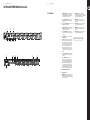
ULTRALINK PRO MX882 Controls
(EN) Controls
(2)
(5)
(1) (3) (4)
(10)
(1)
The MAIN INPUT LEVEL control sets the main input
gain, before the signal reaches the input bus. In SPLIT
mode, the MAIN INPUT LEVEL control determines the
common output level for all mono outputs.
(13)
MAIN OUTPUTS. These are the main outputs,
available as balanced XLR connectors. They may be fed
either by the left and right main inputs or by any of the
six mono inputs (or a combination of both).
(2)
The 4-digit INPUT LEVEL meter informs you about
the input level of the main input within a range from
-24 to +6 dB.
(14)
MONO INPUTS (channel 1 to 4). These are the
mono inputs. Connection takes place via balanced
XLR connectors.
(3)
By depressing the MAIN LINK switch you can route the
MAIN INPUT signal to the MAIN OUT.
(15)
MONO OUTPUTS (channel 1 to 4). These are the mono
outputs, available as balanced XLR connectors.
(4)
The MAIN OUTPUT LEVEL control adjusts the output
level applied to the main outputs. The levels present at
the six mono outputs are not affected.
(16)
MONO INPUTS (channel 5 to 6). These are the
mono inputs. Connection takes place via balanced
phone jacks.
(5)
The 4-digit OUTPUT LEVEL meter informs you about
the output level of the main input within a range from
-24 to +6 dB.
(17)
MONO OUTPUTS (channel 5 to 6). These are the mono
outputs, available as balanced phone jacks.
(6)
This SPLIT/MIX switch sets the respective channel to
SPLITTER or MIXER mode.
(7)
The LEVEL control determines the signal level of the
individual channels. In SPLIT mode, the LEVEL control
sets the output level of the mono channels. In MIX
mode, however, it controls the amount of the mono
channel’s input signal feeding into the main output
section; at the same time, the level of the mono
channel can be determined, which—owing to the
maximum gain of +15 dB—allows for converting,
e.g., home recording levels (-10 dBV) into studio levels
(+4 dBu).
(8)
The 8-digit OUTPUT LEVEL meter informs you about
the output level of each channel within a range from
-24 to +18 dB.
(9)
With the BALANCE/PAN control you can set the
balance between the left and right main signals.
In SPLIT mode, the main input signal is routed to the
mono output, with the BALANCE control determining
the balance beween the left and right main signal
portions. In MIX mode, the mono inputs are mixed
and routed via the LEVEL control to the main outputs,
with the PAN controls determining the allocation of
the mono inputs to the left and right main outputs.
(10)
FUSE HOLDER / VOLTAGE SELECTOR.
(11)
MAINS CONNECTION.
(12)
MAIN INPUTS. These are the main audio inputs of your
ULTRALINK PRO, available as balanced XLR connectors.
They may feed the mono outputs of all channels which
are operated in SPLIT mode.
(8)
(6) (7) (9)
(17) (16) (15)
(14)
(13)
(12)
(11)
Check Out behringer.com for Full Manual