1
Feature Operation
Explanations
Legend
Note 1: Features must be enabled by your network
administrator. You only have access to the five
features or Auto Dial positions that appear on the
feature card of your telephone.
Lift the handset, or press
Replace handset, or press
Dial a number.
Press the Hold Key.
Press the Goodbye Key.
Auto Dial
Fx
B
use
A
Fx
Message Waiting and Call Status Indicator
A
Fx
Press the Feature Key.
Press the left side of the Volume Control Bar to lower
the volume. Press the right side to increase the volume.
A
Fx
On (steady light)
A message is waiting.
place a call on hold
Wink (slow flash)
An incoming call is ringing.
return to a held call
Flash
Hold
Off
Transfer
transfer a call
A
Fx
C
On (steady light)
Conference
create a conference
Flash
A
Fx
D
A
Fx
Last Number Redial
Ring Again
A
Fx
use
B
Use the Dial Pad to enter the number (maximum of 31
characters). Be sure to include any required access
codes.
C
Dial the number to which you want to Transfer the
call.
D
Dial the number of the party that you want to add to
the Conference. You may repeat this process to add
up to six people to a Conference Call.
E
Dial the 1 to 3 digit Speed Call code (ask your
network administrator if you are unsure about the
number of digits used on your network) followed by
the telephone number that the code represents
(maximum of 31 digits). Be sure to include any
required access codes.
F
Dial the 1 to 3 digit Speed Call code.
A
Fx
E
Fx
A
Fx
A
F
Volume Control
ringing
(while the telephone is ringing)
handset
(while on a telephone call)
Deactivate all active
features
A feature is being programmed and input is
required.
Press the Dial Pad Key (
) that corresponds to
Auto Dial or Feature number on your feature card
A
Fx
Speed Call
store
One or more features are active.
A
A
Fx
when notified
cancel
There is no message waiting, no call on hold, and
no incoming call.
Remarks
correct an error or
receive busy tone
activate
A call is on hold.
Feature Activation Indicator
A
Fx
to end the call.
Press the Line Key.
Note 2: When activating features or programming Auto
Dial Keys, you have 30 seconds to complete the
key sequence or the process ends.
store
to receive dialtone.
Fx
For information on using your Avaya 3901Digital Deskphone when
connected to a Meridian SL-100 system, please consult the Avaya Digital
Deskphones 3901, 3902, 3903, 3904 User Guide.
For additional information on the operation of your telephone, please
consult the Avaya Digital Deskphones 3901, 3902, 3903, 3904 User
Guide.
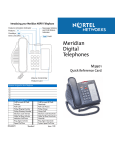
Introducing your Avaya 3901 Digital Deskphone
Feature Activation Indicator
Feature Fx
Goodbye
One Line (DN)
Message Waiting
and Call Status
Indicator
Hold
Avaya
Digital
Deskphones
3901
Quick Reference Card
Volume Control Bar
Feature Card
Features Assigned to Your Telephone
Flexible Feature Codes (FFCs)
Call Forward All Calls
Activate
Park Call
Pickup Ringing Number
Pickup Directory Number
Electronic Lock Activate
Make Set Busy Activate
Malicious Call Trace
Ring Again Activate
Speed Call User
P0942072
Standard 02.01
Call Forward All Calls
Deactivate
Park Call Access
Pickup Group
Group Call
Electronic Lock Deactivate
Make Set Busy Deactivate
Override
Ring Again Deactivate
System Speed Call User
November 2010