1
Inbox
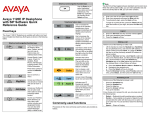
Display screen icons
Icon
Incoming Call, Missed, New
The following table lists the screen display icons for:
•
•
•
•
Call state — Icons to indicate the call state of your phone.
Instant Messaging — Icons displayed when you view your
instant message log. The icon appears beside each IM to
indicate the status.
Inbox — Icons to indicate the status of each incoming calls in
your Inbox.
Presence — Icons to indicate the presence state of your
Address Book entries you designate as Friend.
Call state
Icon
On hook
Incoming Call, Missed, Reviewed
Presence
Icon
Terminated
Connected Inactive (only available if
audio presence is activated)
Unavailable Busy, or Offline
On the phone
On hold
Active Available (only available if audio
presence is activated)
Call Forward
On the Phone (only available if audio
presence is activated)
Unknown
Do Not Disturb
November 2013
Outgoing call, Incoming call (ringing)
Missed call
Instant messaging
Icon
New, unread
Read
Replied to
Sent/forwarded
Inbox
Incoming Call Answered
Icon