1
TELL ME MORE® EDUCATION
Admin Tools
TELL ME MORE® Education: system set-up
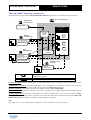
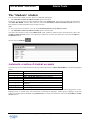
This diagram displays the standard TELL ME MORE® Education system set-up for a multi-workstation licence.
sdfqsdfqsdf
Server workstation (1)
Administrator
workstation (2)
Admin Tools
File and Data
Server
TELL ME
MORE
Server
Student
workstation (3)
Lessons
System data
Shared data
TELL ME MORE
Lesson Copier
Users
Paramétrages
du serveur
Server
Manager
Tutor
workstation (4)
Lessons
Lessons
Tutor Tools
Lesson Copier
TELL ME MORE
Auxiliary lesson
server (5)
Lessons
Auxiliary
Lesson Server
Http protocol server connection, most frequently used for
identification purposes
Network access to data and files
Local connection
Server workstation: designated workstation for the technical administrator to configure the system and the File and
Data Server.
Administrator workstation: designated workstation for the Administrator to organise the structure of the Tutoring
Service (students, Tutors, language and student groups) using the Admin Tools application.
Student workstation: designated workstation for students to work in TELL ME MORE®.
Tutor workstation: designated workstation for the Tutor to organise, follow and personalise student training using the
Tutor Tools application.
Auxiliary lesson server: designated workstation for the technical administrator to copy the lesson content of TELL
ME MORE® onto an auxiliary server. According to the needs and configuration of the network on which TELL ME
MORE® Education is installed, the installation of this workstation is optional.
Note:
Depending on the network configuration, all applications can be installed on the same workstation.
Copyright 2003 Auralog S.A. All rights reserved.
3