1
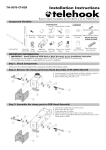
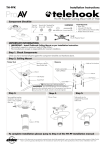
TH-2250-VF Installation Instructions TM Flat Screen Wall Mount | Fixed Important Notes The Telehook 2250 Wall Mount supports Flat Panel Displays from 20” (50cm) to 37” (94cm) and supports a maximum load of 50kgs (110lbs). This product only supports VESA compliant displays with 100mm x 100mm (4”x4”), 100mm x 200mm (4”x8”) and 200mm x 200mm (8”x8”) mounting hole patterns. The manufacturer does not accept responsibility for incorrect installation. Component Checklist Bits Bag Mounting Screws Coach Screw (x4) Large Washer (x4) M6x12mm & M6x20mm Phillips Head Screw (x6 each) Masonry Wall Plug (x4) Dry Wall Anchor (x4) M5x12mm & M5x20mm Phillips Head Screw (x6 each) Wall Plate A M4x12mm & M4x20mm Phillips Head Screw (x6 each) Spacer Bush (x6) Display Plate TOOLS REQUIRED: Power Drill 10mm or 6mm Drill Bit Phillips Head Screw Driver Spirit Level Socket Wrench or Shifter Mounting the Wall Plate Timber Stud Wall Masonry Wall Note: Ensure the Wall Plate is mounted with the arrow cut out pointing upwards. Dry Wall Note: Ensure the Wall Plate is mounted with the arrow cut out pointing upwards. ( 3/ Timber Stud Note: Ensure the Wall Plate is mounted with the arrow cut out pointing upwards. 10mm (3/8 ”) Hole (1/ 10mm 8 ”) Hole 6mm 4”) Hole Dry Wall Anchor Masonry Wall Plug Wall Plate Washer Coach Screw TIP: Use a spirit level to ensure the wall plate is horizontal Wall Plate Washer Coach Screw TIP: Use a spirit level to ensure the wall plate is horizontal Use a stud finder to accurately locate the centre of the stud. Ensure that all four screws fix securely into the stud Wall Plate Dry Wall Anchor Screw Dry Wall Anchor Washer TIP: Use a spirit level to ensure the wall plate is horizontal B Mounting the Display Plate Note: When attaching the Display Plate to the back of the display, ensure that the arrow cut out in the Display Plate is pointing towards the top of the display Mounting Screw (20mm (13/16”) Length) Back of Display Back of Display Mounting Screw (12mm (1/2 ”) Length) Spacer Bush Recessed Mounting Hole Display Plate C Top of Display Display Plate Recessed Mounting Holes If the mounting holes are recessed into the back of the display, use the supplied Spacer Bushes to pack the recessed holes. Ensure that the correct 20mm length mounting screws are used to securely fix the plate to the display. Attaching the Display to the Wall Plate With the Display Plate attached to the display, lift the display and hook the plate through the four corresponding mounting holes in the Wall Plate as shown. Mounting Hole Hook Mounting Hole Hook Note: For demonstration purposes, the wall has been omitted from the above image. D Security Option Locking Tabs To properly secure the display to the wall it is recommended to use two of the supplied M4 mounting screws to securely attach the two plates together. M4 Mouning Screw Note: For demonstration purposes, the wall has been omitted from the above image. Due to continuing product development, the manufacturer reserves the right to alter specificationswithout notice. Published: 06.05.09 ©