1
ASUS Desktop PC
M70AD
User Manual
E8553
First Edition V1
August 2013
Copyright © 2013 ASUSTeK Computer Inc. All Rights Reserved.
No part of this manual, including the products and software described in it, may be reproduced,
transmitted, transcribed, stored in a retrieval system, or translated into any language in any form or by any
means, except documentation kept by the purchaser for backup purposes, without the express written
permission of ASUSTeK Computer Inc. (“ASUS”).
Product warranty or service will not be extended if: (1) the product is repaired, modified or altered, unless
such repair, modification of alteration is authorized in writing by ASUS; or (2) the serial number of the
product is defaced or missing.
ASUS PROVIDES THIS MANUAL “AS IS” WITHOUT WARRANTY OF ANY KIND, EITHER EXPRESS
OR IMPLIED, INCLUDING BUT NOT LIMITED TO THE IMPLIED WARRANTIES OR CONDITIONS OF
MERCHANTABILITY OR FITNESS FOR A PARTICULAR PURPOSE. IN NO EVENT SHALL ASUS, ITS
DIRECTORS, OFFICERS, EMPLOYEES OR AGENTS BE LIABLE FOR ANY INDIRECT, SPECIAL,
INCIDENTAL, OR CONSEQUENTIAL DAMAGES (INCLUDING DAMAGES FOR LOSS OF PROFITS,
LOSS OF BUSINESS, LOSS OF USE OR DATA, INTERRUPTION OF BUSINESS AND THE LIKE),
EVEN IF ASUS HAS BEEN ADVISED OF THE POSSIBILITY OF SUCH DAMAGES ARISING FROM ANY
DEFECT OR ERROR IN THIS MANUAL OR PRODUCT.
SPECIFICATIONS AND INFORMATION CONTAINED IN THIS MANUAL ARE FURNISHED FOR
INFORMATIONAL USE ONLY, AND ARE SUBJECT TO CHANGE AT ANY TIME WITHOUT NOTICE,
AND SHOULD NOT BE CONSTRUED AS A COMMITMENT BY ASUS. ASUS ASSUMES NO
RESPONSIBILITY OR LIABILITY FOR ANY ERRORS OR INACCURACIES THAT MAY APPEAR IN THIS
MANUAL, INCLUDING THE PRODUCTS AND SOFTWARE DESCRIBED IN IT.
Products and corporate names appearing in this manual may or may not be registered trademarks or
copyrights of their respective companies, and are used only for identification or explanation and to the
owners’ benefit, without intent to infringe.
Contents
Notices........................................................................................................... 5
Safety information........................................................................................... 8
Conventions used in this guide....................................................................... 9
Where to find more information...................................................................... 9
Package contents......................................................................................... 10
Chapter 1:
Getting started
Welcome!.......................................................................................................11
Getting to know your computer......................................................................11
Setting up your computer.............................................................................. 16
Turning your computer ON........................................................................... 18
Chapter 2:
Using Windows® 8
Starting for the first time................................................................................ 19
Using the Windows® UI................................................................................. 20
Working with Windows® apps....................................................................... 23
Other keyboard shortcuts............................................................................. 28
Turning your Desktop PC OFF..................................................................... 29
Putting your Desktop PC to sleep................................................................. 29
Entering the BIOS Setup.............................................................................. 30
Chapter 3:
Using Windows® 8.1
Starting for the first time................................................................................ 31
Windows® 8.1 lock screen............................................................................. 31
Using the Windows® UI................................................................................. 32
Working with Windows® apps....................................................................... 35
Other keyboard shortcuts............................................................................. 40
Turning your Desktop PC OFF..................................................................... 41
Putting your Desktop PC to sleep................................................................. 41
Entering the BIOS Setup.............................................................................. 42
Chapter 4:
Connecting devices to your computer
Connecting a USB storage device................................................................ 43
Connecting multiple external displays.......................................................... 47
Connecting an HDTV.................................................................................... 49
Contents
Chapter 5:
Using your computer
Proper posture when using your Desktop PC.............................................. 51
Using the memory card reader..................................................................... 52
Using the optical drive.................................................................................. 53
Chapter 6:
Connecting to the Internet
Chapter 7:
Using the utilities
Wired connection.......................................................................................... 55
ASUS AI Suite II............................................................................................ 61
ASUS Smart Cooling System (optional)....................................................... 68
Recovering your system............................................................................... 70
Chapter 8:
Troubleshooting
Troubleshooting............................................................................................ 75
ASUS contact information............................................................................. 83
Notices
ASUS Recycling/Takeback Services
ASUS recycling and takeback programs come from our commitment to the highest standards
for protecting our environment. We believe in providing solutions for you to be able to
responsibly recycle our products, batteries, other components, as well as the packaging
materials. Please go to http://csr.asus.com/english/Takeback.htm for the detailed recycling
information in different regions.
REACH
Complying with the REACH (Registration, Evaluation, Authorisation, and Restriction of
Chemicals) regulatory framework, we published the chemical substances in our products at
ASUS REACH website at http://csr.asus.com/english/REACH.htm
Federal Communications Commission Statement
This device complies with Part 15 of the FCC Rules. Operation is subject to the following two
conditions:
• This device may not cause harmful interference; and
•
This device must accept any interference received including interference that may cause
undesired operation.
This equipment has been tested and found to comply with the limits for a Class B digital
device, pursuant to Part 15 of the FCC Rules. These limits are designed to provide
reasonable protection against harmful interference in a residential installation. This
equipment generates, uses and can radiate radio frequency energy and, if not installed
and used in accordance with manufacturer’s instructions, may cause harmful interference
to radio communications. However, there is no guarantee that interference will not occur
in a particular installation. If this equipment does cause harmful interference to radio or
television reception, which can be determined by turning the equipment off and on, the user
is encouraged to try to correct the interference by one or more of the following measures:
• Reorient or relocate the receiving antenna.
•
Increase the separation between the equipment and receiver.
•
Consult the dealer or an experienced radio/TV technician for help.
•
Connect the equipment to an outlet on a circuit different from that to which the receiver is
connected.
The use of shielded cables for connection of the monitor to the graphics card is required
to assure compliance with FCC regulations. Changes or modifications to this unit not
expressly approved by the party responsible for compliance could void the user’s authority
to operate this equipment.
Lithium-Ion Battery Warning
CAUTION: Danger of explosion if battery is incorrectly replaced. Replace only with the
same or equivalent type recommended by the manufacturer. Dispose of used batteries
according to the manufacturer’s instructions.
IC: Canadian Compliance Statement
Complies with the Canadian ICES-003 Class B specifications. This device complies with RSS
210 of Industry Canada. This Class B device meets all the requirements of the Canadian
interference-causing equipment regulations.
This device complies with Industry Canada license exempt RSS standard(s). Operation
is subject to the following two conditions: this device may not cause interference, and (2)
this device must accept any interference, including interference that may cause undesired
operation of the device.
Cut appareil numérique de la Classe B est conforme à la norme NMB-003 du Canada.
Cet appareil numérique de la Classe B respecte toutes les exigences du Règlement sur le
matériel brouilleur du Canada.
Cet appareil est conforme aux normes CNR exemptes de licence d’Industrie Canada. Le
fonctionnement est soumis aux deux conditions suivantes.
(1) cet appareil ne doit par provoquer d’interférences et
(2) cet appareil doit accepter toute interférence, y compris celles susceptibles de provoquer
un fonctionnement non souhaité de l’appareil.
Canadian Department of Communications Statement
This digital apparatus does not exceed the Class B limits for radio noise emissions from
digital apparatus set out in the Radio Interference Regulations of the Canadian Department
of Communications.
This class B digital apparatus complies with Canadian ICES-003.
VCCI: Japan Compliance Statement
VCCI Class B Statement
KC: Korea Warning Statement
RF Equipment Notices
CE: European Community Compliance Statement
The equipment complies with the RF Exposure Requirement 1999/519/EC, Council
Recommendation of 12 July 1999 on the limitation of exposure of the general public to
electromagnetic fields (0–300 GHz). This wireless device complies with the R&TTE Directive.
Wireless Radio Use
This device is restricted to indoor use when operating in the 5.15 to 5.25 GHz frequency
band.
Exposure to Radio Frequency Energy
The radiated output power of the Wi-Fi technology is below the FCC radio frequency
exposure limits. Nevertheless, it is advised to use the wireless equipment in such a manner
that the potential for human contact during normal operation is minimized.
FCC Bluetooth Wireless Compliance
The antenna used with this transmitter must not be colocated or operated in conjunction with
any other antenna or transmitter subject to the conditions of the FCC Grant.
Bluetooth Industry Canada Statement
This Class B device meets all requirements of the Canadian interference-causing equipment
regulations.
Cet appareil numérique de la Class B respecte toutes les exigences du Règlement sur le
matériel brouilleur du Canada.
BSMI: Taiwan Wireless Statement
Japan RF Equipment Statement
KC (RF Equipment)
Safety information
Disconnect the AC power and peripherals before cleaning. Wipe the Desktop PC using a
clean cellulose sponge or chamois cloth dampened with solution of nonabrasive detergent
and a few drops of warm water then remove any extra moisture with a dry cloth.
•
•
•
•
•
•
•
•
•
•
•
•
•
DO NOT place on uneven or unstable work surfaces. Seek servicing if the casing has
been damaged.
DO NOT expose to dirty or dusty environments. DO NOT operate during a gas leak.
DO NOT place or drop objects on top and do not shove any foreign objects into the
Desktop PC.
DO NOT expose to strong magnetic or electrical fields.
DO NOT expose to or use near liquids, rain, or moisture. DO NOT use the modem during
electrical storms.
Battery safety warning: DO NOT throw the battery in fire. DO NOT short circuit the
contacts. DO NOT disassemble the battery.
Use this product in environments with ambient temperatures between 0˚C (32̊F)and 35˚C
(95̊F).
DO NOT cover the vents on the Desktop PC to prevent the system from getting
overheated.
DO NOT use damaged power cords, accessories, or other peripherals.
To prevent electrical shock hazard, disconnect the power cable from the electrical outlet
before relocating the system.
Seek professional assistance before using an adapter or extension cord. These devices
could interrupt the grounding circuit.
Ensure that your power supply is set to the correct voltage in your area. If you are not
sure about the voltage of the electrical outlet you are using, contact your local power
company.
If the power supply is broken, do not try to fix it by yourself. Contact a qualified service
technician or your retailer.
Conventions used in this guide
To ensure that you perform certain tasks properly, take note of the following symbols used
throughout this manual.
DANGER/WARNING: Information to prevent injury to yourself when trying
to complete a task.
CAUTION: Information
������������������������������������������������������������
to prevent damage to the components when trying
to complete a task.
IMPORTANT: Instructions that you MUST follow to complete a task.
NOTE: ������������������������������������������������������������
Tips and additional information to help you complete a task.
Where to find more information
Refer to the following sources for additional information and for product and software
updates.
ASUS websites
The ASUS website provides updated information on ASUS hardware and software
products. Refer to the ASUS website www.asus.com.
ASUS Local Technical Support
Visit ASUS website at http://support.asus.com/contact for the contact information of
local Technical Support Engineer.
• The user manual is located in the following folder in your Desktop PC:
• C:\Program Files(X86)\ASUS\eManual
Package contents
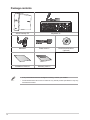
ASUS Desktop PC
Mouse x1
Keyboard x1
Power cord x1
DVD/SDVD/RDVD x1
(optional)
Installation Guide
Installation Guide x1
Warranty card x1
• If any of the above items are damaged or missing, contact your retailer.
• The illustrated items above are for reference only. Actual product specifications may vary
with different models.
10
Chapter 1
Getting started
Welcome!
Thank you for purchasing the ASUS M70AD Desktop PC!
The ASUS M70AD Desktop PC provides cutting-edge performance, uncompromised
reliability, and user-centric utilities. All these values are encapsulated in a stunningly futuristic
and stylish system casing.
Read the ASUS Warranty Card before setting up your ASUS Desktop PC.
Getting to know your computer
Illustrations are for reference only. The ports and their locations, and the chassis color vary
with different models.
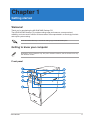
Front panel
ASUS M70AD
11
ENGLISH
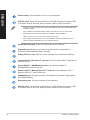
Power button. Press this button to turn on your computer.
USB 3.0 ports. These Universal Serial Bus 3.0 (USB 3.0) ports connect to USB
3.0 devices such as a mouse, printer, scanner, camera, PDA, and others.
• DO NOT connect a keyboard / mouse to any USB 3.0 port when installing Windows®
operating system.
• Due to USB 3.0 controller limitation, USB 3.0 devices can only be used under
Windows® OS environment and after the USB 3.0 driver installation.
• USB 3.0 devices can only be used as data storage only.
• We strongly recommend that you connect USB 3.0 devices to USB 3.0 ports for
faster and better performance for your USB 3.0 devices.
Optical disk drive bay. There is an optical disk drive in this bay.
Expansion bay. Allows you to install an optical disk drive, power pack, or
Universal Storage Module (USM) in this bay.
Sliding I/O front cover. Slide this cover to display the I/O ports and ODD bay.
CompactFlash® / Microdrive™ card slot. Insert a CompactFlash® / Microdrive™
card into this slot.
Secure Digital™ / MultiMediaCard slot. Insert a Secure Digital™ /
MultiMediaCard card into this slot.
Memory Stick™ / Memory Stick Pro™ card slot. Insert a Memory Stick™ /
Memory Stick Pro™ card into this slot.
Headphone port. This port connects to a headphone or speaker. Supported by
ASUS Audio Wizard.
Microphone port. This port connects to a microphone.
USB 2.0 ports. These Universal Serial Bus 2.0 (USB 2.0) ports connect to USB
2.0 devices such as a mouse, printer, scanner, camera, PDA, and others.
12
Chapter 1: Getting started
ENGLISH
Rear panel
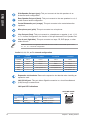
Voltage selector. Use this switch to select the appropriate system input voltage
according to the voltage supply in your area. If the voltage supply in your area is
100-127V, set the switch to 115V. If the voltage supply in your area is 200-240V,
set the switch to 230V.�
Setting the switch to 115V in a 230V environment or 230V in a 115V environment will
seriously damage the system!
Power connector. Plug the power cord to this connector.
RATING: 100-120V/200-240V, 5A/2.5A, 50/60Hz
USB 2.0 ports. These Universal Serial Bus 2.0 (USB 2.0) ports connect to USB
2.0 devices such as a mouse, printer, scanner, camera, PDA, and others.
HDMI port. This port is for a High-Definition Multimedia Interface (HDMI)
connector, and is HDCP compliant allowing playback of HD DVD, Blu-ray, and
other protected content.
DVI-D port. This port is for any DVI-D compatible device and is HDCP compliant
allowing playback of HD DVD, Blu-ray, and other protected content.
ASUS M70AD
13
ENGLISH
Side Speaker Out port (gray). This port connects to the side speakers in an
8-channel audio configuration.
Rear Speaker Out port (black). This port connects to the rear speakers in a 4, 6,
and 8-channel audio configuration.
Center/Subwoofer port (orange). This port connects to the center/subwoofer
speakers.
Microphone port (pink). This port connects to a microphone.
Line Out port (lime). This port connects to a headphone or speaker. In a 4.1, 5.2,
or 7.1-channel configuration, the function of this port becomes Front Speaker Out.
Line In port (light blue). This port connects to a tape, CD, DVD player, or other
audio sources.
Refer to the audio configuration table below for the function of the audio ports in a 2.1,
4.1, 5.1, or 7.1-channel configuration.
Audio 2.1, 4.1, 5.1, or 7.1-channel configuration
Headset
2.1-channel
Port
4.1-channel
5.1-channel
7.1-channel
Light Blue
Line In
Line In
Line In
Line In
Lime
Line Out
Front Speaker Out
Front Speaker Out
Front Speaker Out
Pink
Mic In
Mic In
Mic In
Mic In
Orange
–
–
Center/Subwoofer
Center/Subwoofer
Black
–
Rear Speaker Out
Rear Speaker Out
Rear Speaker Out
Gray
–
–
–
Side Speaker Out
Expansion slot brackets. Remove the expansion slot bracket when installing an
expansion card
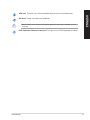
LAN (RJ-45) port. This port allows Gigabit connection to a Local Area Network
(LAN) through a network hub.
LAN port LED indications
Activity/Link LED
Status
Description
ORANGE
Linked
OFF
BLINKING
14
No link
Data activity
Speed LED
ACT/LINK SPEED
LED
LED
Status
Description
ORANGE
100Mbps connection
OFF
GREEN
10Mbps connection
1Gbps connection
LAN port
Chapter 1: Getting started
ENGLISH
VGA port. This port is for VGA-compatible devices such as a VGA monitor.
Air vents. These vents allow air ventilation.
DO NOT block the air vents on the chassis. Always provide proper ventilation for your
computer.
PS/2 Keyboard / Mouse Combo port. This port is for a PS/2 keyboard or mouse
ASUS M70AD
15
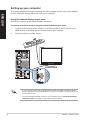
Setting up your computer
ENGLISH
This section guides you through connecting the main hardware devices, such as the external
monitor, keyboard, mouse, and power cord, to your computer.
Using the onboard display output ports
Connect your monitor to the onboard display output port.
To connect an external monitor using the onboard display output ports:
1.
Connect a VGA monitor to the VGA port, or a DVI-D monitor to the DVI-D port, or an
HDMI monitor to the HDMI port on the rear panel of your computer.
2.
Plug the monitor to a power source.
• If your computer comes with an ASUS Graphics Card, the graphics card is set as the
primary display device in the BIOS. Hence, connect your monitor to a display output port
on the graphics card.
• To connect multiple external monitors to your computer, refer to Connecting multiple
external monitors in Chapter 3 of this user manual for details.
16
Chapter 1: Getting started
Connecting a USB keyboard and a USB mouse
ENGLISH
Connect a USB keyboard and a USB mouse to the USB ports on the rear panel of your
computer.
`
Connect your USB keyboard and USB mouse to the USB 2.0 ports.
Connecting the power cord
Connect one end of the power cord to the power connector on the rear panel of your
computer and the other end to a power source.
ASUS M70AD
17
Turning your computer ON
This section describes how to turn on your computer after setting up your computer.
ENGLISH
Turning your computer ON
To turn your computer ON:
1.
Turn on the power switch.
2.
Turn your monitor ON.
3.
Press the power button on your computer.
Power button
4.
Wait until the operating system loads automatically.
• For details on shutting down your Desktop PC under Windows® 8 or Windows® 8.1, refer
to the section Turning your Desktop PC OFF in Chapter 2 or 3.
18
Chapter 1: Getting started
Chapter 2
ENGLISH
Using Windows® 8
Starting for the first time
When you start your computer for the first time, a series of screens appear to guide you in
configuring the basic settings of your Windows® 8 operating system.
To start for the first time:
1.
Turn your computer on. Wait for a few minutes until the setup screen appears.
2.
Carefully read the license terms. Tick I accept the license terms for using Windows
and click Accept.
3.
4.
Follow the next onscreen instructions to configure the following basic items:
•
Personalize
•
Settings
Once you are done configuring the basic items, the Windows® 8 video tutorial appears.
Watch this tutorial to learn more about Windows® 8 functionalities.
For details on using Windows® 8, refer to the next sections.
ASUS M70AD
19
Using the Windows® UI
ENGLISH
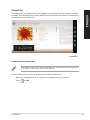
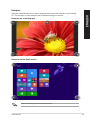
The Windows® User Interface (UI) is the tile-based display used in Windows® 8. It includes
the following features you can use while working on your Desktop PC.
Start screen
The Start screen appears after successfully signing in to your user account. It helps organize
all the programs and applications you need in just one place.
You can press the Windows key
to launch the Start screen from any apps.
live tiles
User account
Zoom in/out button
for live tiles
Windows® apps
These are apps pinned on the Start screen and displayed on tiled-format for easy access.
A screen resolution of 1024 x 768 pixels or higher is required to run Windows® apps.
Some apps require signing in to your Microsoft account before they are fully launched.
20
Chapter 2: Using Windows® 8
Hotspots
ENGLISH
Onscreen hotspots allow you to launch programs and access the settings of your Desktop
PC. The functions in these hotspots can be activated using your mouse.
Hotspots on a running app
Hotspots on the Start screen
Refer to the next page for the Hotspots’ functions.
ASUS M70AD
21
ENGLISH
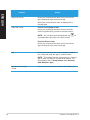
Hotspot
upper left corner
Action
Hover your mouse pointer then click on the recent
app’s thumbnail to go back to that app.
Move your mouse pointer down to display all the
running apps.
lower left corner
From a running app screen:
Hover your mouse pointer then click on the Start
screen’s thumbnail to go back to the Start screen.
NOTE: You can also press the Windows key
your keyboard to go back to the Start screen.
on
From the Start screen:
Hover your mouse pointer then click on the recent
app’s thumbnail to go back to that app.
22
top
Hover your mouse pointer until it changes to a hand
icon. Drag then drop the app to a new location.
NOTE: This hotspot function only works on a running
app or when you want to use the Snap feature. For
more details, refer to Snap feature under Working
with Windows® apps.
upper and lower right
corner
Hover your mouse pointer to launch the Charms bar.
Chapter 2: Using Windows® 8
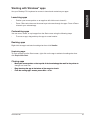
Working with Windows® apps
Use your Desktop PC’s keyboard or mouse to launch and customize your apps.
•
Position your mouse pointer on an app then left-click once to launch it.
•
Press <Tab> twice then use the arrow keys to browse through the apps. Press <Enter>
to launch your selected app.
ENGLISH
Launching apps
Customizing apps
You can move, resize, or unpin apps from the Start screen using the following steps.
•
To move an app, drag and drop the app to a new location.
Resizing apps
Right-click the app to activate its settings bar then click Smaller.
Unpinning apps
To unpin an app from the Start screen, right-click on the app to activate its settings bar then
click Unpin from Start.
Closing apps
•�����������������������������������������������������������������������������������������
Move your mouse pointer on the top side of the launched app then wait for the pointer to
change to a hand icon.
•���������������������������������������������������������������
Drag then drop the app to the bottom of the screen to close it.
•�������������������������������������������
From the running app’s screen, press <Alt> +
�� <F4>.
�����
ASUS M70AD
23
Accessing the All Apps screen
ENGLISH
From the All Apps screen, you can configure an apps settings or pin an app to the Start
screen or to the Desktop mode taskbar.
Launching the All Apps screen
Right-click on the Start screen or press
+ <Z>, and click the All Apps icon.
Pinning an app on the Start screen
24
1.
Launch the All Apps screen.
2.
From the All Apps screen, right-click an app to display its settings bar.
3.
From the settings bar, click Pin to Start.
Chapter 2: Using Windows® 8
Charms bar
ENGLISH
The Charms bar is a toolbar that can be triggered on the right side of your screen. It consists
of several tools that allow you to share applications and provide quick access for customizing
the settings of your Desktop PC.
Charms bar
Launching the Charms bar
When called out, the Charms bar initially appears as a set of white icons. The image above
shows how the Charms bar looks like once activated.
Use your Desktop PC’s mouse or keyboard to launch the Charms bar.
•
Move your mouse pointer on the upper or lower right corner of the screen.
•
Press
ASUS M70AD
+
�� <C��
����
>.
25
ENGLISH
Inside the Charms bar
Search
This tool allows you to look for files, applications, or programs in your
Desktop PC.
Share
This tool allows you to share applications via social networking sites or
email.
Start
This tool reverts the display back to the Start screen. From the Start
screen, you can also use this to revert back to a recently opened app.
Devices
This tool allows you to access and share files with the devices attached
to your Desktop PC such as an external display or printer.
Settings
This tool allows you to access the PC settings of your Desktop PC.
26
Chapter 2: Using Windows® 8
Snap feature
ENGLISH
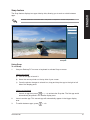
The Snap feature displays two apps side-by-side, allowing you to work or switch between
apps.
A screen resolution of at least 1366 x 768 pixels is required to use the Snap feature.
Snap bar
Using Snap
To use Snap:
1.
Use your Desktop PC’s mouse or keyboard to activate Snap onscreen.
Using your mouse
a) Click on an app to launch it.
b) Hover the mouse pointer on the top side of your screen.
c) Once the pointer changes to a hand icon, drag and drop the app to the right or left
side of the display panel.
Using your keyboard
•
Launch an app then press
+ < . > to activate the Snap bar. The first app would
automatically be placed in the smaller display area.
2.
Launch another app. This second app will automatically appear in the bigger display
area.
3.
To switch between apps, press
ASUS M70AD
+ <J>.
27
Other keyboard shortcuts
ENGLISH
Using your keyboard, you can also use the following shortcuts to help you launch applications
and navigate Windows® 8.
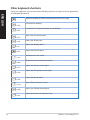
Switches between the Start screen and the last running app.
+ <D>
+ <E>
+ <F>
+ <H>
+ <I>
+ <K>
+ <L>
+ <M>
+ <P>
+ <Q>
+ <R>
+ <U>
+ <W>
+ <X>
28
Launches the desktop.
Launches the Computer window on the desktop.
Opens the File search pane.
Opens the Share pane.
Opens the Settings pane.
Opens the Devices pane.
Activates the Lock screen.
Minimizes the Internet Explorer window.
Opens the Second screen pane.
Opens the Apps search pane.
Opens the Run window.
Opens Ease of Access Center.
Opens the Settings search pane.
Opens a menu box of Windows tools
Chapter 2: Using Windows® 8
+ <->
+ <,>
+ <Enter>
+ <Prt Sc>
Launches the magnifier and zooms in your screen.
ENGLISH
+ <+>
Zooms out your screen.
Allows you to peek at the desktop.
Opens the Narrator Settings.
Enables the print screen function.
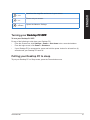
Turning your Desktop
��������������
PC����
OFF
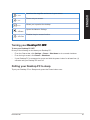
To turn your Desktop PC OFF:
Do any of the following to shut down your Desktop PC:
• From the Charms bar, click Settings > Power > Shut down to do a normal shutdown.
•
•
From the login screen, click Power > Shutdown.
If your Desktop PC is unresponsive, press and hold the power button for at least four (4)
seconds until your Desktop PC turns off.
Putting your Desktop PC to sleep
To put your Desktop PC on Sleep mode, press the Power button once.
ASUS M70AD
29
Entering the BIOS Setup
ENGLISH
BIOS (Basic Input and Output System) stores system hardware settings that are needed for
system startup in the Desktop PC.
In normal circumstances, the default BIOS settings apply to most conditions to ensure
optimal performance. Do not change the default BIOS settings except in the following
circumstances:
•
An error message appears on the screen during the system bootup and requests you
to run the BIOS Setup.
•
You have installed a new system component that requires further BIOS settings or
update.
Inappropriate BIOS settings may result to instability or boot failure. We strongly recommend
that you change the BIOS settings only with the help of a trained service personnel.
Quickly enter the BIOS
Windows® 8 boot time is quite fast, so we developed the following ways for you to quickly
access the BIOS:
• Press the power button for at least four seconds to shut down your Desktop PC, then
press the power button again to turn your Desktop PC back on, and press <Del> during
POST.
•
When your Desktop PC is off, disconnect���������������������������������������
the power cord from your Desktop PC’s
power connector. Reconnect the power cord and press the power button to turn on your
Desktop PC. Press �������������������
<Del> during POST.�
POST (Power-On Self Test) is a series of software controlled diagnostic tests that run when
you turn on your Desktop PC.
30
Chapter 2: Using Windows® 8
Chapter 3
ENGLISH
Using Windows® 8.1
Starting for the first time
When you start your computer for the first time, a series of screens appear to guide you in
configuring the basic settings of your Windows® 8.1 operating system.
To start your Desktop PC for the first time:
1.
Press the power button on your Desktop PC. Wait for a few minutes until the setup
screen appears.
2.
From the setup screen, pick a language to use on your Desktop PC. As other settings
appear, select your country or region, app language, keyboard layout, and time zone
then tap Next.
3.
Carefully read the License Terms, then tap I Accept.
4.
Follow the onscreen instructions to configure the following basic items:
5.
•
Personalize
•
Connect
•
Settings
•
Your account
After configuring the basic items, the Windows®8.1 tutorial appears. Watch this to
learn more about Windows®8.1 functionalities.
Windows® 8.1 lock screen
The Windows®8.1 lock screen may appear when your Desktop PC enters the Windows®8.1
operating system. To proceed, tap on the lock screen or press any key on your Desktop PC's
keyboard.
ASUS M70AD
31
Using the Windows® UI
ENGLISH
The Windows® User Interface (UI) is the tile-based display used in Windows® 8. It includes
the following features you can use while working on your Desktop PC.
Start screen
The Start screen appears after successfully signing in to your user account. It helps organize
all the programs and applications you need in just one place.
You can press the Windows key
to launch the Start screen from any apps.
live tiles
User account
Zoom in/out button
for live tiles
Windows® apps
These are apps pinned on the Start screen and displayed on tiled-format for easy access.
A screen resolution of 1024 x 768 pixels or higher is required to run Windows® apps.
Some apps require signing in to your Microsoft account before they are fully launched.
32
Chapter 3: Using Windows® 8.1
Hotspots
ENGLISH
Onscreen hotspots allow you to launch programs and access the settings of your Desktop
PC. The functions in these hotspots can be activated using your mouse.
Hotspots on a running app
Hotspots on the Start screen
Refer to the next page for the Hotspots’ functions.
ASUS M70AD
33
ENGLISH
Hotspot
upper left corner
Action
Hover your mouse pointer then click on the recent
app’s thumbnail to go back to that app.
Move your mouse pointer down to display all the
running apps.
lower left corner
From a running app screen:
Hover your mouse pointer then click on the Start
screen’s thumbnail to go back to the Start screen.
NOTE: You can also press the Windows key
your keyboard to go back to the Start screen.
on
From the Start screen:
Hover your mouse pointer then click on the recent
app’s thumbnail to go back to that app.
34
top
Hover your mouse pointer until it changes to a hand
icon. Drag then drop the app to a new location.
NOTE: This hotspot function only works on a running
app or when you want to use the Snap feature. For
more details, refer to Snap feature under Working
with Windows® apps.
upper and lower right
corner
Hover your mouse pointer to launch the Charms bar.
Chapter 3: Using Windows® 8.1
Working with Windows® apps
Use your Desktop PC’s keyboard or mouse to launch and customize your apps.
•
Position your mouse pointer on an app then left-click once to launch it.
•
Press <Tab> twice then use the arrow keys to browse through the apps. Press <Enter>
to launch your selected app.
ENGLISH
Launching apps
Customizing apps
You can move, resize, or unpin apps from the Start screen using the following steps.
•
To move an app, drag and drop the app to a new location.
Resizing apps
Right-click the app to activate its settings bar, then tap
and select an app tile size.
Unpinning apps
To unpin an app from the Start screen, right-click on the app to activate its settings bar then
click Unpin from Start.
Closing apps
•�����������������������������������������������������������������������������������������
Move your mouse pointer on the top side of the launched app then wait for the pointer to
change to a hand icon.
•���������������������������������������������������������������
Drag then drop the app to the bottom of the screen to close it.
•�������������������������������������������
From the running app’s screen, press <Alt> +
�� <F4>.
�����
ASUS M70AD
35
Accessing the All Apps screen
ENGLISH
From the All Apps screen, you can configure an apps settings or pin an app to the Start
screen or to the Desktop mode taskbar.
Launching the All Apps screen
•
•
On the Start screen, click
.
From the Start screen, press <Tab>, then press <Enter> on your keyboard.
Pinning an app on the Start screen
36
1.
Launch the All Apps screen.
2.
From the All Apps screen, right-click an app to display its settings bar.
3.
From the settings bar, click Pin to Start.
Chapter 3: Using Windows® 8.1
Charms bar
ENGLISH
The Charms bar is a toolbar that can be triggered on the right side of your screen. It consists
of several tools that allow you to share applications and provide quick access for customizing
the settings of your Desktop PC.
Charms bar
Launching the Charms bar
When called out, the Charms bar initially appears as a set of white icons. The image above
shows how the Charms bar looks like once activated.
Use your Desktop PC’s mouse or keyboard to launch the Charms bar.
•
Move your mouse pointer on the upper or lower right corner of the screen.
•
Press
ASUS M70AD
+
�� <C��
����
>.
37
ENGLISH
Inside the Charms bar
Search
This charm allows you to look for files, applications, or programs in your
Desktop PC.
Share
This charm allows you to share applications via social networking sites
or email.
Start
This charm reverts the display back to the Start screen. From the Start
screen, you can also use this to revert back to a recently opened app.
Devices
This charm allows you to access and share files with the devices
attached to your Desktop PC such as an external display or printer.
Settings
This charm allows you to access the PC settings of your Desktop PC.
38
Chapter 3: Using Windows® 8.1
Snap feature
ENGLISH
The Snap feature displays two apps side-by-side, allowing you to work or switch between
apps.
Ensure that your Desktop PC’s screen resolution is set to 1366 x 768 pixels or higher
before using the Snap feature.
Snap bar
Using Snap
To use Snap:
1.
Use your Desktop PC’s mouse or keyboard to activate Snap onscreen.
Using your mouse
a) Click on an app to launch it.
b) Hover the mouse pointer on the top side of your screen.
c) Once the pointer changes to a hand icon, drag and drop the app to the right or left
side of the display panel.
Using your keyboard
•
Launch an app then press
+ < . > + left or right key to place the first app on
the left or right side of the display panel.
ASUS M70AD
39
Other keyboard shortcuts
ENGLISH
Using your keyboard, you can also use the following shortcuts to help you launch applications
and navigate Windows® 8.
Switches between the Start screen and the last running app.
+ <D>
+ <E>
+ <F>
+ <H>
+ <I>
+ <K>
+ <L>
+ <M>
+ <P>
+ <Q>
+ <R>
+ <U>
+ <W>
+ <X>
40
Launches the desktop.
Launches the Computer window on the desktop.
Opens the File search pane.
Opens the Share pane.
Opens the Settings pane.
Opens the Devices pane.
Activates the Lock screen.
Minimizes all currently active screens.
Opens the Second screen pane.
Opens the Everywhere search pane.
Opens the Run window.
Opens Ease of Access Center.
Opens the Settings search pane.
Opens a menu box of Windows tools
Chapter 3: Using Windows® 8.1
+ <->
+ <Enter>
Launches the magnifier and zooms in your screen.
ENGLISH
+ <+>
Zooms out your screen.
Opens the Narrator Settings.
Turning your Desktop
��������������
PC����
OFF
To turn your Desktop PC OFF:
Do any of the following to shut down your Desktop PC:
• From the Charms bar, click Settings > Power > Shut down to do a normal shutdown.
•
•
From the login screen, click Power > Shutdown.
If your Desktop PC is unresponsive, press and hold the power button for at least four (4)
seconds until your Desktop PC turns off.
Putting your Desktop PC to sleep
To put your Desktop PC on Sleep mode, press the Power button once.
ASUS M70AD
41
Entering the BIOS Setup
ENGLISH
BIOS (Basic Input and Output System) stores system hardware settings that are needed for
system startup in the Desktop PC.
In normal circumstances, the default BIOS settings apply to most conditions to ensure
optimal performance. Do not change the default BIOS settings except in the following
circumstances:
•
An error message appears on the screen during the system bootup and requests you
to run the BIOS Setup.
•
You have installed a new system component that requires further BIOS settings or
update.
Inappropriate BIOS settings may result to instability or boot failure. We strongly recommend
that you change the BIOS settings only with the help of a trained service personnel.
Quickly enter the BIOS
Windows® 8 boot time is quite fast, so we developed the following ways for you to quickly
access the BIOS:
• Press the power button for at least four seconds to shut down your Desktop PC, then
press the power button again to turn your Desktop PC back on, and press <Del> during
POST.
•
When your Desktop PC is off, disconnect���������������������������������������
the power cord from your Desktop PC’s
power connector. Reconnect the power cord and press the power button to turn on your
Desktop PC. Press �������������������
<Del> during POST.�
POST (Power-On Self Test) is a series of software controlled diagnostic tests that run when
you turn on your Desktop PC.
42
Chapter 3: Using Windows® 8.1
Chapter 4
ENGLISH
Connecting devices to your computer
Connecting a USB storage device
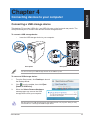
This desktop PC provides USB 2.0/1.1 and USB 3.0 ports on the front and rear panels. The
USB ports allow you to connect USB devices such as storage devices.
To connect a USB storage device:
•
Insert the USB storage device to your computer.
Front panel
Rear panel
You can connect your USB storage devices to the USB 3.0 ports.
To remove a USB storage device:
1.
From the Start screen, click Desktop to launch
the Desktop Mode.
2.
Click
from the taskbar, then click Eject
[Name of USB Drive].
3.
When the Safe to Remove Hardware
message pops up, remove the USB
storage device from your computer.
DO NOT remove a USB storage device when data transfer is in progress. Doing so may
cause data loss or damage the USB storage device.
ASUS M70AD
43
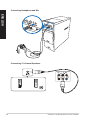
Connecting Headphone and Mic
ENGLISH
Connecting 2.1-channel Speakers
44
Chapter 4: Connecting devices to your computer
ENGLISH
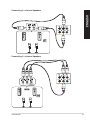
Connecting 4.1-channel Speakers
Connecting 5.1-channel Speakers
ASUS M70AD
45
Connecting 7.1-channel Speakers
ENGLISH
46
Chapter 4: Connecting devices to your computer
Connecting multiple external displays
ENGLISH
Your desktop PC may come with VGA, HDMI, or DVI ports and allows you to connect
multiple external displays.
When a graphics card is installed in your computer, connect the monitors on the output
ports of the graphics card.
Setting up multiple displays
When using multiple monitors, you are allowed to set display modes. You can use the
additional monitor as a duplicate of your main display, or as an extension to enlarge your
Windows desktop.
To set up multiple displays:
1.
Turn off your computer.
2.
Connect the two monitors to your computer and connect the power cords to the
monitors. Refer to Setting up your computer section in Chapter 1 for details on how
to connect a monitor to your computer.
For some graphic cards, only the monitor that is set to be the primary display has display
during POST. The dual display function works only under Windows.
ASUS M70AD
47
ENGLISH
3.
Turn on your computer.
4.
Do any of the following to open the Screen Resolution setting screen:
From the Start screen
a) Launch the All Apps screen and pin Control Panel on the Start screen.
For details, refer to Pinning an app on the Start screen from the section Working with
Windows® apps.
b) From the Control Panel, click Adjust screen resolution under Appearance and
Personalization.
From the Desktop mode screen
a) Launch the Desktop mode from the Start screen.
b)�����������������������������������������������������������������������
Right click anywhere on your Desktop mode screen. When the pop-up menu
appears, click Personalize > Display > Change display settings.
48
5.
Select the display mode from the Multiple displays: drop-down list.
•Duplicate these displays: Select this option to use the additional monitor as a
duplicate of your main display.
•Extend these displays: Select this option to use the additional monitor as an
extension display. This increases your desktop space.
•Show desktop only on 1 / 2: Select this option to show desktop only on monitor
1 or monitor 2.
6.
Click Apply or OK. Then click Keep Changes on the confirmation message.
Chapter 4: Connecting devices to your computer
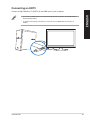
Connecting an HDTV
Connect a High Definition TV (HDTV) to the HDMI port of your computer.
ENGLISH
• You need an HDMI cable to connect the HDTV and the computer. The HDMI cable is
purchased separately.
• To get the best display performance, ensure that your HDMI cable is less than 15
meters.
ASUS M70AD
49
ENGLISH
50
Chapter 4: Connecting devices to your computer
Chapter 5
ENGLISH
Using your computer
Proper posture when using your Desktop PC
When using your Desktop PC, maintaining the proper posture is necessary to prevent strain
to your wrists, hands, and other joints or muscles. This section provides you with tips on
avoiding physical discomfort and possible injury while using and fully enjoying your Desktop
PC.
Eye level to the top of
the monitor screen
Foot rest
90˚ angles
To maintain the proper posture:
•
Position your computer chair to make sure that your elbows are at or slightly above the
keyboard to get a comfortable typing position.
•
Adjust the height of your chair to make sure that your knees are slightly higher than
your hips to relax the backs of your thighs. If necessary, use a footrest to raise the level
of your knees.
•
Adjust the back of your chair so that the base of your spine is firmly supported and
angled slightly backward.
•
Sit upright with your knees, elbows and hips at an approximately 90º angle when you
are at the PC.
•
Place the monitor directly in front of you, and turn the top of the monitor screen even
with your eye level so that your eyes look slightly downward.
•
Keep the mouse close to the keyboard, and if necessary, use a wrist rest for support to
reduce the pressure on your wrists while typing.
•
Use your Desktop PC in a comfortably-lit area, and keep it away from sources of glare
such as windows and straight sunlight.
•
Take regular mini-breaks from using your Desktop PC.
ASUS M70AD
51
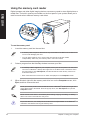
Using the memory card reader
ENGLISH
Digital cameras and other digital imaging devices use memory cards to store digital picture or
media files. The built-in memory card reader on the front panel of your system allows you to
read from and write to different memory card drives.
To use the memory card:
1.
Insert the memory card into the card slot.
• A memory card is keyed so that it fits in only one direction. DO NOT force a card into a
slot to avoid damaging the card.
• You can place media in one or more of the card slots and use each media
independently. Place only one memory card in a slot at one time.
2.
Select a program from the AutoPlay window to access your files.
• If AutoPlay is NOT enabled in your computer, hover your mouse pointer over the lower
left corner of Windows® desktop then right-click on the Start screen’s thumbnail. From
the popup menu, click File Explorer, and then double-click the memory card icon to
access the data on it.
• Each card slot has its own drive icon which is displayed on the Computer screen.
3.
When finished, right-click the memory card drive icon on the Computer screen, click
Eject, and then remove the card.
Hover your mouse pointer over the lower left corner of Windows® desktop then right-click
on the Start screen’s thumbnail. From the popup menu, click File Explorer to open the
Computer screen.
Never remove cards while or immediately after reading, copying, formatting, or deleting
data on the card or else data loss may occur.
To prevent data loss, use “Safely Remove Hardware and Eject Media” in the Windows®
notification area before removing the memory card.
52
Chapter 5: Using your computer
ENGLISH
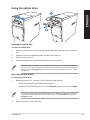
Using the optical drive
Inserting an optical disc
To insert an optical disc:
1.
While your system is on, press the eject button below the drive bay cover to open the
tray.
2.
Place the disc to the optical drive with the label side facing up.
3.
Push the tray to close it.
4.
Select a program from the AutoPlay window to access your files.
If AutoPlay is NOT enabled in your computer, hover your mouse pointer over the lower
left corner of Windows® desktop then right-click on the Start screen’s thumbnail. From the
popup menu, click File Explorer, and then double-click the CD/DVD drive icon to access
the data on it.
Removing an optical disc
To remove an optical disc:
1.
While the system is on, do either of the following to eject the tray:
•
Press the eject button below the drive bay cover.
•
Right-click the CD/DVD drive icon on the Computer screen, and then click Eject.
Hover your mouse pointer over the lower left corner of Windows® desktop then right-click
on the Start screen’s thumbnail. From the popup menu, click File Explorer to open the
Computer screen.
2.
Remove the disc from the disc tray.
ASUS M70AD
53
ENGLISH
54
Chapter 5: Using your computer
Chapter 6
ENGLISH
Connecting to the Internet
Wired connection
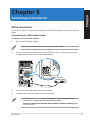
Use an RJ-45 cable to connect your computer to a DSL/cable modem or a local area network
(LAN).
Connecting via a DSL/cable modem
To connect via a DSL/cable modem:
1.
Set up your DSL/cable modem.
Refer to the documentation that came with your DSL/cable modem.
2.
Connect one end of an RJ-45 cable to the LAN (RJ-45) port on the rear panel of your
computer and the other end to a DSL/cable modem.
SPDIF OUT
Modem
RJ-45 cable
3.
Turn on the DSL/cable modem and your computer.
3.
Configure the necessary Internet connection settings.
• For more details, refer to the sections Configuring a dynamic IP/PPPoE network
connection or Configuring a static IP network connection.
•������������������������������������������������������������������������������������������
Contact your Internet Service Provider (ISP) for details or assistance in setting up your
Internet connection.
ASUS M70AD
55
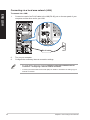
Connecting via a local area network (LAN)
ENGLISH
To connect via a LAN:
1.
Connect one end of an RJ-45 cable to the LAN (RJ-45) port on the rear panel of your
computer and the other end to your LAN.
RJ-45 cable
2.
Turn on your computer.
3.
Configure the necessary Internet connection settings.
LAN
• For more details, refer to the sections Configuring a dynamic IP/PPPoE network
connection or Configuring a static IP network connection.
• Contact your Internet Service Provider (ISP) for details or assistance in setting up your
Internet connection.
56
Chapter 6: Connecting to the Internet
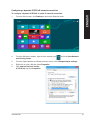
Configuring a dynamic IP/PPPoE network connection
1.
From the Start screen, click Desktop to launch the Desktop mode.
2.
From the Windows® taskbar, right-click the network icon
and Sharing Center.
3.
From the Open Network and Sharing Center screen, click Change Adapter settings.
4.
Right-click on your LAN and select Properties.
5.
Click Internet Protocol Version
4(TCP/IPv4) and click Properties.
ASUS M70AD
ENGLISH
To configure a dynamic IP/PPPoE or static IP network connection:
and click Open Network
57
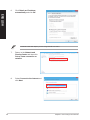
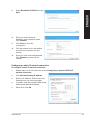
6.
Click Obtain an IP address
automatically and click OK.
ENGLISH
Continue to the next steps if you are using PPPoE connection.
58
7.
Return to the Network and
Sharing Center and then click
Set up a new connection or
network.
8.
Select Connect to the Internet and
click Next.
Chapter 6: Connecting to the Internet
Select Broadband (PPPoE) and click
Next.
ENGLISH
9.
10. Enter your User name and,
Password, and Connection name.
Click Connect.
11.
Click Close to finish the
configuration.
12. Click the network icon in the taskbar
and click the connection you just
created.
13. Enter your user name and password.
Click Connect to connect to the
Internet.
Configuring a static IP network connection
To configure a static IP network connection:
1.
Repeat steps 1 to 4 of the previous section Configuring a dynamic IP/PPPoE
network connection.
2
Click Use the following IP address.
3.
Enter the IP address, Subnet mask and
Gateway from your service provider.
4.
If needed, enter the preferred DNS Server
address and alternative address.
5.
When done, click OK.
ASUS M70AD
59
ENGLISH
60
Chapter 6: Connecting to the Internet
Chapter 7
ENGLISH
Using the utilities
The Support DVD and Recovery DVD may not be included in the package. For more details
on the recovery options in Windows® 8, refer to Recovering your system in this chapter.
ASUS AI Suite II
ASUS AI Suite II is an all-in-one interface that integrates several ASUS utilities and allows
users to launch and operate these utilities simultaneously.
This utility is pre-installed on some models. For models without an operating system, follow
the steps below to install this utility.
Using AI Suite II
AI Suite II automatically starts when you enter the Windows® operating system. The AI Suite
II icon appears in the Windows® notification area. Click the icon to open the AI Suite II main
menu bar.
Click each button to select and launch a utility, to monitor the system, to update the
motherboard BIOS, to display the system information, and to customize the settings of AI
Suite II.
Click to select a utility
Click to update the
motherboard BIOS
Click to monitor sensors
or CPU frequency
Click to show the ASUS
support information
Click to show the
system information
Click to customize
the interface settings
• The applications in the Tool menu vary with models.
• The screenshots of AI Suite II in this user manual are for reference only. The actual
screenshots vary with models.
ASUS M70AD
61
The Tool menu
ENGLISH
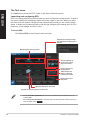
The Tool menu includes the EPU, Probe II, and Sensor Recorder panels.
Launching and configuring EPU
EPU is an energy-efficient tool that provides you with a total power-saving solution. It detects
the current loading and intelligently adjusts the power usage in real-time. When you select
the Auto mode, the system changes modes automatically according to the current system
status. It allows you to customize each mode through configuring the settings such as CPU
frequency, vCore Voltage, and Fan Control.
To launch EPU:
•
Click Tool > EPU on the AI Suite II main menu bar.
Displays the following message
if no VGA power saving engine is
detected.
Multiple system operating modes
The items lighting up
means power saving
engine is activated
Displays the amount
of CO2 reduced
*Shifts between the
display of Total and
Current CO2 reduced
Displays the current
CPU power
Advanced settings for each mode
Displays the system properties of each mode
• * Select From EPU Installation to show the CO2 that has been reduced since you
installed EPU.
• * Select From the Last Reset to show the total CO2 that has been reduced since you
click the Clear button
.
62
Chapter 7: Using the utilities
Launching and configuring Probe II
ENGLISH
Probe II is a utility that monitors the computer’s vital components, and detects and alerts you
of any problem with these components. Probe II senses fan rotations, CPU temperature,
and system voltages, among others. With this utility, you are assured that your computer is
always at a healthy operating condition.
To launch Probe II:
•
Click Tool > Probe II on the AI Suite II main menu bar.
To configure Probe II:
•
Click the Voltage/Temperature/Fan Speed tabs to activate the sensors or to adjust the
sensor threshold values.
•
The Preference tab allows you to customize the time interval of sensor alerts, or
change the temperature unit.
Saves your
configuration
Loads your saved configuration
ASUS M70AD
Loads the default
threshold values for
each sensor
Applies your changes
63
Launching and configuring Sensor Recorder
ENGLISH
Sensor Recorder allows you to monitor the changes in the system voltage, temperature, and
fan speed, as well as recording the changes.
To launch Sensor Recorder:
•
Click Tool > Sensor Recorder on the AI Suite II main menu bar.
To configure Sensor Recorder:
•
Click the Voltage/Temperature/Fan Speed tabs and select the sensors that you want
to monitor.
•
The History Record tab allows you to record the changes in the sensors that you
enable.
Select the
sensors that you
want to monitor
Drag to view the
status during a
certain period
of time
Click to zoom in/out the Y axis
Click to zoom in/out the X axis
Click to return to the default mode
64
Chapter 7: Using the utilities
The Monitor menu
ENGLISH
The Monitor menu includes the Sensor and CPU Frequency panels.
Launching Sensor
The Sensor panel displays the current value of a system sensor such as fan rotation, CPU
temperature, and voltages.
To launch Sensor:
•
Click Monitor > Sensor on the AI Suite II main menu bar.
Launching CPU Frequency
The CPU Frequency panel displays the current CPU frequency and CPU usage.
To launch CPU frequency:
•
Click Monitor > CPU Frequency on the AI Suite II main menu bar.
The Update menu
The Update menu allows you to update the motherboard BIOS and the BIOS boot logo with
the ASUS designed update utilities.
ASUS Update
The ASUS Update is a utility that allows you to manage, save, and update the motherboard
BIOS in Windows® OS. The ASUS Update utility allows you to update the BIOS directly
from the Internet, download the latest BIOS file from the Internet, update the BIOS from an
updated BIOS file, save the current BIOS file or view the BIOS version information.
Updating the BIOS through the Internet
To update the BIOS through the Internet:
1.
From the ASUS Update screen, select Update BIOS from Internet, then click Next.
2.
Select the ASUS FTP site nearest you to avoid network traffic.
Tick the two items if you want to enable the BIOS downgradable and Auto-BIOS
backup functions.
3.
Select the BIOS version that you want to download, then click Next.
When no updated version is detected, a message is displayed informing you that there
is no new BIOS file from the BIOS server.
4.
Click Yes if you want to change the boot logo, which is the image appearing on screen
during the Power‑On Self-Tests (POST). Otherwise, click No.
5.
Follow the onscreen instructions to complete the update process.
ASUS M70AD
65
ENGLISH
Updating the BIOS through a BIOS file
To update the BIOS through a BIOS file:
1.
From the ASUS Update screen, select Update BIOS from file, then click Next.
2.
Locate the BIOS file from the Open window, click Open, and click Next.
3.
Click Yes if you want to change the boot logo, which is the image appearing on screen
during the Power‑On Self-Tests (POST). Otherwise, click No.
4.
Follow the onscreen instructions to complete the update process.
The System Information screen
The System Information screen displays the information about the motherboard, CPU, and
memory slots.
•
Click the MB tab to see the details on the motherboard manufacturer, product name,
version, and BIOS.
•
Click the CPU tab to see the details on the processor and the Cache.
•
Click the Memory tab and then select the memory slot to see the details on the
memory module installed on the corresponding slot.
•
Click the Disk tab and then select each disk to see the details on it.
The Support screen
The Support screen displays the information about the ASUS website, technical support
website, download support website, or contact information.
The Settings screen
The Settings screen allows you to customize the main menu bar settings and the interface’s
skin.
66
•
Application allows you to select the application that you want to enable.
•
Bar allows you to modify the bar setting,
•
Skin allows you to customize the interface’s contrast, brightness, saturation, hue, and
gamma.
Chapter 7: Using the utilities
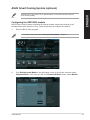
ASUS Smart Cooling System (optional)
ENGLISH
ASUS Smart Cooling System is an optional feature on selected models and may be
purchased separately.
Configuring the UEFI BIOS models
ASUS Smart Cooling System maintains the internal system components through its air
circulation after each system boot up. Follow these steps to configure this feature:
1.
Enter the BIOS Setup program.
For details, refer to the section Entering the BIOS Setup in Chapter 2.
2.
Click Exit/Advanced Mode on the right upper corner of the screen, and then select
Advanced Mode. From the menu bar of the Advanced Mode screen, select Monitor.
ASUS M70AD
67
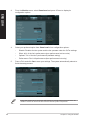
From the Monitor menu, select Clean Level and press <Enter> to display its
configuration options.
4.
Select your preferred option from Clean Level’s four configuration options:
•
Disable: Disables the fan system and the fan operates under the Q-Fan settings.
•
Silent: 40% of the fan’s performance (poor performance but low noise)
•
Optimal: 70% of the fan’s performance (standard setting).
•
Performance: Fan’s full performance (best performance but noisy)
5.
Press <F10> and click Yes to save your settings. The system automatically reboots to
finish the setup process.
ENGLISH
3.
During the system reboot, the Power LED flashes to indicate that the dust extraction fan
rotates in reverse to remove the dust from the internal system components.
68
Chapter 7: Using the utilities
Recovering your system
ENGLISH
Resetting your PC
The Reset your PC option restores your PC to its factory default settings.
Back up all your data before using this option.
To reset your PC:
1.
Press <F9> during bootup.
2.
From the screen, click Troubleshoot.
3.
Select Reset your PC.
4.
Click Next.
5.
Select Only the drive where the Windows is installed.
6.
Select Just remove my files.
7.
Click Reset.
Recovering from a system image file
You can create a USB recovery drive and use this to recover your PC’s settings.
Creating a USB recovery drive
The USB storage device must have at least 16 GB available space.
All files on your USB storage device will be permanently deleted during the process. Before
you proceed, ensure that you back up all your important data.
To create a USB recovery drive:
1.
Launch the Control Panel from the All Apps screen.
For details, refer to Launching the All Apps screen under Working with Windows® apps.
2.
From the Control Panel’s System and Security, click Find and fix problems.
ASUS M70AD
69
ENGLISH
70
3.
Click Recovery > Create a
recovery drive.
4.
Click Copy the recovery partition
from the PC to the recovery
drive and then click Next.
5.
Select the USB storage device
where you want to copy the
recovery files.
6.
Click Next.
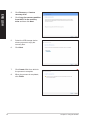
7.
Click Create. Wait for a while for
the process to complete.
8.
When the process is completed,
click Finish.
Chapter 7: Using the utilities
Removing everything and reinstalling Windows
ENGLISH
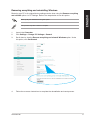
Restoring your PC to its original factory settings can be done using the Remove everything
and reinstall option s in PC Settings. Refer to the steps below to use this option.
Back up all your data before using this option.
This process may take a while to complete.
1.
Launch the Charm bar.
2.
Click Settings > Change PC Settings > General.
3.
Scroll down to view the Remove everything and reinstall Windows option. Under
this option, click Get Started.
4.
Follow the onscreen instructions to complete the reinstallation and reset process.
ASUS M70AD
71
ENGLISH
72
Chapter 7: Using the utilities
Chapter 8
ENGLISH
Troubleshooting
Troubleshooting
This chapter presents some problems you might encounter and the possible solutions.
?
?
My computer cannot be powered on and the power LED on the front
panel does not light up.
•
Check if your computer is properly connected.
•
Check if the wall outlet is functioning.
•
Check if the Power Supply Unit is switched on. Refer to the section Turning
your computer ON in Chapter 1.
My computer hangs.
•
Do the following to close the programs that are not responding:
1.Simultaneously press <Alt> + <Ctrl> + <Delete> keys on the keyboard,
then click Task Manager.
2.Under Task Manager in the Processes tab, select the program that is
not responding, then click End Task.
•
?
?
If the keyboard is not responding. Press and hold the Power button on the top
of your chassis until the computer shuts down. Then press the Power button
to turn it on.
I cannot connect to a wireless network using the ASUS WLAN Card
(on selected models only)?
•
Ensure that you enter the correct network security key for the wireless network
you want to connect to.
•
Connect the external antennas (optional) to the antenna connectors on the
ASUS WLAN Card and place the antennas on the top of your computer
chassis for the best wireless performance.
The arrow keys on the number key pad are not working.
ASUS M70AD
Check if the Number Lock LED is off. When the Number Lock LED is on,
the keys on the number key pad are used to input numbers only. Press the
Number Lock key to turn the LED off if you want to use the arrow keys on the
number key pad.
73
?
ENGLISH
?
?
?
No display on the monitor.
•
Check if the monitor is powered on.
•
Ensure that your monitor is properly connected to the video output port on
your computer.
•
If your computer comes with a discrete graphics card, ensure that you connect
your monitor to a video output port on the discrete graphics card.
•
Check if any of the pins on the monitor video connector is bent. If you discover
bent pins, replace the monitor video connector cable.
•
Check if your monitor is plugged to a power source properly.
•
Refer to the documentation that came with your monitor for more
troubleshooting information.
When using multiple monitors, only one monitor has display.
•
Ensure that the both monitors are powered on.
•
During POST, only the monitor connected to the VGA port has display. The
dual display function works only under Windows.
•
When a graphics card is installed on your computer, ensure that you connect
the monitors to the output port on the graphics card.
•
Check if the multiple displays settings are correct. Refer to section
Connecting multiple external displays in Chapter 3 for details.
My computer cannot detect my USB storage device.
•
The first time you connect your USB storage device to your computer,
Windows automatically installs a driver for it. Wait for a while and go to My
Computer to check if the USB storage device is detected.
•
Connect your USB storage device to another computer to test if the USB
storage device is broken or malfunctions.
I want to restore or undo changes to my computer’s system settings
without affecting my personal files or data.
74
You can use Windows® 8 Refresh everything without affecting your
files recovery option to restore or undo changes to your computer’s system
settings without affecting your personal data such as documents or photos.
To use this recovery option, click Settings > Change PC Settings > General
from the charms bar, select Refresh everything without affecting your files,
and click Get Started.
Chapter 8: Troubleshooting
The picture on the HDTV is distorted.
•
It is caused by the different resolutions of your monitor and your HDTV. Adjust
the screen resolution to fit your HDTV. To change the screen resolution:
ENGLISH
?
Do any of the following to open the Screen Resolution setting screen:
1.
From the Start screen
�������������������������������������������������������������������������
a) Launch the All Apps screen and pin Control Panel on the Start screen.
For details, refer to Pinning an app on the Start screen from the section
Working with Windows® apps.
b) From the Control Panel, click Adjust screen resolution under
Appearance and Personalization.
From the Desktop Mode screen
a) Launch the Desktop Mode from the Start screen.
b) Right click anywhere on your Desktop Mode screen. When the pop-up
menu appears, click Personalize > Display > Change display settings
?
My speakers produce no sound.
•
Ensure that you connect your speakers to the Line out port (lime) on the front
panel or the rear panel.
•
Check if your speaker is connected to an electrical source and turned on.
•
Adjust your speakers’ volume.
•
From the Desktop Mode screen, ensure that your computer’s system sounds
are not Muted.
•
If it is muted, the volume icon is displayed as . To enable the system
sounds, click
the volume.
•
•
ASUS M70AD
from the Windows taskbar, then move the slider to adjust
If it is not muted, click
and drag the slider to adjust the volume.
Connect your speakers to another computer to test if the speakers are
working properly.
75
ENGLISH
?
?
The DVD drive cannot read a disc.
•
Check if the disc is placed with the label side facing up.
•
Check if the disc is centered in the tray, especially for the discs with
non-standard size or shape.
•
Check if the disc is scratched or damaged.
1.
Hover your mouse pointer over the lower left corner of Windows® desktop then
right-click on the Start screen’s thumbnail. From the popup menu, click File
Explorer to open the Computer screen.
2.
Right-click
The DVD drive eject button is not responding.
, then click Eject from the menu.
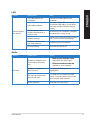
Power
Problem
Possible Cause
Incorrect power voltage
No power
(The power
indicator is off)
Your computer is not
turned on.
Your computer’s power
cord is not properly
connected.
PSU (Power supply unit)
problems
Action
•����������������������������������
Set your computer’s power voltage
switch to your area’s power
requirements.
•������������������������������������
Adjust the voltage settings. Ensure
that the power cord is unplugged
from the power outlet.
Press the power key on the front panel
to ensure that your computer is turned
on.
•������������������������������
Ensure that the power cord is
properly connected.
•��������������������������������
Use other compatible power cord.
Contact the ASUS Service Center
about installing another PSU on your
computer.
Display
Problem
No display
output after
turning the
computer on
(Black screen)
Possible Cause
The signal cable is
not connected to the
correct VGA port on your
computer.
Signal cable problems
76
Action
•��������������������������������
Connect the signal cable to the
correct display port (onboard VGA
or discrete VGA port).
•��������������������������������
If you are using a discrete VGA
card, connect the signal cable to
the discrete VGA port.
Try connecting to another monitor.
Chapter 8: Troubleshooting
Problem
Cannot access
the Internet
Possible Cause
Action
LAN cable problems
Ensure the LAN LED is on. If not,
try another LAN cable. If it still does
not work, contact the ASUS service
center.
The LAN cable is not
connected.
Your computer is not
properly connected to a
router or hub.
ENGLISH
LAN
Connect the LAN cable to your
computer.
Ensure that your computer is properly
connected to a router or hub.
Network settings
Contact your Internet Service Provider
(ISP) for the correct LAN settings.
Problems caused by the
anti-virus software
Close the anti-virus software.
Driver problems
Reinstall the LAN driver
Audio
Problem
Possible Cause
Speaker or headphone is
connected to the wrong
port.
No Audio
ASUS M70AD
Action
•������������������������������
Refer to your computer’s user
manual for the correct port.
•�����������������������������
Disconnect and reconnect the
speaker to your computer.
Speaker or headphone
does not work.
Try using another speaker or
headphone.
The front and back audio
ports do not work.
Try both the front and back audio
ports. If one port failed, check if the
port is set to multi-channel.
Driver problems
Reinstall the audio driver
77
ENGLISH
System
Problem
System speed is
too slow
Possible Cause
Too many programs are
running.
Computer virus attack
Action
Close some of the programs.
•������������������������������
Use an anti-virus software to
scan for viruses and repair your
computer.
•�������������������������������
Reinstall the operating system.
Hard disk drive failure
• S��������������������������
end the damaged hard disk
drive to ASUS Service Center for
servicing.
•�������������������������������
Replace with compatible memory
modules.
The system often
hangs or freezes.
Memory module problems
There is not enough
air ventilation for your
computer.
Incompatible softwares are
installed.
78
•������������������������
Remove the extra memory
modules that you have installed,
then try again.
•��������������������������������
Contact the ASUS Service Center
for assistance.
Move your computer to an area with
better air flow.
Reinstall the OS and reinstall
compatible softwares.
Chapter 8: Troubleshooting
Problem
Too noisy right
after turning on
the computer.
Computer is too
noisy when in use.
Possible Cause
Action
Your computer is booting
up.
It is normal. The fan runs on its
full speed when the computer is
powering on. The fan slows down
after entering the OS.
The BIOS settings have
been changed.
Restore the BIOS to its default
settings.
Old BIOS version
Update the BIOS to the latest
version. Visit the ASUS Support
site at http://support.asus.com to
download the latest BIOS versions.
The CPU fan has been
replaced.
Ensure that you are using a
compatible or ASUS-recommended
CPU fan.
There is not enough
air ventilation for the
computer.
The system temperature is
too high.
ENGLISH
CPU
Ensure that your computer is
working in an area with good air flow.
•�����������������
Update the BIOS.
•���������������������������������
If you know how to reinstall the
motherboard, try to clean the inner
space of the chassis.
• Contact the ASUS Service Center
for assistance.
If the problem still persists, refer to your Desktop PC’s warranty card and contact the ASUS
Service Center. Visit the ASUS Support site at http://support.asus.com for the service
center information.
ASUS M70AD
79
ASUS contact information
ASUSTeK COMPUTER INC.
Address
15 Li-Te Road, Peitou, Taipei, Taiwan 11259
Telephone +886-2-2894-3447
Fax +886-2-2890-7798
E-mail
[email protected]
Web site
www.asus.com.tw
Technical Support
Telephone +86-21-38429911
Online support
support.asus.com
ASUS COMPUTER INTERNATIONAL (America)
Address
800 Corporate Way, Fremont, CA 94539, USA
Telephone +1-510-739-3777
Fax+1-510-608-4555
Web site
usa.asus.com
Technical Support
Telephone +1-812-282-2787
Support fax+1-812-284-0883
Online support
support.asus.com
ASUS COMPUTER GmbH (Germany and Austria)
Address
Harkort Str. 21-23, D-40880 Ratingen, Germany
Fax+49-2102-959911
Web site
www.asus.de
Online contact
www.asus.de/sales
Technical Support
Telephone (Component)+49-1805-010923*
Telephone (System/Notebook/Eee/LCD)+49-1805-010920*
Support Fax+49-2102-9599-11
Online support
support.asus.com
* EUR 0.14/minute from a German fixed landline; EUR 0.42/minute from a mobile
phone.
Manufacturer:
ASUSTeK Computer Inc.
Address:
4F, No.150, LI-TE RD., PEITOU, TAIPEI 112,
TAIWAN
Authorised representative in
Europe:
ASUS Computer GmbH
Address:
HARKORT STR. 21-23, 40880 RATINGEN,
GERMANY