1
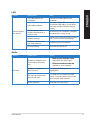
Problem
Cannot access
the Internet
Possible Cause
Action
LAN cable problems
Ensure the LAN LED is on. If not,
try another LAN cable. If it still does
not work, contact the ASUS service
center.
The LAN cable is not
connected.
Your computer is not
properly connected to a
router or hub.
ENGLISH
LAN
Connect the LAN cable to your
computer.
Ensure that your computer is properly
connected to a router or hub.
Network settings
Contact your Internet Service Provider
(ISP) for the correct LAN settings.
Problems caused by the
anti-virus software
Close the anti-virus software.
Driver problems
Reinstall the LAN driver
Audio
Problem
Possible Cause
Speaker or headphone is
connected to the wrong
port.
No Audio
ASUS M70AD
Action
•������������������������������
Refer to your computer’s user
manual for the correct port.
•�����������������������������
Disconnect and reconnect the
speaker to your computer.
Speaker or headphone
does not work.
Try using another speaker or
headphone.
The front and back audio
ports do not work.
Try both the front and back audio
ports. If one port failed, check if the
port is set to multi-channel.
Driver problems
Reinstall the audio driver
77