1
ENGLISH
CPU
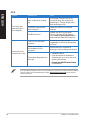
Problem
Too noisy right
after turning on
the computer.
Computer is too
noisy when in use.
Possible Cause
Action
Your computer is booting
up.
It is normal. The fan runs on its
full speed when the computer is
powering on. The fan slows down
after entering the OS.
The BIOS settings have
been changed.
Restore the BIOS to its default
settings.
Old BIOS version
Update the BIOS to the latest
version. Visit the ASUS Support
site at http://support.asus.com to
download the latest BIOS versions.
The CPU fan has been
replaced.
Ensure that you are using a
compatible or ASUS-recommended
CPU fan.
There is not enough
air ventilation for the
computer.
Ensure that your computer is
working in an area with good air flow.
The system temperature is
too high.
• U
pdate the BIOS.
• If you know how to reinstall the
motherboard, try to clean the inner
space of the chassis.
• Contact
��������������������������������
the ASUS Service Center
for assistance.
If the problem still persists, refer to your Desktop PC’s warranty card and contact the ASUS
Service Center. Visit the ASUS Support site at http://support.asus.com for the service
center information.
38
Chapter 5: Troubleshooting