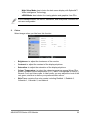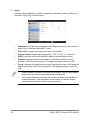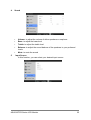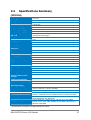
1
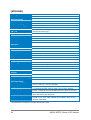
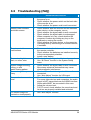
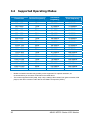
MT276 Series LCD Monitor User’s Manual E5082 First Edition V1 November 2009 Copyright © 2009ASUSTeK COMPUTER INC. All Rights Reserved. No part of this manual, including the products and software described in it, may be reproduced, transmitted, transcribed, stored in a retrieval system, or translated into any language in any form or by any means, except documentation kept by the purchaser for backup purposes, without the express written permission of ASUSTeK COMPUTER INC. (“ASUS”). Product warranty or service will not be extended if: (1) the product is repaired, modified or altered, unless such repair, modification of alteration is authorized in writing by ASUS; or (2) the serial number of the product is defaced or missing. ASUS PROVIDES THIS MANUAL “AS IS” WITHOUT WARRANTY OF ANY KIND, EITHER EXPRESS OR IMPLIED, INCLUDING BUT NOT LIMITED TO THE IMPLIED WARRANTIES OR CONDITIONS OF MERCHANTABILITY OR FITNESS FOR A PARTICULAR PURPOSE. IN NO EVENT SHALL ASUS, ITS DIRECTORS, OFFICERS, EMPLOYEES OR AGENTS BE LIABLE FOR ANY INDIRECT, SPECIAL, INCIDENTAL, OR CONSEQUENTIAL DAMAGES (INCLUDING DAMAGES FOR LOSS OF PROFITS, LOSS OF BUSINESS, LOSS OF USE OR DATA, INTERRUPTION OF BUSINESS AND THE LIKE), EVEN IF ASUS HAS BEEN ADVISED OF THE POSSIBILITY OF SUCH DAMAGES ARISING FROM ANY DEFECT OR ERROR IN THIS MANUAL OR PRODUCT. SPECIFICATIONS AND INFORMATION CONTAINED IN THIS MANUAL ARE FURNISHED FOR INFORMATIONAL USE ONLY, AND ARE SUBJECT TO CHANGE AT ANY TIME WITHOUT NOTICE, AND SHOULD NOT BE CONSTRUED AS A COMMITMENT BY ASUS. ASUS ASSUMES NO RESPONSIBILITY OR LIABILITY FOR ANY ERRORS OR INACCURACIES THAT MAY APPEAR IN THIS MANUAL, INCLUDING THE PRODUCTS AND SOFTWARE DESCRIBED IN IT. Products and corporate names appearing in this manual may or may not be registered trademarks or copyrights of their respective companies, and are used only for identification or explanation and to the owners’ benefit, without intent to infringe. ii ASUS MT276 Series LCD Monitor Contents Contents .............................................................................................iii Notices ................................................................................................iv Safety Information ..............................................................................v Care and Cleaning .............................................................................vi Recycling Place................................................................................viii 1.1 Welcome! ....................................................................................11 1.2 Package Contents .....................................................................11 1.3 Monitor Introduction................................................................12 1.3.1 Front view.......................................................................................... 12 1.3.2 Top view ............................................................................................ 13 1.3.3 Rear view ........................................................................................... 15 1.4 Remote Controller Introduction .............................................16 2.1 Assembling the Monitor ...........................................................18 2.2 Adjusting the Posture of the Monitor ....................................18 2.3 Detaching the arm/base (only for the MT276) ...................19 2.4 Connecting the Monitor ...........................................................20 2.4 Turning the Monitor On............................................................21 2.5 Setting the Monitor...................................................................21 3.1 On-Screen Display (OSD) Menu..............................................22 3.1.1 How to reconfigure ........................................................................... 22 3.1.2 OSD menu introduction.................................................................... 22 3.2 Specifications Summary ..........................................................27 3.3 Troubleshooting (FAQ).............................................................29 3.4 Supported Operating Modes ...................................................30 ASUS MT276 Series LCD Monitor iii Notices Federal Communications Commission Statement This device complies with Part 15 of the FCC Rules. Operation is subject to the following two conditions: ▪ This device may not cause harmful interference, and ▪ This device must accept any interference received including interference that may cause undesired operation. This equipment has been tested and found to comply with the limits for a Class B digital device, pursuant to Part 15 of the FCC Rules. These limits are designed to provide reasonable protection against harmful interference in a residential installation. This equipment generates, uses and can radiate radio frequency energy and, if not installed and used in accordance with manufacturer’ s instructions, may cause harmful interference to radio communications. However, there is no guarantee that interference will not occur in a particular installation. If this equipment does cause harmful interference to radio or television reception, which can be determined by turning the equipment off and on, the user is encouraged to try to correct the interference by one or more of the following measures: ▪ Reorient or relocate the receiving antenna. ▪ Increase the separation between the equipment and receiver. ▪ Connect the equipment to an outlet on a circuit different from that to which the receiver is connected. ▪ Consult the dealer or an experienced radio/TV technician for help. The use of shielding cables for connection of the monitor to the graphics card is required to assure compliance with FCC regulations. Changes or modifications to this unit not expressly approved by the party responsible for compliance could void the user’s authority to operate this equipment. As an Energy Star® Partner, our company has determined that this product meets the Energy Star® guidelines for energy efficiency. Canadian Department of Communications Statement This digital apparatus does not exceed the Class B limits for radio noise emissions from digital apparatus set out in the Radio Interference Regulations of the Canadian Department of Communications. This class B digital apparatus complies with Canadian ICES-003. iv ASUS MT276 Series LCD Monitor Safety Information ▪ Before setting up the monitor, carefully read all the documentation that came with the package. ▪ To prevent fire or shock hazard, never expose the monitor to rain or moisture. ▪ Never try to open the monitor cabinet. The dangerous high voltages inside the monitor may result in serious physical injury. ▪ If the power supply is broken, do not try to fix it by yourself. Contact a qualified service technician or your retailer. ▪ Before using the product, make sure all cables are correctly connected and the power cables are not damaged. If you detect any damage, contact your dealer immediately. ▪ Slots and openings on the back or top of the cabinet are provided for ventilation. Do not block these slots. Never place this product near or over a radiator or heat source unless proper ventilation is provided. ▪ The monitor should be operated only from the type of power source indicated on the label. If you are not sure of the type of power supply to your home, consult your dealer or local power company. ▪ Use the appropriate power plug which complies with your local power standard. ▪ Do not overload power strips and extension cords. Overloading can result in fire or electric shock. ▪ Avoid dust, humidity, and temperature extremes. Do not place the monitor in any area where it may become wet. Place the monitor on a stable surface. ▪ Unplug the unit during a lightning storm or if it will not be used for a long period of time. This will protect the monitor from damage due to power surges. ▪ Never push objects or spill liquid of any kind into the slots on the monitor cabinet. ▪ To ensure satisfactory operation, use the monitor only with UL listed computers which have appropriate configured receptacles marked between 100-240V AC. ▪ If you encounter technical problems with the monitor, contact a qualified service technician or your retailer. This symbol of the crossed out wheeled bin indicates that the product (electrical, electronic equipment, and mercury-containing button cell battery) should not be placed in municipal waste. Please check regulations for disposal of electronic products. ASUS MT276 Series LCD Monitor v Care and Cleaning ▪ Before you lift or reposition your monitor, it is better to disconnect the cables and power cord. Follow the correct lifting techniques when positioning the monitor. When lifting or carrying the monitor, grasp the edges of the monitor. Do not lift the monitor by the stand or the cord. ▪ Cleaning. Turn your monitor off and unplug the power cord. Clean the monitor surface with a lint-free, non-abrasive cloth. Stubborn stains may be removed with a cloth dampened with mild cleaner. ▪ Avoid using a cleaner containing alcohol or acetone. Use a cleaner intended for use with the LCD. Never spray cleaner directly on the screen, as it may drip inside the monitor and cause an electric shock. The following symptoms are normal with the monitor: ▪ The screen may flicker during the initial use due to the nature of the fluorescent light. Turn off the Power Switch and turn it on again to make sure that the flicker disappears. ▪ You may find slightly uneven brightness on the screen depending on the desktop pattern you use. ▪ When the same image is displayed for hours, an afterimage of the previous screen may remain after switching the image. The screen will recover slowly or you can turn off the Power Switch for hours. ▪ When the screen becomes black or flashes, or cannot work anymore, contact your dealer or service centre to fix it. Do not repair the screen by yourself! Conventions used in this guide WARNING: Information to prevent injury to yourself when trying to complete a task. CAUTION: Information to prevent damage to the components when trying to complete a task. IMPORTANT: Information that you MUST follow to complete a task. NOTE: Tips and additional information to aid in completing a task. vi ASUS MT276 Series LCD Monitor Where to find more information Refer to the following sources for additional information and for product and software updates. 1. ASUS websites The ASUS websites worldwide provide updated information on ASUS hardware and software products. Refer to http://www.asus.com 2. Optional documentation Your product package may include optional documentation that may have been added by your dealer. These documents are not part of the standard package. ASUS MT276 Series LCD Monitor vii Recycling Place EUROPE When disposing of ASUS products in Europe, please contact one of the following locations to make arrangements for recycling. ▪ ASUS France S.A.R.L. 10 allee bienvenue, 93160, noisy le grand, France Tel: +33 1 49 32 96 50 ▪ ASUS COMPUTER GmbH (Germany) Harkortstr. 21 – 23, 40880 Ratingen, Deutschland Hotline: +49 01805 / 010920 ( Mo – Fr / 9 – 17h) Fax: +49 2102 9599-11 (24h) ▪ ASUSTeK Italy srl Via Piero Gobetti 2/B Centro direzionale Villa Fiorita 20063 Cernusco sul Naviglio (MI), Italy Tel: +39 199400089 Fax: +39 02 20240555 ▪ ASUSTek UK Ltd. 1st Floor, Focus 31, West Wing, Mark Road, Hemel Hempstead, HP2 7BW, UK Tel: +44 1442 202 700 Fax: +44 1442 245 882 ▪ ASUS IBERICA S.L. C/ Plomo 5-7, 08038 Barcelona, Spain Tel: +34 902 889688 ▪ ASUS Nordic AB Finlandsgatan 16, 4 Tr., 16474 Kista, Sweden Tel: +46 8 5889 8900 Fax: +46 8 5889 8999 ▪ ASUS Computer Benelux B.V. Fultonbaan 12 3439 NE Nieuwegein The Netherlands Tel: +31.30.60.22.452 Hotline: +31 (0)591-668190 Fax: +31 (0)591-666853 ▪ ASUS Computer Czech Republic S.R.O. V Olsinach 2300/75, 10000 Prague, Czech Republic Tel: +420 274 774 872 Fax: +420 274 774 889 ▪ ASUS Polska SP. Z.O.O. Al. Jerozolimskie 200, 02-222 Warsaw 4 floor, Poland Tel: +48 22 571 80 00 Fax: +48 22 571 80 01 ▪ ASUS Hungary Kft. Tel: +36 1 505 45 61 Fax: +36 1 505 45 63 viii ASUS MT276 Series LCD Monitor NORTH AMERICA When disposing of ASUS products in North America, please contact the following locations to make arrangements for recycling. ASUS COMPUTER INTERNATIONAL (America) ▪ US Headquarters: 800 Corporate Way, Fremont, CA 94539, USA Tel: +1 510-739-3777 Fax: +1 510-608-4555 ▪ Canada Branch Office: 802 Cochrane Dr., Unit 2, Markham ON, L3R 8C9, Canada Tel: (905) 370-2787 Fax: (905) 489-2718 ASIA PACIFIC When disposing of ASUS products in Asia Pacific, please contact the following location to make arrangements for recycling. ▪ ASUSTeK COMPUTER INC. No. 15, Li-Te Rd., Peitou, Taipei, Taiwan Tel: +886-2-2894-3447 Hotline: +886-(0)800-093-456 Fax: +886-2-2895-9254 “THIS UNIT IS AN ELECTRIC DEVICE WHICH MAY CONTAIN HAZARDOUS MATERIALS AND COMPONENTS, AND WHICH MUST BE DISPOSED OF AT END OF LIFE ACCORDING TO THE PROPER PROCEDURE” ASUS MT276 Series LCD Monitor ix ________________________________________________________________________________ ________________________________________________________________________________ ________________________________________________________________________________ ________________________________________________________________________________ ________________________________________________________________________________ ________________________________________________________________________________ ________________________________________________________________________________ ________________________________________________________________________________ ________________________________________________________________________________ ________________________________________________________________________________ ________________________________________________________________________________ ________________________________________________________________________________ ________________________________________________________________________________ ________________________________________________________________________________ ________________________________________________________________________________ ________________________________________________________________________________ ________________________________________________________________________________ ________________________________________________________________________________ ________________________________________________________________________________ ________________________________________________________________________________ ________________________________________________________________________________ ________________________________________________________________________________ ________________________________________________________________________________ x ASUS MT276 Series LCD Monitor 1.1 Welcome! Thank you for purchasing the ASUS® MT Series Multifunction LCD Monitor! The latest LCD monitor from ASUS provides a host of features that enhance your viewing experience. It integrates a number of various media input interfaces to meet your needs on a monitor for working as well as entertainment. With these features, you can enjoy the convenience and delightful visual experience that the MT Series brings you! 1.2 Package Contents Check the package of your MT series Multifunction LCD monitor for the following items: ▪ LCD monitor ▪ Monitor base and screw ▪ Warranty card ▪ Quick start guide ▪ User’s manual CD ▪ Power cord ▪ HDMI-to-DVI cable ▪ VGA cable ▪ Audio cable ▪ Remote controller and battery ▪ If any of the above items is damaged or missing, contact your retailer immediately. ▪ Remove the tab before using the remote control. 1 ASUS MT276 Series LCD Monitor 2 11 1.3 1.3.1 Monitor Introduction Front view 1 1. Power button and power indicator ▪ Press this button to turn the monitor on, off, or stand-by. ▪ The colour of the power indicator is as the below table. Status 2. Description Blue On Red No signal (Power saving) Off (dark) Off/Standby Remote receiver ▪ 12 2 The monitor receives the signal from the remote controller here. ASUS MT276 Series LCD Monitor 1.3.2 Top view 1 / 1. 2. 2 3 4 5 / Splendid / Auto Adjust / Exit button ▪ Use this hotkey to switch from six video preset modes (Standard mode, Theatre mode, Game mode, Scenery mode, Night view mode and sRGB mode) with SPLENDID™ Video Enhancement Technology ▪ Exits the OSD menu or goes back to the previous menu when the OSD menu is active. ▪ Automatically adjust the image to its optimized position, clock, and phase by pressing this button for 2 – 3 seconds (VGA input only) MENU / Enter button ▪ To turn on the OSD menu ▪ To enter/select the icon (function) highlighted while the OSD is active 3. / Brightness hotkey / Right & Left button ▪ To move the left/right to adjust the value of the function selected or move right to the next function. ▪ When OSD is not on the screen, this is also a hotkey for Brightness adjustment. ASUS MT276 Series LCD Monitor 13 4. / Volume hotkey / up & Down button ▪ To move the down/up to choose the function ▪ When OSD is not on the screen, this is also a hotkey for sound volume adjustment. 5. ▪ Source button To switch among the input signal sources of Component, VGA, HDMI1, and HDMI2. Press (Input Select Button) to display HDMI signals after you connect HDMI cables with the monitor. 14 ASUS MT276 Series LCD Monitor 1.3.3 Rear view 9 10 MT276H 3 4 5 6 1 2 MT276HE 3 1 7 8 4 5 2 7 1. Power socket and switch to connect power cord and to switch the monitor on and off 2. Kensington lock 3. HDMI connection for High-Definition Multimedia Interface (HDMI) signal connection 4. S/PDIF audio-out to output digital audio signal over S/PDIF cable 5. Audio-in for PC stereo sound to connect PC audio source 6. Audio-in connection to input audio signal over an RCA cable (only for the MT276H) 7. VGA connection for PC VGA analogue signal connection 8. Component connection to connect Component (YPbPr) video signal source (only for the MT276H) 9. Remote control storage 10. Headphone jack to output audio signal to headphone ASUS MT276 Series LCD Monitor 15 1.4 Remote Controller Introduction Replacing the battery 1. Open the battery compartment cover on the back side. 2. Remove the old battery 3. Insert a lithium battery in correct polarity (+ to +, - to -). 4. Close the cover. 22.5 22.5 16 ▪ Use the remote controller in front of the remote receiver with a distance shorter than 7 meters and within 22.5 degree to the left and to the right. ▪ Dispose of used batteries in a recycle bin to prevent from environment pollution. ASUS MT276 Series LCD Monitor 1 2 1. Increases, decreases, and mutes the sound. 3 2. To switch among the input signal sources of Component, VGA, HDMI1, and HDMI2 4 3. Press this button to turn the monitor on, off, or stand-by. 4. Use this hotkey to switch from six video preset modes (Standard mode, Theatre mode, Game mode, Scenery mode, Night view mode and sRGB mode) with SPLENDID™ Video Enhancement Technology 5. Adjusts the aspect ration to “Full”, “4:3”, or “Overscan”. 6. Automatically adjusts the image to its optimized position, clock, and phase by pressing this button for 2–3 seconds (for VGA mode only.) 7. Brightness hotkey 8. To move the left/right to adjust the value of the function selected or move right to the next function. To move the down/up to choose the function. 9. To enter/select the icon (function) highlighted while the OSD is active 5 6 7 8 9 10 11 10. Exits the OSD menu or goes back to the previous menu when the OSD menu is active. 11. Turns on the OSD menu. ASUS MT276 Series LCD Monitor 17 2.1 Assembling the Monitor To assemble the monitor base: 1. Have the front of the monitor face down on a table. 2. Align the base on the arm to fit it into the arm groove. 3. Fix the base to the arm by fastening the bundled screw. We recommend that you cover the table surface with soft cloth to prevent damage to the monitor. 1 2 2.2 Adjusting the Posture of the Monitor ▪ For optimal viewing, we recommend that you look at the full face of the monitor, and then adjust the monitor to the angle that is most comfortable for you. ▪ Hold the stand to prevent the monitor from falling when you change its angle. ▪ You can adjust the monitor’s angle from -5˚ – 18˚. -5˚ – 18˚ It is normal that the monitor slightly shakes while you adjust the viewing angle. 18 ASUS MT276 Series LCD Monitor 2.3 Detaching the arm/base (only for the MT276) (For VESA wall mount) The detachable am/base of this LCD monitor is specially designed for VESA wall mount To detach the arm/base: 1. 2. 3. 4. 5. Have the front of monitor face down on a table. Remove the rubbers in the four screw holes (figure 1.) Remove the base (figure 2.) Using a flat head screwdriver to pry the rear hinge cover (figure 3.) Use a screwdriver to remove 4 screws on the hinge (figure 4), than remove it from the monitor. 1 1 2 3 4 2 We recommend that you cover the table surface with soft cloth to prevent damage to the monitor. ASUS MT276 Series LCD Monitor 19 2.4 Connecting the Monitor MT276H PC z 1 6 1 External Speakers z 3 4 2 AV device z 2 2 3 4 5 7 5 8 MT276HE z 1 1 PC 6 z 4 2 6 7 External Speakers z 3 2 3 4 AV device 2 8 6 ▪ To connect the power cord: Connect one end of the power cord securely to the monitor’s 1 AC-IN port, the other end to a power outlet. Before you connect the cables, ensure that the connected devices are switched off or the power cord is unplugged from the electricity supply. ▪ To connect the signal cables: Connect one end of the 2 HDMI/ 6 VGA/ 7 YPbPr cable(s) to the monitor, the other end to your computer or any other video devices. When more than one signal sources are simultaneously connected, you can switch the input source by using the key on the key pad of the monitor or on the remote controller. 20 ASUS MT276 Series LCD Monitor ▪ To connect the audio cable: Connect the audio cable from the monitor’s audio-in port to the computer’s and/or video device’s 4 / 5 audio-out port. ▪ To connect to external speakers: Connect an 3 S/PDIF cable from the S/PDIF audio-out port of the monitor to the audio-in port of external speakers. ▪ To use earphones: Connect the end with plug type to the monitor’s jack. 2.4 8 earphone Turning the Monitor On Turn on the main power switch on the rear of the monitor. Press the power button. See section 1.3 Monitor Introduction for the location of the power button. The power indicator lights up in blue to show that the monitor is ON. 2.5 Setting the Monitor Set the PC signal to the optimal resolution and frequency for the best picture quality. ▪ Press button for 2 – 3 seconds if noise, trembling, or picture offset appears on the screen while VGA input in use. ASUS MT276 Series LCD Monitor 21 3.1 On-Screen Display (OSD) Menu 3.1.1 How to reconfigure 1. Press the MENU button either on the key pad of the monitor or on the remote controller to activate the OSD menu. 2. Use W, X, S, and T to navigate through the functions. The chosen function will be highlighted. To activate the chosen function, press ENTER button. If the selected function has a sub-menu, still use W, X, S, and T to navigate through the sub-menu functions. Again, the chosen function will be highlighted and you may activate it by pressing ENTER button 3. Use W, X, S, or T to change the settings of the activated function. 4. You can go back to the top level of the OSD menu list whenever you press the MENU button. Repeat step 2 and 3 to adjust any other function. 5. To exit from the OSD menu, press the set or EXIT button on the remote controller. 3.1.2 1. key on the key pad of the monitor OSD menu introduction Splendid This function contains five sub-functions you can select for your reference. Each mode has the Reset selection, allowing you to maintain your setting or return to the preset mode 22 - Standard Mode: best choice for document editing with Splendid™ Video Intelligence Technology - Theatre Mode: best choice for watching films with Splendid™ Video Intelligence Technology - Game Mode: best choice for game playing with Splendid™ Video Intelligence Technology - Scenery Mode: best choice for scenery photo display with Splendid™ Video Intelligence Technology ASUS MT276 Series LCD Monitor - Night View Mode: best choice for dark-scene display with Splendid™ Video Intelligence Technology - sRGB Mode: best choice for viewing photos and graphics from PCs. In the Standard Mode, the ASCR, Saturation, and Sharpness functions are not user-configurable. 2. Colour Select image colour you like from this function ▪ Brightness: to adjust the luminance of the monitor ▪ Contrast: to adjust the contrast of the displayed picture ▪ Saturation: to adjust the saturation of the displayed picture ▪ Colour Temperature: to select the colour temperature among Warm (The preset correlated colour temperature (CCT) “warm” corresponds to 6500 K.), Normal, Cool, and User mode. In User mode, you may adjust the level of the red, green, and blue to define your preferred white colour. ▪ Skin Tone: contains five color modes including Reddish 1, Reddish 2, Yellowish 1, Yellowish 2, and Natural. ASUS MT276 Series LCD Monitor 23 3. Image You can adjust brightness, contrast, sharpness, saturation, position (VGA only), and focus (VGA only) from this menu 24 ▪ Sharpness: to adjust the sharpness of the displayed picture; this function is active only in Standard Splendid™ mode ▪ Trace Free: to adjust the response time of the monitor ▪ Aspect Control: adjust the aspect ratio to “Full” or “4:3” or “ Overscan”. ▪ ASCR: to switch on and off the ASUS Smart Contrast Ratio function ▪ Position: adjusts the horizontal position (H-Position) and the vertical position (V-Position) of the image. The adjusting range is from 0 to 100. ▪ Focus: reduces Horizontal line noise and Vertical-line noise of the image by adjusting (Phase) and (Clock) separately. The adjusting range is from 0 to 100. ▪ Phase adjusts the phase of the pixel clock signal. With a wrong phase adjustment, the screen shows horizontal disturbances. ▪ Clock (pixel frequency) controls the number of pixels scanned by one horizontal sweep. If the frequency is not correct, the screen shows vertical stripes and the image is not proportional. ASUS MT276 Series LCD Monitor 4. 5 Sound ▪ Volume: to adjust the volume of either speakers or earphone ▪ Bass: to adjust the bass level ▪ Treble: to adjust the treble level ▪ Balance: to adjust the sound balance of the speakers to your preferred levels ▪ Mute: to mute the sound Input Source In this function, you can select your desired input source. ASUS MT276 Series LCD Monitor 25 6 System Setup Allow you to adjust the system. ▪ 26 OSD Setup: Adjusts the horizontal position (H-Position)/the vertical position (V-Position) of the OSD from 0 to 100. Adjusts the OSD timeout from 10 to 120 seconds. Enables or disables the DDC/CI function. Adjusts the OSD transparency. ▪ Information: shows the monitor information. ▪ Language: there are 11 languages for your selection, including English, German, Italian, French, Dutch, Spanish, Russian, Traditional Chinese, Simplified Chinese, Japanese and Korean. ▪ All Reset: “Yes” allows you to restore the default settings. ASUS MT276 Series LCD Monitor 3.2 Specifications Summary (MT276H) Panel Type Panel Size Max Resolution Pixel Pitch Brightness (Typ) Contrast Ratio (Typ) Contrast Ratio (Max) Viewing Angle (H/V) CR > 10 Display Colors Response Time SPLENDID Selection Auto Adjustment Color Temperature Selection Skin-Tone Selection Digital Input Analogue Input Audio-in Port Digital Audio Output Earphone Jack Colors Speaker (Built-in) Power LED Tilt Kensington Lock AC/DC Adaptor Input Voltage Power Consumption Temperature (Operating) Temperature (Non-operating) Dimension (W*H*D) Weight (Esti) Multilanguage Accessory Regulation Approvals TFT LCD 27” (16:9) wide screen 1920 x 1080 0.31125 mm 400 cd/m2 1000:1 50000:1 (with ASCR on) 170 degrees Horizontal (typ.) 160 degrees Vertical (typ.) 16.7 M 2 ms 6 video preset modes Yes 4 color temperatures 5 skin-tones HDMI x 2 (v1.3) D-Sub, Component (YPbPr) x 1 RCA (R+L) x 1, 3.5 mm Mini-jack x 1 S/PDIF x 1 Yes Black 3W x 2 Blue (On)/Red (Standby) -5°~18° Yes AC 100 -240V Power on < 65W; Stand-by <1 W; Power off < 1W 0°C ~ 40 °C -20°C ~ 60 °C 666.5 mm x 515.2 mm x 229.9 mm (machine) 755 mm x 685 mm x 148 mm (package) 9 Kg (Net); 11.8 Kg (gross) 11 Languages (English, German, Italian, French, Dutch, Spanish, Russian, Traditional Chinese, Simplified Chinese, Japanese, Korean) D-Sub cable, Audio cable, Power cord, HDMI-DVI cable, Warranty card, Quick Start Guide, User Guide CD Energy Star®, EuP, TCO06, UL/cUL, CB, CE, FCC, CCC, BSMI, Gost-R, C-Tick, VCCI, PSB, J-MOSS, RoHS, WEEE, ISO 9421-307, Windows Vista WHQL * Specifications are subject to change without prior notice. ASUS MT276 Series LCD Monitor 27 (MT276HE) Panel Type Panel Size Max Resolution Pixel Pitch Brightness (Typ) Contrast Ratio (Typ) Contrast Ratio (Max) Viewing Angle (H/V) CR > 10 Display Colors Response Time SPLENDID Selection Auto Adjustment Color Temperature Selection Skin-Tone Selection Digital Input Analogue Input Audio-in Port Digital Audio-out Port Earphone Jack Colors Speaker (Built-in) Power LED Tilt Kensington Lock AC/DC Adaptor Input Voltage Power Consumption Temperature (Operating) Temperature (Non-operating) Dimension (W*H*D) Weight (Esti) Multilanguage Accessory Regulation Approvals TFT LCD 27” (16:9) wide screen 1920 x 1080 0.31125 mm 400 cd/m2 1000:1 50000:1 (with ASCR on) 170 degrees Horizontal (typ.) 160 degrees Vertical (typ.) 16.7 M 2 ms 6 video preset modes Yes 4 color temperatures 5 skin-tones HDMI x 2 (v1.3) D-Sub 3.5 mm Mini-jack x 1 S/PDIF x 1 Yes Black 3W x 2 Blue (On)/Red (Standby) -5°~18° Yes AC 100 -240V Power on < 65W; Stand-by <1 W; Power off < 1W 0°C ~ 40 °C -20°C ~ 60 °C 666.5 mm x 515.2 mm x 229.9 mm (machine) 755 mm x 685 mm x 148 mm (package) 9 Kg (Net); 11.8 Kg (gross) 11 Languages (English, German, Italian, French, Dutch, Spanish, Russian, Traditional Chinese, Simplified Chinese, Japanese, Korean) D-Sub cable, Audio cable, Power cord, HDMI-DVI cable, Warranty card, Quick Start Guide, User Guide CD Energy Star®, EuP, TCO06, UL/cUL, CB, CE, FCC, CCC, BSMI, Gost-R, C-Tick, VCCI, PSB, J-MOSS, RoHS, WEEE, ISO 9421-307, Windows Vista WHQL * Specifications are subject to change without prior notice. 28 ASUS MT276 Series LCD Monitor 3.3 Troubleshooting (FAQ) Phenomenon Power indicator off ▪ ▪ Amber power indicator and blank screen ▪ ▪ ▪ ▪ ▪ ▪ Remote controller malfunctions ▪ ▪ Screen too bright, too dark, or colour error Screen image bouncing, rolling, or with water-flowing pattern Screen image blurry or fuzzy No sound or low sound level ▪ ▪ ▪ ▪ ▪ ▪ ▪ ▪ ▪ ▪ PC screen image not centred or sized properly ▪ Recommended Actions Press the power button again and check whether the power is on. Check whether the power switch on the back side of the monitor is on. Check whether the power cord is well connected. Check whether both the monitor and the selected video device, or the computer, are on. Check whether the signal cable is well connected. Check whether the signal cable is undamaged. When computer is in use, check whether the computer is waken by clicking any key on the keyboard or moving the mouse. Check whether the video device, or the computer, is working well by connecting it to another monitor, if available. Ensure no obstruction between the monitor and the remote controller. Check whether the batteries are installed correctly to the correspondent polarities. Install a new battery. Check whether the signal cable is undamaged. Use “All Reset” function in the System Setup menu. Check whether the signal cable is well connected. Move away electrical devices that may cause electromagnetic interference. Check whether the video signal cable is well connected. Use “Auto Adjust” function for VGA input. Check whether the audio cable is well connected. For some video devices and computers, the audio signal is NOT transmitted over the HDMI interface. Audio cable MUST be connected in this case. Adjust the volume level. For PC sound, check whether the sound card and its driver are properly installed and activated. Use “Auto Adjust” function. ASUS MT276 Series LCD Monitor 29 3.4 Supported Operating Modes Resolution Vertical frequency 640 x 480 640 x 480 640 x 480 640 x 480 720 x 400 800 x 600 800 x 600 800 x 600 800 x 600 832 x 624 1024 x 768 1024 x 768 1024 x 768 1152 x 864 1280 x 960 1280 x 1024 1280 x 1024 1440 x 900 1600 x 1200 1680 x 1050 1920 x 1080 60Hz 67Hz 73Hz 75Hz 70Hz 56Hz 60Hz 72Hz 75Hz 75Hz 60Hz 70Hz 75Hz 75Hz 60Hz 60Hz 75Hz 60Hz 60Hz 60Hz 60Hz Horizontal frequency 31.47KHz 35.00KHz 37.86KHz 37.50KHz 31.47KHz 35.16KHz 37.88KHz 48.08KHz 46.88KHz 49.72KHz 48.36KHz 56.48KHz 60.02KHz 67.50KHz 60KHz 63.98KHz 79.98KHz 55.94KHz 75.00KHz 65.29KHz 67.50KHz Pixel frequency 25.17MHz 30.24MHz 31.50MHz 31.50MHz 28.32MHz 36.00MHz 40.00MHz 50.00MHz 49.50MHz 57.28MHz 65.00MHz 75.00MHz 78.75MHz 108.00MHz 108MHz 108.00MHz 134.99MHz 106.50MHz 162.00MHz 146.24MHz 148.50MHz ▪ Modes not listed in the table may possibly not be supported. For optimal resolution, we recommend that you choose a mode listed in the table above. ▪ The monitor supports full HD (480p, 576p, 720p, 1080i/p) video content from game consoles, DVD players, and other consumer video devices via HDMI & Component (YPbPr). 30 ASUS MT276 Series LCD Monitor