1
Connections
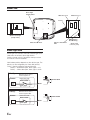
Power Connector
ALPINE's PKG-RSE3DVD needs the following power
connections to assure proper operation of the monitor.
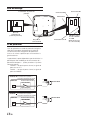
1) BATTYellow
• Battery Lead
Connect this lead to the positive (+) post of the vehicle’s battery.
2) ACCRed
• ACC
Connect this line to the vehicle’s ACC line.
(Switched 12V, ignition)
3) GNDBlack
• GND
Connect this line to the vehicle’s GND line.
4) DOORGreen
• Door
Connect
thislead
lead
vehicle
Connect this
to to
thethe
vehicle’s
doordoor
(polarity selectable, see following page)
AV Connector 1
AUX IN 1 (VIDEO)Yellow
• Video Input Connector
Connects to the video output of other video products.
AUX
IN 1 (AUDIO R)
White (L)
• Audio Input Connectors
Connects to the audio output of other video products. Red (R)
REMO OUT White/Brown • Remote Out
To control ALPINE DVD player, TV tuner or AV head unit, connect AUX IN 1 (AUDIO L)
to each REMOTE IN.
REMOTE IN White/Brown • Remote In
To control ALPINE PKG-RSE3DVD from AV head unit in the front area of the vehicle, connect this line to the ALPINE DVD-HU or LCD monitor REMOTE OUT.
AV Connector 2
AUX OUT (VIDEO)Yellow
• Video Output Connector
Connects to the video inputs of other video products.
AUX OUT (AUDIO L) White (L)
• Audio Output Connectors
Connects to the audio inputs of other audio or video products.
AUX OUT (AUDIO R) Red (R)
5-EN