1
Actiontec 54 Mbps Wireless DSL Gateway User Manual
Network Status
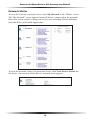
To view the Gateway’s network status, select My Network in the “Home” screen.
The “My Network” screen appears, listing all devices connected to the network.
From this screen, various settings can be accessed, including Website blocking,
Schedule Rules, and Enable Application.
To view the network status of a particular device, click View Device Details for
the device. An overview of the device’s network status appears.
16