1
CS2500BookFile : Overview Page 4 Thursday, December 11, 1997 10:44 AM
1-4
CHAPTER 1: OVERVIEW
00
CS/26
3Com
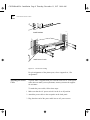
Hardware
interrupt
switch
Diskette drive
(CS/2600 only)
Air intake
LED indicators
Reset switch
Transceiver connector
Printer port
Power supply module
Serial ports
Air exhaust
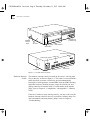
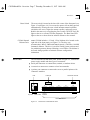
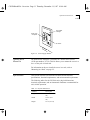
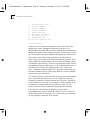
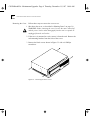
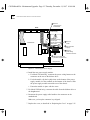
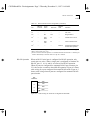
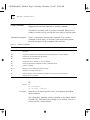
Figure 1-2 CS/2500 Series Enclosure
Hardware Interrupt
Switch
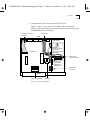
The hardware interrupt switch is located on the server’s left side panel
close to the rear, as shown in Figure 1-2. The switch is recessed behind a
small round hole to protect it from being pressed unintentionally.
Pressing this switch generates a nonmaskable interrupt (NMI), aborting
application software, disabling all ports except the console port, and
passing control to the monitor utility. For information on the monitor
utility, refer to Chapter 4, “Configuration,” and Appendix C, “Monitor
Utility.”
If the server crashes or stops working entirely, you may need to use the
hardware interrupt switch to reboot or to perform a memory dump. For
more information concerning memory dumps, refer to Chapter 6,
“Troubleshooting.”