1
W-ClearPass Access Management System Data Sheet
Advanced Policy Management
Employee access
The Access Management System provides user and device
authentication based on 802.1X, non-802.1X and web portal access
methods. Multiple authentication protocols like PEAP, EAP-FAST,
EAP-TLS, and EAP-TTLS can be used concurrently to strengthen
security in any environment.
Attributes from multiple identity stores such as Microsoft Active
Directory, LDAP-compliant directory, ODBC-compliant SQL
database, token servers and internal databases can be used within a
single policy for fine-grained control.
Additionally, posture assessments and remediation can be added to
existing policies at any time.
Mobile device and application management
The ClearPass MDM Connector makes it easy to use attributes
collected by third-party MDM solutions to enforce network policies.
A device can be denied Wi-Fi access if it is jailbroken, running
blacklisted apps or if the owner does not appear in an authorization
database.
Handling access for unmanaged endpoints
Unmanaged non-802.1X devices – printers, IP phones and
IP cameras – can be identified as known or unknown upon
connecting to the network. The identity of these devices is based
on the presence of their MAC address in an external or internal
database.
Built-in ClearPass profiling ensures that these devices are accurately
fingerprinted and match the characteristics on subsequent profiling
scans. Policies can be tailored to provide full or limited access to
secure resources.
Secure device provisioning
ClearPass with Onboard fully automates the provisioning of any
Windows, Mac OS X, iOS, and Android devices via a built-in captive
portal. Users are re-directed to a template based interface to
provision required SSID, 802.1X settings, and download unique
device credentials.
Additional capabilities include the ability for IT to revoke and delete
credentials for lost or stolen devices, and the ability to configure
mobile email settings for Exchange ActiveSync and VPN clients on
some device types.
Device health checks
ClearPass with OnGuard and separate OnGuard persistent or
dissolvable agents perform advanced endpoint posture assessments.
Traditional NAC health check capabilities ensure compliance and
network safeguards before devices connect. Information about
endpoint integrity – such as status of anti-virus, anti-spyware,
firewall, and peer-to-peer applications – can be used to enhance
authorization policies. Automatic remediation services are also
available for non-compliant devices.
Additional Policy
Management Capabilities
Built-in device profiling
ClearPass is the only profiling service that discovers and classifies
all endpoints, regardless of device type. A variety of contextual data
– MAC OUIs, DHCP fingerprinting and other identity-centric device
data – can be obtained and used within policies.
Stored profiling data is also used to identify device profile changes
and to dynamically modify authorization privileges. For example, if a
printer appears as a Windows laptop, Access Management System
can automatically deny access.
Extensive captive portal support
The ClearPass solution provides a central captive portal for
authentication that works on any multivendor wired and wireless
network. This eliminates the need for separate Wi-Fi and wired
captive portals.
Also, built-in web-based device registration services let users selfregister their devices, such as Apple Bonjour capable devices, game
consoles, and other personal devices to automatically capture MAC
address, device type and operating system version for IT.
W-ClearPass Access Management
System appliances
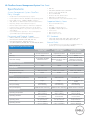
The W-ClearPass Access Management System is available as
hardware or virtual appliances that support 500, 5,000 and 25, 000
authenticating devices. Virtual appliances are supported on VMware
ESX and ESXi platforms, versions ESX 4.0, ESXi 4.0 and 5.0.
Virtual appliances, as well as the hardware appliances, can be
deployed within a cluster for scalability and redundancy.
Customizable visitor management
ClearPass with Guest simplifies workflow processes, allowing
receptionists, employees and other non-IT staff to create temporary
accounts for Wi-Fi and wired network access.
Once registered, users receive account login credentials via SMS
text messages or email. Guest network access accounts can be set
to expire automatically after a specific number of hours or days.
Customizable captive portal capabilities let IT and marketing
organizations create a branded guest login experience with targeted
advertising and user code-of-conduct messaging. Self-registration
and automated credential delivery also streamlines IT operations.
*Select Dell Networking products carry an Extended Life Warranty with Basic Hardware Service. Warranty covers repair or replacement of the product for as long
as it remains in use by the customer. In the event of discontinuance of product manufacture, Dell Extended Life Warranty extends until five (5) years after end of
product model sales. Warranty limits any power supply, antennae or accessories to one (1) year from date of purchase. Warranty does not include troubleshooting,
configuration, or other advanced service provided by Dell ProSupport.The Extended Life Limited Hardware Warranty is not transferrable. For more information see
dell.com/warranty.
© 2013 Dell Inc, All Rights Reserved. Dell, the DELL logo, and PowerConnect are trademarks of Dell Inc. Reproduction of these materials in any manner whatsoever
without the written permission of Dell Inc. is strictly forbidden.
Learn more at Dell.com/Networking