1
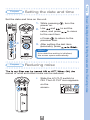
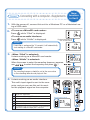
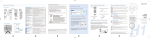
Setting the date and time
1. While pressing
, turn the
power on.
2. Use
and
to set the
value, and press
to move
to the next item.
2
2,3
2
↓1
Prepare
1,2
• Press
to return to the
previous item.
3. After setting the last item
(seconds), press
MEMO
If the date/time setting is initialized,
this screen opens automatically.
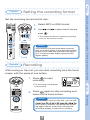
Reducing noise
sound of wind and other noise can be reduced.
• Slide the LO CUT switch to
ON. The LO CUT icon appears
on the
screen.
2
Power / Disabling buttons / Setting the date and time / Reducing noise
Set the date and time on the unit.
Prepare
Prepare