1
Product Specifications
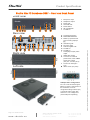
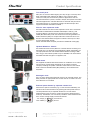
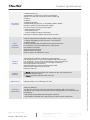
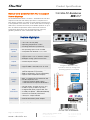
Shuttle Slim PC Barebone DS87 – Front and Back Panel
Front view
1
2
3
4
5
6
7
Microphone input
Headphone output
Power LED
Hard disk LED
Power Button
SD Card Reader
4x USB 2.0
Rear view
Rear
Front
Right side
Rear
Front
Left side
2x WLAN perforation
RS232/RS422/RS485
RS232 (or optional VGA
port for analog displays
[9])
D Ventilation grille
E DC power input
F 2x RJ45 Gigabit LAN
G 2x USB 3.0
H 2x USB 2.0
I 2x DisplayPort (DP) video
output
J HDMI video output
K Connector for external
power button, Clear CMOS
and 5V DC voltage
(four pins, 2.54 mm pitch)
L 2x holes for Kensigton
Lock
M VESA mount (two parts)
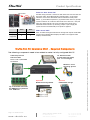
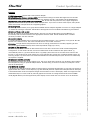
COM port Pin 9 Configuration
Pin 9 is a multi-functional signal.
Based on jumper configuration on
the mainboard, it can be
configured as Ring Indicator (RI)
or external power supply with
either 5V or 12V voltage level
(each COM port separately).
Page 2 10 October 2014
www.shuttle.eu
Shu t tl e Computer Han dels GmbH
Fritz- Strassmann-S t r. 5
25337 Elmshorn | Germany
Tel. +49 (0) 4121-47 68 60
Fax +49 (0) 4121-47 69 00
[email protected]
© 2014 by Shuttle Computer Handels GmbH (Germany). All information subject to change without notice. Pictures for illustration purposes only.
A
B
C