1
1 Upper cassette: 250 sheets of plain paper
Lower cassette: 250 sheets of plain paper
2 PGI-2500XL BK (2500 pages)
PGI-2500XL C (1755 pages)
PGI-2500XL M (1295 pages)
PGI-2500XL Y (1520 pages)
Colour ink tanks (CMY) average yield: 1500 pages
2
Specifications
OVERVIEW
Summary
Functions
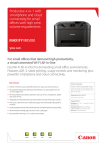
Fast and economical printer for small offices
Print, Wi-Fi, Ethernet + Cloud Link
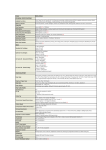
PRINTER SPECIFICATIONS
Print Speed (approx.) 23.0 ipm mono A4 [1]
15.0 ipm colour A4 [1]
First Page Out Time (approx.)Mono: 7 sec (ready) / 11 sec (sleep)
Colour: 9 sec (ready) / 14 sec (sleep)
Print Technology
Inkjet, FINE print head
Maximum Print Resolution
600 x 1200 dpi
Print Margins (min.)
Top: 3mm, Bottom: 5mm, Left & Right: 3.4mm
2-Sided Printing
Automatic (A4, LTR plain paper)
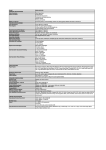
INKS & YIELD
Ink TypeDual Resistant High Density ink
4 ink tanks (Black, Cyan, Magenta, Yellow)
XL InksPGI-2500XL BK (2500 pages) [2]
PGI-2500XL C (1755 pages) [2]
PGI-2500XL M (1295 pages) [2]
PGI-2500XL Y (1520 pages) [2]
Colour ink tanks (CMY) average yield: 1500 pages [2]
PAPER SUPPORT
Paper TypesPlain Paper
Envelopes (DL, COM10)
Canon High Resolution Paper (HR-101N)
Canon Matte (MP-101)
Canon Pro Luster (LU-101)
Canon Plus Semi-gloss (SG-201)
Canon Plus Glossy II (PP-201)
Canon Glossy Everyday Use (GP-501)
Maximum Paper InputUpper cassette: 250 sheets of plain paper
Lower cassette: 250 sheets of plain paper
Paper SizesPlain paper: A4, A5, B5, LTR, LGL (upper and lower cassette)
Photo paper: A4, LTR, 20x25cm, 13x18cm, 10x15cm (upper cassette)
Custom sizes: Width 89-215.9 mm, Length 127-355.6 mm
Paper WeightPlain paper: 64 - 105 g/m²
Canon photo paper up to 275 g/m²
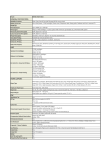
CONNECTIVITY
Wired ConnectionsHi-Speed USB 2.0
Ethernet 10/100Mbps (auto switchable)
Wireless ConnectionsWi-Fi IEEE802.11 b/g/n [3]
Access Point Mode
Applications SupportMAXIFY Printing Solutions app
MAXIFY Cloud Link (from smart device)
Canon Print Service plug-in (Android)
Apple AirPrint
Google Cloud Print
Print from Email
1
SOFTWARE
Supported Operating SystemWindows 8.1 / 8 / 7 / Vista SP1 & SP2 / XP SP3 32-bit
Windows Server 2003, 2003 R2, 2008, 2008 R2, 2012, 2012 R2
Mac OS X v10.6.8 or later
Supported Mobile SystemsiOS
Android
Windows RT
Minimum System RequirementsWindows: Internet Explorer 8, internet connection or CD-ROM
Mac: Safari 5 and internet connection
Display: 1024x768 or higher
Software IncludedCanon Quick Toolbox
Easy-WebPrint EX (for Windows)
GENERAL FEATURES
Display Type & Size
Full dot display
Dimensions (W x D x H)463 x 394 x 290 mm
463 x 459 x 290 mm (paper installed)
Weight9.8kg
Power Source
AC 100-240V, 50/60Hz
Power ConsumptionStandby: Approx. 1.0 W (USB connection to PC, scanning lamp off)
Off: Approx. 0.3 W
Printing: Approx. 24 W [4]
Typical Electricity Consumption
0.2 kWh [5]
Noise Levels
Approx. 53 dB(A) [6]
Recommended Operating
Temperature: 15-30°C
Environment
Humidity: 10-80%RH (no dew condensation)
Duty Cycle (monthly)
up to 30,000 pages [7]
Recommended Print Volume
250-1500 pages / month
Footnotes
[1] Document print speed on plain paper is measured based on average of ESAT in Office Category Test of ISO/IEC
24734 standard.
[2]
Page yield is based on ISO/IEC 24711 and continuous printing. Printer ships with setup ink tanks: 1000 pages black
(BK) and 700 pages colour (C/M/Y average).
[3]
Wi-Fi frequency band: 2.4GHz, Wi-Fi Security: WPA-PSK, WPA2-PSK, WEP, Administration password
[4]
When printing ISO/JIS-SCID N2 (printed by inkjet printer) on A4 size plain paper using default settings.
[5]
Acoustic Noise is measured based on ISO7779 standard.
[6]
Typical Energy Consumption (TEC) represents the typical electricity consumed by a product during one week.
[7]
Duty cycle is defined as a maximum number of printed pages for a single peak month.
Standard disclaimers:
All specifications subject to change without notice.
Print speed may vary depending on system configuration, interface, software, document complexity, print mode, page
coverage, type of paper used etc.
Ink yield may vary depending on documents printed, applications software used, print mode and type of paper used. For
more information see www.canon-europe.com/ink/yield
All brand and product names are trademarks of their respective companies.
Canon Inc.
canon.com
Canon Europe
canon-europe.com
English Edition
© Canon Europa N.V., 2014