1
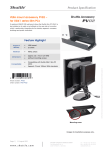
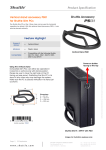
Product Specification XPC Accessory PV03 – Installation Guide Due to safety reasons, please turn off your computer completely first and unplug it from the power supply. Unscrew one screw of the stand mount and remove the vertical stand. Fasten the VESA MOUNT at rear of LCD monitor with four screws. As shown, install the XS36 in the VESA MOUNT and push it towards the direction as indicated by the red arrow. Check that it is properly aligned, then tighten securely with one thumbscrew. Page 2 | 18 March 2013 www.shuttle.com Shu t tl e Computer Han dels GmbH Fritz- Strassmann-S t r. 5 25337 Elmshorn | Germany Tel. +49 (0) 4121-47 68 60 Fax +49 (0) 4121-47 69 00 [email protected] ©2009 by Shuttle Computer Handels GmbH (Germany). All Information subject to change without notice. Pictures for illustration puposes only.