1
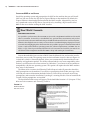
4 | Chapter 1 Does Your Hardware Measure Up? hardware. Windows 7 has much higher hardware requirements than Windows XP. You will have to know the requirements of Windows 7 so that you can identify the desktops and laptops that must be either upgraded or replaced. Those organizations that bought PCs recently would have been purchasing machines that were designed for Windows Vista but were downgraded to Windows XP. We have some very good news for you; these machines will be probably fine for Windows 7. The hardware requirements are pretty much identical. Knowing the minimum requirements for Windows 7 is useful for a couple of reasons. First, exams tend to feature questions about minimum requirements. Being able to recall these facts will score you a few easy points on your next certification exam. Second, the usual experience for a consultant, engineer, or administrator in this situation is that they are offered antique computers that are collecting dust in a storage room. You can use the minimum requirements to identify which machines will be useful and which should be sent to a recycle facility. However, remember that these are the minimum requirements. That means that these are the most basic specifications that you will need to get Windows 7 running. These specifications will not suffice for a typical office machine. They also won’t meet the requirements of higher-end applications. Windows 7 Requirements Reference The official Windows 7 requirements statement can be found here: www.microsoft.com/windows/windows-7/get/system-requirements.aspx The core minimum requirements for Windows 7 are as follows: Processor The processor should be 1 GHz or faster. You can use either a 32-bit (x86) or a 64-bit (x64) processor thanks to Windows 7 having 32-bit and 64-bit builds. Many organizations are choosing to deploy the 64-bit builds of Windows 7 to future-proof their desktop network and to maximize the security. Windows 7 will support up to 32 logical processors or cores in a single processor with a 32-bit build. It can support a massive 256 cores with a 64-bit edition. A few power users may require multiple processors (sockets rather than logical processors). The Windows 7 Professional, Ultimate, and Enterprise editions will support up to two physical processors (with multiple cores each). The other editions will support only one processor (with multiple cores). Memory The minimum requirements for memory are 1 GB of RAM for a 32-bit installation and 2 GB of RAM for a 64-bit installation. However, this amount of memory would not be sufficient in practice. The typical Windows XP office computer could run with 512 MB of RAM but was usually configured with 2 GB of RAM. Realistically, you will want to add more than the minimum to suit the applications that are installed on the computer. For example, a kiosk machine will probably be fine with the minimum amount of RAM so that it can run a web browser. However, a Windows 7 computer that is being used by a graphics artist will require much more RAM.