1
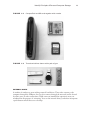
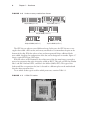
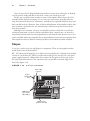
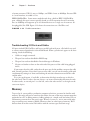
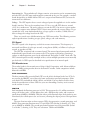
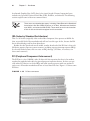
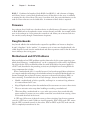
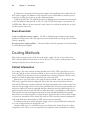
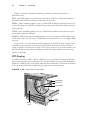
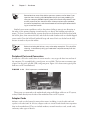
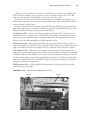
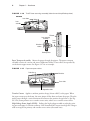
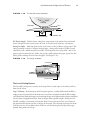
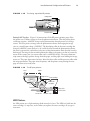
24 Chapter 1 Hardware n of system resources. USB 1.1 runs at 12Mbps, and USB 2.0 runs at 480Mbps. Because USB is a serial interface, its width is 1 bit. IEEE 1394/FireWire Some newer motherboards have a built-in IEEE 1394/FireWire port, although this port is more typically found on a PCI expansion board. It transfers data at 400Mbps and supports up to 63 chained devices on a single set of resources. It’s hot-pluggable, like USB. Figure 1.12 shows the connections on a FireWire card. F i g u r e 1 .1 2 FireWire connections Troubleshooting I/O Ports and Cables I/O ports include USB, FireWire, and legacy parallel and serial ports, all of which are used to connect external peripherals to the motherboard. When a port doesn’t appear to be functioning, check the following: NN Cables are snugly connected. NN The port has not been disabled in BIOS Setup. NN The port has not been disabled in Device Manager in Windows. NN No pins are broken or bent on the male end of the port or of the cable being plugged into it. If you suspect that the cable, rather than the port, may be the problem, swap out the cable with a known good one. If you don’t have an extra cable, you can test the existing cable with a multimeter by setting it to ohms and checking the resistance between one end of the cable and the other. Use a pin-out diagram, if available, to determine which pin matches up to which at the other end. There is often—but not always—an inverse relationship between the ends. In other words, at one end pin 1 is at the left, and at the other end it’s at the right on the same row of pins. Memory To pass the A+ exam and be a productive computer technician, you must be familiar with memory. Not only will you be tested on this subject, but one of the most common upgrades performed on a PC is adding memory. Adding memory is a simple task, but before you can add memory you must have the correct type. When I say memory, we are most often referring to random access memory (RAM). However, there are other types of memory. We’ll discuss them all in this section. Be familiar with the various types and their usage.