1
Chapter 1
6
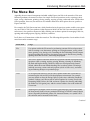
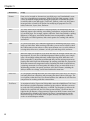
Menu Item
Usage
Format
Once you’ve inserted an element into your Web page, you’ll undoubtedly want
some way of modifying its properties. While Expression Web supports a wide
variety of methods for physically editing the properties of elements that you’ll
eventually add to your Web pages (Task Panes, toolbars, and so on), the Format
menu provides a central list of options for modifying all properties for CSS,
tables, behaviors, layers, fonts, and more.
Tools
The Tools menu can be considered a central repository for functionality that will
ultimately improve the usability, accessibility, performance, and professionalism
of your Web pages. For example, options within the Tools menu include a spelling
dictionary, a thesaurus, accessibility checker, browser compatibility validation,
CSS reports, an HTML optimizer, and various options for working with add-ins
and macros.
Table
As you’ll learn, tables are a traditional approach to structuring Web pages easily,
with very little effort. When working with tables, you can access features within
the Table menu to insert or draw a table; insert columns, rows, or cells within an
existing table; delete rows, columns, or cells; split and merge cells; and more.
Site
While this topic won’t begin to reveal itself until later, the concept of Web sites is an
important one. If you’re new to Web development, habit may drive you to simply
open a file and begin editing it directly within Expression Web. While this is certainly acceptable, it’s important to understand that you’ll be missing out on many
features that make Expression Web unique. By working with Web sites, Expression
Web offers numerous management features, including file check in and check out,
versioning, automatic visual navigation, the ability to copy an entire Web site to a
Web hosting provider, site reports, and more. All of these features, including the
ability to define site settings, can be found within this menu item.
Data View
As you progress through the book, one of the topics that you’ll arrive at is that of
extracting data from a database and presenting that data within a Web page. The
set of options within the Data View menu facilitates the addition of user interface
components for working with that extracted data.
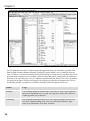
Task Panes
As mentioned earlier, Expression Web includes more than 20 different Task Panes
that facilitate a rich development workflow for the end user. Whether you want
to work with CSS, JavaScript Behaviors, or HTML Tag Properties, or browse the
folder list for your Web site, the Task Panes menu contains a Task Pane that is
right for the job. Because a large portion of Expression Web’s features stem from
the functionality offered by the various Task Panes, I cannot begin to provide
detailed coverage of all of them in this chapter. Instead, each Task Pane is covered as its related chapter unfolds.