1
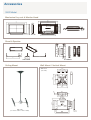
400P / 400Pn Model
Mechanical Lay-out & Monitor Head
1181.0
973.0
971.0
920.4(Wall Mount)
1181.0
971.0
118.0
53.3
80.5
200.0
72.4
42.8
582.0
582.0
629.5
1
1
1
400.0(Wall Mount)
200.0
60.5
67.5
104.0
760.2
939.4
300.0
61.5
53.8
197.5
582.0
Stand & Speaker
974.0
104.0
295.0
136.6
STN-323TB
80.0
SP-L400PB/S
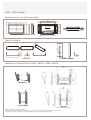
Components (WMB-4050PS)
ASSY -HINGE (LEFT):1 EA
WALL BRKT-PLATE:1 EA
ASSY -HINGE (RIGHT):1 EA
PLASTIC:4EA
SCREW:11EA
SCREW:4EA
SCREW:11EA
Only use the components and accessories shipped with the product.
Wall Bracket Assembly & Wall Bracket & Wall Bracket Angle Adjustment (WMB-4050PS)
-2.0˚
Check the installation diagram and mark the drill points on
the wall. Use the 5.0 mm bit to drill holes deeper than 35
mm. Fix each anchor in the corresponding hole. Match
each of the brackets and hinge holes to the corresponding anchor holes and insert and tighten the 11 screws A.
Remove the 4 screws on the back of the product.
Insert the screw B into the plastic hanger.
15.0˚
1. Fix the product to the wall bracket.
2. Hold the product at the top in the center and pull it
forward (direction of the arrow) to adjust the angle.
(See the figure to the right)
3. You can adjust the bracket angle between -2˚ and 15˚.