1
10
Part I: Illuminating Silverlight
After the plug-in is installed, visiting any site that hosts a Silverlight application
causes Silverlight to start up in the browser seamlessly. The plug-in itself is
around 4MB, and in addition to the Silverlight runtime (which is responsible
for running the Silverlight application), the application itself needs to be
downloaded from the site that hosts the application. Modern popular browsers
such as Internet Explorer, Firefox, Safari, and Chrome support Silverlight
while running on Microsoft’s Windows operating systems 2003, XP, Vista,
and 7) or on Apple’s Mac OS X. Recently, Silverlight has also been rewritten
to run on browsers in Linux-based operating systems. With Silverlight 4, the
application can also run as a stand-alone application — that is, it can be run
outside the browser.
Obtaining and installing Silverlight on your computer is quite simple. All you
have to do is visit a Silverlight-enabled site and it will prompt you to install
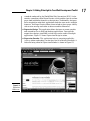
Silverlight. Figure 1-1 shows a site that uses Silverlight. As soon as you visit
the site using a Web browser, the browser prompts you to install Silverlight.
Figure 1-1:
Site
prompting
Silverlight
installation.
All you have to do is click the button to install and you are done. A Silverlight
installation is around 4.7MB and needs to be installed only once. If you
visit the same site again or another site that uses Silverlight, you are not
prompted to reinstall it.
Checking Out Some SilverlightEnhanced Sites
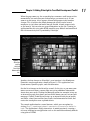
So, what do Silverlight applications look like? You can find a good example at
the Hard Rock Café Memorabilia site (http://memorabilia.hardrock.
com/), shown in Figure 1-2. This site contains photographs of some of the
memorabilia that Hard Rock Café owns.