1
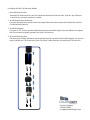
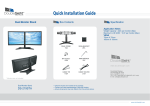
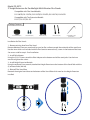
Installation for Flex Tier Extension Models:
1 - Uninstall Extension Post
Detached Tier Extension from your Flex Stand and remove the Extension Post. Skip this step if Product
is new Post has not been previously installed.
2 - Install Height Extension Module
Using the enclosed 5mm wrench, attach the Height Extension to the bottom of the Stand Pole with the
(2) enclosed bolts (M6-80).
3 - Install Pole Adapter
Using the (2) 3/4” Screws, attach the Pole Adapter to the end of the Height Extension Module and tighten
with 4mm wrench originally provided with your Tier Extension.
4 - Re-Install Extension Post
Use the original (2) Bolts (M6-80) to attach the Extension Post to the end of the Pole Adapter. You are now
ready to attach your Tier Extension to your Flex Stand. Follow directions provided with Tier Extension.
Service & Support
t: 888.897.8869
e: [email protected]