1
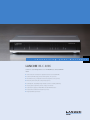
LANCOM WLC-4006
Scope of features: as of LCOS version 7.8x
WLAN Controller
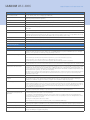
Stand alone operation
In 'Managed' mode, an adjustable setting defines the time- span for which the AP continues Stand- alone operation in the event
the connection to the Controller fails. After this time- span the AP configuration is deleted and the AP resumes operation only
after the connection to the Controller is reestablished. By default this value is set to zero and AP ceases operation as soon as
connection to the Controller is lost. Alternatively, a special time setting allows the AP to function in Stand- alone mode
indefinetly. In Stand- alone mode only Pre- shared Key SSID's are functional.
VLAN and IP contexts
A fixed VLAN can be set for each SSID. The WLAN Controller can independently provide up to 16 separate IP networks, and each
of these can be individually mapped to VLANs and, consequently, to SSIDs (Advanced Routing and Forwarding, ARF). The
Controller can provide, among others, individual DHCP, DNS, routing, firewall and VPN functions for these networks.
Dynamic VLAN assignment
Dynamic VLAN assignment for target user groups based on MAC addresses, BSSID or SSID by means of external RADIUS server.
RADIUS server
Integrated RADIUS server for MAC address list management. Support for RADSEC (Secure RADIUS) for secure communication
with RADIUS servers.
EAP server
Integrated EAP server for authentication of 802.1x clients via EAP- TLS, EAP- TTLS, PEAP, MSCHAP or MSCHAPv2
RADIUS/EAP proxy
Proxy mode for external RADIUS/EAP servers (forwarding and realm handling)
Redundancy, Controller backup and
load balancing
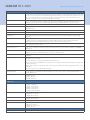
Every managed LANCOM AP can be assigned to a group of alternative WLAN Controllers. A suitable Controller is selected within
this group depending on AP load. This ensures that also in backup state the load of larger installations remains equally
distributed.
Fast roaming
VoWLAN devices require seamless roaming for ensuring optimal speech quality. The Access Points support PMK caching and
Pre- authentication for such demanding applications. WPA2 and WPA2- PSK operate with sub- 85 ms roaming times
(requirements: adequate signal quality, sufficient RF overlap, clients with a low roaming threshold).
QoS
802.11e / WME: Automatic VLAN tagging (802.1p) in the Access Points. Mapping to DiffServ attributes in the WLAN Controller
if this is deployed as a layer- 3 router
Background scanning, rogue- AP and
rogue- client detection
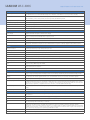
Background scanning does not interupt normal AP operation and collects information on the radio channel load (AP acts as a
'Probe' or 'Sensor' by going off- channel). Foreign Access Points and clients is sent to the Rogue AP Detection in LANCOM
WLANmonitor.
WLAN visualization
The management tool LANCOM WLANmonitor (included) acts as a central monitoring program for the WLAN Controller and
visualizes the performance of all WLAN Controllers, Access Points, SSIDs and clients.
WLAN guess access accounts
Static mapping of guest SSIDs in VLANs, access limitations and VLAN routing by means of ARF (Advanced Routing and
Forwarding).
Public Spot function
Easy set- up of guest accounts with just a few mouse clicks using the Voucher- Wizard. The vouchers can be printed over any
standard Printer on the network.
The Voucher- Wizard can be customized by uploading an individual logo.
Function works without external RADIUS and Accounting servers. Configuration of time and/or traffic budgets as well as when
accounting should start.
Support of public certificates and certificate chains from trust centers for Public Spots. This allows popular browsers to access
trustworthy
login pages with secure access (HTTPS) without warnings
WLAN client limiting
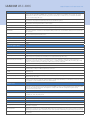
To ensure that load is evenly balanced between multiple Access Points, each one can be set with a maximum number of
allowable WLAN clients.
Management software
Included:
쮿 LANCOM LANconfig
쮿 LANCOM LANmonitor
쮿 LANCOM WLANmonitor
Supported Access Points and
WLAN routers
Indoor
쮿
쮿
쮿
쮿
쮿
쮿
Outdoor
쮿 LANCOM OAP- 54 Wireless
쮿 LANCOM OAP- 54- 1 Wireless
쮿 LANCOM OAP- 310 Wireless
Industrial
쮿 LANCOM IAP- 54 Wireless
쮿 LANCOM XAP-40- 2 Wireless
UMTS/HSPDA
쮿 LANCOM 3850 Wireless
WLAN- Router and IADs
쮿
쮿
쮿
쮿
LANCOM L- 54g Wireless
LANCOM L- 54ag Wireless
LANCOM L- 54 dual Wireless
LANCOM L- 305agn Wireless
LANCOM L- 310agn Wireless
LANCOM L- 315agn dual Wireless
LANCOM 1811n Wireless
LANCOM 1821n Wireless
LANCOM 1821+ Wireless ADSL
LANCOM 1823 VoIP
Functions in layer- 3 routing mode
Note:
Some of the below functions are only active when the device is operating as a router, firewall or VPN gateway.